LTP (Linux Test Project) User Guide
Article Directory
1. Introduction to ltp-ddt
1.1、ltp
LTP (Linux Test Project) is a joint project initiated by SGI, OSDL and Bull. It is developed and maintained by companies such as IBM, Cisco, Fujitsu, SUSE, Red Hat, and Oracle. The goal of the project is to provide tests to the open source community to verify the reliability, robustness and stability of Linux.
The LTP test suite contains a series of tools for testing the Linux kernel and related functions. The goal is to improve the Linux kernel and system libraries by bringing test automation into the testing work.
From the perspective of the code directory structure, LTP is divided into the following important parts:
- 1. Testcase directory:
This directory contains specific implementation files (test logic files) of test cases in the format: C code, shell script.
ltp-ddt$ ls testcases/
commands  cve  ddt  kdump  kernel  lib  Makefile  misc  network  open_posix_testsuite  realtime
ltp-ddt$ ls testcases/kernel/
connectors  containers  controllers  device-drivers  firmware  fs  hotplug  include  input  io  ipc  lib  logging  Makefile  mem  module  numa  power_management  pty  sched  security  syscalls  timers  tracing
ltp-ddt$ ls testcases/kernel/syscalls/
abort         clock_nanosleep   execl       flock          getgroups
accept        clock_nanosleep2  execle      fmtmsg         gethostbyname_r
accept4       clone             execlp      fork           gethostid
access        close             execv       fpathconf      gethostname
acct          cma               execve      fstat          getitimer
add_key       confstr           execvp      fstatat        get_mempolicy
adjtimex      connect           exit        fstatfs        getpagesize
alarm         copy_file_range   exit_group  fsync          getpeername
...
- 2. Runtest directory:
The LTP test framework does not directly call testcase, but through an intermediate packaging script test scenario files (test scenario files) to call, placed under the runtest path. Generally, a testcase corresponds to a runtest file.
ltp-ddt$ ls runtest/
admin_tools  controllers  dma_thread_diotest  fs_perms_simple  input        ltp-aiodio.part1      ltplite
can          cpuhotplug   fcntl-locktests     fs_readonly      io           ltp-aiodio.part2      lvm.part1
...
ltp-ddt$
ltp-ddt$ cat runtest/syscalls
#DESCRIPTION:Kernel system calls
abort01 abort01

accept01 accept01
accept4_01 accept4_01

access01 access01
access02 access02
access03 access03
access04 access04
...
Which runtests are run by defaultscenario_groups/defaultDefined in the file:
ltp-ddt$ ls scenario_groups/
default  default-ddt  Makefile  network
ltp-ddt$
ltp-ddt$ cat scenario_groups/default
syscalls
fs
fs_perms_simple
fsx
dio
io
...
- 3. The runltp command:
runltp is the general entry command for running ltp tests.
After compiling and installing ltp, use the following command to run:
$ ./runltp
You can also run a set of testcases individually:
$ ./runltp -f syscalls
You can also directly call the bin file of a testcase:
$ testcases/bin/fork13 -i 37
- 4. Other features:


1.2、ltp-ddt
LTP-DDT is a test application used by Texas Instruments (TI) to verify the Linux version. It is based on LTP.
LTP verifies many areas of the kernel, such as memory management, scheduler, and system calls. LTP-DDT extends the core kernel test of LTP through testing to verify the kernel driver developed by Texas Instruments. LTP-DDT focuses on embedded device driver testing. It contains hundreds of tests that verify the functionality and performance of device drivers. LTP-DDT also contains tests to verify system use cases and overall system stability.
LTP-DDT has carried out a series of extensions on the basis of LTP:
- 1. Testcase directory:
ltp-ddt adds the ddt directory to the testcase directory:
ltp-ddt$ ls testcases/ddt/
alsa_test_suite  dmtimer_test_suite  fbdev_display_test_suite  gpio_test_suite  ipc_test_suite  rtc_test_suite  spidev_test_suite  utils                    v4l2_display_davinci_test_suite  wdt_test_suite
devfreq_drivers  edma_test_suite     filesystem_test_suite     i2c_test_suite   Makefile        scripts         usb_test_suite     v4l2_capture_test_suite  v4l2_display_test_suite
In addition to supporting C code and shell scripts, testcase also supports python scripts. python script putddt/scriptsIn the directory, and the corresponding template filetestcases/ddt/scripts/TEMPLATE::
ltp-ddt$ ls testcases/ddt/scripts/
adc  alsa  blk  can  clk_fw  common  crypto  dma  dmtimer  drm  eth  gpio  graphics  i2c  ipc  Makefile  mtd  pci  powermgr  pwm  rng  rtc  scsi  TEMPLATE  thermal  touchscreen  uart  usb  video  wlan
- 2. Runtest directory:
ltp-ddt adds the ddt directory to the runtest directory:
ltp-ddt$ ls runtest/ddt/
adc_ti                                 gpio_rotaryencoder                         nand_mtd_dd_write_concurrence_ubifs     powermgr_suspend_emmc                    realtime_v4l2cap_load                   system_eth_smp_priority_processing
alsa_accesstype                        gpio-test-kerneldebug                      nand_mtd_debug_erase                    powermgr_suspend_ethernet                realtime_v4l2cap_load-smp               system_gpio_cpufreq
alsa_amixer_switchtoggle               gpio-tests                                 nand_mtd_debug_rw                       powermgr_suspend_graphics                remoteproc_r5f                          system_graphics_cpufreq
alsa_amixer_volumesetting              gst_capture                                nand_mtd_flash_erase                    powermgr_suspend_i2c                     rng_test                                system_gst_cpufreq
...
The following annotation keywords have been added to test scenario files: @name, @desc, @requires and @setup_requires.
@requires and @setup_requires are used to select test cases at runtime based on the PLATFORM function.
The specific format of test scenario files is as follows:
  // In the formal part, each line corresponds to a test step. The format of a test step is: <TAG> <COMMANDS>
 * Follow LTP guidelines. The test scenario file is basically made of one or
   more test step lines. Each test step line have following format
   <TAG> <COMMANDS>, where
   TAG is a string that identifies the test step.
     Use following convention to named TAGs so that the test cases can be
     selectively run based on AREA, SCOPE and/or TYPE.
     <AREA>_<SCOPE>_<TYPE>_<OPT_ID>,
      i.e. “NAND_S_FUNC_RW_8K”, “NAND_M_PERF_ALL-SIZES”
     The SCOPE tags are used to indicate the amount of time require to run
     the tests, giving users ability to filter test cases based on estimated
     execution time.
     SCOPE TAGS:
      'XS', 'S', 'M', 'L', 'XL', 'XXL' (for eXtra Small, Small, Medium, etc.
		     Just imagine you are buying clothes ;)
      We used the following rough guidelines to determine test duration based
      on scope:
        XS:  <= 1  min
        S:   <= 10 mins
        M:   <= 1  hour
        L:   <= 8  hours
        XL:  <= 24 hours
        XXL: <= 1  week
     TYPE TAGS:
      ‘FUNC’, ‘PERF’, ‘STRESS’, ‘USECASE’, ‘COMPLIANCE’, ‘MODULAR’, ‘DOC’
   COMMANDS is a list of one or more shell commands separated by semicolon (;),
     the test step will pass if the commands return zero, otherwise it fails.

   // The default template file is runtest/ddt/TEMPLATE
 * Use the default test scenario file template available at
   runtest/ddt/TEMPLATE as a starting point to develop your test scenario.

   // In the comment section, you can use the @requires keyword to limit the ARCH, DRIVER, SOC and/or MACHINE conditions required for the test.
 * Use the @requires annotation to specify ARCH, DRIVER, SOC and/or MACHINE
   requirements to run the test scenario. You can use (), &&, ||, * to specify
   the test requirements. Examples:

   @requires /net/eth/* && spi_master
   To run this test the platform must have an ethernet driver and a
   spi_master driver

   @requires am3517-evm
   This test can only be run on an am3517 EVM.

   @requires (mmc_host || nand) && armv*
   This test requires mmc or nand drivers and an ARM architecture

   // In the comment part, you can use @setup_requires to describe the external conditions required for the test, such as connecting an external USB device, etc.
 * Use the @setup_requires annotation to specify test setup requirements.
   Some test cases like USB and Video capture requires special peripherals, such as
   USB flash drives, DVD players, video cameras, etc., to be connected to the DUT.
   Using @setup_requires the test developer highlights such test setup requirements.
   This information might be used by test automation frameworks to allocate test requests
   to DUTs that have the appropriate peripherals connected to them.
   Please follow the naming conventions identified in section 9) of this document
   if the test scenario needs to identify any setup requirements.

   You can use underscore(_) to seperate multiple @setup_requires. Examples:

   @setup_requires usbhostvideo_usbhostaudio
   This test requires usbhostvideo setup and usbhostaudio setup.
ltp-ddt corresponds to a new default running filescenario_groups/default-ddt:
ltp-ddt$ ls scenario_groups/
default  default-ddt  Makefile  network
ltp-ddt$
ltp-ddt$ cat scenario_groups/default-ddt
ddt/alsa_samplerate
ddt/clcd
ddt/edma
ddt/edma_chain
ddt/edma_link
ddt/emmc_quick_perf
...
- 3. The platforms directory:
ltp-ddt completely added a new folderplatforms/:
ltp-ddt$ ls platforms/
am170x-evm  am335x-hsevm  am37x-evm   am437x-sk     am571x-idk    am57xx-beagle-x15  am654x-idk        da830-omapl137-evm  dm385-evm   dra71x-hsevm  dra76x-evm       hikey      k2g-hsevm   k2l-evm    omap5-evm      tci6614-evm
...
ltp-ddt$ cat platforms/am335x-evm
armv7l
am335x
am335x-evm
adc/tscadc
can
crypto/crypto-omap
...
This file sets a set of configurations according to the specific platform, and you can use this set of configurations to select the testcase that the current platform can support during testing.
The format of the platform configuration file is as follows:
  // The default template file: platforms/TEMPLATE
 * Copy the default platform file available at platforms/TEMPLATE to
   platforms/<your platform>. <your platform> name is typically the evm name

   // When writing the ltp-ddt script, please use the following platform file name to compare with $ MACHINE
 * Please use the following names for platform files and to compare against
   $MACHINE when writing ltp-ddt scripts:

    am180x-evm   arago-armv7         dm355-evm    dm814x-evm
    am181x-evm   dm365-evm           dm816x-evm
    am3517-evm   beagleboard         dm368-evm
    am37x-evm    c6a814x-evm         dm37x-evm    omap3evm
    am387x-evm   c6a816x-evm         dm6446-evm   tnetv107x-evm
    am389x-evm   da830-omapl137-evm  dm6467-evm   am335x-evm
    arago-armv5  da850-omapl138-evm  dm6467t-evm  beaglebone

   // file format:
   // The first 3 lines of the platform file must be: architecture, SoC and EVM
   // Each subsequent line corresponds to a driver, and the driver name conforms to the naming under the file level of `/sys/class`
 * Modify your platform file based on the capabilities supported by the new evm
   The platform file identifies the architecture, the SoC, the evm and the
   supported drivers. The supported drivers lines follow a variation of the
   hierarchy used in /sys/class but it is not exactly the same. Hence it is
   important to use the platforms/TEMPLATE file as your starting point.
   Please note the first 3 lines of the platform file MUST identify, the
   architecture, SoC and EVM respectively, follow by one or more driver lines.
   Typically the architecture and machine name used in the platform file are
   the ones reported by uname -a.
   Sample platform file:
    armv7l
    am3517
    am3517-evm
    net/eth/davinci_emac
    nand/omap2-nand
    ehci/ehci-omap
    i2c-adapter/i2c_omap
    mmc_host/mmci-omap-hs
    rtc/rtc-s35390a
    watchdog/omap_wdt
    ...

 * You might need to define new override values for your new platform in some
   test case files (see section 4.1 above for details). A reasonable strategy
   is to try to run an existing test plan and then analyze the test failures
   to determine probable test cases where you need to define override values.
- 4. Runltp command:
The runltp command of ltp-ddt can use platform files to define the testcase to be run.
Run all testcases of the developed platform:
./runltp -P am335x-evm
Run the specified testcase of the specified platform:
./runltp -P am335x-evm -f ddt/lmbench
2. Environmental structure
2.1, cross compilation
Cross compilation of ltp-ddt:
linux-3.2.0$ make CROSS_COMPILE=arm-linux-gnueabihf- ARCH=arm headers_install
  CHK     include/linux/version.h
  INSTALL include/linux/mmc (1 file)
  INSTALL include/linux/netfilter/ipset (4 files)
  INSTALL include/linux/netfilter (69 files)
  INSTALL include/linux/netfilter_arp (2 files)
  INSTALL include/linux/netfilter_bridge (18 files)
  INSTALL include/linux/netfilter_ipv4 (15 files)
  INSTALL include/linux/netfilter_ipv6 (11 files)
  INSTALL include/linux/nfsd (4 files)
  INSTALL include/linux/raid (2 files)
  INSTALL include/linux/spi (1 file)
  INSTALL include/linux/sunrpc (1 file)
  INSTALL include/linux/tc_act (7 files)
  INSTALL include/linux/tc_ematch (4 files)
  INSTALL include/linux/usb (10 files)
  INSTALL include/linux/wimax (1 file)
  INSTALL include/linux (366 files)
  INSTALL include/mtd (5 files)
  INSTALL include/rdma (6 files)
  INSTALL include/scsi/fc (4 files)
  INSTALL include/scsi (3 files)
  INSTALL include/sound (8 files)
  INSTALL include/video (3 files)
  INSTALL include/xen (2 files)
  INSTALL include (0 file)
  INSTALL include/asm (32 files)
linux-3.2.0$ pwd
~/linux-3.2.0
ltp-ddt$ make autotools
sed -n '1{s:LTP-:m4_define([LTP_VERSION],[:;s:$:]):;p;q}' VERSION > m4/ltp-version.m4
aclocal -I m4
autoconf
autoheader
automake -c -a
configure.ac:20: installing './compile'
configure.ac:18: installing './config.guess'
configure.ac:18: installing './config.sub'
configure.ac:4: installing './install-sh'
configure.ac:4: installing './missing'
make -C testcases/realtime autotools
 make[1]: Entering directory `~/ltp-ddt/testcases/realtime'
aclocal -I ~/ltp-ddt/testcases/realtime/m4
autoconf
autoheader
autoheader
automake -c -a
configure.ac:9: installing './compile'
configure.ac:14: installing './config.guess'
configure.ac:14: installing './config.sub'
configure.ac:4: installing './install-sh'
configure.ac:4: installing './missing'
 make[1]: Leaving the directory `~/ltp-ddt/testcases/realtime'
ltp-ddt$
ltp-ddt$ export CROSS_COMPILER=arm-linux-gnueabihf-
ltp-ddt$ export CC=${CROSS_COMPILER}gcc
ltp-ddt$ export LD=${CROSS_COMPILER}ld
ltp-ddt$ export AR=${CROSS_COMPILER}ar
ltp-ddt$ export STRIP=${CROSS_COMPILER}strip
ltp-ddt$ export RANLIB=${CROSS_COMPILER}ranlib
./configure --host=arm-linux-gnueabihf

./configure --host=arm-linux-gnueabihf CC=arm-linux-gnueabihf-gcc LD=arm-linux-gnueabihf-ld AR=arm-linux-gnueabihf-ar STRIP=arm-linux-gnueabihf-strip RANLIB=arm-linux-gnueabihf-ranlib
ltp-ddt$ make SKIP_IDCHECK=1 KERNEL_USR_INC=~/linux-3.2.0/usr/include/ CROSS_COMPILE=arm-linux-gnueabihf- clean
ltp-ddt$ make SKIP_IDCHECK=1 KERNEL_USR_INC=~/linux-3.2.0/usr/include/ CROSS_COMPILE=arm-linux-gnueabihf-
make DESTDIR=~/rootfs_yaff2/home/root/ltp-ddt-install SKIP_IDCHECK=1 PLATFORM=am335x-evm install
The cross-compilation process of ltp is the same as ltp-ddt.
2.2, file system
sudo mkyaffs2image rootfs_yaff2/ ubi.img
Cross compile sysstat:
./configure --host=arm-linux-gnueabihf --cache-file=~/sysstat-12.0.5/cache_file_0  --prefix=~/sysstat_install/ --exec-prefix=~/sysstat_install/
make
make install
Cross compile busybox:
1. Configuration
$ make menuconfig

 1.1. Static compilation:
Build Options --->
 Enable Build BusyBox as a static binary (no shared libs) through the space bar (the corresponding square bracket shows an asterisk * to indicate the enabled state).

 1.2. Set up cross tool chain:
Build Options --->
 Set the Cross Compiler prefix as follows (the specific path and cross tool chain prefix are modified according to the actual situation):
/usr/bin/arm-linux-gnueabihf-

 1.3. Installation path setting:
Busybox Settings --->
    Installation Options("make install" behavior) --->
 Just enter the installation path:
~/busybox_install/

 1.4. Does not include the /usr directory:
Busybox Settings --->
    General Configuration --->
        [*]Don't use /usr
 This must be selected, otherwise BusyBox will be installed in the /usr directory of Ubuntu during installation, which will damage the root file system of the host!

 2. Compile & install
$ make
$ make install
3. Test run
./runltp -P am335x-evm -f syscalls
./runltp -P am335x-evm -f ddt/lmbench
./runltp -P am335x-evm -f nandtest
./runltp -P am335x-evm -f uart
example: runltp -c 2 -i 2 -m 2,4,10240,1 -D 2,10,10240,1 -p -q -l /tmp/result-log.1879 -o /tmp/result-output.1879 -C /tmp/result-failed.1879 -d /home/root/sda1/ltp-ddt-install/opt/ltp
Intelligent Recommendation
[Ltp] [eas] test cases resolved
contents eas_one_small_task eas_one_big_task eas_small_to_big eas_big_to_small eas_small_big_toggle eas_two_big_three_small sched_cfs_prio sched_dl_runtime sched_latency_dl sched_latency_rt sched_prio...
Linux Docker User Guide
Docker is an open source application container engine, based on Go language and open source following the Apache2.0 protocol; Docker allows developers to package their applications and dependent packa...
Linux --- AWK User Guide
AWK is a powerful data processing engine, relative to grep search, SED editing, AWK's analysis and generated report more powerful When the awk command handles one or more files, it willSequentially re...
Linux performance testing tools LTP
Linux Test Project Linux Test Project is sponsored by SGI, OSDL, and Bull joint project of IBM, Cisco, Fujitsu, SUSE, Red Hat, Oracle and other development and maintenance. The project's objective is ...

Notes-ltp server service construction guide
Foreword Recently, I wanted to learn about nlp-related technologies, so I found ltp to get started. ltp homepage: http://ltp.readthedocs.io/zh_CN/latest/index.html ltp is a Chinese natural language pr...
More Recommendation
LTP and THULAC word segmentation user dictionary tips
The word segmentation tool is needed when doing relationship extraction recently. Try to segment the following sentence: After the word segmentation: The participle exists in the case of (Korea Yu) as...
I.MX YOCTO Project User Guide -
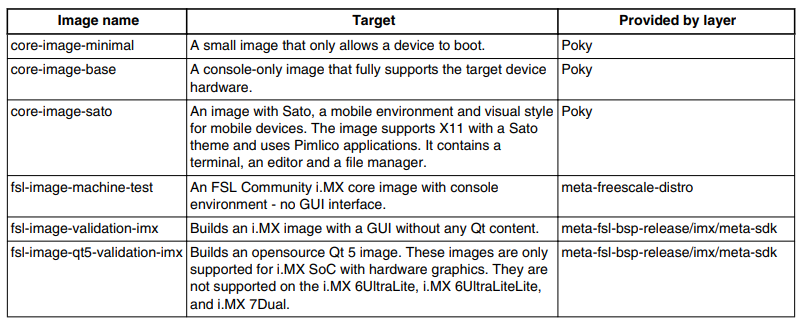
I.MX YOCTO Project User Guide - 5 Imaging Build This section provides detailed information and procedures for building an image. 5.1 Build configuration i. MX provides a script FSL-SETUP-RELEASE.SH, w...
I.MX YOCTO Project User Guide - On
I.MX YOCTO Project User Guide - On 1 Overview This document describes how to build an I.MX board image using the YOCTO Project build environment. It describes the I.MX publishing layer and I.MX-specif...
Comprehension - Terminal + Linux User Guide
Reference article address: connect to the server Connect to the server using a terminal ssh [email protected] Connect with tools like FileZilla Some basic commands File operation command Features com...

Graphics User Guide(Rockchip Linux)
November 27, 2017 | CN graphic rockchip linux platform, we are accustomed to in the past, and the difference is, we should be the first comprehensive application ondrmwithdmabufThe arm linux platform....