Graphics User Guide(Rockchip Linux)
graphic rockchip linux platform, we are accustomed to in the past, and the difference is, we should be the first comprehensive application ondrmwithdmabufThe arm linux platform. The advantage is that a common architecture, will be very easy customized above, you can take advantage of many existing components, there are a lot of open source development infrastructure projects, are beginning to rockchip based platform as the arm-side adaptation platform. But the disadvantage is that we are not really quite understand these things, it requires a practical application of the learning process.
hardware
vop
vop is a display unit for displaying images (such as input nv12, rgb the buffer, to the screen. 1080p input image, display size 4k).
There are two rk3288 VOP, VOP has three layers, the first two 4k resolution to support, the layer is only a mouse 64 × 64.
rk3399 with rk3288.
rk3036 only a vop, 2 Ge layers, a support 1080p, a 720p.
API
- libdrm
gpu
gpu provide opengles api, suitable for accelerated graphics and 3d 2d graphics.
API
- opengles
- egl
- opencl
software

Look at this chart, what you can not understand the message.
Focus on understanding, mesa and libmali, relations libdrm, wayland and x11 (compositor) qt and gtk (applcation) of. This figure understood, it is easy to write graphic, do not understand, will be confused.
libdrm
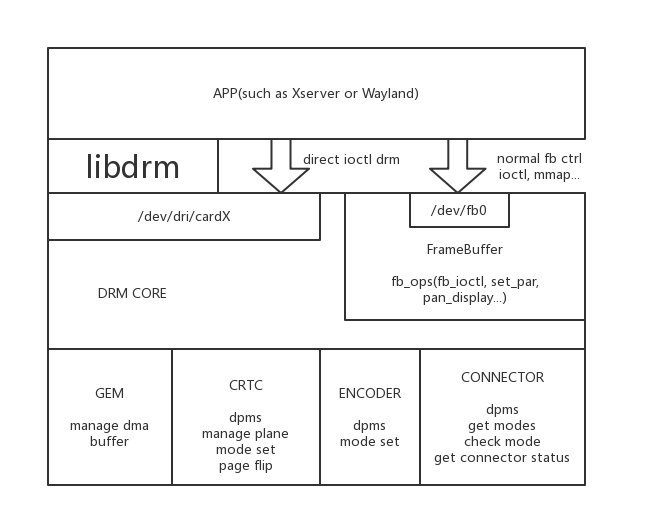
libdrm is drm library communication drivers and user layers. Over the past app may be used directlyopen(fb)In such a way to communicate and graphics drivers, but in the current hardware evolution, has been inappropriate. Such as hardware
- There are multiple layers how to do?
- There are multiple screens how to do?
- How to deal with vsync issue how the synchronization is not torn?
- How to use the dmabuf, do memory zero-copy?
The present libdrm layer and is used to drive user problems, to provide API X11, the use of such a display Wayland backend. If your program is relatively simple, such as a looping video advertising, it can be called directly libdrm,It is not recommended to use libdrm of direct api. Many reasons:
- First of all, you certainly are not familiar with libdrm, because libdrm itself is a relatively new api, but limited contacts related drm driver developer and wayland / xserver developer these people.
- Evolution libdrm faster, for example, api also sub-atomic and legacy, the information you might see and you are now completely different, only people familiar with the evolution of recording lines.
- Many vendors effects depend on the implementation, and even modify rockchip there are a lot of core API performance results to assist our internal product item, so with a different API performance possible in an entirely different platform
Of course, this is not let you use x11 and wayland, but with our package good things. For example, advertising video loop, it is best to use gstreamer, and then choose kmssink display, instead of calling the api libdrm.
Simple to understand
drm there crtc, plane, connector these three things, you can understand
- connector is the screen, such as a hdmi a connector num, a dsi a connector num
- crtc represents vop, a screen corresponding to a general crtc
- plane is a layer, such as a video layer Plane2, in Plane1 UI, the UI above the video
drm api points in two sets, legacy and atomic.
see the name is legacy early api, legacy api we are now most programs are also used. There are several key funciton to pay attention to the next,drmModeSetCrtc including drmModeSetPlane including drmModePageFlip。
drmModeSetCrtc setting UI layer is generally used, while the resolution is provided by, where I set at the last change to the size of the screen resolution. On bsp kernel rockchip the buffer size drmModeSetCrtc given us does not need to be set equal to the resolution, which is to implement the use of UI 1080p on a screen and 4k done, but note that this is rockchip own blind reform .
drmModeSetPlane to set the different layers of the display, such as video. FD respectively, to be displayed on the parameter buffer, the layer to be operated, the size to be displayed, the size of the buffer. He zooms to the screen buffer. On this platform api rockchip is async, the two continued to call twice, in front of it was covered, it may be necessary drmwaitvblank, but note, generally the kernel will not be the case.
Why are so many places rockchip to change it. Because we want to display multiple layers also completed on the api legacy. Think the next, I am using two layers, layer 1 and layer 2, layer 1 I called once drmModeSetPlane, layer 2 is called once drmModeSetPlane, then they are waiting for a time vsync unit, it is assumed that the screen refresh rate 60hz, we have the maximum number of frames is not the only 30fps? To solve this problem, the upstream has developed the atomic api.
The essence of atomic api can be understood as a submission includes updated information on all the layers. So do not call twice a drmModeSetPlane, but once drmModeAtomicCommit, keep up with all the parameters. atomic also useful in a place he can set the plane's zpos, so you can freely exchange and display hierarchy overlay plane of the primary plane. Before we are in hard code in the kernel level, but with atomic (mpv) when he need not do so when legacy api (kmssink) after setting zpos, osd (primary layer) can (overlay layer) in the video above shown.
data
Examples of leagacy
Examples of atomic
Of course, better to look at the documentation and libdrmtest program. If you were to write small programs, canmpp+libdrmThat's demo file in the rkdrm come out of their use, it is very convenient. If only written with rockchip platform, on legacy api, if there is demand for multiple platforms, we will study the atomic next.
libmali
 libmali alone pulled out speaking about, this thing is userspace gpu arm to provide driver.
I said earlier, gpu provide opengles, egl, opencl api, so you have to work these, you need to add libmali rootfs years.
On the default binary that we will pass github: https: //github.com/rockchip-linux/libmali
Naming: gpu model - Software version - hardware version (if, for example, to distinguish between r1p0 3288 and 3288w) - compiler options.
Pay attention to compiler options。
- Without the suffix. Is x11-gbm, note gbm drm mechanism is used to configure memory, if not the 3.10 kernel, do not use the fbdev.
- gbm. Such a procedure is qteglfs to use, does not depend x11, wayland.
- wayland. wayland-gbm, to use wayaland
Need to replace the system link: x11 or none: https: //github.com/rockchip-linux/libmali/blob/rockchip/debian/libmali-rk-midgard-t76x-r14p0-r0p0.linkswayland: https: // github. com / rockchip-linux / libmali / blob / rockchip / debian / libmali-rk-midgard-t76x-r14p0-r0p0-wayland.links
zero-copy
The display data dmabuf mali, such as cameras, video can actually be used dmabuf zero-copy mechanism optimization. Otherwise cpu load texture but also to copy.
reference:
x11
And general desktop platforms on almost, but there must be a problem for x11 gpu performance defects.
links
https://en.wikipedia.org/wiki/X.Org_Server
http://www.comptechdoc.org/os/linux/howlinuxworks/linux_hlxwindows.html
https://dri.freedesktop.org/wiki/DDX/
https://www.freedesktop.org/wiki/Software/Glamor/
wayland
We recommended yocto sdk do wayland of development. Or do not answer how compiled, the question of how to run.
wayland x11 better than the efficiency point, the main issue is compatibility. If you do not need a desktop, but also multi-window, you can wayland try.
zero-copy
wayland also zero-copy of the configuration, the power to search relevant wayland dmabuf.
data
https://en.wikipedia.org/wiki/Wayland
none
Do not use x11 and friends wayland is none, which is why we are more exposed on the embedded. What minigui ah, sdl friends are like this.
However, to support this kind of drm and to opengl, only a qt.
qteglfs
QT EGLFS is a qt gui own implementation of the system, does not support multi-window, but because of less window compoiste.
QT EGLFS and dri2 way similar, the difference is that, qt eglfs the font buffer after they used gpu compoiste, drm go directly to the display, while the X Window manager to do is to send in compoiste, so EGLFS is on efficiency have advantage of.
FAQ
Output 4k, but the UI just want to 1080p
Currently only supports qteglfs achieve this demand. http://blog.iotwrt.com/tips/2017/06/04/swap-layer/
How to pick the display recommendation
At present, the recommended choices for fullscreen window are :
- qt with eglfs plugin
- EGL program + x11
- wayland
- x11
The recommended choices for multi window are :
- wayland
- x11
The recommended choices for desktop are :
- x11
The recommended choices for 4K playback + fullscreen window are :
- qt with eglfs plugin
- x11
The recommended choices for 4K playback + multi window are :
- x11
Comments
Intelligent Recommendation
Cross-compile x264 and ffmpeg for Rockchip Micro Rockchip 3288 on Linux
Cross-compiled target platformIs linux,Not android. FromHereClone the 3288 toolchain down. I clone to **/home/yourname/arm-linux-gnueabihf** below. Compile x264 first. Since **–prefix=./libs is ...
Rockchip RK3399 Linux development environment to build
Rockchip RK3399 Linux development environment to build 1. VM+Ubuntu installation The installation package is VMware 10.7z and ubuntu-16.04-desktop-amd64.iso, VM was searched on Baidu, Ubuntu can go to...
Linux general gpio port driver, rockchip
dts file...

Logical Volume Management (LVM) Linux User Guide
What I want to tell you is that when LVM (logical volume management) first appeared in Fedora Linux, I was very resistant to it. My initial reaction was that I did not need this extra layer of abstrac...
Jenkins User Documentation-Guide Interface (based on Linux)
What is the Jenkins pipeline? Jenkins Pipeline (or simply called "pipeline") is a set of plug-ins that support the implementation and integration of continuous delivery pipelines to Jenkins....
More Recommendation
[Linux] ufw (simple firewall) user guide
#Install UFW firewall #Allow ssh traffic in and out of the network #Allow traffic on port 22 to enter and exit the network #Refuse the traffic on port 111 to enter and exit the network #Allow TCP port...

LTP (Linux Test Project) User Guide
Article Directory 1. Introduction to ltp-ddt 1.1、ltp 1.2、ltp-ddt 2. Environmental structure 2.1, cross compilation 2.2, file system 3. Test run 1. Introduction to ltp-ddt 1.1、ltp LTP (Linux Test Proje...
Linux virtual machine installation user guide
1. Install virt-manager yum install virt-manager.x86_64 yum install virt-viewer.x86_64 yum install libvirt-devel.x86_64 yum install libvirt-python.x86_64 yum install libvirt.x86_64 2. Modify the confi...
Sed - Linux SED Command User Guide
Article catalog Sed command Common Options Replacement mark Line up Delete operation other Sed command The SED editor is called a stream editor, which will do the following: Read a line of data from t...
Rockchip BT.656 TX and BT.1120 TX Development Guide
Rockchip BT.656 TX and BT.1120 TX Development Guide Foreword The text mainly introduces the RockChip platform BT.656 BT.1120 interface debugging guide product version Chip name Kernel version RV1109/R...