Linux --- AWK User Guide
AWK is a powerful data processing engine, relative to grep search, SED editing, AWK's analysis and generated report more powerful
- When the awk command handles one or more files, it willSequentially readEach line of the file, then process it
- awk commandBy default from stdio Standard input acquisition file content
- AWK uses a pairapostropheTo represent some executable scripting code
- Inside the executable script code, use a paircurly bracesTo represent a paragraph, multiple code blocks can be present at the same time.
- There can be multiple instructions at each flower brackets of awk, each instructionSectional separation
AWK is actually a script programming language
Remember that awk is the script code in a single quotes, each time you read it, how many times will be performed in the file, but the script behind the begin and End keywords Except for the code, if there is anything in the file being processed, the awk will not execute once.
1-awk command basic format
awk [options] 'program' file- options Represents some optional parameter options (optional)
- program Represents the executable script code (required) [single quotation] [Single number] [Single number] [single quotation number]
- file Represents the file that AWK needs to be processed (Note that it is a plain text file)
Actual example example
$ awk '{print $0}' /etc/passwd- Executable scripting code is enclosed using single quotes
- Inside the larves are some executable script code segments
When AWK reads a row, it will execute each script code segment in double quotes.
2-awk custom separator
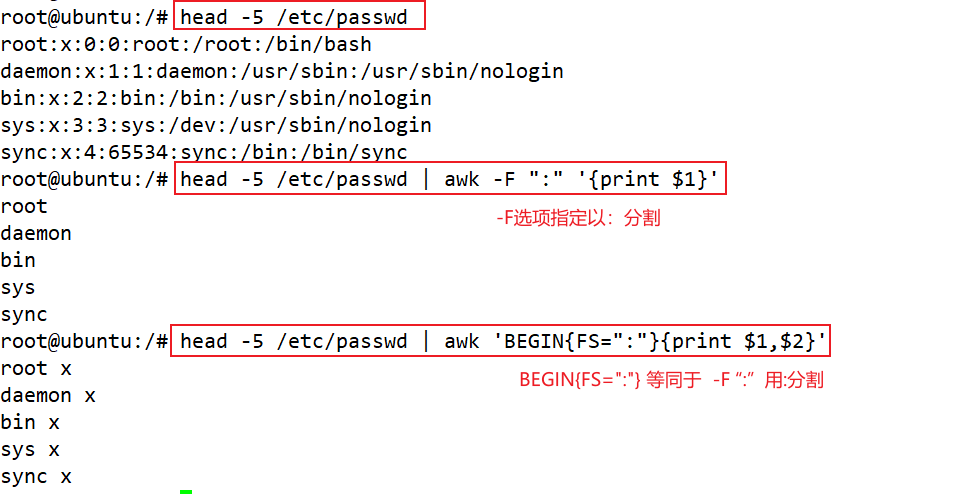
1. AWK default split is a space and tab, you can use the -f parameter to specify the separator
Actual example example
$ awk -F ':' '{print $1}' /etc/passwdThe above command uses a colon in the / etc / passwd file: split into multiple fields, then use print to print the contents of the first column field
2, use a pair of brackets in the -f parameter to specify multiple separators
$ awk -F '[()]' '{print $1, $2, $3}' some.logThe "(" and ")" use "(" and ")" to split each line of the file when the AWK processes the Some.log file.
3-AWK built-in variables
- $0 This means that when the text is processedCurrent
- $1 Indicates that the text line is separated1st field column
- $2 Indicates that the text is divided2nd field column
- $3 Indicates that the text is dividedLesson 3
- $n Indicates that the text is dividedNth field column
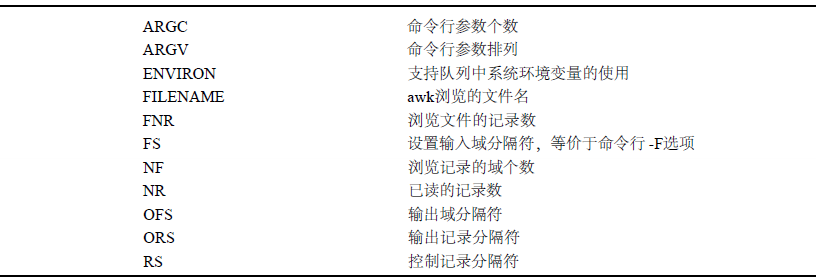
- NR Represents the line number in the file, indicatingCurrently a few lines
- NF RepresentativeNumber of current rowsHow many fields are similar to each record in the MySQL data sheet.
- FS AWKInput separatorThe default separator is a space and tab, you can customize it.
- OFS AWKOutput separator, Default is space, you can customize it
- FILENAME IndicateThe file name of the current fileIf multiple files are handled simultaneously, it also represents the current file name
Actual example example
1 - Print the content of each of the project files
$ awk '{print $0}' fruit.txt2 - Less 1 list of each line of printing output files
$ awk '{print $1}' fruit.txt3 - Leading output files, column, column 2, and third column of content (where the comma added to the insertion output separator is inserted, that is, the default space
$ awk '{print $1, $2, $3}' fruit.txt 4 - The content of each column of each line of the file can be assigned to the output in addition to the print command (indicating that the value of the $ 2 variable is hidden in the second column of each line)
$ awk '{$2 = "***"; print $0}' fruit.txt 5 - Add some strings or escape characters in the parameter list (using double quotes)
$ awk '{print $1 "\t" $2 "\t" $3}' fruit.txt 6-awk built-in NR variable indicates the line number of each row
$ awk '{print NR "\t" $0}' fruit.txt7 - AWK built-in NF variable indicates the number of columns of each row
$ awk '{print NF "\t" $0}' fruit.txt8 - Use of $ NF variables in AWK
$ awk '{print $NF}' fruit.txt    //last row
$ awk '{print $(NF - 1)}' fruit.txt // Countdown second columnThis$NF Just indicating the last column of each line, because NF represents the total number of rows, then adds $ symbols in front, indicating the last column.
9 - handle multiple files at the same time
$ awk '{print FILENAME "\t" $0}' fruit.txt company.txtWhen using AWK to process multiple files, it will process multiple files, and the variable filename indicates the file name where the current text line is located.
4-begin keyword
When using the Begin keyword in front of the script code segment, it runs the script code segment behind the Begin key before starting to read a file.The script code segment behind Begin will only be executed onceAfter the execution, the AWK program will exit.
$ awk 'BEGIN {print "Start read file"}' /etc/passwdAWK scripts can be used to perform multiple script code with multiple curly brackets
$ awk 'BEGIN {print "Start read file"} {print $0}' /etc/passwd5-End keyword method
The AWK's END instruction and Begin are just in the opposite, and after all the contents of the AWK read and processed the content line of the file, the script code segment after the end is performed.
$ awk 'END {print "End file"}' /etc/passwd$ awk 'BEGIN {print "Start read file"} {print $0} END {print "End file"}' /etc/passwd6 - Use variables in AWK
Declare and use variables in the AWK script
$ awk '{msg="hello world"; print msg}' /etc/passwdAWK declared variables can be used in any plurality of flower bracket scripts
$ awk 'BEGIN {msg="hello world"} {print msg}' /etc/passwd7 - Using Mathematical Operations in AWK
$ awk '{a = 12; b = 24; print a + b}' company.txtFirst declare two variables A = 12 and b = 24, then printed with PRINT A plus B result
| symbol | name |
|---|---|
| + | Addition operator |
| - | Subtraction operator |
| * | Multiplication operator |
| / | Division operator |
| % | Divide the operator |
8 - Use conditions in AWK judgment
Determine the third column of the file, then print it
$ awk '$3 < 5500 {print $0}' company.txt  // The two instructions are the same
$ awk '{if ($3 < 5500) print $0}' company.txt    //// Two instructions are the same
$3 < 5500 It means that the back is executed when the content of the third column field is less than 5500.{print $0} Code block
$ awk '$1 == "yahoo" {print $0}' company.txt| symbol | name |
|---|---|
| < | Be less than |
| <= | less than or equal to |
| == | equal |
| != | not equal to |
| > | more than the |
>= |
greater than or equal to |
| ~ | Match regular expression |
| !~ | Do not match regular expressions |
9 - Using regular expressions in AWK
If you are not familiar with the regular expression, you will never write it.
Intelligent Recommendation
Linux awk
grammar $ awk [options] 'command' file(s) options: -F Specifies the separator, which defaults to a space. -f Execute a script file: awk -f awk-script-file file(s) command: [pattern: regular expression...
Linux | awk
reference: Standard format of the awk command 1. Take out a column in the document 2. Specify the separator 3. Algorithm application (1) Data filtering Note: commonly used symbols (2) Data operation 4...
Linux – AWK
The AWK command can be used to format messages or extract data packets from a large text file. It has excellent performance in text browsing and proficient use of data. Call awk There are three...

awk for linux
The previous article introduced the "functions" for character and string processing, such as grep, sed egrep, etc. Now, I will introduce a useful data processing tool, namely awk. Awk usuall...
awk(linux)
refer to:10 super stick AWK commands info awk EXAMPLES The awk program specified in the command line is most easily specified within ...
More Recommendation
Linux awk
one zero awk, , , 。 1. “ + + ”。 “ ” , 。 , 。 2. , , 。 、awk 1、BEGIN{ commands } , 。 , 。 : , 。 2、/pattern/ {commands} pattern , commands 。 3、END{ commands } 。 : 、awk Option meanin...
Awk concise guide
awkIt is an application that processes text files, and is used by almost all Linux systems. This tutorial will explain the usage of this command line. For most scenarios, it has been used enough: Basi...
Awk getting started guide
1. AWK is a language for processing text files and is a powerful text analysis tool. The reason why it is called AWK is because it took the first characters of the three founders Alfred Aho, Peter Wei...
AWK study guide
Original address of the blog:https://awk.readthedocs.io/en/latest/chapter-one.htm A. AWK Getting Started Guide Awk is an easy-to-use and expressive programming language for a variety of computing and ...
Level B-1023 minimum number of groups (20 points) (simple)
Topic (20): Idea: pay attention to the cases where the first place is 0 and not 0 Several numbers 0-9 are given. You can arrange these numbers in any order, but you must use them all. The goal ...