I.MX YOCTO Project User Guide - On
I.MX YOCTO Project User Guide - On
1 Overview
This document describes how to build an I.MX board image using the YOCTO Project build environment. It describes the I.MX publishing layer and I.MX-specific usage.
The YOCTO project is an open source collaboration project that focuses on embedded Linux OS development. For more information on YOCTO projects, see the YOCTO project page: www.yoctoproject.org/. There are several documents on the YOCTO project home page to describe how to use this system. Follow the YOCTO project Quick Start at www.yoctoproject.org/docs/current/
yocto-project-qs/yocto-project-qs.html。
The FSL YOCTO project community BSP (FREESCALE.GITHUB.IO) is a developed community outside NXP, providing an I.MX board in the YOCTO project. I.MX joins the YOCTO Project community and provides a version based on the YOCTO Project framework.
The specific information of the FSL community BSP is available on the community page. This document is an extension of the community BSP document.
Files used to build images are stored in the layer. The layer contains different types of customizations from different sources. Some files in a layer are called recipes. YOCTO Project Recipes contains the mechanism for retrieving source code, building, and packaging components. The following list shows the layers used in this release.
Overview
I.MX release layer
  meta-fsl-bsp-release
     Meta BSP - Update Meta-Freescale, Poky and Meta-Openembedded Layers
 Meta-SDK - Update Meta-FreeScale-Distries

 YOCTO project community layer
     Meta-Freescale: Support for the I.MX ARM reference board.
     Meta-Freescale-3rdParty: Support for third-party and partner boards.
     Meta-Freescale-Distro: Additional projects to help develop and apply a board capability.
     FSL-Community-BSP-BASE: Usually renamed Base. Provides basic configuration of the FSL community BSP.
     Meta-Openembedded: OE Core World Layer Collection. See layers.openembedded.org/.
     The basic YOCTO project item in Poky: Poky. For more information, see Poky Readme.
     META-BROWSER: Provides multiple browsers.
     META-QT5: Provides QT5.
The reference to the community layer is applied to all layers other than the META-FSL-BSP version in the YOCTO project. The I. MX board is configured in the Meta-FSL-BSP-Release and Meta-FreeScale layers. This includes the specific details of the U-Boot, Linux kernel, and reference boards.
i.mx provides an extra layer called I.MX BSP Release, called Meta-FSL-BSP-Release, is used to integrate new i.mx Release and FSL YOCTO Project Community BSP. The purpose of the Meta-FSL-BSP-publisher is to publish updates to new YOCTO project recipes and machine configurations for the existing Meta-Freescale and Meta-Freescale-Distro layers in the YOCTO project. The content of the I.MX BSP Release layer is a recipe and machine configuration. In many test cases, other layers implement recipes or include files, the I.MX release layer provides recipe updates by adding to the current recipe or containing components and using patch or source location updates. Most I.MX publishing layers are very small because they use the content provided by the community and update the contents required for each new package version, and these new package versions are unavailable in other layers.
The I.MX BSP publishing layer also provides image recipes that include all components required for system image boots, and users are easier to boot. The components can be built separately or can be built by image Recipes (importing all components needed in the image).
Access the I.MX kernel and U-Boot version via the I.MX public git server. However, several components in the I.MX mirror are released in the form of a package. Based on the package-based recipes extract files from the I.MX image (rather than git position), and generate the required package.
All packages published in binary form are to enable hardware floating point numbers when constructing, which are specified by the defaultTune defined in each machine profile. Soft floating point packages are available from the Jethro issued.
Distribution L4.14.98-2.0.0_GA is released for YOCTO Project 2.5 (Sumo). YOCTO project 2.5 The same recipe will be online and provided in the next version released by the YOCTO project. The publisher of the YOCTO project lasts for 6 months.
The formulation and patches in META-FSL-BSP-Release are uploaded to the community layer. After completing this operation for a specific component, the files in Meta-FSL-BSP-Release are no longer needed, and FSL YOCTO Project Community BSP will provide support. Community supports I.MX reference board, community board, and third-party boards. A complete list can be found in Freescale.github.IO/doc/release notes / 2.2 / index.html # Document BSP Scope. All board references in this document are only related to the I.mx machine profile.
1.1 End User License Agreement
The NXP End User License Agreement (EULA) is displayed during the environmental setting of the FreeScale YOCTO project community. To continue using i.mx proprietary software, users must agree to the terms of this license. The protocol terms allow YOCTO projects to build packages from i.mx mirroring.
Notice
Read this license agreement carefully during the installation process, because all further work in the i.mx YOCTO project environment is related to this acceptable protocol.
1.2 reference
I.MX supports multiple families in software. The following is the list of families and each family's SOC. I.MX Linux Release Notes describes the SOC supported in the current version. Some previously published SOCs can be built in the current version, but if they are in the previous verification level, they cannot be verified.
  i.MX 6Series: 6Quadplus, 6quad, 6DUALLITE, 6SOLOX, 6SOLOLITE, 6SLL, 6ULTRALITE, 6ULL, 6ULZ
  i.MX 7Series: 7Dual, 7ULP
  i.MX 8Series: 8quadmax
     I.MX 8M Series: 8M Quad, 8M Mini
     I.MX 8x Series: 8quadxplus
This release includes the following reference materials and other information.
•i.MX Linux® Release Notes (IMXLXRN) - Provide release information.
•i.MX Linux® User'S Guide (IMXLUG) - contains specific information on installing the U-Boot and Linux operating systems and using i.mx.
•i.MX Yocto Project User's Guide (IMXLXYOCTOUG) - Instructions containing and building a Linux operating system in the YOCTO project.
•i.MX Reference Manual (IMXLXRM) - Information containing Linux drivers about I.MX.
•i.MX Graphics User's Guide (IMXGRAPHICUG) - Introduce the graphics function.
•i.MX BSP Porting Guide (IMXXBSPPG) - Contains a description related to transplanting BSP to new plates.
•i.MX VPU Application Programming Interface Linux® Reference Manual (IMXVPUAPI) - Provide Reference I.MX 6 VPU API information on the VPU.
Quick Start Guide contains basic information and settings on your board. They are on the NXP website.
SABRE platform Quick Start Guide (IMX6QSDPQSG)
SABRE Board Quick Start Guide (IMX6QSDBQSG)
i. MX 6ULTRALITE EVK Quick Start Guide (IMX6ULTRALITEQSG)
i. MX 6 EVK Quick Getting Started Guide (IMX6ULLQSG)
SABRE Auto Information Entertainment Quick Start Guide (IMX6SABREINFOQSG)
i. MX 6SoloLite Evaluation Kit Quick Start Guide (iMx6Slevkqsg)
i. MX 7Dual Sabre-SD Quick Getting Started Guide (SabResdbiMx7DUALQSG)
i. MX 8M Quad Evaluation Kit Quick Start Guide (IMX8MQUADEVKQSG)
I. MX 8M Mini Evaluation Suite Quick Start Guide (8MINIEVKQSG)
i. MX 8QUADXPLUS MULTISENSORY Enablement Kit Quick Start Guide (iMx8quadxplusqsg) Document can be obtained online online.
i. MX 6Information is located in nxp.com/imx6series
i. MX SABRE information is located in nxp.com/imxsabre
i. MX 6SOLETE EVK information, please visit nxp.com/6slevk
i. MX 6ULTRALITE information, please visit nxp.com/imx6ul
i. MX 6ULL information, please visit nxp.com/imx6ull
i. MX 7DUAL information is located in NXP.com/Imx7D
i. MX 7ULP information, please visit nxp.com/imx7ulp
i. MX 8Please visit nxp.com/imx8
i. MX 6ULZ information, please visit NXP.com/Imx6ulz
2 feature
i. MX YOCTO project release layer has the following functions:
Linux kernel formula
The kernel recipe resides in the Recipes-Kernel folder and integrates the I.MX kernel in the source code downloaded from the I.MX Git server. This is done automatically by the recipe in the project.
L4.14.98-2.0.0_GA is a Linux kernel published for the YOCTO project.
U-Boot recipe
U-Boot Recipe resides in the "Recipes-BSP" folder and integrates I.MX Uboot-Imx.git, downloading source code from the i.mx git server.
Some I.MX boards use different U-BOOT versions.
I, I.MX 6, I.MX 7, I.MX 8 device MX distribution L4.14.98-2.0.0_GA uses updated V2018.03 I.mx U-BOOT versions. This version is not updated for all I.mx hardware.
I.MX YOCTO project community BSP uses U-boot-fslc from the main line, but this is only supported by Uboot Community, and the L4.14.98 kernel is not supported.
I.MX YOCTO Project Community BSP often updates the U-Boot version, so the above information may be in the main line as the new U-Boot version is integrated into the Meta Freescale layer. Change.
Graphic formula
The graphics formula is located in the Recipes-Graphics folder.
Graphic formula integrates the I.MX graphics package version. For I.MX boards with GPUs, the IMXGPU-VIV recipe packages each release of graphics component-x11, frame buffer (FB), Xwayland, Wayland backend, and Weston Synthesizer (WESTON). Only I.MX 6 and I.mx 7 support X11 and frame buffers.
XORG-Driver integrates xserver-xorg.
i. MX package
IMX-LIB, IMX-TEST and FIRMware-IMX resides in Recipes-BSP and extract from the I.MX image to build and package them in Image Recipes.
Multimedia recipe
Multimedia formula resides in Recipes-Multimedia.
The formula includes IMX-CODEC, IMX-PARSER, LIBVPUWRAP, and IMX-GStreamer-Plugins plug-in, which are extracted from the I.MX mirror to build and package them into the image formula.
Some formulations are provided for restricted codecs. There is no such package on the I.MX image. These packages are available separately. Contact your i.mx market representative to get these.
Core formula
Some rules (such as udev) provide I.MX rules for updates to be deployed in the system. These formulations are usually updated for strategies, only for customization. The version only provides updates only when needed.
Demonstrate recipe
The demonstration formulation is located in the META-SDK directory. This layer contains image recipes and custom recipes such as touch calibration, or demonstrating application recipes.
3 host settings
To obtain the expected behavior of the YOCTO project on the Linux host, you must install the package and utilities described below. An important consideration is the hard disk space required for the host. For example, the minimum hard disk space required for the back end required for the X11 is approximately 50GB when it is built on the machine running the Ubuntu. It is recommended to provide at least 120GB, which is enough to compile all backends.
The recommended minimum Ubuntu version is 16.04 or higher. Early versions may cause the YOCTO project to build installation failed because it requires the Python version only starting with Ubuntu12.04. For more information, see the YOCTO project reference manual.
Ubuntu16.04 users have published a comment on errors in the SDL build process. To fix this comment in local.conf, add # characters as follows
#PACKAGECONFIG_append_pn-qemu-native = " sdl"
#PACKAGECONFIG_append_pn-nativesdk-qemu = " sdl"
3.1 Host Pack
The YOCTO project construction requires a building package to build a record under the YOCTO project. Go to YOCTO Project Quick Start to check the package that you must install by your build machine.
The important YOCTO project host package is:
$ sudo apt-get install gawk wget git-core diffstat unzip texinfo gcc-multilib build-essential chrpath socat libsdl1.2-dev
Ubuntu 12.04 or 14.04 Host I.MX layer host package includes:
$ sudo apt-get install libsdl1.2-dev xterm sed cvs subversion coreutils texi2html docbook-utils python-pysqlite2 help2man make gcc g++ desktop-file-utils libgl1-mesa-dev libglu1-mesa-dev mercurial autoconf automake groff curl lzop asciidoc
I.MX Layers host packs only for Ubuntu 12.04 hosts include:
$ sudo apt-get install uboot-mkimage
I.MX Layers host package only for Ubuntu 14.04 hosts include:
$ sudo apt-get install u-boot-tools
Configuration Tool Use the default version of the GREP on the build machine. If there are different versions of GREP in your path, it may result in failure. A solution is to rename a special version as content that does not contain "grep".
3.2 Setting the REPO Tool
REPO is a tool built on Git that makes it easier to manage items that contain multiple repositories, which do not need to be on the same server. The REPO has a good addition to the hierarchical characteristics of the YOCTO project, making users easier to add their layers to the BSP.
To install the "REPO" utility, perform the following steps:
1 Create a bin folder in the primary directory.
$ mkdir  ~ / bin (if the Bin folder already exists, you may not need this step)
$ curl https://storage.googleapis.com/git-repo-downloads/repo > ~/bin/repo
$ chmod a+x ~/bin/repo
2 Add to ensure that the ~ / bin folder is in the PATH variable.
export PATH=~/bin:$PATH
4 YOCTO project settings
First, use the following command to ensure that the Git setting is correct.
$ git config --global user.name "Your Name"
$ git config --global user.email "Your Email"
$ git config --list
The I.MX YOCTO Project BSP Release directory contains a Sources directory containing methods for building one or more build directories, and a set of scripts for setting the environment.
The method used to build a project comes from the community and i.mx. The YOCTO project layer is downloaded to the Sources directory. This will set the recipe used to build the project.
The following example demonstrates how to download the I.MX YOCTO project community BSP recipe layer. For this example, a directory called IMX-YOCTO-BSP will be created for the project. You can use any name instead of this name.
$ mkdir imx-yocto-bsp
$ cd imx-yocto-bsp
$ repo init -u https://source.codeaurora.org/external/imx/imx-manifest -b imx-linux-sumo -m imx-4.14.98-2.0.0_ga.xml
$ repo sync
Notice
https://source.codeaurora.org/external/imx/imx-manifest/tree/?h=imx-linux-sumo provides a list of all the list of files supported in this release.
After completing this process, the source code will check out in directory IMX-YOCTO-BSP / SOURCES.
You can use the repo sync command to periodically execute the REPO synchronization to update to the latest code.
If an error occurs during the REPO initialization, try to delete the .repo directory and run the REPO initialization command again.
Repo init has been configured for the latest patch of the line. Follow the instructions in IMX-Manifest. Git retrieves the original GA. Otherwise, the GA + patch is selected by default. To get an earlier version from SUMO-BASE, add -m (version list name) at the end of the REPO INIT line, which will retrieve early versions. See the link provided above the readme file.
Intelligent Recommendation
YOCTO Project concept
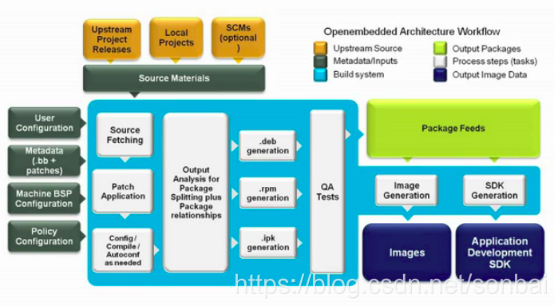
YOCTO Project components YOCTO Project components 1, BitBake Tool BitBake Clean Project Bitbake compilation 2, Recipes recipe file 3, Classes class file 4, configuretions file 5, Layers metadata Opene...
Yocto Project Quick Build
2019 Unicorn Enterprise Heavy Glour Recruitment Python Engineer Standard >>> Yocto Project Quick Build Build a typical image mirror using YOCTO Project Compatible with a specific hardware Com...
nxp yocto install guide-0
nxp yocto install guide -0 1. repo set 1 > Create a bin folder in the home directory. 2 > Add the following line to the .bashrc file to ensure that the ~/bin folder is in your PATH variable. 2.g...

【In-depth and easy to understand imx8 enterprise-level development practice | 01】imx8qxp yocto project construction guide
This is the 46th article of the future of the machine Original first post address: Article Directory 1. Overview 2. Repo installation and source code download speed up 2.1. Repo Tsinghua Source Accele...
YOCTO Add login user and password
Modify under local.conf file: 1. Modify the password of the root user, the password is jian123: 2. Add user name as jian, password is jianjian account:...
More Recommendation
The use of Yocto project (imx6dl processor)
Preface The magic of the Yocto project is that when you need to transplant some software, you only need to configure recipes (recipes, methods), and it will compile it for you! Amazing, this article m...

3. Yocto project development environment
3.3 Yocto project source repository The Yocto project team is athttps://git.yoctoproject.org/cgit/cgit.cgi/Maintains a full source repository of all Yocto Project files. This web-based source code bro...
WindRiver Linux Yocto Project Note
Project download 1. Windriver Linux YOCTO SDK download Windriver SDK custody on github, you can pass the linkwrlinuxVisit the repository. From the readme document, there are two ways to choose to choo...
i.MX-RT1052 official SDK analysis and project creation
Write in front: The purpose of this article is to summarize the backup and facilitate future queries. As it is a personal summary, please correct me if there is any error; in addition, most of the con...
YOCTO Practice (1): Build YOCTO Project Based on Dunfell
Because many times in work need to change the code based on YOCTO, compile SDK, I want to completely understand YOCTO's philosophy, the details of the entire build. Now open, based on YOCTO official d...