ESP32--Arduino--use oled
Install the libraryhttps://github.com/ThingPulse/esp8266-oled-ssd1306
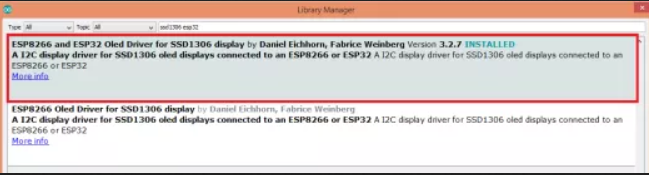
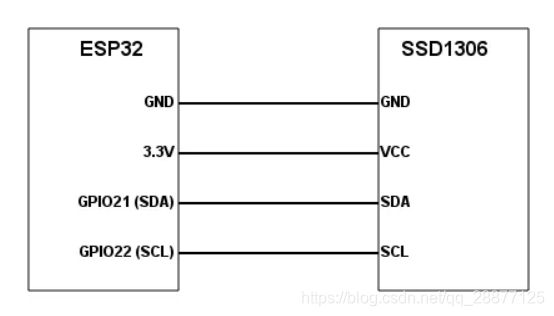
First, we need to include the Wire.h library, which is required for I2C communication with the OLED display. We also need to include the SSD1306.h library, which we will use to interact with the device.
#include <wire.h>
#include "SSD1306.h"
Next, we need to declare an object of class SSD1306, which will provide the functions needed for drawing in the display. We will call this object to display.
The constructor of the class mentioned below receives the I2C address of the device as the first parameter, which is 0x3c. As the second and third parameters, the constructor receives the number of SDA and SCL pins, respectively. In our example, as shown in the schematic, we use pins 21 and 22 of ESP32.
SSD1306 display(0x3c, 21, 22);
Now, in the setup function, we will initialize the display by calling the init method of the display object. This method takes no parameters and returns void.
display.init();
Next we can start drawing on the display. For this simple example, we will draw a very simple "Hello World" message. For this, we can call the drawString method of the display object.
This method receives the x and y coordinates as the first and second parameters, where the string will be drawn on the display, and as the third parameter, it receives the String with actual content.
display.drawString(0, 0, "Hello World");
Finally, to send the content to the display for effective drawing, we need to call the display method on the object. This method does not receive any parameters.
display.display();
Since we do not intend to change the display content, we may leave an empty Arduino loop function. As long as it is connected, the string we have just drawn will remain on the display. The final source code is shown below.
#include <Wire.h>
#include "SSD1306.h"

SSD1306 display(0x3c, 21, 22);

void setup() {
  display.init();

  display.setFont(ArialMT_Plain_24);
  display.drawString(0, 0, "Hello World");
  display.display();
}

void loop() {

}
Intelligent Recommendation
Use of ESP32 BLE - Arduino
Open file == "exemplary ==" ESP32 BLE Arduino example there are used 8 BLE device scans...

Arduino-ESP32: Use LVGL
Overview The previous article has completed the driver of the display touch screen, which can be displayed and touched normally. This article introduces an embedded GUI: LVGL. This is exactly my ultim...
Arduino: ESP32 WIFI Get web content and display it on OLED
It is a very practical application scenario for ESP32 to access the Web Server to specify a web page through the network and display the content on the display. Resting at home today, I have a raspber...
Play with ESP32 + Arduino (25) SSD1306 library to drive OLED
This time we used the following libraries: Compared with the U8G2 library, this library has a lot less functions, and the relative RAM and ROM occupancy is also less. The drawing progress bar is very ...
ESP32 reads SHT20 temperature and humidity based on the Arduino environment, displayed on OLED
ESP32 reads SHT20 temperature and humidity based on the Arduino environment, displayed on OLED Add RTC Add SmartConfig One-click File Network and EEPROM Save WiFi Information...
More Recommendation
ESP32 serial port transmission data and OLED display based on Arduino
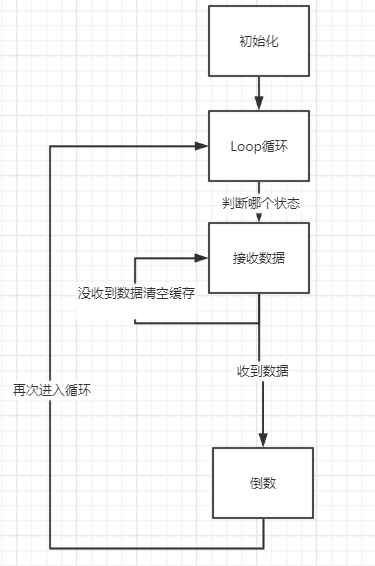
Beginner ESP32 Hardware OLED screen ESP32 One USB to TTL The background is to transmit the data on the ESP32. After receiving the data, the corresponding countdown according to the data The overall id...

Problems in the use of ESP32-CAM-Arduino
Article Directory WT-ESP32-CAM camera module 1. Arduino IDE development environment data preparation 1. Arduino IDE installation package download 2. Install the installation package of ESP32 2. Instal...
Arduino ESP32 timer function use
Arduino ESP32 timer function use ESP32 hardware timer introduction ESP32 chip contains two hardware timer groups. There are two general hardware timers in each group. They are 64 -bit universal timers...
Arduino--Basic (3)--Use of 0.96-inch OLED
reference:http://www.geek-workshop.com/thread-10634-1-1.html OLED has two protocols: SPI and I2C Four wires: Vcc, GND, SCL, SDA Protocol: IIC A4–SDA A5–SCL First install an external librar...
[IoT] ESP32 Arduino GPIO use Brief
A, GPIO interrupt use Brief 1, the interrupt trigger mode ESP32 Arduino There are four trigger modes: LOW LOW trigger CHANGE level change rising trigger RISING FALLING falling edge HIGH high level tri...