Mysql learning
tags: Java learning guide mysql database java
MySQL
## mysql target
First, why do you want to learn a database?
 Second, the relevant concept of the database
	DBMS、DB、SQL
 Third, the data set data
 Four, initial mysql
	 Introduction to MySQL products
	 MYSQL product installation ★
	 Mysql service startup and stop ★
	 Mysql service login and exit ★
	 Mysql's common command and grammar specification
 V. DQL language learning ★
	 Basic inquiry ★
	 Conditional query ★
	 Sort query ★
	 Frequent function ★
	 Group function ★
	 Group query ★
	 Connection query ★
	 Subpillar √
	 Page inquiry ★
	 Union combined with query √

 Sixth, DML language learning ★
	 Insert statement
	 Modify the statement
	 Delete statement
 Seven, DDL language learning
	 Library and table management √
	 Common data type introduction √
	 Common constraint √
 Eight, TCL language learning
	 Transaction and transaction processing
 Nine, the explanation of the view √
Ten, variables
 XI, stored procedures and functions
 Twelve, process control structure
## Database benefits
Persistent data to the local
 2. Can realize structured queries, convenient management
## Database Related Concepts *
1, DB: Database, save a container with organized data
 2, DBMS: Database Management System, also known as database software (product), used to manage data in DB
 3, SQL: Structured Query language, language for communication with DBMS
## characteristics
1. Put the data in the table, and put it in the library.
 2, there can be multiple tables in a database, each table has a name, used to identify yourself. The table name has uniqueness.
 3, the table has some features that define how data is stored in the table, similar to "class" in Java.
 4, the table consists of columns, and we also call it a field. All tables consist of one or more columns, each column similar to "attribute"
 5, the data in the table is stored in line, each line similar to "object" in Java.
## mSQL product introduction and installation
Mysql background
A company belonging to Sweden, Myaql AB
 In 2008 by Sun Company
 SUN was acquired by Oracle in 2009
The advantages of mysql
1, open source, free, low cost
 2, high performance, good transplantability
 3, small size, easy to install
MySQL installation
C / S architecture software, generally installation server
 Divided into Enterprise Edition and <U> Community Edition </ u>
 Commonly used 5.5, <u> 5.6 </ u>, 5.7, 8.0
### Mysql service startup and stop
Method 1: Computer - Right-click Management - Services
 Second: Run CMD as an administrator
 NET START service name (start service)
 NET STOP service name (stop service)
### mysql service login and exit
Method 1: Clients comes with MySQL
 Only limited to root users
 Method 2: Clients comes with Windows
 Log in:
 Mysql [-h host name -P port number] -u username -P password
 quit:
 EXIT or CTRL + C
Frequently commanded by ### mysql
1. Check out all current databases
show databases;
 2. Open the specified library
 USE library name
 3. View all tables in the current library
show tables;
 4. View all tables in other libraries
 Show Tables from library name;
 5. Create a table
 CREATE TABLE Name (

	 Column name column type,
	 Column name column type,
	。。。
);
 6. View the table structure
 DESC table name;
7. View the version of the server
 Method 1: Log in to the MySQL server
select version();
 Method 2: No login to the mysql server
mysql --version
 or
mysql --V
### mysql grammar specification
1. Not case sensitive, but recommended keyword uppercase, table name, column lowercase
 2. Each command is best to end with a semicolon
 3. Each command can be indented or wrap according to the requirements as needed.
 4. Notes
	 Single line notes: #
	 Single line of comments: - Comment text
	 Multi-line comment: / * Comment text * /
### SQL language classification
DQL (Data Query Language): Data Query Language
	select
 DML (Data Manipulate Language): Data Operation Language
	insert 、update、delete
 DDL (Data Define Languge): Data Definition Language
	create、drop、alter
 TCL (Transaction Control Language): Transaction Control Language
	commit、rollback
Frequent commands in ### SQL
Show Databases; View all databases
 Use library name; open the specified library
 Show tables; Display all tables in the library
 Show Tables from library name; display all tables in the specified library
 CREATE TABLE Name (
	 Field name field type,
	 Field name field type
 Create a table

 DESC table name; View the structure of the specified table
 SELECT * FROM table name; Display all data in the table
DQL language
- (Database Query Language) Database Table Query Operation Language
Basic inquiry
-
grammar:
select Query list 1, Query list 2 ··· from Table Name ; -
Features:
- The list of queries can be: fields, constant values, expressions, functions in the table (represent all fields in the table)
- Character-based and date type constant values must be usedapostropheCause, numeric model does not need
- The result of the query is a virtual form
Conditional query
-
grammar:
select Query field from Table Name WHERE filtering criteria; -
Classification:
-
Simple condition operator:>, <, =,> =, <=, <> (not equal), <=> (safe equal)
-
Logical operator: and, or, not
-
Fuzzy query: Like, Between and NULL (due to =, <> due to =, <> cannot judge NULL value)
- Like usually matches wildcards, you can judge characters or numeric types
//like
like '_$_%' escape '$';
//between and
between 100 and 200;
//in
in(`A`,`B`);
-
-
Features: Where must be placed behind from FROM (next to)
-
Where does not support alias
Sort query
-
grammar:
select Query field from surface WHERE screening conditions Order By Sort List ASC | DESC, Sort list ASC | DESC ·····; -
understand:
- ASC: Ascending (if not writing, default is ascending)
- DESC: descending order
Features: Order by support alias
Packet query
-
grammar:
select Query field, group function from Table Name [WHERE filter conditions] Group By group field (expressions or functions) [Order By sorted field or expression] -
Screening grammar after packet:
select Query field, group function from Table Name Group By group field (expressions or functions) Screening conditions after the group of Having; -
Features:
- You can packet according to a single field. You can also group multiple fields, and the fields are separated from commas.
- And the field of group functions is best to group the field after grouping
- GROUP BY, HAVING support alias
Multi-table connection query
-
The field of the query is used from multiple tables.
-
Classification:
- SQL92 standard: only support in MySQL
- SQL99 standard: Support in MySQL + external connection (left external connection, right external connection) + cross connection
-
Features:
- Table supports alias (generally the table alias, improve reading and performance)
- If you have an alias, you can't use the original table name.
- N table connections, at least N-1 connection conditions
- Multiple tables do not divide the host, no order requirements
-
Syntax (SQL99):
SELECT query field FROM table 1 alias Connection Type JOIN Table 2 Alias ON connection conditions [WHERE filter conditions] [Group By group field] [Having packet after screening conditions] [Order By sorted field or expression] -
Classification:
- Internal connection ☆: inner (default, omitted)
- Equivalent connection
- Non-equivalent connection
- Self-connection
- Outer connection:
- Left outside ☆: Left Outer (Outer omitted)
- Right outside ☆: Right Outer
- All: Full Outer
- Cross connection: cross
- Internal connection ☆: inner (default, omitted)
-
understand:
- Equal Connection: Equal Connection results = intersection of multiple tables
- Left, right external connection: Query results are all records in the primary table. If there is a sum of it from the table, the matching value is displayed, otherwise Null
- All external connections = the result of the internal connection + Table 1 is available in Table 2, but there is nothing in Table 1
- Cross connection = result of Cartesol product
Subquery
-
meaning:
- Another complete SELECT statement is nested in a query statement, which is called a subquery or inquiry in query.
- In the outside query statement, called the main query or external query
-
Classification:
- Scale quantity query (only one line of result set) [or a single-line query]
- List query (with only one column multi-line result set) [or more query]
- Sub-query (the result set has a row of multiple columns)
- Table query (result set is generally multi-row)
-
Features:
- Subposition is placed in parentheses
- Subsidence can be placed behind from, SELECT, after WHERE, back, exists, exists ·····, but generally on the right side of the condition
- The subquery takes precedence over the primary query, the main query uses the execution result of the child query.
- Single-line query, generally match the single line operator:> <= <>> = <=
- Multi-line query, generally match multi-line operator: Any, All, Some, IN, Not in
| Operator | meaning |
|---|---|
| in | not in | Equivalent to any one in the list |
| any | some | Comparison of a certain value returned to the subquery |
| all | Comparison of all values returned to subquery |
- The case of illegal use of sub-queries:
- The result type of subquery is not matched.
- The result of the subquery is empty
Paging query
-
grammar:
SELECT field | Expression FROM table name [WHERE Condition] [group by group field] [Having Condition] [Order By Sort Field] LIMIT started entry index, entry number; -
Features:
-
The starting entry index starts from 0 (can be omitted, default is 0)
-
LIMIT clause places in the final query statement
-
Formula (Page = number of pages to display, sizeperpage = number per page):
limit (page - 1) * sizePerPage,sizePerPage
-
Joint inquiry
-
Complete the results of multiple query statements into a result
-
grammar:
SELECT query list from the name where WHERE condition union [all] SELECT query list from the name where WHERE condition union [all] ··· -
Features:
- Union is heavy, union all does not
- The type of query of multiple query statements is almost the same
- The number of columns of the query of multiple query statements must be consistent
Knowledge points and common functions
Single line function
| Features | illustrate | |
|---|---|---|
| Character function | ||
| length | Get bytes | One Chinese character in UTF8 is 3 bytes |
| concat | Splicing character | If you use quotation marks, it is recommended to use single quotes. |
| upper | lower | Size transfer conversion | |
| substr | Interceptor string | SQL index starts from 1 |
| instr | Returning the index of the sub-string | If you can't find it, return 0 |
| trim | Go to the spaces and characters specified before and after | TRIM (Character from Character) |
| lpad | rpad | Left | right fill | |
| replace | replace | |
| Mathematical function | ||
| round | rounding | |
| ceil | floor | Up | | |
| mod | Mold | Result symbols and divided |
| truncate | Cut off | |
| Date function | ||
| now | Current system date + time | |
| curdate | Current system date | |
| curtime | Current system time | |
| year|month ·· | Get date specified section | |
| str_to_date | Convert characters to date | Such as ('1998-3-2', '% Y-% C-% d') |
| date_format | Convert the date to a character | |
| Other functions | ||
| version | version number | |
| database | Current database | |
| user | Current connection user | |
| Process control function | ||
| if | Handling double branch | Similar to the three yuan operator in Java |
| case | Handling multi-branch | WHEN condition THEN statement ... End; |
- Date format:
| Format | Features |
|---|---|
| %Y | Four years old |
| %y | Two years old |
| %m | Month (01, 02) |
| %c | Month (1, 2) |
| %d | Day (01,02) |
| %H | Hours (24 hours) |
| %h | Hours (12 hours) |
| %i | Minute (00, 01) |
| %s | Second (00, 01) |
Group function
- Function: Do a statistical use, also known as statistical function, aggregate function, group function
| Features | illustrate | |
|---|---|---|
| sum | Sum up | |
| max | Maximum value | |
| min | Minimum | |
| avg | average value | |
| count | count |
- Features:
- The above five packet functions ignore the NULL value, except count (*)
- SUM and AVG are generally used to process numerical type, max, min, and count can handle any data types.
- Can be used with Distinct, used for statistics
- COUNT parameters can support: field, *, constant value (generally put 1)
Name (AS)
-
Format:
SELECT query list AS alias; -
specific:
- AS can omit
- Alias If you need quotation marks, it is recommended to use double quotes ""
Distinct
-
Format:
Select Distinct query list;
+ Number
- Use:
- Both operands are valued, doing additional operations
- If there is a character pattern, try to convert the character value value into a value type. If the conversion fails, convert the character value to 0
- As long as there is an operand as null, the result is definitely null
=
- Cannot judge NULL value
- <> Safety is equal to the number can judge the ordinary array, or it can judge the NULL value.
Wildcard
-
Classification:
- % (Any of the characters, including 0 characters)
- _ (Any single character)
-
I want to make wildcards as characters:
-
Way (recommended):
Like '_ $ _%' escape '$'; // $ alternative to any character -
Method 2:
like '_\_%';
-
DML language
- (Database Manipulation Language) Database Table Data Operation Language
insert
-
grammar:
# 1 INSERT INTO Name (column name, ···) VALUES (value 1, ...), (value 2, ...); # 2 INSERT INTO Name Set column name 1 = value, column name 2 = value ··· -
Characteristics
- Can be empty fields, can not be inserted, or fill with NULL
- Fields can be omitted, but the default all fields, and the order in the order and the store sequence in the table
- Way 1 can insert multiple lines, support subqueries
Revise
-
grammar:
#
 Update table 1
 Set field = new value, field = new value 3
 [WHERE Condition] 2
 # Multist table
 Update table 1 alias
 Connection Type JOIN Table 2 Alias
 ON connection conditions
 Set field = new value, field = new value
 [WHERE Condition]
delete
-
grammar:
-
Way (DELETE statement):
# delete FROM table name [WHERE filter conditions] # Multist table Delete alias 1, alias 2 From table 1 alias 1 Connection Type JOIN Table 2 Alkname 2 ON connection conditions WHERE filtering criteria; -
Method 2 (TRUNCATE statement):
Truncate Table Name -
Two ways comparison:
- Truncate can't add WHERE conditions, while Delete can add WHERE conditions
- Truncate's efficiency is a little higher
- Truncate deletes the table with a column from the growth, if the data is inserted, the data starts from 1
- After deleting a table with a growth column, if the data is inserted, the data starts from the last breakpoint.
- Truncate deletes can't roll back, Delete deletes can roll back
-
DDL language
- (Database Definition Language) Database Table Structure Operation Language
Library and table management
-
Management management:
# Create a library Create Database (IF NOTS) library name # DROP DATABASE (IF EXISTS) library name -
Table management:
-
Create a table:
CREATE TABLE (IF NOTS) Name ( Type 1 [(length) constraint], Type 2 [(length) constraint], ······· ); -
Modified table:
ALTER TABLE Name Operating Name Column Column Name [Column Type Constraint]- Operating Name: Add | Modify | Drop | Change | Rename [to]
- Add (add field)
- Modify (Modify Field Type and Collators)
- DROP (Delete field)
- Change (modify the field name)
ALTER TABLE Name Change Column Old Column Name New Column Name New Type(Types can not be province) - Rename [to] (modified table name)
- Operating Name: Add | Modify | Drop | Change | Rename [to]
-
Delete the table:
DROP TABLE (IF EXISTS) table name; -
Copy table:
# Only copy structure
 CREATE TABLE Name 1 Like Table 2;
 #             + Data
 CREATE TABLE Name 1
 SELECT * FROM table name 2
 [WHERE Condition]
-
-
Supplementary operation:
-
Create a MySQL database user
Create User Tom Identified by 'New Password' -
Granted permission
# Tom users logged in via the network, set all the permissions of all the lists of all libraries, and the password is set to ABC123.
grant all privileges on *.* to tom@'%'  identified by 'abc123';

   # To TOM users use local command line, grant the permissions of all tables below Atguigudb under this library.
grant select,insert,delete,update on atguigudb.* to tom@localhost identified by 'abc123';
-
Common type
Numerical type
Plastic surgery
- Category: Tinyint (1), Smallint (2), Mediumint (3), INT / INTEGER (4), Bigint (8) (Number of items in parentheses)
- Features:
- If it is not set, it is a symbol (+ -) by default.
- Add unsigned settings to unsigned after keywords
- If the inserted value exceeds the scope of the shaping, Out of Range is reported and inserted into the critical value.
- If the length is not set, there is a default value.
- The length represents the maximum width of the display. If not enough, use zerofill to fill it with 0 (using Zerofill, the default is not symbol)
Decimal
-
Classification:
- Floating point:
- float(M , D)
- double(M , D)
- Designated point:
- dec(M , D)
- decimal(M , D)
- Floating point:
-
Features:
- M: Integer Bit + Capacity
- D: Digital number
- If the range is exceeded, the threshold is also inserted.
- M and D can be omitted. If it is decimal, then M defaults to 10, and D defaults to zero. If it is float and double, the accuracy is determined according to the accuracy of the inserted value.
- The accuracy of the fixed point is high, and if there is high requirements for accuracy, it can be used.
Character type
- Category:
- Short text (M represents the maximum number of characters):
- CHAR (M): [M can be omitted, default is 1. Fixed length characters. Compare space. efficient]
- VARCHAR (M): [m is not omitted. Variable length characters. Save space. low efficiency]
- Binary and Varbinary (for saving binary)
- Enum (for saving enumeration), SET (for saving a collection)
- Longer text: Text, Blob (larger binary)
- Short text (M represents the maximum number of characters):
Date type
- Category:
- Data, Time (Time), Year (Year)
- DateTime [8 bytes. Range 1000-9999. Not affected by time zone]
- TimeStamp (Date + Time) [4 bytes. Range 1970-2038. Temperature zone and other effects]
Common constraint
-
A limit for limiting the data in the table. In order to ensure the accuracy and reliability of data in the table
-
Classification (Six Constraints):
- NOT NULL: Non-empty, used to ensure that the value of this field cannot be empty
- Default: By default, it is used to ensure that the field has default values.
- Primary Key: Primary key, is used to ensure that the value of the field has uniqueness, and is not empty
- Unique: Unique, used to ensure that the value of the field is unique, but can be empty
- Foreign Key: Foreign key to ensure that the value of this field must come from the value of the main table associated column (add foreign key constraints in the slave table, the value of a column in the primary table, and the associated column of the primary table must be one Key [generally primary key or unique])
- Check (mysql is not supported): Check
-
add category:
- Level-level constraints: Six major conference syntax support (plus multiple, separated by spaces), but foreign key constraints have no effect
- Table-level constraints: except for non-empty, default, other support
-
Labeling:
- You can provide a manual insert value, the system provides the default sequence value, also known as self-growth column (Auto_Increment)
- Features:
- There is at most a list in a table.
- Identifier requirements are a key (primary key, unique key)
- The type of identifier can only be numeric
- Identifier can pass
set auto_increment_increment = numberSet the steps. You can set the start value by manually inserting the value.
-
Primary key and only comparison:
Guarantee uniqueness Allow empty A number of allowable existence Allow combination Primary key √ × There is one more √ (Not recommended) only √ √ There can be multiple √ (Not recommended) -
Add a constraint when creating a table, universal writing:
create table if not exists stuinfo( id int primary key, stuname varchar(20) not null, age int default 18, seat int unique, majorid int, # [constraing fk_stuinfo_major] foreign key(majorid) references major(id) ); -
Add a constraint when modifying the table, syntax:
# rating constraint ALTER TABLE Name Modify Column Field Name Field Type New Constraint; # ALTER TABLE Name Add [Constraint Constraint Name] Constraint Type (Field Name) [Foreign Key Quote]; -
Delete constraints when modifying the table, syntax:
#   rating constraint
 ALTER TABLE Name Modify Column Field Name Field Type;
 #
 ALTER TABLE Name DROP constraint type (unique key is index) [column name];
TCL language
- (Transaction Control Language) Transaction Control Language
Database transaction
-
Classification of transactions:
- Implicit transaction: There is no significant opening and end of the transaction.
- Explicit transaction: The transaction has a significant opening and end tag (provided: you must set the auto submission function is disabled)
-
Related steps:
- Open a business
- A set of logical operators (INSERT, DELETE, UPDATE, SELECT)
- Submit a transaction or rollback transaction
#
set autocommit=0;
start transaction;
 #

·······

 #     (   )
 Commit; (submit a transaction)
 Rollback; (rollback transaction)
SavePoint Name (setting save point, can only be used with rollabck to)
Commit to node
Rollback to node
other
view
-
Virtual table, use with ordinary table
-
Create syntax of the view:
CREATE VIEW view name AS query statement; -
View of the view
#method one: DESC view name; # 2: Show Create View View Name; -
View modification:
-
method one:
# If there is a modification, create Create or Replace View View name AS query statement; -
Method 2:
ALTER VIEW view name AS query statement;
-
-
The deletion of view data:
DELETE FROM view; -
The deletion of the view:
DROP VIEW view 1, view name 2 ···; -
The following view cannot be updated:
- SQL statement containing the following keywords: Grouping Functions, Distinct, Group By, Join, Having, Union or UNION All
- Constant view
- Subqueries in SELECT
- From a view that cannot be updated
- The child query of the WHERE clause references the table in the FROM clause
variable
-
Classification:
- System variable
- Global variable (scope: will assign the initial value for all global variables, valid for all sessions, but cannot cross the server)
- Session variable (scope: only for the current session (connection) is valid)
- Custom variable
- User variable (scope: only for the current session (connection) is valid)
- Local variable (action domain: only defined its begin, END is valid)
- System variable
-
Order:
-
View system variables:
show global | [session] variables [ like 'XXX' ]; -
View the value of the specified system variable
SELECT @@global | [session]. System variable name -
Assign a value for a system variable
#method one Set global | [session] system variable name = value; # 2 Set @@global | [session]. System variable name = value; -
Notice:
-
Global levels with global. Session level with session. If you don't write, the default session
-
-
Custom variable:
-
Steps for usage:
- Declaration and initialization (local variables can be not initialized)
- Value
- User variable (anywhere placed in a session)
# and initialize Set @ user variable name = value Set @ user variable name: = value SELECT @ user variable name: = value # SELECT field INTO @ user variable name from the name; # View the value of the user variable SELECT @ user variable name;- Local variable (can only be in Begin End, and in the first sentence)
#
 Declare Variable Name Type [Default Value];
 #
 SET local variable name = value
 SET local variable name: = value
 SELECT @ local variable name: = value
 SELECT field INTO local variable name from FROM table;
 # View the value of the user variable
 SELECT local variable name;
-
Stored procedure
-
A set of pre-compiled SQL statements
-
Classification (in, out, inout can be tested in a stored procedure):
- No return
- Just bring in type, no return
- Only with an OUT type, there is no change
- Bring both in again, there is a return
- With inout, there is a return
-
Create a stored procedure, syntax:
CREATE Procedure stored procedure name (list of parameters) begin Stored Process Body (if only one SQL statement, you can omit the begin end) END End Marker- Parameter list contains: parameter mode (in | out | inout), parameter name, parameter type
- IN: This parameter can only be used as input, requiring call party transmission
- OUT: This parameter can only be used as an output, return value
- INOUT: This parameter can be used as an input or input, requiring a transmission value, but also returns a value.
- need to use
Delimiter new end tagSet new end tag
- Parameter list contains: parameter mode (in | out | inout), parameter name, parameter type
-
Call the stored procedure, syntax:
Call stored procedure name (Real parameter list) end tag -
Delete stored procedures, syntax:
Drop Procedure stored procedure name; -
View stored procedures, syntax:
Show Create Procedure stored procedure name;
function
-
Features:
- Some and have only one return
-
Create a function, syntax:
CREATE FUNCTION function name (parameter list) Returns return type begin Function (if only one SQL statement, you can omit the begin end) Return value; END End Marker- Parameter list: parameter name, parameter type
-
Call function, syntax:
SELECT function name (parameter list) end tag -
View function, syntax:
Show create function function name; -
Delete functions, syntax:
DROP FUNCTION function name;
Process control structure
Branch structure
IF function
-
grammar:
IF (condition, value 1, value 2);
Case structure
-
Situation 1 (Similar to the Switch statement, generally used to implement an equivalent judgment)
Case to be judged by the field or expression WHEN constant 1 THEN returned value 1 or statement 1; (if the value does not have a semicolon, the statement must have a semicolon) The value 2 or statement 2 returned by the WHEN constant 2. ··· ELSE returns the value or statement; (can be without ELSE) END [case] (if you need to add case in Begin End, if you put it behind SELECT) -
Case 2 (Similar to multiple IF statements, generally used to implement interval judgment)
case WHEN Condition 1 THEN Returns 1 or Statement 1; WHEN Condition 2 The value returned by the THEN 2 or statement 2; ··· ELSE returns the value or statement; end [case] -
Features:
- Can be used as an expression, nested in other statements, can be placed anywhere
- Can be used as an independent statement, only in Begin End
IF elseif structure
-
grammar:
IF condition 1 THEN statement 1; Elseif Condition 2 THEN Statement 2; ... ELSE statement n; end if; -
Features:
- Can only be used in Begin End
Circulating structure
-
Category: While, Loop, Repeat
-
Cycling control:
- Iterate: Similar to Continue End This cycle continues next time
- Leave: Similar to the current cycle of Break
-
grammar:
# First judgment [Tags:] while loop condition do Circulation body End while [tag]; # # [Tags:] Repeat Circulation body Until End Conditions End repeat [tag]; # [Tags:] loop Circulation body End loop [tag]; -
Features:
- Can only be used in Begin End
Intelligent Recommendation
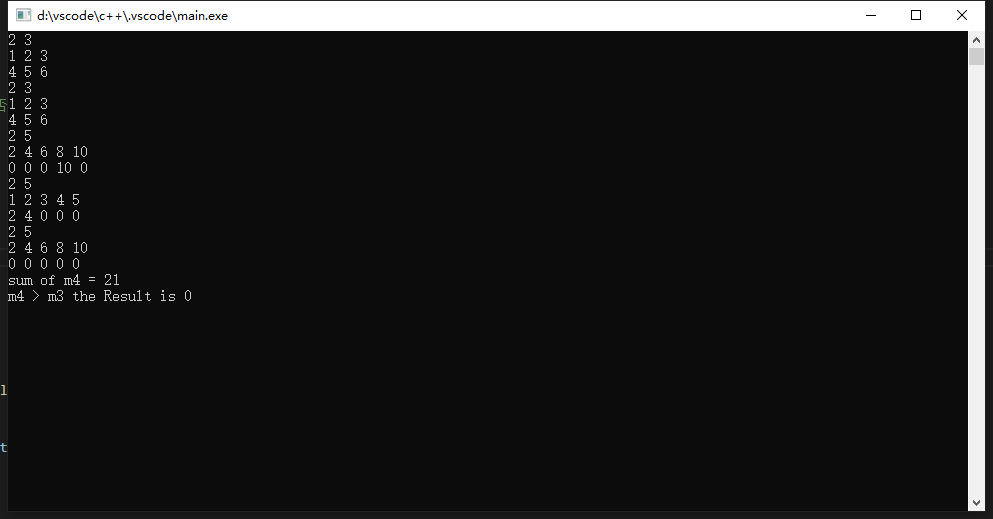
C ++ Experiment_1: Relief of Function Construction and Computing Character
Articles directory Experimental background 1. Function analysis 1.1 Construction function 1.1.1 No parameter constructor function 1.1.2 There are parameter constructor functions 1.1.3 Copy constructor...
Some pits stepped on Caffe
One.Caffe training your own modelThe connection author is very good. However, there will be some pit records in the actual use: 1. In the process of generating LMDB, the first step is to write files a...
C ++ improve programming (3) - STL common container (7): List container
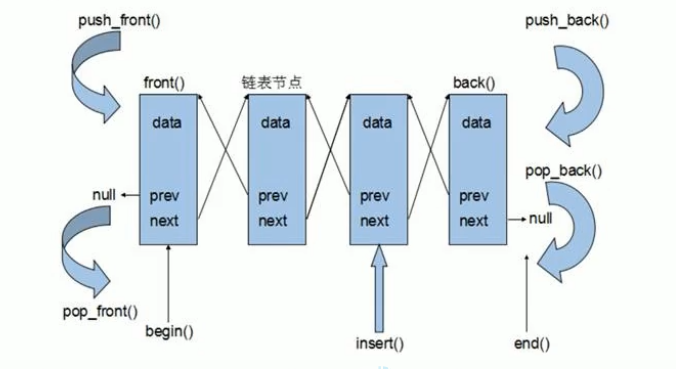
7. List container 7.1 List Basic Concept 7.2 LIST constructor 7.3 List assignment and exchange 7.4 List size operation 7.5 List Insert and Delete 7.6 List data access 7.7 LIST reverse and sort 7.8 Sor...
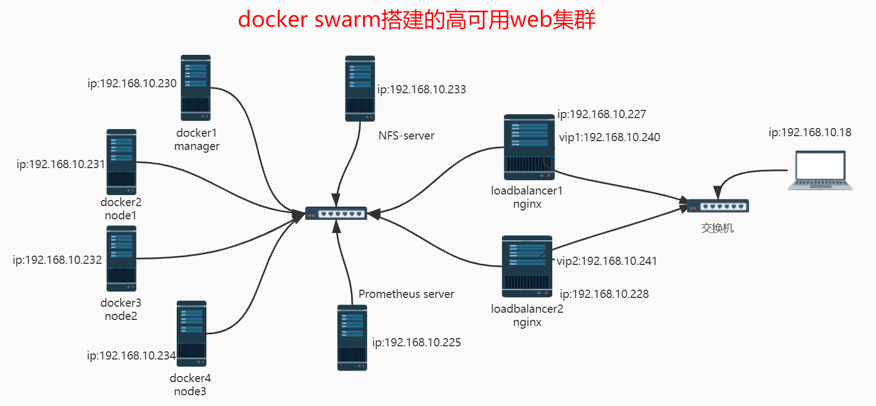
Project name: high available web cluster built by Docker Swarm
Table of contents Project name: high available web cluster built by Docker Swarm Network topology Data flowchart Project environment: CentOS 8.3 (8), Docker 20.10.8, NFS, Nginx/1.21.1, Keepalived, Pro...
More Recommendation
Create a list that cannot be modified
import java.util.ArrayList; import java.util.Collection; import java.util.Collections; import java.util.LinkedList; import java.util.List; public class UnmodifiableList { } Console: [asdf, java]...
Experiment 4-1-6 Find the sum of the first N items in the score sequence (15 points)
This question requires writing a program to calculate the sum of the first N items of the sequence 2/1+3/2+5/3+8/5+... Note that in this sequence from the second term, the numerator of each term is th...
Node environment installation
Install node download link https://nodejs.org/en/download/ Use of NPM and debugging tools Mainly introduce a few aspects NPM nodemon pm2 node-inspector Install npm Because npm is hosted abroad, the do...
linux practice
https://zhangge.net/4023.html 1. Writing a script allows us to automatically generate the line "#!/bin/bash" and comment information when writing a script. Exercise: write a script 1. Set th...

Android command line tool (2) - DDMS
DDMSFull nameDalvikDebugMonitorServiceThe function is very powerful, can be used to intercept the connected device or virtual machine screen, can view the heap and thread information of the running pr...