GRPC python package deep learning algorithm tutorial
Recently, I need to provide a python code containing multiple neural network inferences for gRPC to call, that is, I need to encapsulate a server that supports gRPC on the basis of this main program. The purpose of this tutorial is to help friends in need use python to build their own gRPC server/client through simple code.
0. Preface
Recently, we need to use grpc to call our algorithm modules. For me, we need to provide a grpc server for consumption by their go or c++ clients. So, how to define a complete server-client in python and make it run very well is a very important task.
1. The official introduction of gRPC
The python interface example of the Chinese official website is directly placed in grpc's github, and we may need to dig further. Here, in order to avoid cumbersomeness, I will use a simple example to illustrate how to encapsulate our tasks as gRPCServer(server), and openClient(client) calls it.
Before that, let’s briefly introduce what gRPC is:
1.1 What is gRPC
-
gRPC It is a high-performance, open source and universal RPC (remote procedure call) framework, designed for mobile and HTTP/2. Currently, C, Java and Go language versions are provided, respectively: grpc, grpc-java, grpc-go. The C version supports C, C++, Node.js, Python, Ruby, Objective-C, PHP and C#.
gRPC is designed based on the HTTP/2 standard, which brings features such as bidirectional streaming, flow control, header compression, and multiplexing requests on a single TCP connection. These features make it perform better on mobile devices, save power and space. -
In gRPC, client applications can directly call methods of server applications on a different machine just like calling local objects, making it easier for you to create distributed applications and services. Similar to many RPC systems, gRPC is also based on the following concepts:① Define a service,② Specify the method that can be called remotely (including parameters and return types),③ Implement this interface on the server side and run a gRPC server to handle client calls. Have one on the clientStubThe same method as the server.
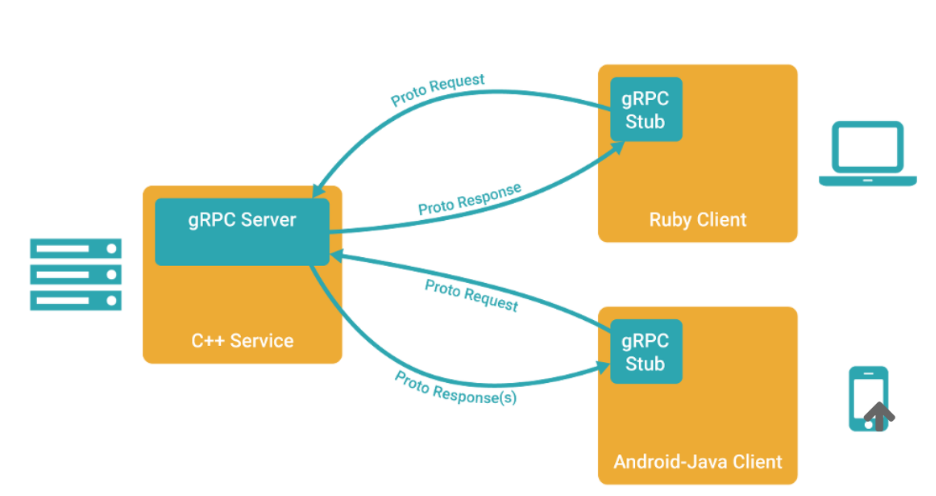
- The gRPC client and server can run and interact in a variety of environments-from Google's internal server to your own notebook, and can be written in any language supported by gRPC. Therefore, you can easily create a gRPC server in Java and a client in Go, Python, and Ruby. In addition, Google’s latest API will have a gRPC version of the interface, making it easy for you to integrate Google’s functions into your application.
1.2 Use protocol buffers
gRPC uses protocol buffers by default, which is a mature structured data serialization mechanism open sourced by Google (of course, other data formats such as JSON can also be used). As you will see in the example below, you use proto files to create gRPC services, and protocol buffers message types to define method parameters and return types. You can find more information about Protocol Buffers in the Protocol Buffers documentation.
Protocol buffers version
Although protocol buffers have existed for open source users for a while, the example uses a new style of protocol buffers called proto3, which has a lightweight and simplified syntax, some Useful new features, and support more new languages. Currently a beta version is released for Java and C++, and an alpha version is released for JavaNano (ie Android Java). There is Ruby support in the protocol buffers Github source code library, and there is a generator for Go language in the golang/protobuf Github source code library. Support for more languages is under development. You can find more content in the proto3 language guide. Compare the release notes with the current default version and see the main differences between the two. More documentation on proto3 will appear soon. Although you can use proto2 (the current default version of protocol buffers), we usually recommend that you use proto3 in gRPC, because this way you can use gRPC to support a full range of languages and avoid proto2 clients interacting with proto3 servers. Compatibility issues and vice versa.
ps: I use allprotobufAs the definition of the intermediate data transmission format agreed by gRPC. Although json can be used, I haven't seen a tutorial on this.
2. Basic steps
Because the official tutorial has a more comprehensive installation tutorial for grpc's language interfaces, I will take python as an example to illustrate how we should build a grpc-based server-client for deep learning applications.
Step 1: Define the service (implement your own hellogdh.proto)
An RPC service specifies methods that can be called remotely through parameters and return types, and gRPC is implemented through protocol buffers. Use protocol buffers interface definition language to define service methods, and protocol buffers to define parameters and return types. Both the client and the server use the interface code generated by the service definition.
Of this articlehellogdh.protoIt is defined as follows [2]:
// Copyright 2015 gRPC authors.
//
// Licensed under the Apache License, Version 2.0 (the "License");
// you may not use this file except in compliance with the License.
// You may obtain a copy of the License at
//
//     http://www.apache.org/licenses/LICENSE-2.0
//
// Unless required by applicable law or agreed to in writing, software
// distributed under the License is distributed on an "AS IS" BASIS,
// WITHOUT WARRANTIES OR CONDITIONS OF ANY KIND, either express or implied.
// See the License for the specific language governing permissions and
// limitations under the License.

// Reference: Python version of gRPC quick start 1
// https://blog.csdn.net/Eric_lmy/article/details/81355322
syntax = "proto3";

option java_multiple_files = true;
option java_package = "io.grpc.gdh.proto";
option java_outer_classname = "GdhProto";
option objc_class_prefix = "HLW";

package hellogdh;

// Define the service.
service Greeter {
  // ① Simple rpc.
  rpc SayHello (HelloRequest) returns (HelloReply) {}

  // ② Response stream rpc.
  rpc LstSayHello (HelloRequest) returns (stream HelloReply) {}
}

// Message from the client: HelloRequest.
message HelloRequest {
  string name = 1;
}
// Message sent by the server: HelloReply.
// Cannot use int, only int32 can be used.
// 1, 2, 3 means order.
message HelloReply {
  int32 num_people = 1;
// repeated defines the structure corresponding to the list.
  repeated int32 point = 2;
}
among them,syntax = "proto3"Indicates that the proto3 version is used. I haven't moved anything related to option;service GreeterMeans to define a name calledGreeterService. There are two types of this service, and there are four types of services that can be defined with gRPC, which will be described in detail below.
After the definition is complete, generate the client and server code (Note:I thought that the client and server code was written by myself, but after actual practice, I learned that it was generated based on xxx.proto! ! We don’t need to write it ourselves!)
To perform this step, you need to install some tools as follows:
sudo apt-get install protobuf-compiler-grpc
sudo apt-get install protobuf-compiler
Execute to my environment (ubuntu18.04 python3.6):
protoc -I ./grpc --python_out=./grpc --grpc_out=./grpc --plugin=protoc-gen-grpc=`which grpc_python_plugin` hellogdh.proto
Generate two files in the corresponding directoryhellogdh_pb2_grpc.pywithhellogdh_pb2.py。
Among them, hellogdh_pb2.py includes:
- Message class (Message) defined in hellogdh.proto
- The abstract class of the service defined in hellogdh.proto:
BetaHellogdhServicer, Defines the implementation of Hellogdh serviceinterface。
BetaHellogdhStub, Defines the Hellogdh RPC that can be activated by the clientstub。 - Functions applied:
beta_create_Hellogdh_server: Create a gRPC server (server dedicated) based on the BetaHellogdhServicer object.
beta_create_Hellogdh_stub: The client is used to create a stub stub (client only).
Step 2: Implement part of the server code.
This section is divided intoSimple call (single RPC)withServer stream RPCAs an example to illustrate, in fact, gRPC allows 4 types of service methods (if you want to learn completely, it is recommended to look at the official document example [1]):
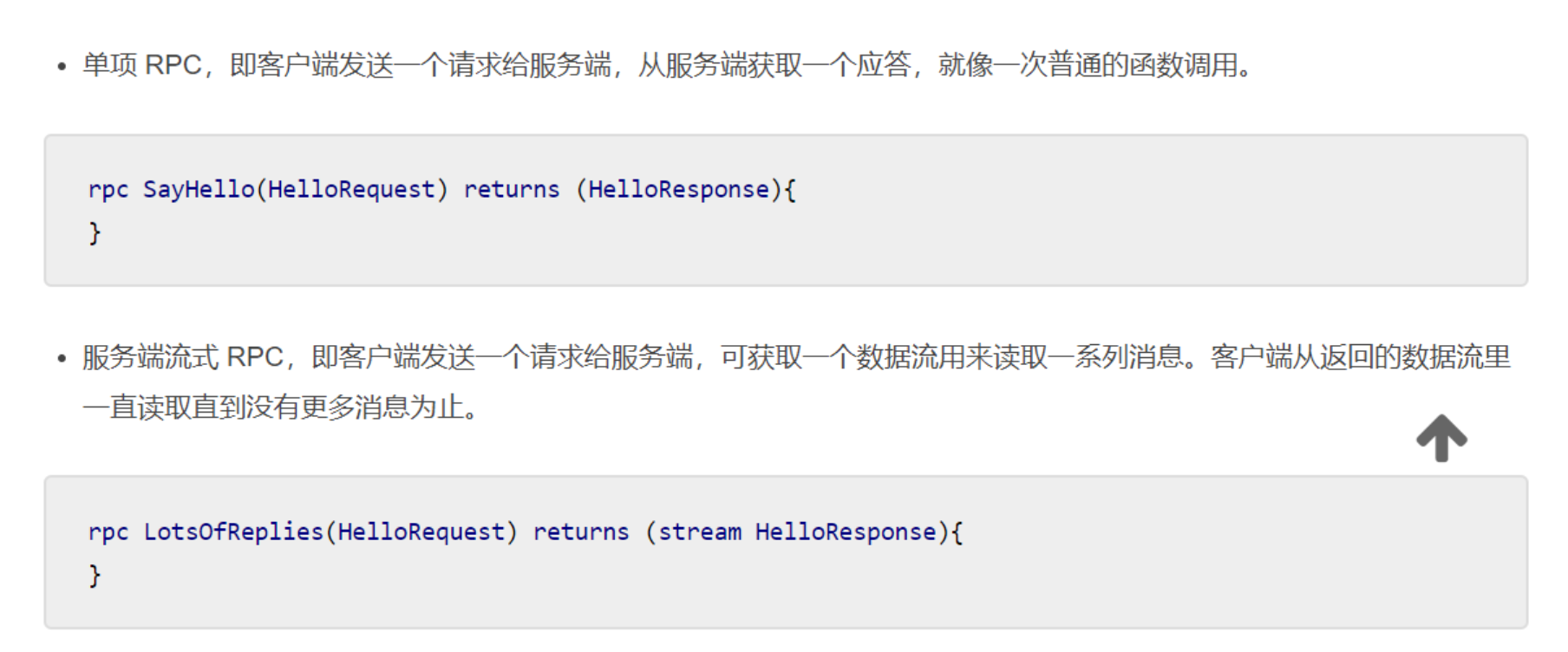
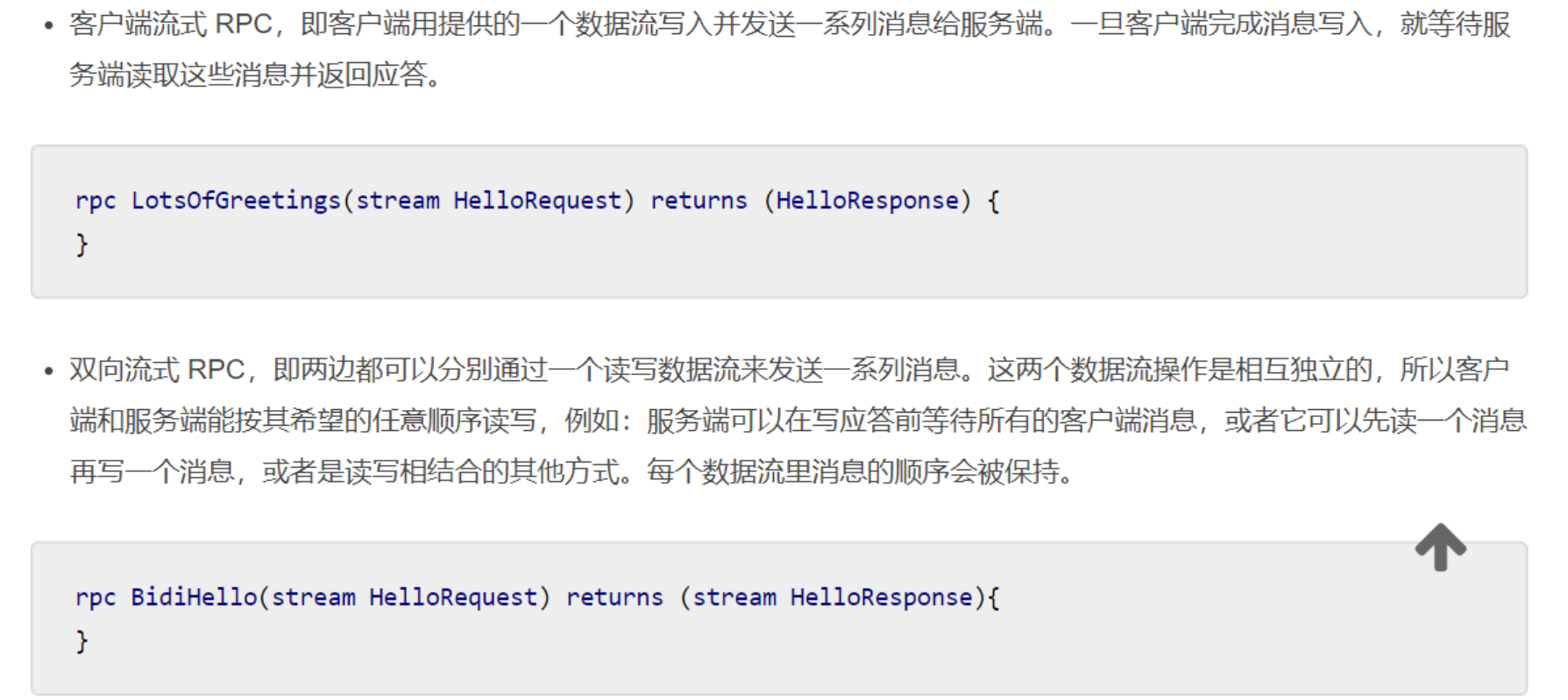
For me, because I need to encapsulate the final output queue of the multi-process python program to the gRPC server process,So I first need to transfer the queue to be processed (Queue) to the process of gRPC server, and then define some methods of overwrite helloworld_pb2.py in this process.
Finally, start all neural network task processes and gRPC processes in the main process, andblock(join(), the role of join is to ensure that the current process ends normally, that is, the unfinished child process will not be killed because the main process exits first.).
The code is as follows, referenced from githubgrpc/examples/pythonDownroute_guide
import sys
sys.path.append("..")

import grpc
import hellogdh_pb2
import hellogdh_pb2_grpc
from concurrent import futures

import cv2
import time
import numpy as np
from utils.config import *
import logging
from capture import queue_put, queue_get, queue_img_put
from module.Worker import PoseWorker
import multiprocessing as mp
from multiprocessing import Pool, Queue, Lock


# 0.0 grpc.
def grpc_server(queue):
    class gdhServicer(hellogdh_pb2.BetaGreeterServicer):

        def SayHello(self, request, context):
            # Note: You must explicitly specify the parameter name when passing parameters, not lynxi_pb2.HelloReply(1, [5, 10])
            if request.name == 'gdh':
                return hellogdh_pb2.HelloReply(num_people=1, point=[1, 1])
            else:
                return hellogdh_pb2.HelloReply(num_people=55, point=[1, 1])

        def LstSayHello(self, request, context):
            while request.name == 'gdh':
                data = queue.get()
                # Because it is a server-side streaming mode, yield is used.
                yield hellogdh_pb2.HelloReply(num_people=data.num, point=[data.point[0], data.point[1]])

    # 1. The way to start the server before.
    # server = helloworld_gdh_pb2.beta_create_Greeter_server(gdhServicer())

    # 2. The way to start the server learned in route_guide.
    server = grpc.server(futures.ThreadPoolExecutor(max_workers=10))
    lynxi_pb2_grpc.add_GreeterServicer_to_server(gdhServicer(), server)
    server.add_insecure_port('[::]:50051')
    # Because start() does not block, if your code has nothing else to do during runtime, you may need to wait in a loop.
    server.start()

    try:
        while True:
            # time.sleep(_ONE_DAY_IN_SECONDS)
            time.sleep(5)
    except KeyboardInterrupt:
        server.stop()


# 2.1 Create a queue for each task.
pose_queue_raw = Queue()
monitor_queue_raw = Queue()
pose_out_queue = Queue()

# key: name, val[0]: queue, val[1]: loaded model.
queues = {'pose': pose_queue_raw, 'monitor': monitor_queue_raw}

#                     pose
#                  /
#                 /
# 3. Producer-Consumer --- detect
#                 \
#                  \
#                     face_detect

processes = []
for key, val in queues.items():
    processes.append(mp.Process(target=queue_put, args=(val,)))
    if key == 'pose':
        processes.append(PoseWorker(val, pose_out_queue))
    else:
        processes.append(mp.Process(target=queue_get, args=(val, )))


processes.append(mp.Process(target=grpc_server, args=(pose_out_queue, )))
[process.start() for process in processes]
[process.join() for process in processes]
This code means the queue obtained by PoseWorker processingpose_out_queueFeed it to the gRPC server process and set it up to send processed data according to the request sent by the client.queue_putwithqueue_getIt is a function that encapsulates the video frame and puts it into queue A and reads and displays it from queue A.
import cv2
from multiprocessing import Queue, Process
from PIL import Image, ImageFont, ImageDraw
import cv2

def queue_put(q, video_name="/home/samuel/gaodaiheng/handup.mp4"):
    cap = cv2.VideoCapture(video_name)
    while True:
        is_opened, frame = cap.read()
        q.put(frame) if is_opened else None

def queue_get(q, window_name='image'):
    cv2.namedWindow(window_name, flags=cv2.WINDOW_NORMAL)
    while True:
        frame = q.get()
        cv2.imshow(window_name, frame)
        cv2.waitKey(1)
Need extra attention is that PoseWorker is inheritedmultiprocessing.ProcessThe process of the class is roughly defined as follows:
from multiprocessing import Queue, Process

class PoseWorker(Process):
    """
                 Pose estimation pose estimation.
    """
    def __init__(self, queue, out_queue):
        Process.__init__(self, name='PoseProcessor')
        # Input queue and output queue.
        self.in_queue = queue
        self.out_queue = out_queue

    def run(self):
        #set enviornment
        os.environ["CUDA_VISIBLE_DEVICES"] = "0"

        #load models
        import tensorflow as tf
        ...
        model = load_model(xxx)
        ...
        while True:
            # Consume data from the incoming queue.
        	frame = self.in_queue.get()
            # Feed the model inference to get the result.
            result = model.inference(frame)
            # Put the result back in the producer.
            self.out_queue.put(result)
Step 3: Implement part of the server code.
Similar to step 2, the code is as follows, refer to githubgrpc/examples/python[3] underroute_guide
# coding: UTF-8
"""
    @author: samuel ko
"""
import os
import grpc
import hellogdh_pb2 as helloworld_gdh_pb2
import hellogdh_pb2_grpc as helloworld_gdh_pb2_grpc
import time

_ONE_DAY_IN_SECONDS = 60*60*24

# 1. In order to call the service method, we have to create a stub first.
# We use the function beta_create_RouteGuide_stub of the route_guide_pb2 module generated in .proto.


def run():
    with grpc.insecure_channel('localhost:50051') as channel:
        # 1) Stubbing method 1.
        stub = helloworld_gdh_pb2.GreeterStub(channel)
        # 2) Stubbing method 2.
        # stub = helloworld_gdh_pb2_grpc.GreeterStub(channel)
        print("-------------- ① Simple RPC --------------")
        # response = stub.SayHello(helloworld_gdh_pb2.HelloRequest(name='gdh'))
        features = stub.SayHello(helloworld_gdh_pb2.HelloRequest(name='gdh'))
        print(features)

        print("-------------- ② Server-side streaming RPC --------------")
        features = stub.LstSayHello(helloworld_gdh_pb2.HelloRequest(name='gdh'))
        for feature in features:
            print("Hahaha %s at %s, %s" % (feature.num_people, feature.point[0], feature.point[1]))


if __name__ == "__main__":
    run()
Finally, it will print out the data structure that meets our server settings...
Supplementary knowledge: python data structure supported by protobuf.
In the message definition of proto, we support python string and other types, which need to be explicitly marked in proto, I guess it isSince gRPC supports multiple language interfaces, some languages areStrong type(C/C++, Go), so you must explicitly indicate the data type to avoid unnecessary trouble:
message HelloRequest {
  string name = 1;
}
Among them, 1, 2, 3 indicate the order of the parameters. The data types we support are as follows:
- ① string
- ② float
- ③ int32/uint32 (Does not support int16 and int8)
- ④ bool
- ⑤ repeated int and our custom Message.
needs special emphasis here, repeated means an array of indefinite length, in which you can put built-in type, or your own additional encapsulated message. Very flexible. Corresponding to python list.
	message BoxInfos {
	    message BoxInfo {
	        uint32 x0 = 1;
	        uint32 y0 = 2;
	        uint32 x1 = 3;
	        uint32 y1 = 4;
	    }
    repeated BoxInfo boxInfos = 1;
}
- ⑥ bytes Byte stream, can be used to transfer pictures. But generally in gRPC, the size of each message is not large (about 1MB?) So generally it is the absolute path of the picture?
- ⑦ map<string, int> Dictionary, corresponding to python's dict, but you need to explicitly specify the key and value types.
to sum up
As of now, a python version of gRPC server-client that encapsulates multi-process neural network algorithms has been successfully completed, because I am just new to contact, and there may be deviations in understanding. Please correct me, thank you very much~
Reference
[1] gRPC--python Chinese official website
[2] Python version of gRPC quick start one
[3] grpc/examples/python
Intelligent Recommendation

Python tutorial return in Keras deep learning library
Keras deep learning is a library that encapsulates an efficient and math libraries Theano TensorFlow. In this article, you will learn how to use Keras development and evaluation of the neural network ...
Deep Learning: Python Tutorial Practice (1)
Please see Chapter 7 https://cnbeining.github.io/deep-learning-with-python-cn/3-multi-layer-perceptrons/ch9-use-keras-models-with-scikit-learn-for-general-machine-learning.html Purpose: Train a model ...

Python Quick Tutorial for Deep Learning Beginners-Basics
Python quick tutorial for deep learning beginners-basics Darwin 10 months ago Next article:Python quick tutorial for deep learning beginners-numpy and matplotlib Life is short, you need Python Life is...

Deep learning algorithm | LSTM algorithm principle introduction and Tutorial
Beijing | Deep Learning and Artificial Intelligence Training December 23-24 Set up a classic course againRead the full text> The text contains 4880 words and 17 pictures, and the estimated reading ...
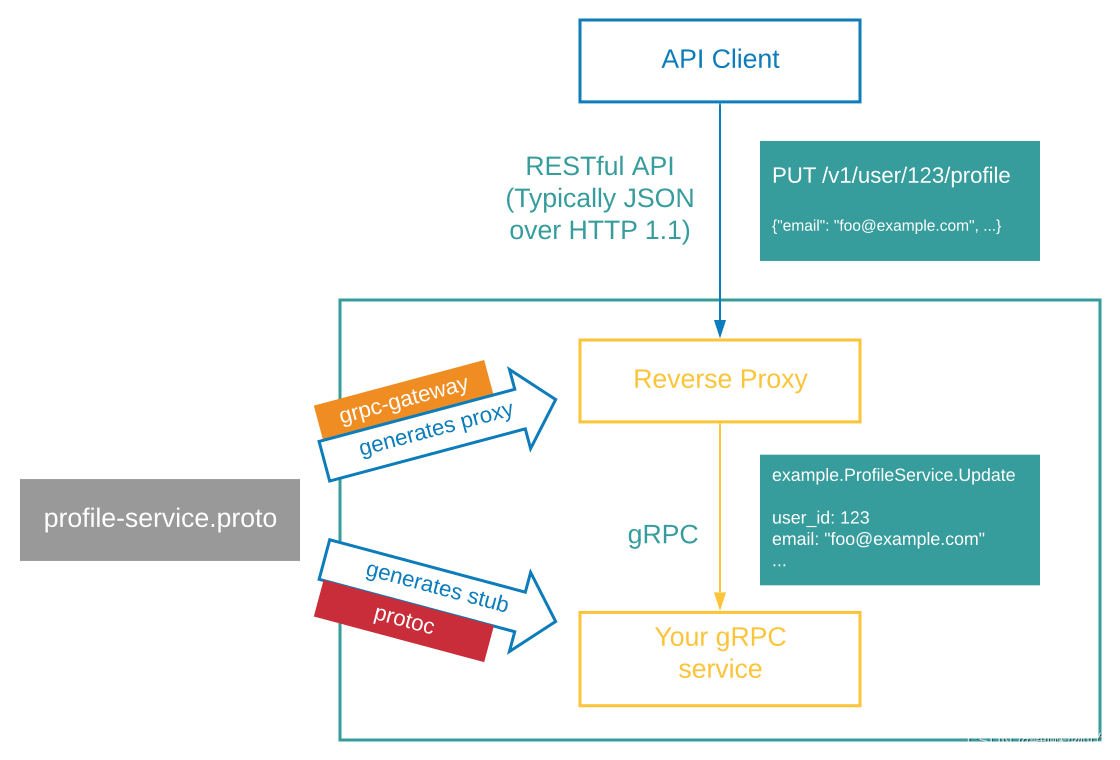
GRPC Tutorial-GRPC-Gateway
GRPC Tutorial-GRPC-Gateway Foreword Code 1. GRPC gateway introduction 1.1 cause 1.2 Supplement 1.3 Process 1.4 flowchart Second, environmental configuration 2.1 Dependencies required 2.1.1 Proto to GO...
More Recommendation
GRPC Basic Concept Learning and Installation Tutorial
content First, basically 1, GRPC definition 2、grpc VS restful api 3, GRPC usage scene 4、protobuf 4.1 definition 4.2 Advantages 5. Relationship between protoc, protoc-gen-go and grpc 5.1 protoc 5.2 pro...
Use of gRPC transfer protocol (python tutorial)
Full Stack Engineer Development Manual (Author: Luan Peng) Data Architect Full Solution Introduction to gRPC: gRPC is a high-performance, open-source RPC framework, produced by Google, developed based...

GRPC package
GRPC C ++ package method: What is GRPC? Before you need to understand the GRPC, you need to understand the micro service architecture. It is a system architectural method for the micro service archite...
Deep learning optimization algorithm analysis and python implementation
Preface Sort out the optimization algorithms used before to facilitate the reproduction of Learning to learn by gradient descent by gradient descent paper work. The author uses LSTM optimizer to repla...
Introduction and installation of python tensorflow deep learning algorithm
About Tenso Flow Tenso Flow is an open source learning library for programming based on data flow, TensorFlow. It was originally developed by researchers and engineers from the Google Brain Group (par...