27. grpc python tutorial
1. Write protobuf file
syntax = "proto3";

package rpc_package;

// define a service
service AirRecognitionService {
    // define the interface and data type

    rpc  SVMAirRecognition(MLAirRequest) returns (MLAirReply) {}
    rpc  CNNAirRecognition(DLAirRequest) returns (DLAirReply) {}

}

// define the data type of request
message MLAirRequest {

      int32 fs_rate=1;
      repeated float sig=2;#Pass in one-dimensional array


}

// define the data type of response
message MLAirReply {
    string mlmessage = 1;

}


// define the data type of request
message DLAirRequest {

      int32 fs_rate=1;
      repeated float sig=2;Pass in a one-dimensional array


}

// define the data type of response
message DLAirReply {
    string dlmessage = 1;

}
2. Generated with protobuf compiler
#The following code can be modified according to your own folder function deployment
python -m grpc_tools.protoc -I=./protos --python_out=./rpc_package --grpc_python_out=./rpc_package ./protos/AirRecognition.protoMy file deployment is
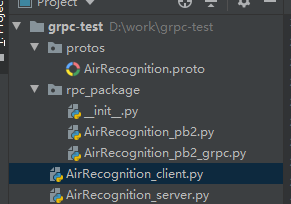
3. Write in AirRecognition_client.py
# @File  : AirRecognition_client.py
# @Author: Wang Zhimin
# @Date  :  2019/10/28
#!/usr/bin/env python
# -*- coding: utf-8 -*-

from __future__ import print_function
import logging
import cv2
import grpc
from rpc_package.AirRecognition_pb2 import MLAirRequest,DLAirRequest
from rpc_package.AirRecognition_pb2_grpc import AirRecognitionServiceStub
import numpy as np
import soundfile as sf
def run():
    # Use with syntax to ensure that the channel is automatically closed
    with grpc.insecure_channel('localhost:50000') as channel:
        # The client implements rpc communication through stub
        stub = AirRecognitionServiceStub(channel)

        dir1 = "D:/work/pictures/1/9.jpg"
        dir2 = "D:/work/audio raw data/10.wav"

        dir3 = "D:/work/pictures/1/1.jpg"
        sig, fs_rate = sf.read(dir2)
        sig=np.array(sig)
        # The client must use the defined type, here is the HelloRequest type

        ML = stub.SVMAirRecognition(MLAirRequest(sig=sig,fs_rate=fs_rate))#Machine LearningSVM

        DL = stub.CNNAirRecognition(DLAirRequest(sig=sig,fs_rate=fs_rate))#Deep learning

    print ("DL's result: " + DL.dlmessage)
    print("ML's result: " + ML.mlmessage)

if __name__ == "__main__":
    logging.basicConfig()
    run()
4. Write in AirRecognition_server.py
# @File  : AirRecognition_server.py
# @Author: Wang Zhimin
# @Date  :  2019/10/28

#!/usr/bin/env python
# -*-coding: utf-8 -*-

from concurrent import futures
import grpc
import logging
import time
import numpy as np
import tensorflow as tf
from scipy import signal
from scipy.fftpack import fft
import pickle
import CnnModel
import ModelSave
from config import Config
import cv2
from rpc_package.AirRecognition_pb2_grpc import add_AirRecognitionServiceServicer_to_server, \
    AirRecognitionServiceServicer
from rpc_package.AirRecognition_pb2 import MLAirReply,DLAirReply
from scipy.misc import imsave

class Air(AirRecognitionServiceServicer):

    # Implement the interface we defined here

    def SVMAirRecognition(self, request, context):
        sig=request.sig

        fs_rate=request.fs_rate
          "...........Write the actual function in the middle............"
        return MLAirReply(mlmessage='Hello, %s. is not an airplane' % fs_rate, )

    def CNNAirRecognition(self, request, context):
        sig=request.sig
        fs_rate=request.fs_rate   # sig is the matrix fs_data=sampling rate
	"..............The actual function is written in the middle............"
        return DLAirReply(dlmessage='Hello, %s. is not an airplane' % lafs_ratebels)


def serve():
    # Here we use thread pool to process server tasks concurrently
    server = grpc.server(futures.ThreadPoolExecutor(max_workers=10))

    # Add the corresponding task processing function to the rpc server
    add_AirRecognitionServiceServicer_to_server(Air(), server)

    # The non-secure interface used here, the world gRPC supports TLS/SSL secure connection, and various authentication mechanisms
    server.add_insecure_port('[::]:50000')
    server.start()
    try:
        while True:
            time.sleep(60 * 60 * 24)
    except KeyboardInterrupt:
        server.stop(0)


if __name__ == "__main__":
    logging.basicConfig()
    serve()
5. Start AirRecognition_server first
then start AirRecognition_client
Intelligent Recommendation
python grpc
The big brother taught me that RPC is more at the bottom and more efficient than HTTP. This is a big pit and has a lot of use. GRPC will generate a set of two Python classes to the client and server u...
Python+grpc
Grpc Demo GRPC package protobuf Protobuf corresponds to the data format of python protobuf python double float float float int32 int int64 int/long uint32 int/long uint64 int/long sint32 (can be used ...
GRPC for python
GRPC for python Dependence torchserve related pip install torchserve torch-model-archiver torch-workflow-archiver GRPC related pip install -U grpcio protobuf grpcio-tools Start TorchServe Use the Prot...
Python 27 Programming Tutorial Web Crawling
Reprinted at: https://www.jianshu.com/p/10a1aa285afa...
Python 3 Basic Tutorial 27-Dictionary
This article introduces the dictionary in Python. The dictionary is generally wrapped in braces, and the elements inside are all key and values. The above Beijing is a key, and the corresponding 22 in...
More Recommendation
GRPC detailed introduction tutorial, golang / python / php multilingual explanation
First, what is GRPC? GRPC, in fact, one of the RPC framework, with a G, representing the big brother in the RPC, the meaning of the faucet boss, and the Global is also global, meaning the globalizatio...
Install grpc tutorial
Original portal: The default go successfully installed First step Create a folder The second step Step 3 Clone someone else's repository from GitHub Step 4 Installation carry out...
grpc java basic tutorial
1 RPC framework principleThe goal of the RPC framework is to make remote service calls simpler and more transparent. The RPC framework is responsible for shielding the underlying transmission mode (TC...
gRPC C++ Introduction Tutorial
I have written a tutorial on sending and receiving messages using gRPC in Python before, you can refer to the article"Those who experience gRPC". I recently planned to use gRPC in a C++ proj...
grpc-go tutorial of helloworld
protobuf installation Google's grpc-go usage tutorial github address:https://github.com/grpc/grpc-go Please configure the go environment and gopath before use helloworld tutorial: 1. First install the...