[K210 + micropython] Drive SSD1306 OLED Display (I2C)
tags: Learn card python Embedded
[K210 + micropython] driver SSD1306 display
Article catalog
Related knowledge preparation
First, I2C and SPI
SSD1306 has two communication protocols: I2C (4 pins) and SPI (7 pins). I used I2C's SSD1306, so I only introduced I2C, but I2C said in the previous chapter, so please move toLast chapter。
I haven't used it yet, but I want to know the SPI-related knowledge.machine.SPI
Second, SSD1306 OLED display
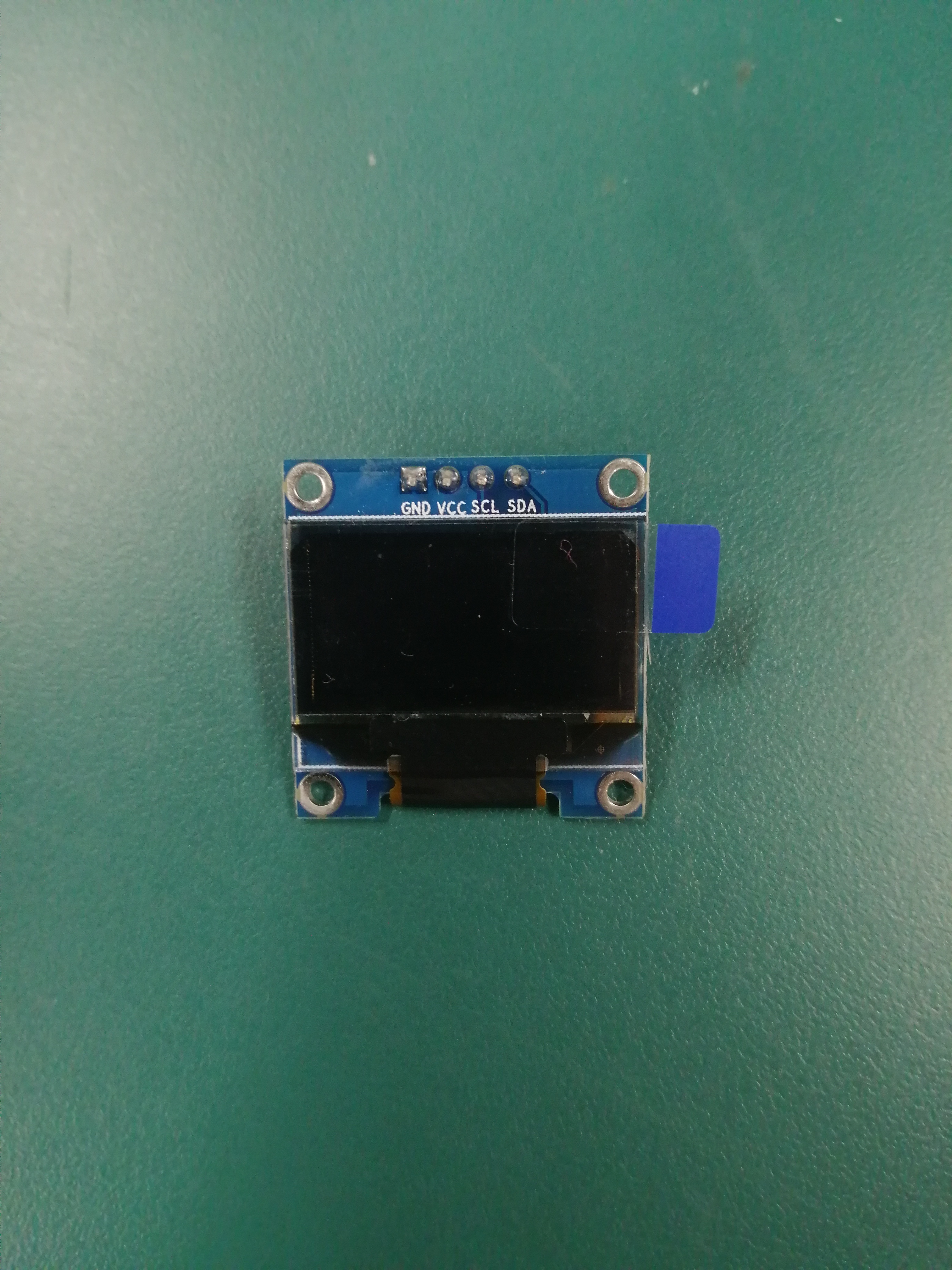
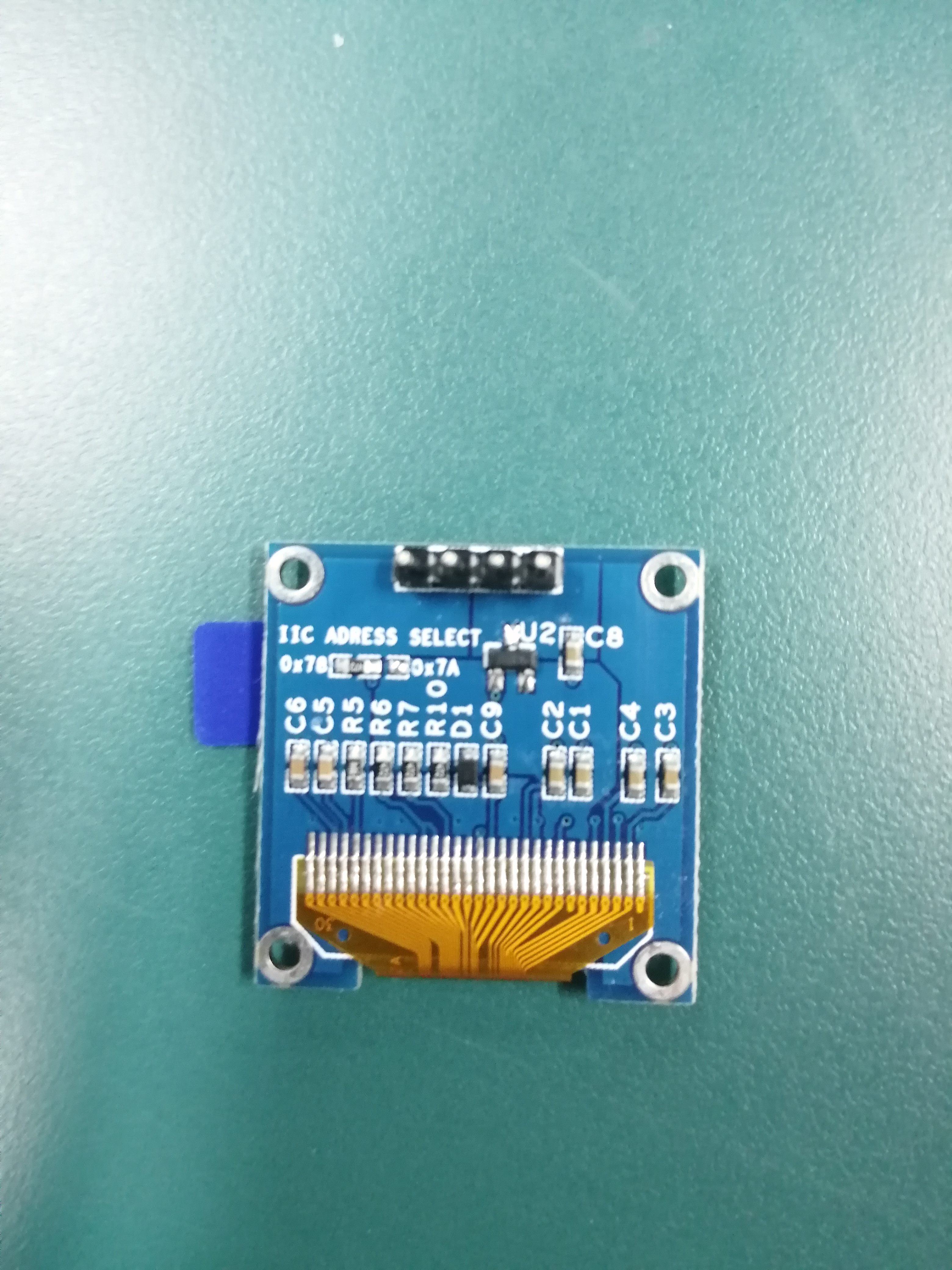
This display size is about 0.96 inches, driven by SSD1306, drive interface I2C
This display seems to have only two of the two colors, and even the grayscale is not available. .
Wiring, such as:
| K210 | SSD1306 OLED |
|---|---|
| VCC | VCC |
| GND | GND |
| SCL (Pin 28, I2C) | SCL |
| SDA (Pin 29, I2C) | SDA |
Third, SSD1306 drive library
This Framebuf library is necessary to say. When I first imported the SSD1306.py library on the Internet, I can't find it.framebufModule. So I wondered, I can't do this module in the latest firmware in K210? ? ? Changed the plates of the block ESP8266, run smoothly.
This is whipped, look at the K210 firmware source warehouse:
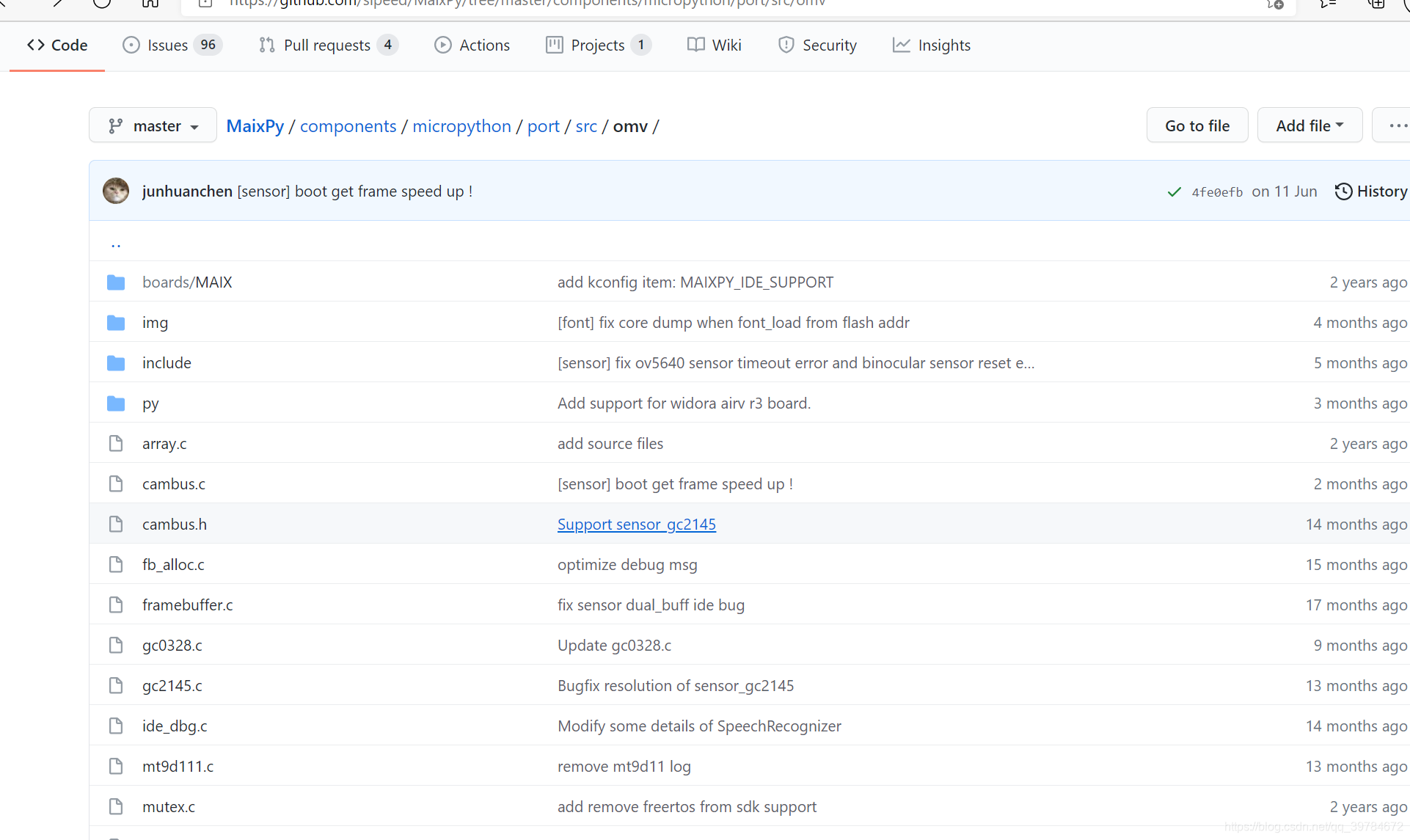
Finally, I found a name calledframebufferWill this library not compiled? So I made a variety of drums for a long time, and I didn't have it. . . I don't know if it is my IMORT's way, anything is no fruit. Later, I found an Adafruit's SSD1306 drive library on Github and modified the framebuf.py file.
Thank you for all the Contributors on Github.
framebuf.py:
# The MIT License (MIT)
#
# Copyright (c) 2018 Kattni Rembor for Adafruit Industries
#
# Permission is hereby granted, free of charge, to any person obtaining a copy
# of this software and associated documentation files (the "Software"), to deal
# in the Software without restriction, including without limitation the rights
# to use, copy, modify, merge, publish, distribute, sublicense, and/or sell
# copies of the Software, and to permit persons to whom the Software is
# furnished to do so, subject to the following conditions:
#
# The above copyright notice and this permission notice shall be included in
# all copies or substantial portions of the Software.
#
# THE SOFTWARE IS PROVIDED "AS IS", WITHOUT WARRANTY OF ANY KIND, EXPRESS OR
# IMPLIED, INCLUDING BUT NOT LIMITED TO THE WARRANTIES OF MERCHANTABILITY,
# FITNESS FOR A PARTICULAR PURPOSE AND NONINFRINGEMENT. IN NO EVENT SHALL THE
# AUTHORS OR COPYRIGHT HOLDERS BE LIABLE FOR ANY CLAIM, DAMAGES OR OTHER
# LIABILITY, WHETHER IN AN ACTION OF CONTRACT, TORT OR OTHERWISE, ARISING FROM,
# OUT OF OR IN CONNECTION WITH THE SOFTWARE OR THE USE OR OTHER DEALINGS IN
# THE SOFTWARE.
"""
`adafruit_framebuf`
====================================================
CircuitPython pure-python framebuf module, based on the micropython framebuf module.
* Author(s): Kattni Rembor, Tony DiCola, original file created by Damien P. George
Implementation Notes
--------------------
**Hardware:**
* `Adafruit SSD1306 OLED displays <https://www.adafruit.com/?q=ssd1306>`_
**Software and Dependencies:**
* Adafruit CircuitPython firmware for the supported boards:
  https://github.com/adafruit/circuitpython/releases
"""

__version__ = "0.0.0-auto.0"
__repo__ = "https://github.com/adafruit/Adafruit_CircuitPython_framebuf.git"

import os
import struct
import font

# Framebuf format constants:
MVLSB = 0  # Single bit displays (like SSD1306 OLED)
RGB565 = 1  # 16-bit color displays
GS4_HMSB = 2  # Unimplemented!
MHMSB = 3  # Single bit displays like the Sharp Memory


class MHMSBFormat:
    """MHMSBFormat"""

    @staticmethod
    def set_pixel(framebuf, x, y, color):
        """Set a given pixel to a color."""
        index = (y * framebuf.stride + x) // 8
        offset = 7 - x & 0x07
        framebuf.buf[index] = (framebuf.buf[index] & ~(0x01 << offset)) | (
            (color != 0) << offset
        )

    @staticmethod
    def get_pixel(framebuf, x, y):
        """Get the color of a given pixel"""
        index = (y * framebuf.stride + x) // 8
        offset = 7 - x & 0x07
        return (framebuf.buf[index] >> offset) & 0x01

    @staticmethod
    def fill(framebuf, color):
        """completely fill/clear the buffer with a color"""
        if color:
            fill = 0xFF
        else:
            fill = 0x00
        for i in range(len(framebuf.buf)):
            framebuf.buf[i] = fill

    @staticmethod
    def fill_rect(framebuf, x, y, width, height, color):
        """Draw a rectangle at the given location, size and color. The ``fill_rect`` method draws
        both the outline and interior."""
        # pylint: disable=too-many-arguments
        for _x in range(x, x + width):
            offset = 7 - _x & 0x07
            for _y in range(y, y + height):
                index = (_y * framebuf.stride + _x) // 8
                framebuf.buf[index] = (framebuf.buf[index] & ~(0x01 << offset)) | (
                    (color != 0) << offset
                )


class MVLSBFormat:
    """MVLSBFormat"""

    @staticmethod
    def set_pixel(framebuf, x, y, color):
        """Set a given pixel to a color."""
        index = (y >> 3) * framebuf.stride + x
        offset = y & 0x07
        framebuf.buf[index] = (framebuf.buf[index] & ~(0x01 << offset)) | (
            (color != 0) << offset
        )

    @staticmethod
    def get_pixel(framebuf, x, y):
        """Get the color of a given pixel"""
        index = (y >> 3) * framebuf.stride + x
        offset = y & 0x07
        return (framebuf.buf[index] >> offset) & 0x01

    @staticmethod
    def fill(framebuf, color):
        """completely fill/clear the buffer with a color"""
        if color:
            fill = 0xFF
        else:
            fill = 0x00
        for i in range(len(framebuf.buf)):
            framebuf.buf[i] = fill

    @staticmethod
    def fill_rect(framebuf, x, y, width, height, color):
        """Draw a rectangle at the given location, size and color. The ``fill_rect`` method draws
        both the outline and interior."""
        # pylint: disable=too-many-arguments
        while height > 0:
            index = (y >> 3) * framebuf.stride + x
            offset = y & 0x07
            for w_w in range(width):
                framebuf.buf[index + w_w] = (
                    framebuf.buf[index + w_w] & ~(0x01 << offset)
                ) | ((color != 0) << offset)
            y += 1
            height -= 1


class FrameBuffer:
    """FrameBuffer object.
    :param buf: An object with a buffer protocol which must be large enough to contain every
                pixel defined by the width, height and format of the FrameBuffer.
    :param width: The width of the FrameBuffer in pixel
    :param height: The height of the FrameBuffer in pixel
    :param buf_format: Specifies the type of pixel used in the FrameBuffer; permissible values
                        are listed under Constants below. These set the number of bits used to
                        encode a color value and the layout of these bits in ``buf``. Where a
                        color value c is passed to a method, c is  a small integer with an encoding
                        that is dependent on the format of the FrameBuffer.
    :param stride: The number of pixels between each horizontal line of pixels in the
                   FrameBuffer. This defaults to ``width`` but may need adjustments when
                   implementing a FrameBuffer within another larger FrameBuffer or screen. The
                   ``buf`` size must accommodate an increased step size.
    """

    def __init__(self, buf, width, height, buf_format=MVLSB, stride=None):
        # pylint: disable=too-many-arguments
        self.buf = buf
        self.width = width
        self.height = height
        self.stride = stride
        self._font = None
        if self.stride is None:
            self.stride = width
        if buf_format == MVLSB:
            self.format = MVLSBFormat()
        elif buf_format == MHMSB:
            self.format = MHMSBFormat()
        else:
            raise ValueError("invalid format")
        self._rotation = 0

    @property
    def rotation(self):
        """The rotation setting of the display, can be one of (0, 1, 2, 3)"""
        return self._rotation

    @rotation.setter
    def rotation(self, val):
        if not val in (0, 1, 2, 3):
            raise RuntimeError("Bad rotation setting")
        self._rotation = val

    def fill(self, color):
        """Fill the entire FrameBuffer with the specified color."""
        self.format.fill(self, color)

    def fill_rect(self, x, y, width, height, color):
        """Draw a rectangle at the given location, size and color. The ``fill_rect`` method draws
        both the outline and interior."""
        # pylint: disable=too-many-arguments, too-many-boolean-expressions
        self.rect(x, y, width, height, color, fill=True)

    def pixel(self, x, y, color=None):
        """If ``color`` is not given, get the color value of the specified pixel. If ``color`` is
        given, set the specified pixel to the given color."""
        if self.rotation == 1:
            x, y = y, x
            x = self.width - x - 1
        if self.rotation == 2:
            x = self.width - x - 1
            y = self.height - y - 1
        if self.rotation == 3:
            x, y = y, x
            y = self.height - y - 1

        if x < 0 or x >= self.width or y < 0 or y >= self.height:
            return None
        if color is None:
            return self.format.get_pixel(self, x, y)
        self.format.set_pixel(self, x, y, color)
        return None

    def hline(self, x, y, width, color):
        """Draw a horizontal line up to a given length."""
        self.rect(x, y, width, 1, color, fill=True)

    def vline(self, x, y, height, color):
        """Draw a vertical line up to a given length."""
        self.rect(x, y, 1, height, color, fill=True)

    def circle(self, center_x, center_y, radius, color):
        """Draw a circle at the given midpoint location, radius and color.
        The ```circle```method draws only a 1 pixel outline."""
        x = radius - 1
        y = 0
        d_x = 1
        d_y = 1
        err = d_x - (radius << 1)
        while x >= y:
            self.pixel(center_x + x, center_y + y, color)
            self.pixel(center_x + y, center_y + x, color)
            self.pixel(center_x - y, center_y + x, color)
            self.pixel(center_x - x, center_y + y, color)
            self.pixel(center_x - x, center_y - y, color)
            self.pixel(center_x - y, center_y - x, color)
            self.pixel(center_x + y, center_y - x, color)
            self.pixel(center_x + x, center_y - y, color)
            if err <= 0:
                y += 1
                err += d_y
                d_y += 2
            if err > 0:
                x -= 1
                d_x += 2
                err += d_x - (radius << 1)

    def rect(self, x, y, width, height, color, *, fill=False):
        """Draw a rectangle at the given location, size and color. The ```rect```method draws only
        a 1 pixel outline."""
        # pylint: disable=too-many-arguments
        if self.rotation == 1:
            x, y = y, x
            width, height = height, width
            x = self.width - x - width
        if self.rotation == 2:
            x = self.width - x - width
            y = self.height - y - height
        if self.rotation == 3:
            x, y = y, x
            width, height = height, width
            y = self.height - y - height

        # pylint: disable=too-many-boolean-expressions
        if (
            width < 1
            or height < 1
            or (x + width) <= 0
            or (y + height) <= 0
            or y >= self.height
            or x >= self.width
        ):
            return
        x_end = min(self.width - 1, x + width - 1)
        y_end = min(self.height - 1, y + height - 1)
        x = max(x, 0)
        y = max(y, 0)
        if fill:
            self.format.fill_rect(self, x, y, x_end - x + 1, y_end - y + 1, color)
        else:
            self.format.fill_rect(self, x, y, x_end - x + 1, 1, color)
            self.format.fill_rect(self, x, y, 1, y_end - y + 1, color)
            self.format.fill_rect(self, x, y_end, x_end - x + 1, 1, color)
            self.format.fill_rect(self, x_end, y, 1, y_end - y + 1, color)

    def line(self, x_0, y_0, x_1, y_1, color):
        # pylint: disable=too-many-arguments
        """Bresenham's line algorithm"""
        d_x = abs(x_1 - x_0)
        d_y = abs(y_1 - y_0)
        x, y = x_0, y_0
        s_x = -1 if x_0 > x_1 else 1
        s_y = -1 if y_0 > y_1 else 1
        if d_x > d_y:
            err = d_x / 2.0
            while x != x_1:
                self.pixel(x, y, color)
                err -= d_y
                if err < 0:
                    y += s_y
                    err += d_x
                x += s_x
        else:
            err = d_y / 2.0
            while y != y_1:
                self.pixel(x, y, color)
                err -= d_x
                if err < 0:
                    x += s_x
                    err += d_y
                y += s_y
        self.pixel(x, y, color)

    def blit(self):
        """blit is not yet implemented"""
        raise NotImplementedError()

    def scroll(self, delta_x, delta_y):
        """shifts framebuf in x and y direction"""
        if delta_x < 0:
            shift_x = 0
            xend = self.width + delta_x
            dt_x = 1
        else:
            shift_x = self.width - 1
            xend = delta_x - 1
            dt_x = -1
        if delta_y < 0:
            y = 0
            yend = self.height + delta_y
            dt_y = 1
        else:
            y = self.height - 1
            yend = delta_y - 1
            dt_y = -1
        while y != yend:
            x = shift_x
            while x != xend:
                self.format.set_pixel(
                    self, x, y, self.format.get_pixel(self, x - delta_x, y - delta_y)
                )
                x += dt_x
            y += dt_y

    # pylint: disable=too-many-arguments
    def text_origin(self, string, x, y, color, *, font_name="/sd/font5x8.bin", size=1):
        """Place text on the screen in variables sizes. Breaks on \n to next line.
        Does not break on line going off screen.
        """
        for chunk in string.split("\n"):
            if not self._font or self._font.font_name != font_name:
                # load the font!
                self._font = BitmapFont(font_name)
            w = self._font.font_width
            for i, char in enumerate(chunk):
                self._font.draw_char(
                    char, x + (i * (w + 1)) * size, y, self, color, size=size
                )
            y += self._font.font_height * size

    # pylint: disable=too-many-arguments
    def text(self, string, x, y, color, size=1):
        """Place text on the screen in variables sizes. Breaks on \n to next line.
        Does not break on line going off screen.
        """
        for chunk in string.split("\n"):
            self._font = MSTIFIY_Font()
            w = self._font.font_width
            for i, char in enumerate(chunk):
                self._font.draw_char(
                    char, x + (i * (w + 1)) * size, y, self, color, size=size
                )
            y += self._font.font_height * size


    # pylint: enable=too-many-arguments

    def image(self, img):
        """Set buffer to value of Python Imaging Library image.  The image should
        be in 1 bit mode and a size equal to the display size."""
        if img.mode != "1":
            raise ValueError("Image must be in mode 1.")
        imwidth, imheight = img.size
        if imwidth != self.width or imheight != self.height:
            raise ValueError(
                "Image must be same dimensions as display ({0}x{1}).".format(
                    self.width, self.height
                )
            )
        # Grab all the pixels from the image, faster than getpixel.
        pixels = img.load()
        # Clear buffer
        for i in range(len(self.buf)):
            self.buf[i] = 0
        # Iterate through the pixels
        for x in range(self.width):  # yes this double loop is slow,
            for y in range(self.height):  #  but these displays are small!
                if pixels[(x, y)]:
                    self.pixel(x, y, 1)  # only write if pixel is true


# MicroPython basic bitmap font renderer.
# Author: Tony DiCola
# License: MIT License (https://opensource.org/licenses/MIT)
class BitmapFont:
    """A helper class to read binary font tiles and 'seek' through them as a
    file to display in a framebuffer. We use file access so we dont waste 1KB
    of RAM on a font!"""

    def __init__(self, font_name="/sd/font5x8.bin"):
        # Specify the drawing area width and height, and the pixel function to
        # call when drawing pixels (should take an x and y param at least).
        # Optionally specify font_name to override the font file to use (default
        # is font5x8.bin).  The font format is a binary file with the following
        # format:
        # - 1 unsigned byte: font character width in pixels
        # - 1 unsigned byte: font character height in pixels
        # - x bytes: font data, in ASCII order covering all 255 characters.
        #            Each character should have a byte for each pixel column of
        #            data (i.e. a 5x8 font has 5 bytes per character).
        self.font_name = font_name

        # Open the font file and grab the character width and height values.
        # Note that only fonts up to 8 pixels tall are currently supported.
        try:
            self._font = open(self.font_name, "rb")
            self.font_width, self.font_height = struct.unpack("BB", self._font.read(2))
            # simple font file validation check based on expected file size
            if 2 + 256 * self.font_width != os.stat(font_name)[6]:
                raise RuntimeError("Invalid font file: " + font_name)
        except OSError:
            print("Could not find font file", font_name)
            raise
        except OverflowError:
            # os.stat can throw this on boards without long int support
            # just hope the font file is valid and press on
            pass

    def deinit(self):
        """Close the font file as cleanup."""
        self._font.close()

    def __enter__(self):
        """Initialize/open the font file"""
        self.__init__()
        return self

    def __exit__(self, exception_type, exception_value, traceback):
        """cleanup on exit"""
        self.deinit()

    def draw_char(
        self, char, x, y, framebuffer, color, size=1
    ):  # pylint: disable=too-many-arguments
        """Draw one character at position (x,y) to a framebuffer in a given color"""
        size = max(size, 1)
        # Don't draw the character if it will be clipped off the visible area.
        # if x < -self.font_width or x >= framebuffer.width or \
        #   y < -self.font_height or y >= framebuffer.height:
        #    return
        # Go through each column of the character.
        for char_x in range(self.font_width):
            # Grab the byte for the current column of font data.
            self._font.seek(2 + (ord(char) * self.font_width) + char_x)
            try:
                line = struct.unpack("B", self._font.read(1))[0]
            except RuntimeError:
                continue  # maybe character isnt there? go to next
            # Go through each row in the column byte.
            for char_y in range(self.font_height):
                # Draw a pixel for each bit that's flipped on.
                if (line >> char_y) & 0x1:
                    framebuffer.fill_rect(
                        x + char_x * size, y + char_y * size, size, size, color
                    )

    def width(self, text):
        """Return the pixel width of the specified text message."""
        return len(text) * (self.font_width + 1)

class MSTIFIY_Font:

    def __init__(self):
        self._font = font.bytes
        self.font_width, self.font_height = font.cols, font.rows

    def draw_char(self, char, x, y, framebuffer, color, size=1):
        """Draw one character at position (x,y) to a framebuffer in a given color"""
        size = max(size, 1)
        # Don't draw the character if it will be clipped off the visible area.
        # if x < -self.font_width or x >= framebuffer.width or \
        #   y < -self.font_height or y >= framebuffer.height:
        #    return
        # Go through each column of the character.
        for char_x in range(self.font_width):
            # Grab the byte for the current column of font data.
            line = self._font[(ord(char) * self.font_width) + char_x]
            # Go through each row in the column byte.
            for char_y in range(self.font_height):
                # Draw a pixel for each bit that's flipped on.
                if (line >> char_y) & 0x1:
                    framebuffer.fill_rect(x + char_x * size, y + char_y * size, size, size, color)

    def width(self, text):
        """Return the pixel width of the specified text message."""
        return len(text) * (self.font_width + 1)

class FrameBuffer1(FrameBuffer):  # pylint: disable=abstract-method
    """FrameBuffer1 object. Inherits from FrameBuffer."""
Because this program is to output characters, it is originally to read a call.
font5x8.binBinary font file. However, since K210 is always reported to IO class errors in actual operation, I have not been able to solve it. So directly useimport fontImport the font library in the same directory, simply overridetextMethod and newMSTIFIY_FontClassfont.pydocument.
font.py:
cols = 5
rows = 8
bytes = [
    0x00, 0x00, 0x00, 0x00, 0x00,
    0x3E, 0x5B, 0x4F, 0x5B, 0x3E,
    0x3E, 0x6B, 0x4F, 0x6B, 0x3E,
    0x1C, 0x3E, 0x7C, 0x3E, 0x1C,
    0x18, 0x3C, 0x7E, 0x3C, 0x18,
    0x1C, 0x57, 0x7D, 0x57, 0x1C,
    0x1C, 0x5E, 0x7F, 0x5E, 0x1C,
    0x00, 0x18, 0x3C, 0x18, 0x00,
    0xFF, 0xE7, 0xC3, 0xE7, 0xFF,
    0x00, 0x18, 0x24, 0x18, 0x00,
    0xFF, 0xE7, 0xDB, 0xE7, 0xFF,
    0x30, 0x48, 0x3A, 0x06, 0x0E,
    0x26, 0x29, 0x79, 0x29, 0x26,
    0x40, 0x7F, 0x05, 0x05, 0x07,
    0x40, 0x7F, 0x05, 0x25, 0x3F,
    0x5A, 0x3C, 0xE7, 0x3C, 0x5A,
    0x7F, 0x3E, 0x1C, 0x1C, 0x08,
    0x08, 0x1C, 0x1C, 0x3E, 0x7F,
    0x14, 0x22, 0x7F, 0x22, 0x14,
    0x5F, 0x5F, 0x00, 0x5F, 0x5F,
    0x06, 0x09, 0x7F, 0x01, 0x7F,
    0x00, 0x66, 0x89, 0x95, 0x6A,
    0x60, 0x60, 0x60, 0x60, 0x60,
    0x94, 0xA2, 0xFF, 0xA2, 0x94,
    0x08, 0x04, 0x7E, 0x04, 0x08,
    0x10, 0x20, 0x7E, 0x20, 0x10,
    0x08, 0x08, 0x2A, 0x1C, 0x08,
    0x08, 0x1C, 0x2A, 0x08, 0x08,
    0x1E, 0x10, 0x10, 0x10, 0x10,
    0x0C, 0x1E, 0x0C, 0x1E, 0x0C,
    0x30, 0x38, 0x3E, 0x38, 0x30,
    0x06, 0x0E, 0x3E, 0x0E, 0x06,
    0x00, 0x00, 0x00, 0x00, 0x00,
    0x00, 0x00, 0x5F, 0x00, 0x00,
    0x00, 0x07, 0x00, 0x07, 0x00,
    0x14, 0x7F, 0x14, 0x7F, 0x14,
    0x24, 0x2A, 0x7F, 0x2A, 0x12,
    0x23, 0x13, 0x08, 0x64, 0x62,
    0x36, 0x49, 0x56, 0x20, 0x50,
    0x00, 0x08, 0x07, 0x03, 0x00,
    0x00, 0x1C, 0x22, 0x41, 0x00,
    0x00, 0x41, 0x22, 0x1C, 0x00,
    0x2A, 0x1C, 0x7F, 0x1C, 0x2A,
    0x08, 0x08, 0x3E, 0x08, 0x08,
    0x00, 0x80, 0x70, 0x30, 0x00,
    0x08, 0x08, 0x08, 0x08, 0x08,
    0x00, 0x00, 0x60, 0x60, 0x00,
    0x20, 0x10, 0x08, 0x04, 0x02,
    0x3E, 0x51, 0x49, 0x45, 0x3E,
    0x00, 0x42, 0x7F, 0x40, 0x00,
    0x72, 0x49, 0x49, 0x49, 0x46,
    0x21, 0x41, 0x49, 0x4D, 0x33,
    0x18, 0x14, 0x12, 0x7F, 0x10,
    0x27, 0x45, 0x45, 0x45, 0x39,
    0x3C, 0x4A, 0x49, 0x49, 0x31,
    0x41, 0x21, 0x11, 0x09, 0x07,
    0x36, 0x49, 0x49, 0x49, 0x36,
    0x46, 0x49, 0x49, 0x29, 0x1E,
    0x00, 0x00, 0x14, 0x00, 0x00,
    0x00, 0x40, 0x34, 0x00, 0x00,
    0x00, 0x08, 0x14, 0x22, 0x41,
    0x14, 0x14, 0x14, 0x14, 0x14,
    0x00, 0x41, 0x22, 0x14, 0x08,
    0x02, 0x01, 0x59, 0x09, 0x06,
    0x3E, 0x41, 0x5D, 0x59, 0x4E,
    0x7C, 0x12, 0x11, 0x12, 0x7C,
    0x7F, 0x49, 0x49, 0x49, 0x36,
    0x3E, 0x41, 0x41, 0x41, 0x22,
    0x7F, 0x41, 0x41, 0x41, 0x3E,
    0x7F, 0x49, 0x49, 0x49, 0x41,
    0x7F, 0x09, 0x09, 0x09, 0x01,
    0x3E, 0x41, 0x41, 0x51, 0x73,
    0x7F, 0x08, 0x08, 0x08, 0x7F,
    0x00, 0x41, 0x7F, 0x41, 0x00,
    0x20, 0x40, 0x41, 0x3F, 0x01,
    0x7F, 0x08, 0x14, 0x22, 0x41,
    0x7F, 0x40, 0x40, 0x40, 0x40,
    0x7F, 0x02, 0x1C, 0x02, 0x7F,
    0x7F, 0x04, 0x08, 0x10, 0x7F,
    0x3E, 0x41, 0x41, 0x41, 0x3E,
    0x7F, 0x09, 0x09, 0x09, 0x06,
    0x3E, 0x41, 0x51, 0x21, 0x5E,
    0x7F, 0x09, 0x19, 0x29, 0x46,
    0x26, 0x49, 0x49, 0x49, 0x32,
    0x03, 0x01, 0x7F, 0x01, 0x03,
    0x3F, 0x40, 0x40, 0x40, 0x3F,
    0x1F, 0x20, 0x40, 0x20, 0x1F,
    0x3F, 0x40, 0x38, 0x40, 0x3F,
    0x63, 0x14, 0x08, 0x14, 0x63,
    0x03, 0x04, 0x78, 0x04, 0x03,
    0x61, 0x59, 0x49, 0x4D, 0x43,
    0x00, 0x7F, 0x41, 0x41, 0x41,
    0x02, 0x04, 0x08, 0x10, 0x20,
    0x00, 0x41, 0x41, 0x41, 0x7F,
    0x04, 0x02, 0x01, 0x02, 0x04,
    0x40, 0x40, 0x40, 0x40, 0x40,
    0x00, 0x03, 0x07, 0x08, 0x00,
    0x20, 0x54, 0x54, 0x78, 0x40,
    0x7F, 0x28, 0x44, 0x44, 0x38,
    0x38, 0x44, 0x44, 0x44, 0x28,
    0x38, 0x44, 0x44, 0x28, 0x7F,
    0x38, 0x54, 0x54, 0x54, 0x18,
    0x00, 0x08, 0x7E, 0x09, 0x02,
    0x18, 0xA4, 0xA4, 0x9C, 0x78,
    0x7F, 0x08, 0x04, 0x04, 0x78,
    0x00, 0x44, 0x7D, 0x40, 0x00,
    0x20, 0x40, 0x40, 0x3D, 0x00,
    0x7F, 0x10, 0x28, 0x44, 0x00,
    0x00, 0x41, 0x7F, 0x40, 0x00,
    0x7C, 0x04, 0x78, 0x04, 0x78,
    0x7C, 0x08, 0x04, 0x04, 0x78,
    0x38, 0x44, 0x44, 0x44, 0x38,
    0xFC, 0x18, 0x24, 0x24, 0x18,
    0x18, 0x24, 0x24, 0x18, 0xFC,
    0x7C, 0x08, 0x04, 0x04, 0x08,
    0x48, 0x54, 0x54, 0x54, 0x24,
    0x04, 0x04, 0x3F, 0x44, 0x24,
    0x3C, 0x40, 0x40, 0x20, 0x7C,
    0x1C, 0x20, 0x40, 0x20, 0x1C,
    0x3C, 0x40, 0x30, 0x40, 0x3C,
    0x44, 0x28, 0x10, 0x28, 0x44,
    0x4C, 0x90, 0x90, 0x90, 0x7C,
    0x44, 0x64, 0x54, 0x4C, 0x44,
    0x00, 0x08, 0x36, 0x41, 0x00,
    0x00, 0x00, 0x77, 0x00, 0x00,
    0x00, 0x41, 0x36, 0x08, 0x00,
    0x02, 0x01, 0x02, 0x04, 0x02,
    0x3C, 0x26, 0x23, 0x26, 0x3C,
    0x1E, 0xA1, 0xA1, 0x61, 0x12,
    0x3A, 0x40, 0x40, 0x20, 0x7A,
    0x38, 0x54, 0x54, 0x55, 0x59,
    0x21, 0x55, 0x55, 0x79, 0x41,
    0x21, 0x54, 0x54, 0x78, 0x41,
    0x21, 0x55, 0x54, 0x78, 0x40,
    0x20, 0x54, 0x55, 0x79, 0x40,
    0x0C, 0x1E, 0x52, 0x72, 0x12,
    0x39, 0x55, 0x55, 0x55, 0x59,
    0x39, 0x54, 0x54, 0x54, 0x59,
    0x39, 0x55, 0x54, 0x54, 0x58,
    0x00, 0x00, 0x45, 0x7C, 0x41,
    0x00, 0x02, 0x45, 0x7D, 0x42,
    0x00, 0x01, 0x45, 0x7C, 0x40,
    0xF0, 0x29, 0x24, 0x29, 0xF0,
    0xF0, 0x28, 0x25, 0x28, 0xF0,
    0x7C, 0x54, 0x55, 0x45, 0x00,
    0x20, 0x54, 0x54, 0x7C, 0x54,
    0x7C, 0x0A, 0x09, 0x7F, 0x49,
    0x32, 0x49, 0x49, 0x49, 0x32,
    0x32, 0x48, 0x48, 0x48, 0x32,
    0x32, 0x4A, 0x48, 0x48, 0x30,
    0x3A, 0x41, 0x41, 0x21, 0x7A,
    0x3A, 0x42, 0x40, 0x20, 0x78,
    0x00, 0x9D, 0xA0, 0xA0, 0x7D,
    0x39, 0x44, 0x44, 0x44, 0x39,
    0x3D, 0x40, 0x40, 0x40, 0x3D,
    0x3C, 0x24, 0xFF, 0x24, 0x24,
    0x48, 0x7E, 0x49, 0x43, 0x66,
    0x2B, 0x2F, 0xFC, 0x2F, 0x2B,
    0xFF, 0x09, 0x29, 0xF6, 0x20,
    0xC0, 0x88, 0x7E, 0x09, 0x03,
    0x20, 0x54, 0x54, 0x79, 0x41,
    0x00, 0x00, 0x44, 0x7D, 0x41,
    0x30, 0x48, 0x48, 0x4A, 0x32,
    0x38, 0x40, 0x40, 0x22, 0x7A,
    0x00, 0x7A, 0x0A, 0x0A, 0x72,
    0x7D, 0x0D, 0x19, 0x31, 0x7D,
    0x26, 0x29, 0x29, 0x2F, 0x28,
    0x26, 0x29, 0x29, 0x29, 0x26,
    0x30, 0x48, 0x4D, 0x40, 0x20,
    0x38, 0x08, 0x08, 0x08, 0x08,
    0x08, 0x08, 0x08, 0x08, 0x38,
    0x2F, 0x10, 0xC8, 0xAC, 0xBA,
    0x2F, 0x10, 0x28, 0x34, 0xFA,
    0x00, 0x00, 0x7B, 0x00, 0x00,
    0x08, 0x14, 0x2A, 0x14, 0x22,
    0x22, 0x14, 0x2A, 0x14, 0x08,
    0xAA, 0x00, 0x55, 0x00, 0xAA,
    0xAA, 0x55, 0xAA, 0x55, 0xAA,
    0x00, 0x00, 0x00, 0xFF, 0x00,
    0x10, 0x10, 0x10, 0xFF, 0x00,
    0x14, 0x14, 0x14, 0xFF, 0x00,
    0x10, 0x10, 0xFF, 0x00, 0xFF,
    0x10, 0x10, 0xF0, 0x10, 0xF0,
    0x14, 0x14, 0x14, 0xFC, 0x00,
    0x14, 0x14, 0xF7, 0x00, 0xFF,
    0x00, 0x00, 0xFF, 0x00, 0xFF,
    0x14, 0x14, 0xF4, 0x04, 0xFC,
    0x14, 0x14, 0x17, 0x10, 0x1F,
    0x10, 0x10, 0x1F, 0x10, 0x1F,
    0x14, 0x14, 0x14, 0x1F, 0x00,
    0x10, 0x10, 0x10, 0xF0, 0x00,
    0x00, 0x00, 0x00, 0x1F, 0x10,
    0x10, 0x10, 0x10, 0x1F, 0x10,
    0x10, 0x10, 0x10, 0xF0, 0x10,
    0x00, 0x00, 0x00, 0xFF, 0x10,
    0x10, 0x10, 0x10, 0x10, 0x10,
    0x10, 0x10, 0x10, 0xFF, 0x10,
    0x00, 0x00, 0x00, 0xFF, 0x14,
    0x00, 0x00, 0xFF, 0x00, 0xFF,
    0x00, 0x00, 0x1F, 0x10, 0x17,
    0x00, 0x00, 0xFC, 0x04, 0xF4,
    0x14, 0x14, 0x17, 0x10, 0x17,
    0x14, 0x14, 0xF4, 0x04, 0xF4,
    0x00, 0x00, 0xFF, 0x00, 0xF7,
    0x14, 0x14, 0x14, 0x14, 0x14,
    0x14, 0x14, 0xF7, 0x00, 0xF7,
    0x14, 0x14, 0x14, 0x17, 0x14,
    0x10, 0x10, 0x1F, 0x10, 0x1F,
    0x14, 0x14, 0x14, 0xF4, 0x14,
    0x10, 0x10, 0xF0, 0x10, 0xF0,
    0x00, 0x00, 0x1F, 0x10, 0x1F,
    0x00, 0x00, 0x00, 0x1F, 0x14,
    0x00, 0x00, 0x00, 0xFC, 0x14,
    0x00, 0x00, 0xF0, 0x10, 0xF0,
    0x10, 0x10, 0xFF, 0x10, 0xFF,
    0x14, 0x14, 0x14, 0xFF, 0x14,
    0x10, 0x10, 0x10, 0x1F, 0x00,
    0x00, 0x00, 0x00, 0xF0, 0x10,
    0xFF, 0xFF, 0xFF, 0xFF, 0xFF,
    0xF0, 0xF0, 0xF0, 0xF0, 0xF0,
    0xFF, 0xFF, 0xFF, 0x00, 0x00,
    0x00, 0x00, 0x00, 0xFF, 0xFF,
    0x0F, 0x0F, 0x0F, 0x0F, 0x0F,
    0x38, 0x44, 0x44, 0x38, 0x44,
    0x7C, 0x2A, 0x2A, 0x3E, 0x14,
    0x7E, 0x02, 0x02, 0x06, 0x06,
    0x02, 0x7E, 0x02, 0x7E, 0x02,
    0x63, 0x55, 0x49, 0x41, 0x63,
    0x38, 0x44, 0x44, 0x3C, 0x04,
    0x40, 0x7E, 0x20, 0x1E, 0x20,
    0x06, 0x02, 0x7E, 0x02, 0x02,
    0x99, 0xA5, 0xE7, 0xA5, 0x99,
    0x1C, 0x2A, 0x49, 0x2A, 0x1C,
    0x4C, 0x72, 0x01, 0x72, 0x4C,
    0x30, 0x4A, 0x4D, 0x4D, 0x30,
    0x30, 0x48, 0x78, 0x48, 0x30,
    0xBC, 0x62, 0x5A, 0x46, 0x3D,
    0x3E, 0x49, 0x49, 0x49, 0x00,
    0x7E, 0x01, 0x01, 0x01, 0x7E,
    0x2A, 0x2A, 0x2A, 0x2A, 0x2A,
    0x44, 0x44, 0x5F, 0x44, 0x44,
    0x40, 0x51, 0x4A, 0x44, 0x40,
    0x40, 0x44, 0x4A, 0x51, 0x40,
    0x00, 0x00, 0xFF, 0x01, 0x03,
    0xE0, 0x80, 0xFF, 0x00, 0x00,
    0x08, 0x08, 0x6B, 0x6B, 0x08,
    0x36, 0x12, 0x36, 0x24, 0x36,
    0x06, 0x0F, 0x09, 0x0F, 0x06,
    0x00, 0x00, 0x18, 0x18, 0x00,
    0x00, 0x00, 0x10, 0x10, 0x00,
    0x30, 0x40, 0xFF, 0x01, 0x01,
    0x00, 0x1F, 0x01, 0x01, 0x1E,
    0x00, 0x19, 0x1D, 0x17, 0x12,
    0x00, 0x3C, 0x3C, 0x3C, 0x3C,
    0x00, 0x00, 0x00, 0x00, 0x00]
ssd1306.py:
# MicroPython SSD1306 OLED driver, I2C and SPI interfaces

import time
import framebuf


# register definitions
SET_CONTRAST        = const(0x81)
SET_ENTIRE_ON       = const(0xa4)
SET_NORM_INV        = const(0xa6)
SET_DISP            = const(0xae)
SET_MEM_ADDR        = const(0x20)
SET_COL_ADDR        = const(0x21)
SET_PAGE_ADDR       = const(0x22)
SET_DISP_START_LINE = const(0x40)
SET_SEG_REMAP       = const(0xa0)
SET_MUX_RATIO       = const(0xa8)
SET_COM_OUT_DIR     = const(0xc0)
SET_DISP_OFFSET     = const(0xd3)
SET_COM_PIN_CFG     = const(0xda)
SET_DISP_CLK_DIV    = const(0xd5)
SET_PRECHARGE       = const(0xd9)
SET_VCOM_DESEL      = const(0xdb)
SET_CHARGE_PUMP     = const(0x8d)


class SSD1306:
    def __init__(self, width, height, external_vcc):
        self.width = width
        self.height = height
        self.external_vcc = external_vcc
        self.pages = self.height // 8
        # Note the subclass must initialize self.framebuf to a framebuffer.
        # This is necessary because the underlying data buffer is different
        # between I2C and SPI implementations (I2C needs an extra byte).
        self.poweron()
        self.init_display()

    def init_display(self):
        for cmd in (
            SET_DISP | 0x00, # off
            # address setting
            SET_MEM_ADDR, 0x00, # horizontal
            # resolution and layout
            SET_DISP_START_LINE | 0x00,
            SET_SEG_REMAP | 0x01, # column addr 127 mapped to SEG0
            SET_MUX_RATIO, self.height - 1,
            SET_COM_OUT_DIR | 0x08, # scan from COM[N] to COM0
            SET_DISP_OFFSET, 0x00,
            SET_COM_PIN_CFG, 0x02 if self.height == 32 else 0x12,
            # timing and driving scheme
            SET_DISP_CLK_DIV, 0x80,
            SET_PRECHARGE, 0x22 if self.external_vcc else 0xf1,
            SET_VCOM_DESEL, 0x30, # 0.83*Vcc
            # display
            SET_CONTRAST, 0xff, # maximum
            SET_ENTIRE_ON, # output follows RAM contents
            SET_NORM_INV, # not inverted
            # charge pump
            SET_CHARGE_PUMP, 0x10 if self.external_vcc else 0x14,
            SET_DISP | 0x01): # on
            self.write_cmd(cmd)
        self.fill(0)
        self.show()

    def poweroff(self):
        self.write_cmd(SET_DISP | 0x00)

    def contrast(self, contrast):
        self.write_cmd(SET_CONTRAST)
        self.write_cmd(contrast)

    def invert(self, invert):
        self.write_cmd(SET_NORM_INV | (invert & 1))

    def show(self):
        x0 = 0
        x1 = self.width - 1
        if self.width == 64:
            # displays with width of 64 pixels are shifted by 32
            x0 += 32
            x1 += 32
        self.write_cmd(SET_COL_ADDR)
        self.write_cmd(x0)
        self.write_cmd(x1)
        self.write_cmd(SET_PAGE_ADDR)
        self.write_cmd(0)
        self.write_cmd(self.pages - 1)
        self.write_framebuf()

    def fill(self, col):
        self.framebuf.fill(col)

    def pixel(self, x, y, col):
        self.framebuf.pixel(x, y, col)

    def scroll(self, dx, dy):
        self.framebuf.scroll(dx, dy)

    def text(self, string, x, y, col=1):
        self.framebuf.text(string, x, y, col)


class SSD1306_I2C(SSD1306):
    def __init__(self, width, height, i2c, addr=0x3c, external_vcc=False):
        self.i2c = i2c
        self.addr = addr
        self.temp = bytearray(2)
        # Add an extra byte to the data buffer to hold an I2C data/command byte
        # to use hardware-compatible I2C transactions.  A memoryview of the
        # buffer is used to mask this byte from the framebuffer operations
        # (without a major memory hit as memoryview doesn't copy to a separate
        # buffer).
        self.buffer = bytearray(((height // 8) * width) + 1)
        self.buffer[0] = 0x40  # Set first byte of data buffer to Co=0, D/C=1
        self.framebuf = framebuf.FrameBuffer1(memoryview(self.buffer)[1:], width, height)
        super().__init__(width, height, external_vcc)

    def write_cmd(self, cmd):
        self.temp[0] = 0x80 # Co=1, D/C#=0
        self.temp[1] = cmd
        self.i2c.writeto(self.addr, self.temp)

    def write_framebuf(self):
        # Blast out the frame buffer using a single I2C transaction to support
        # hardware I2C interfaces.
        self.i2c.writeto(self.addr, self.buffer)

    def poweron(self):
        pass


class SSD1306_SPI(SSD1306):
    def __init__(self, width, height, spi, dc, res, cs, external_vcc=False):
        self.rate = 10 * 1024 * 1024
        dc.init(dc.OUT, value=0)
        res.init(res.OUT, value=0)
        cs.init(cs.OUT, value=1)
        self.spi = spi
        self.dc = dc
        self.res = res
        self.cs = cs
        self.buffer = bytearray((height // 8) * width)
        self.framebuf = framebuf.FrameBuffer1(self.buffer, width, height)
        super().__init__(width, height, external_vcc)

    def write_cmd(self, cmd):
        self.spi.init(baudrate=self.rate, polarity=0, phase=0)
        self.cs.high()
        self.dc.low()
        self.cs.low()
        self.spi.write(bytearray([cmd]))
        self.cs.high()

    def write_framebuf(self):
        self.spi.init(baudrate=self.rate, polarity=0, phase=0)
        self.cs.high()
        self.dc.high()
        self.cs.low()
        self.spi.write(self.buffer)
        self.cs.high()

    def poweron(self):
        self.res.high()
        time.sleep_ms(1)
        self.res.low()
        time.sleep_ms(10)
        self.res.high()
Main.py:
from machine import I2C
from ssd1306 import SSD1306_I2C

i2c = I2C(I2C.I2C0, mode=I2C.MODE_MASTER, freq=1000000, scl=28, sda=29, addr_size=7)
oled = SSD1306_I2C(128, 64, i2c)
oled.text("wdnmd ssd1306! Wasted me a whole day!",0,0,1)
oled.show()
Issue and summary
In fact, there is not much problem, mainly the implementation of the Framebuf library and the reading of the font file costs me too much time. In general, if you use Micropython to develop embedded words, you will give priority to the Pyboard or OpenMV's drive library to find or bring it. The K210 is still in routine and library comparative stages (probably developing embedded control, not how to use K210 as the master, if you run Ai.)
Intelligent Recommendation
I2C continuously sends data to the OLED of SSD1306
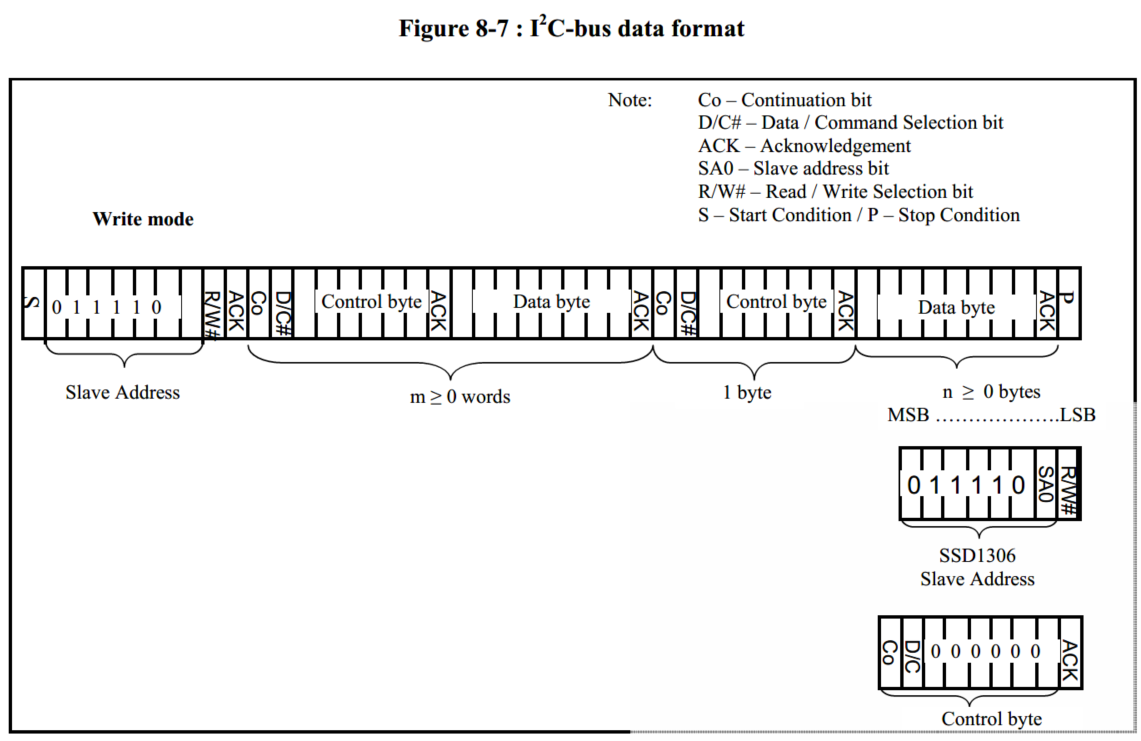
When using the OLED driver chip SSD1306, I use I2C communication When looking at some codes on the Internet, I found that basically every time a byte command/data is sent, a signal, slave address, and...
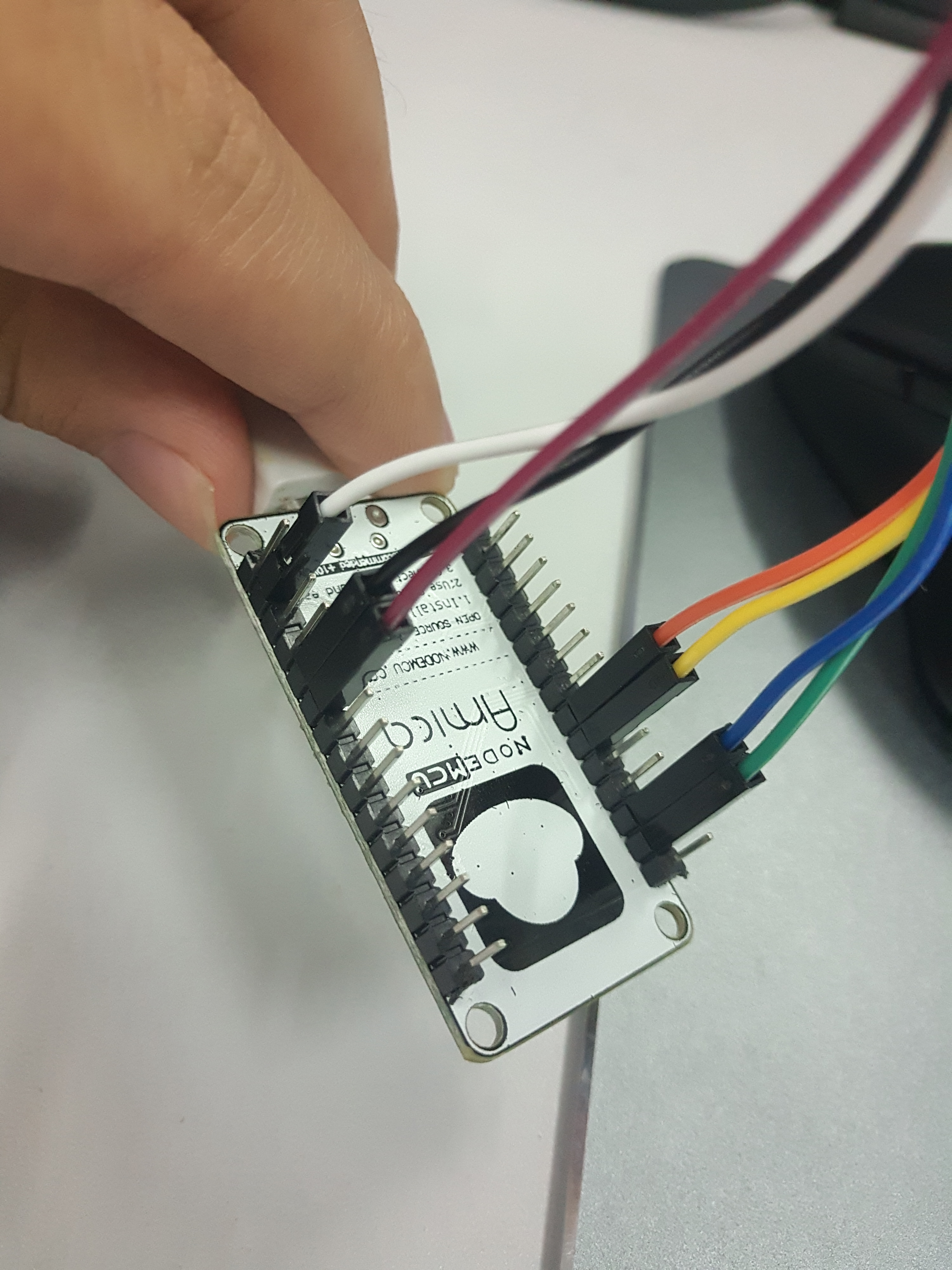
esp8266+oled (ssd1306) driver and display
0x00 OLED change resistance Remove the resistor R3 and solder it to the R1 position; short both ends of R8 with tin, dc and cs pins are grounded; the res pin is controlled by an io to complete the res...
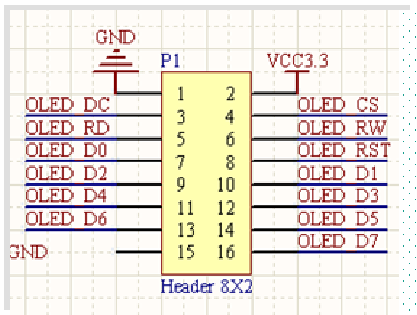
OLED (SSD1306) module display overview
Out Disadvantages of OLED Modules Advantages: small size, high resolution, low pressure 3.3V can work, support multiple interface modes, the module provides a total of four interfaces including: 6800,...

OLED liquid crystal display module (SSD1306 driver) I2C interface driver writing
surroundings Software Environment keil uVision V5.24.2.86 download link Hardware environment STC89C52RC smallest system board OLED liquid crystal display module (SSD1306 driver) I2C interface Programm...
[Micropython] microbit OLED display
With 0.96 inch OLED, the controller is SSD1306, the interface is the liquid crystal screen of the IIC interface. 1. Display characters in the specified location 2, format the display number 3, draw a ...
More Recommendation
K210 bare metal tours (1) lights SSD1306 [C development I2C]
Everything is based on lights Lighting, I2C lighting Just like normal lighting, open SWDE, big earth, gift, find I2c, none. . . Decisive GPIO, open Baidu! Still none? Do it yourself! API,I2C Open the ...

ESP32 Micropython Development Tips 7 - DHT11 OLED SSD1306, simple player
DHT11 OLED SSD1306, simple player DHT11 and DHT22 🎉Micropython built-in library 🔎 Creating a DHT instance - DHT.DHT11 (PIN) 🔎 Start measurement - Sensor.measure () 🔎 Read the temperature - Sensor....
How to elegantly use Micropython to display images on ssd1306?
The ssd1306 can be said to be the most common oled screen on the market, with monochrome, 128x64 resolution, and a lot of drivers. Today, we mainly study how to display pictures. Generally, the defaul...
[K210 + micropython] Drive MPU6050 reads Ora angles
[K210 + micropython] Drive MPU6050 reads Ora angles Article catalog [K210 + micropython] Drive MPU6050 reads Ora angles Related knowledge preparation First, I2C First, MPU6050 Third, hardware connecti...
[K210 + micropython] Drive HS420561K-32 four-digit digital tube display number
[K210 + micropython] Use the HS420561K-32 four-digit digital tube display numbers Article catalog [K210 + micropython] Use the HS420561K-32 four-digit digital tube display numbers Related knowledge pr...