Comparison of SAX, DOM, JDOM, DOM4J
tags: XML data structure application server program software test
1 Introduction
1) DOM (JAXP Crimson parser)
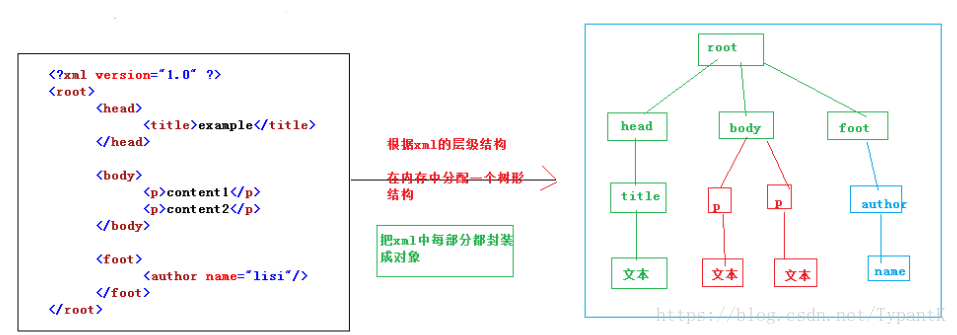
DOM is the official W3C standard for representing XML documents in a platform- and language-independent manner. A DOM is a collection of nodes or pieces of information organized in a hierarchy. This hierarchy allows developers to find specific information in the tree. Analyzing the structure usually requires loading the entire document and the construction hierarchy before you can do anything. Because it is based on information hierarchy, the DOM is considered to be tree-based or object-based. DOM and generalized tree-based processing have several advantages. First, because the tree is persistent in memory, it can be modified so that the application can make changes to the data and structure. It can also navigate up and down the tree at any time, rather than being a one-time process like SAX. DOM is also much simpler to use.
2)SAX
The advantages of SAX processing are very similar to the advantages of streaming media. Analysis can start immediately, rather than waiting for all data to be processed. Moreover, since the application only checks the data while reading the data, there is no need to store the data in memory. This is a huge advantage for large documents. In fact, the application doesn't even have to parse the entire document; it can stop parsing when a condition is met. In general, SAX is much faster than its replacement DOM.
Choose DOM or SAX? For developers who need to write their own code to process XML documents, choosing DOM or SAX parsing models is a very important design decision. The DOM uses a tree structure to access XML documents, and SAX uses an event model.
The DOM parser transforms an XML document into a tree containing its contents and can traverse the tree. The advantage of using DOM parsing model is that programming is easy. Developers only need to call the instructions of the tree, and then use the navigation APIs to access the required tree nodes to complete the task. It's easy to add and modify elements in the tree. However, due to the need to process the entire XML document when using the DOM parser, the performance and memory requirements are relatively high, especially when encountering large XML files. Due to its traversal capabilities, DOM parsers are often used in services where XML documents require frequent changes.
The SAX parser uses an event-based model that triggers a series of events when parsing an XML document. When a given tag is found, it can activate a callback method that tells the tag that the method has been created. SAX's memory requirements are usually lower because it allows developers to decide which tags to process themselves. In particular, SAX's ability to scale is better reflected when developers only need to process some of the data contained in the document. However, coding with the SAX parser can be difficult, and it is difficult to access multiple different data in the same document at the same time.
3)JDOM http://www.jdom.org/
The goal of JDOM is to be a Java-specific document model that simplifies interaction with XML and is faster than using DOM. Because it is the first Java-specific model, JDOM has been promoted and promoted. It is being considered for use as a "Java Standard Extension" by the "Java Specification Request JSR-102". JDOM development has been started since the beginning of 2000.
There are two main differences between JDOM and DOM. First, JDOM only uses concrete classes and does not use interfaces. This simplifies the API in some ways, but it also limits flexibility. Second, the API makes extensive use of the Collections class, simplifying the use of Java developers who are already familiar with these classes.
The JDOM documentation states that its purpose is to "resolve 80% (or more) of Java/XML problems with 20% (or less) effort" (20% based on the learning curve). JDOM is certainly useful for most Java/XML applications, and most developers find that APIs are much easier to understand than DOM. JDOM also includes fairly extensive checks on program behavior to prevent users from doing anything that is meaningless in XML. However, it still requires you to fully understand the XML in order to do something beyond the basics (or even understand the errors in some cases). This may be more meaningful than learning the DOM or JDOM interface.
JDOM itself does not contain a parser. It usually uses the SAX2 parser to parse and validate the input XML document (although it can also take a previously constructed DOM representation as input). It contains converters to output JDOM representations as SAX2 event streams, DOM models, or XML text documents. JDOM is an open source released under the Apache license variant.
4)DOM4J http://dom4j.sourceforge.net/
Although DOM4J represents a completely independent development result, initially it was an intelligent branch of JDOM. It incorporates many features beyond the basic XML document representation, including integrated XPath support, XML Schema support, and event-based processing for large or streaming documents. It also provides the option to build a document representation with parallel access through the DOM4J API and the standard DOM interface. Since the second half of 2000, it has been under development.
To support all of these features, DOM4J uses interfaces and abstract base class methods. DOM4J makes extensive use of the Collections class in the API, but in many cases it provides alternatives to allow for better performance or more straightforward coding methods. The immediate benefit is that while DOM4J pays the price of a more complex API, it offers much greater flexibility than JDOM.
The goal of DOM4J is the same as JDOM when adding flexibility, XPath integration, and the goal of large document processing: ease of use and intuitive operation for Java developers. It is also committed to becoming a more complete solution than JDOM, achieving the goal of essentially handling all Java/XML problems. When this goal is achieved, it is less stressed than JDOM to prevent incorrect application behavior.
DOM4J is a very good Java XML API with excellent performance, power and extreme ease of use, and it is also an open source software. Now you can see that more and more Java software is using DOM4J to read and write XML. It is worth mentioning that even Sun's JAXM is using DOM4J.
2. Compare
1) DOM4J has the best performance, even Sun's JAXM is also using DOM4J. Currently, DOM4J is widely used in many open source projects. For example, the famous Hibernate also uses DOM4J to read XML configuration files. If you don't consider portability, then use DOM4J.
2) JDOM and DOM did not perform well in performance testing, and memory overflow occurred when testing 10M documents. It is also worth considering the use of DOM and JDOM in the case of small documents. Although JDOM developers have stated that they expect to focus on performance issues before the official release, from a performance standpoint, it really has no recommendations. In addition, DOM is still a very good choice. The DOM implementation is widely used in a variety of programming languages. It is also the basis for many other XML-related standards because it is officially W3C-recommended (as opposed to non-standard-based Java models), so it may be needed in some types of projects (such as using DOM in JavaScript).
3) SAX performs better, depending on its specific parsing method - event driven. A SAX detects the incoming XML stream, but it is not loaded into memory (of course, when the XML stream is read, some of the document is temporarily hidden in memory).
3. Basic usage of four xml operation modes
Xml file:
<?xml version="1.0" encoding="utf-8" ?>
<Result>
<VALUE>
<NO DATE="2005">A1</NO>
<ADDR>GZ</ADDR>
</VALUE>
<VALUE>
<NO DATE="2004">A2</NO>
<ADDR>XG</ADDR>
</VALUE>
</Result>
1)DOM

import java.io.*;
import java.util.*;
import org.w3c.dom.*;
import javax.xml.parsers.*;

public class MyXMLReader{
public static void main(String arge[]){

  long lasting =System.currentTimeMillis();
try{
File f=new File("data_10k.xml");
DocumentBuilderFactory factory=DocumentBuilderFactory.newInstance();
DocumentBuilder builder=factory.newDocumentBuilder();
Document doc = builder.parse(f);
NodeList nl = doc.getElementsByTagName("VALUE");
for (int i=0;i<nl.getLength();i++){
System.out.print("License Plate Number:" + doc.getElementsByTagName("NO").item(i).getFirstChild().getNodeValue());
 System.out.println("Car owner address:" + doc.getElementsByTagName("ADDR").item(i).getFirstChild().getNodeValue());
}
}catch(Exception e){
e.printStackTrace();
}
2)SAX

import org.xml.sax.*;
import org.xml.sax.helpers.*;
import javax.xml.parsers.*;

public class MyXMLReader extends DefaultHandler {

 java.util.Stack tags = new java.util.Stack();
public MyXMLReader() {
super();
}

 public static void main(String args[]) {
long lasting = System.currentTimeMillis();
try {
SAXParserFactory sf = SAXParserFactory.newInstance();
SAXParser sp = sf.newSAXParser();
MyXMLReader reader = new MyXMLReader();
sp.parse(new InputSource("data_10k.xml"), reader);
} catch (Exception e) {
e.printStackTrace();
}

 System.out.println("Runtime:" + (System.currentTimeMillis() - lasting) + "milliseconds");}
public void characters(char ch[], int start, int length) throws SAXException {
String tag = (String) tags.peek();
if (tag.equals("NO")) {
 System.out.print("car license number:" + new String(ch, start, length));
}
if (tag.equals("ADDR")) {
 System.out.println("Address:" + new String(ch, start, length));
}
}

  public void startElement(String uri,String localName,String qName,Attributes attrs) {
tags.push(qName);}
}
3) JDOM

import java.io.*;
import java.util.*;
import org.jdom.*;
import org.jdom.input.*;

public class MyXMLReader {

 public static void main(String arge[]) {
long lasting = System.currentTimeMillis();
try {
SAXBuilder builder = new SAXBuilder();
Document doc = builder.build(new File("data_10k.xml"));
Element foo = doc.getRootElement();
List allChildren = foo.getChildren();
for(int i=0;i<allChildren.size();i++) {
 System.out.print("License Plate Number:" + ((Element)allChildren.get(i)).getChild("NO").getText());
 System.out.println("Car owner address:" + ((Element)allChildren.get(i)).getChild("ADDR").getText());
}
} catch (Exception e) {
e.printStackTrace();
}

}
4)DOM4J

import java.io.*;
import java.util.*;
import org.dom4j.*;
import org.dom4j.io.*;

public class MyXMLReader {

 public static void main(String arge[]) {
long lasting = System.currentTimeMillis();
try {
File f = new File("data_10k.xml");
SAXReader reader = new SAXReader();
Document doc = reader.read(f);
Element root = doc.getRootElement();
Element foo;
for (Iterator i = root.elementIterator("VALUE"); i.hasNext();) {
foo = (Element) i.next();
 System.out.print("License Plate Number:" + foo.elementText("NO"));
 System.out.println("Car owner address:" + foo.elementText("ADDR"));
}
} catch (Exception e) {
e.printStackTrace();
}
}
Intelligent Recommendation
DOM, SAX, JDOM, DOM4J four ways to parse xml
First create an xml document, the content of the document is as follows Because the xml definition is the book's book details, after parsing the xml, I want to save the parsed data, so I define a Book...
[XML] XML parsing method (dom+sax) and parser (dom4j+jaxp+jdom)
1.xml parsing method (technical): dom and sax >>dom way to parse: Allocate a tree structure in memory according to the hierarchical structure of xml, and encapsulate the tags, attributes and tex...
DOM, SAX, JDOM, DOM4J advantages and disadvantages and production xml and parse xml
Download the necessary jar package: activation.jar commons-logging-1.0.4.jar dom4j-1.6.1.jar jaxen-1.1.1.jar jdom-1.0.jar A, DOM The parser reads the entire document, and then build a tree structure o...
Detailed --DOM parsing XML parsing, SAX, DOM4J, JDOM
Four kinds of analytical methods: DOMResolution,SAXResolution,DOM4JResolution,JDOMParsing (Which when parsing DOM and SAX parsing official java parse xml document to us the way, so we do not ne...
DOM, SAX, DOM4J, JDOM, StAX generate an XML string and returns XML
used herein, DOM, SAX, DOM4J, JDOM and in JDK1.6 StAX generate new XML data format, and returns an XML string. Said here about StAX way. New features JDK6 of StAX (JSR 173) API JDK6.0 is in addition t...
More Recommendation
Analysis of the relationship between SAX, DOM, JAXP, JDOM and DOM4J
forward from Analysis of the relationship between SAX, DOM, JAXP, JDOM and DOM4J As we all know, SAX and DOM are the two core XML parsing API libraries in JAVA, and JAXP, JDOM and DOM4J are all derive...
Four ways to parse XML in Java (DOM, SAX, JDOM, DOM4J)
This article takes the following xml as an example: 1. DOM: The idea of this method is to parse each layer in the xml tag layer by layer in the form of parent node and child node. step: 1. First imp...
Java 4 common ways to parse xml: DOM SAX JDOM DOM4J
Four characteristics of Java parsing XML 1. DOM analysis: forms a tree structure, which helps to better understand and master, and the code is easy to write. During the parsing process, the tree struc...
Java XML parsing methods (DOM, SAX, JDOM, DOM4J)
Java XML parsing method 1. Introduction to XML 2. XML parsing 2.1 DOM analysis 2.2 SAX analysis 2.3 JDOM analysis 2.4 DOM4J analysis 1. Introduction to XML XML Value Extensible Markup Language is used...
DOM, SAX, JDOM, DOM4J four ways to parse xml files
Books.xml file content 1. DOM analysis, officially provided, load the xml file into the memory at a time, it is not efficient to support the xml file is too large 2. SAX way of analysis, officially pr...