Detailed --DOM parsing XML parsing, SAX, DOM4J, JDOM
tags: xml parsing
Four kinds of analytical methods:
DOMResolution,SAXResolution,DOM4JResolution,JDOMParsing (Which when parsing DOM and SAX parsing official java parse xml document to us the way, so we do not need to introduce some additional jar package; however DOM4J JDOM parsing and other organizations to use their way to parse xml files, so we use when these two analytical methods, need to download some additional jar package, imported into our project)
Example: parsing book.xml file written and stored in the JAVA object. book.xml file as follows:
<?xml version="1.0" encoding="UTF-8"?>
<bookstore>
    <book id="1">
        <Name> Song Ice and Fire </ name>
                 <Author> George Martin </ author>
        <year>2014</year>
        <price>89</price>
    </book>
    <book id="2">
                 <Name> Hans Christian Andersen </ name>
        <year>2004</year>
        <price>77</price>
                 <Language> English </ language>
    </book>
</bookstore>
Create a Book object as follows according to book.xml:
package day13;

/**
 * @ClassName: Book
 * @Description TODO
 * @Author:
 * @Created: 2018/8/13 18:35
 * @Version: 1.0
 */
public class Book {
    private String id;
    private String name;
    private String author;
    private String price;
    private String year;
    private String language;

    public Book() {
    }

    public String getId() {
        return id;
    }

    public String getName() {
        return name;
    }

    public String getAuthor() {
        return author;
    }

    public String getPrice() {
        return price;
    }

    public String getYear() {
        return year;
    }

    public String getLanguage() {
        return language;
    }

    public void setId(String id) {
        this.id = id;
    }

    public void setName(String name) {
        this.name = name;
    }

    public void setAuthor(String author) {
        this.author = author;
    }

    public void setPrice(String price) {
        this.price = price;
    }

    public void setYear(String year) {
        this.year = year;
    }

    public void setLanguage(String language) {
        this.language = language;
    }

    @Override
    public String toString() {
        return "Book [id=" + id + ", name=" + name + ", author=" + author + ", price=" + price + ", year=" + year
                +", language=" + language + "]";
    }

}
A, DOM parsexmlstep:
package day13;
import org.w3c.dom.*;
import javax.xml.parsers.DocumentBuilder;
import javax.xml.parsers.DocumentBuilderFactory;
import java.util.ArrayList;
/**
* @ClassName: DomParse
* @Description TODO
* @Author:
* @Created: 2018/8/13 18:46
* @Version: 1.0
*/
public class DomParse {
public static void main(String[] args) {
// arrayList used to store the parsed objects BOOK
ArrayList<Book> arrayList = new ArrayList<>();
1 // create an object of a DocumentBuilderFactory
DocumentBuilderFactory dbf = DocumentBuilderFactory.newInstance();
try{
2 // create an object of a DocumentBuilder
DocumentBuilder db = dbf.newDocumentBuilder();
// 3, load the file into the book.xml by DocumentBuilder objects parse (String fileName) method in the current project
Document document = db.parse("src/day13/book.xml");
// start parsing
// 4, to obtain a set of nodes by tag name (Gets a collection of all book nodes)
NodeList bookList = document.getElementsByTagName("book");
System.out.println ( "book the number of nodes:" + bookList.getLength ());
// traverse each node a Book
for(int i=0; i<bookList.getLength();i++){
// new object is a Book
Book bookNode = new Book();
// Get a book node item (i) Method
Node book = bookList.item(i);
// premise known book node has one and only one id attribute
// can get the id attribute values directly
Element element=(Element) bookList.item(i);
String attrValue = element.getAttribute("id");
System.out.println ( "id attribute value of the attribute:" + attrValue);
// Get the id attribute set to the Book object
bookNode.setId(attrValue);
// Parse child nodes of node book
NodeList childNodes = book.getChildNodes();
System.out.println ( "first" + (i + 1) + "shared book" + childNodes.getLength () + "child nodes");
// traverse each node childNodes get node name and node value
for(int j=0; j<childNodes.getLength(); j++){
// determine whether the current node is an element node
if(childNodes.item(j).getNodeType() == Node.ELEMENT_NODE){
// Get the node attribute name
String name = childNodes.item(j).getNodeName();
// set according to the Book object attribute value of node attribute name acquired
switch (name) {
case "name":
bookNode.setName(childNodes.item(j).getTextContent());
break;
case "author":
bookNode.setAuthor(childNodes.item(j).getTextContent());
break;
case "year":
bookNode.setYear(childNodes.item(j).getTextContent());
break;
case "price":
bookNode.setPrice(childNodes.item(j).getTextContent());
break;
case "language":
bookNode.setLanguage(childNodes.item(j).getTextContent());
break;
default:
break;
}
}
}
arrayList.add(bookNode);
}
}catch (Exception e){
e.printStackTrace();
}
System.out.println(arrayList);
}
}
Two, SAX parsing
package day13;
import org.xml.sax.Attributes;
import org.xml.sax.SAXException;
import org.xml.sax.helpers.DefaultHandler;
import java.util.ArrayList;
import java.util.List;
/**
* @ClassName: SAXParserHandler
* @Description SAX handler (how to parse xml document)
* @Author:
* @Created: 2018/8/13 19:45
* @Version: 1.0
*/
public class SAXParserHandler extends DefaultHandler {
private String value = null;
private List<Book> bookList = new ArrayList<>();
private Book book = null;
/**
* Begin to identity resolution
*/
@Override
public void startDocument() throws SAXException {
super.startDocument();
}
/**
* End for identity resolution
*/
@Override
public void endDocument() throws SAXException {
super.endDocument();
}
/**
* When opening tag call
*
* @Param qName: start tag represents the tag name
* @Param attributes: representation contained in the start tag (property) [list]
*/
@Override
public void startElement(String uri, String localName, String qName, Attributes attributes) throws SAXException {
// call the startElement method of DefaultHandler
super.startElement(uri, localName, qName, attributes);
// start parsing the book element properties
if (qName.equals("book")) {
// known attributes of the property under the name of the book element, get property values by name
String id = attributes.getValue("id");
System.out.println ( "book attribute value:" + id);
// The id attribute set to the Book object
book = new Book();
book.setId(id);
// do not know the property under the name of the book element attributes
int num = attributes.getLength();
// Traverse property
for (int i=0; i<num; i++){
System.out.println ( "first book element" + (i + 1) + "attribute name:" + attributes.getQName (i));
System.out.println ( "--- attribute value:" + attributes.getValue (i));
}
}else if (!qName.equals("book") && !qName.equals("bookstore")){
System.out.println ( "node name is:" + qName);
}
}
/**
* At the end of the tag call
*
* @Param qName: end tag name tags
*/
@Override
public void endElement(String uri, String localName, String qName) throws SAXException {
super.endElement(uri, localName, qName);
switch (qName) {
case "book":
bookList.add(book);
book = null;
break;
case "name":
book.setName(value);
break;
case "author":
book.setAuthor(value);
case "year":
book.setYear(value);
break;
case "language":
book.setLanguage(value);
break;
case "price":
book.setPrice(value);
break;
}
}
/**
* When reading the text of the call
*
* @Param ch: represents all the contents of the current reading of the text
* @Param start: indicates the current position of the start of the text
* @Param length: indicates the current text length
*/
@Override
public void characters(char[] ch, int start, int length) throws SAXException {
super.characters(ch, start, length);
value = new String(ch, start, length);
}
public List<Book> getBookList() {
return bookList;
}
public void setBookList(List<Book> bookList) {
this.bookList = bookList;
}
}
Three, DOM4J resolve -Note: Use Dom4 resolution, dom4j need to download the appropriate jar file
Official website address:https://dom4j.github.io/
Dom4j recursive traversal of all nodes as follows:
package day13;

import org.dom4j.Attribute;
import org.dom4j.Element;

import java.util.List;

/**
 * @ClassName: Dom4jParse
   * @Description element by recursively traverse all nodes
 * @Author:
 * @Created: 2018/8/14 7:39
 * @Version: 1.0
 */
public class Dom4jParse {

    /**
         * @ Description recursively traverse all the parent node, child node
    *@Author:
    *@Date:   2018/8/14
    *@param:  [element]
    *@return: void
    */
    public void dom4jParse(Element element) {

        System.out.println(element.getName() + ":" + element.getText().trim());
                 // root traversing the book, {attribute = value} to form a stored object is stored in the list Attribute
        List<Attribute> attributeList = element.attributes();
        for (Attribute attribute : attributeList) {
                         // once per cycle, a {attribute = value} analytical secondary node, no empty output
            String name = attribute.getName();
            String value = attribute.getValue();
            System.out.println(name + "=" + value);
        }

        List<Element> elementList = element.elements();
                 // recursively traverse all the child nodes under a parent node
        for (Element e : elementList) {
            dom4jParse(e);
        }
    }
}
DOM4J test:
package day13;


import org.dom4j.Document;
import org.dom4j.DocumentException;
import org.dom4j.Element;
import org.dom4j.io.SAXReader;

/**
 * @ClassName: Dom4jParseTest
 * @Description TODO
 * @Author: [email protected]
 * @Created: 2018/8/13 20:22
 * @Version: 1.0
 */
public class Dom4jParseTest {

    public static void main(String[] args) throws Exception{
                 // construct the object SAXReader
        SAXReader saxReader = new SAXReader();

        try {
                         // read xml file is converted to a Document object by the read method
            Document document = saxReader.read("src/day13/book.xml");
                         // Get the root element object
            Element element = document.getRootElement();
                         // Create Dom4jParse resolve objects
            Dom4jParse dom4jParse = new Dom4jParse();
            // Call analytical method
            dom4jParse.dom4jParse(element);
        }catch (DocumentException e){
            e.printStackTrace();
        }
    }

}
Four, JDOM parsing
package day13;

import org.dom4j.Element;
import org.jdom.Attribute;
import org.jdom.Document;
import org.jdom.input.SAXBuilder;

import java.io.FileInputStream;
import java.io.InputStream;
import java.util.List;

/**
 * @ClassName: JDomParse
 * @Description TODO
 * @Author:
 * @Created: 2018/8/14 9:07
 * @Version: 1.0
 */
public class JDomParse {
    public static void main(String[] args) {
                 1 // Create an object SAXBuilder
        SAXBuilder saxBuilder = new SAXBuilder();
        InputStream in;
        try {
                         // 2, creating the input stream, and load xml file into the input stream
            in = new FileInputStream("src/day13/book.xml");
                         // 3, is loaded into the input stream object SAXBuilder
            Document document = saxBuilder.build(in);
                         // 4, to obtain the root element
            org.jdom.Element element = document.getRootElement();
                         // 5, so get the root element of sub-elements
            List<org.jdom.Element> childList = element.getChildren();
                         // 6, through each sub-element
            for (org.jdom.Element child : childList){
                                 System.out.println ( "===== began to read the first" + (childList.indexOf (child) +1) + "of the book Information");
                                 // 7-1, if you do not know what property, use Element.getAttributes acquire property, and to traverse the property
                List<Attribute> attrList = child.getAttributes();
                for(Attribute attr : attrList) {
                                         System.out.println ( "Attribute Name:" + attr.getName () + "-> the attribute value:" + attr.getValue ());
                }
                                 // 7-2, if you know what property, you can call directly Element.getAttributeValue (String name) Gets the value of the property
                                 System.out.println ( "id attribute is known, the value of the id attribute" + child.getAttributeValue ( "id"));

                                 // 8, get all the child nodes, and calls Element.getName () method to get the node name, call Element.getVlaue () method to get the value of the node
                List<org.jdom.Element> list = child.getChildren();
                for(org.jdom.Element ele : list) {
                                         System.out.println ( "child nodes:" + ele.getName () + "---> subnode value:" + ele.getValue ());
                }
            }

        }catch (Exception e){
            e.printStackTrace();
        }
    }
}
Intelligent Recommendation
DOM, SAX, JDOM, JAXB parsing XML documents
Kree wrote There are four main methods for reading xml files in the java environment:DOM、SAX、JDOM、JAXB 1. DOM(Document Object Model) This method is mainly provided by the W3C. It re...
Parsing XML messages ---- DOM, JDOM, SAX
example: DOM document object model (memory overflow when 10M document) advantage: 1, shapeIt becomes a tree structure, which helps to better understand and master, and the code is easy to write. 2. Du...
XML in Java four ways of parsing XML documents: DOM, SAX, JDOM, DOM4J
The following existing XML documents books.xml, following the example of analytical part of the contents of this document parsing DOM parsing 1, create an object of DocumentBuilder 2, call the parser ...
Four kinds of XML parsing dom, sax, jdom, dom4j principle and performance comparison
XML: four parsers (dom, sax, jdom, dom4j) principle and performance comparison Dom is one of the underlying interfaces for parsing xml (the other is sax). And jdom and dom4j are more advan...
Three parsing of xml files dom, SAX and dom4j
table of Contents First, the XML file Second, DOM analysis Third, SAX analysis Fourth, dom4j analysis First, the XML file student.xml Second, DOM analysis Third, SAX analysis Fourth, dom4j anal...
More Recommendation
Introduction to Java parsing XML file methods (SAX, JDOM, DOM4J)
Sample XML file: SAX way analysis JDOM analysis DOM4J analysis ...
Java-based XML introduction and SAX parsing, DOM parsing XML, JDOM parsing, DOM4J parsing, the use of XMLEncoder and XMLDecoder, and the use of xstream tools 189~195
table of Contents 1. What is XML 2. The purpose of XML 3. SAX parses XML 4. DOM parsing XML 5. JDOM parses XML 6. DOM4J parses XML 7. Generate XML files through objects 8. Comparison of various analys...
JAVA parsing xml (JDOM, DOM4J)
JDOM parsing xml Create a SAXBuilder object, create an input stream Load xml into the stream, load the input stream into saxBuilder Return the Document object Get the root node Get the collection of c...
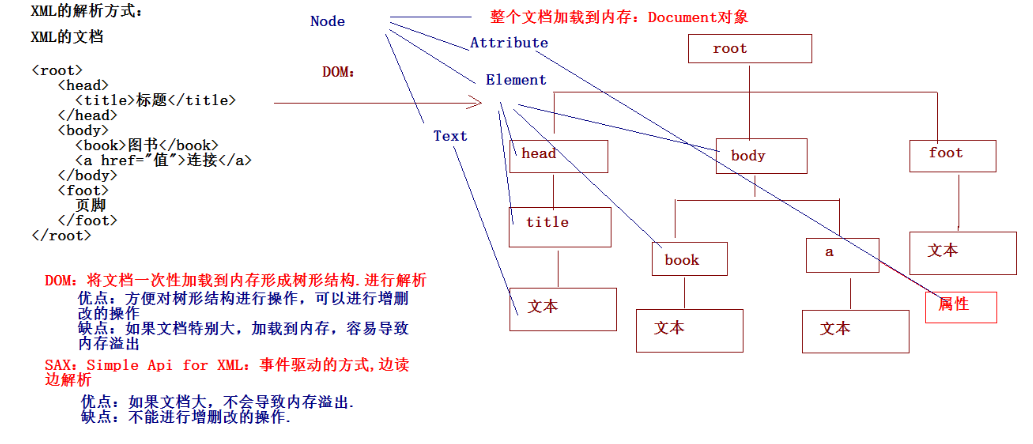
xml analysis ---java DOM, SAX, JDOM, DOM4J
XML is a common text format, which can provide us with the standard of information transmission of various system components and the mode of information persistent storage. Generally, in interface des...