DOM, SAX, JDOM, DOM4J four ways to parse xml files
Books.xml file content
<?xml version="1.0" encoding="UTF-8"?>
<bookstore>
	<book id="1">
		<name>Song of Ice and Fire</name>
		 <author>George Martin</author>
		<year>2014</year>
		<price>89</price>
	</book>
	<book id="2">
		 <name>Andersen's Fairy Tales</name>
		<year>2004</year>
		<price>77</price>
		<language>English</language>
	</book>
</bookstore>
1. DOM analysis, officially provided, load the xml file into the memory at a time, it is not efficient to support the xml file is too large
public static void main(String[] args) {

        DocumentBuilderFactory dbf = DocumentBuilderFactory.newInstance();
        try {
            DocumentBuilder db = dbf.newDocumentBuilder();
            Document document = db.parse("books.xml");
            NodeList books = document.getElementsByTagName("book");
            for(int i = 0;i<books.getLength();i++){
                                 System.out.println("Start to traverse the first"+(i+1)+"book");
                Element book = (Element) books.item(i);
                String id = book.getAttribute("id");
                System.out.println("id:"+id);
                NodeList nodeList = books.item(i).getChildNodes();
                for(int j = 0;j<nodeList.getLength();j++){
                    if(nodeList.item(j).getNodeType()==Node.ELEMENT_NODE){
                        System.out.println(nodeList.item(j).getNodeName()+":"+nodeList.item(j).getTextContent());
                    }
                }
            }
        } catch (ParserConfigurationException e) {
            e.printStackTrace();
        } catch (SAXException e) {
            e.printStackTrace();
        } catch (IOException e) {
            e.printStackTrace();
        }

}package com.example.xml;
import org.xml.sax.Attributes;
import org.xml.sax.SAXException;
import org.xml.sax.helpers.DefaultHandler;
import java.util.ArrayList;
import java.util.List;
public class SAXParserHandler extends DefaultHandler {
Book book = null;
String value = null;
List<Book> books = new ArrayList<>();
@Override
public void startElement(String uri, String localName, String qName, Attributes attributes) throws SAXException {
super.startElement(uri, localName, qName, attributes);
if(qName.equals("book")){
book = new Book();
for(int i =0;i<attributes.getLength();i++){
if(attributes.getQName(i).equals("id")){
book.setId(attributes.getValue(i));
}
System.out.println(attributes.getQName(i)+":"+attributes.getValue(i));
}
}else if(!qName.equals("bookstore")){
System.out.print(qName+":");
}
}
@Override
public void endElement(String uri, String localName, String qName) throws SAXException {
super.endElement(uri, localName, qName);
if(qName.equals("book")){
books.add(book);
book = null;
}else if(qName.equals("name")){
book.setName(value);
}else if(qName.equals("author")){
book.setAuthor(value);
}else if(qName.equals("year")){
book.setYear(value);
}else if(qName.equals("price")){
book.setPrice(value);
}else if(qName.equals("language")){
book.setLanguage(value);
}
}
@Override
public void startDocument() throws SAXException {
super.startDocument();
System.out.println("SAX analysis start");
}
@Override
public void endDocument() throws SAXException {
super.endDocument();
System.out.println("SAX parsing end");
}
@Override
public void characters(char[] ch, int start, int length) throws SAXException {
super.characters(ch, start, length);
value = new String(ch,start,length);
if(!value.trim().equals("")){
System.out.println(value);
}
}
public List<Book> getBooks() {
return books;
}
}@Test
public void Sax() throws IOException, ParserConfigurationException, SAXException {
SAXParserFactory saxParserFactory = SAXParserFactory.newInstance();
SAXParser saxParser = saxParserFactory.newSAXParser();
SAXParserHandler saxParserHandler = new SAXParserHandler();
saxParser.parse("books.xml", saxParserHandler);
List<Book> books = saxParserHandler.getBooks();
for(Book book:books){
System.out.println(book);
}
}package com.example.xml;
import org.jdom2.Attribute;
import org.jdom2.Document;
import org.jdom2.Element;
import org.jdom2.JDOMException;
import org.jdom2.input.SAXBuilder;
import java.io.File;
import java.io.FileInputStream;
import java.io.IOException;
import java.io.InputStreamReader;
import java.util.ArrayList;
import java.util.List;
public class JDOMTest {
public static void main(String[] args) throws IOException, JDOMException {
SAXBuilder saxBuilder = new SAXBuilder();
FileInputStream fileInputStream = new FileInputStream(new File("books.xml"));
InputStreamReader inputStreamReader = new InputStreamReader(fileInputStream,"utf-8");
Document document = saxBuilder.build(inputStreamReader);
Element rootElement = document.getRootElement();
List<Element> elements = rootElement.getChildren();
List<Book> bookEntites = new ArrayList<>();
for(Element element:elements){
Book bookEntity = new Book();
List<Attribute> attributes = element.getAttributes();
for(Attribute attr:attributes){
if(attr.getName().equals("id")){
bookEntity.setId(attr.getValue());
}
System.out.println(attr.getName()+"-----------"+attr.getValue());
}
List<Element> books = element.getChildren();
for(Element book:books){
String name = book.getName();
String value = book.getValue();
if(name.equals("name")){
bookEntity.setName(value);
}else if(name.equals("author")){
bookEntity.setAuthor(value);
}else if(name.equals("year")){
bookEntity.setYear(value);
}else if(name.equals("price")){
bookEntity.setPrice(value);
}else if(name.equals("language")){
bookEntity.setLanguage(value);
}
System.out.println(name+"--------"+value);
}
bookEntites.add(bookEntity);
}
System.out.println("====================================================================");
for(Book book:bookEntites){
System.out.println(book);
}
}
}
package com.example.xml;

import org.dom4j.Attribute;
import org.dom4j.Document;
import org.dom4j.DocumentException;
import org.dom4j.Element;
import org.dom4j.io.SAXReader;

import java.io.*;
import java.util.Iterator;
import java.util.List;

public class DOM4JTest {

    public static void main(String[] args) throws DocumentException, FileNotFoundException, UnsupportedEncodingException {

        SAXReader saxReader = new SAXReader();
        InputStreamReader inputStreamReader = new InputStreamReader(new FileInputStream("books.xml"),"utf-8");
        Document document = saxReader.read(inputStreamReader);
        Element rootElement = document.getRootElement();
        Iterator iterator = rootElement.elementIterator();
        while (iterator.hasNext()){
            Element element = (Element) iterator.next();
            List<Attribute> attributes = element.attributes();
            for(Attribute attr:attributes){
                System.out.println(attr.getName()+"---------------"+attr.getValue());
            }
            List<Element> books = element.elements();
            for (Element element1:books){
                System.out.println(element1.getName()+"---------------"+element1.getStringValue());
            }
        }

    }
}Intelligent Recommendation
xml analysis ---java DOM, SAX, JDOM, DOM4J
XML is a common text format, which can provide us with the standard of information transmission of various system components and the mode of information persistent storage. Generally, in interface des...
XML analysis (SAX, DOM, JDOM, DOM4J)
content 1, interview questions: 2, DOM4J parsing XML file 3, XPath Analysis XML file 1, interview questions: ask: JavaThere are severalXMLAnalytical way? What is it?? What kind of advantages and disad...
XML--jdom/dom4j/sax parsing XML files
XML 1. XML (extensible markup language): Extensible markup language. 2. The characteristic of XML is that tags can be extended by users themselves. For example, how to write tags in html, how to write...
Java parsing xml, parsing xml four methods, DOM, SAX, JDOM, DOM4j, XPath
【introduction】 At present, there are many techniques for parsing XML in Java. The mainstream ones are DOM, SAX, JDOM, and DOM4j. The following mainly introduces the use, advantages, disadvantages, and...
(Reprinted) Java four operations (DOM, SAX, JDOM, DOM4J) xml way to explain and compare
Original link: Keywords: operation xml (dom, sax, jdom, dom4j) way to compare 1. Detailed 1) DOM (JAXP Crimson parser) DOM is the official W3C standard for representing XML documents in a platform- an...
More Recommendation
java in four operations (DOM, SAX, JDOM, DOM4J) xml manner as in Comparative Detailed
1. Detailed 1) DOM (JAXP Crimson parser) DOM is an official W3C standard XML document with language and platform-independent way. DOM is a collection of nodes or pieces of information organized hierar...
Four kinds parser (dom, sax, jdom, dom4j) principle and performance XML Comparison
Four kinds parser (dom, sax, jdom, dom4j) principle and performance XML Comparison XML parsing Configuring the internal xml file after parsing can be used to implement some of the features of the fram...
Four kinds of XML parsing dom, sax, jdom, dom4j principle and performance comparison
XML: four parsers (dom, sax, jdom, dom4j) principle and performance comparison Dom is one of the underlying interfaces for parsing xml (the other is sax). And jdom and dom4j are more advan...
[XML] XML parsing method (dom+sax) and parser (dom4j+jaxp+jdom)
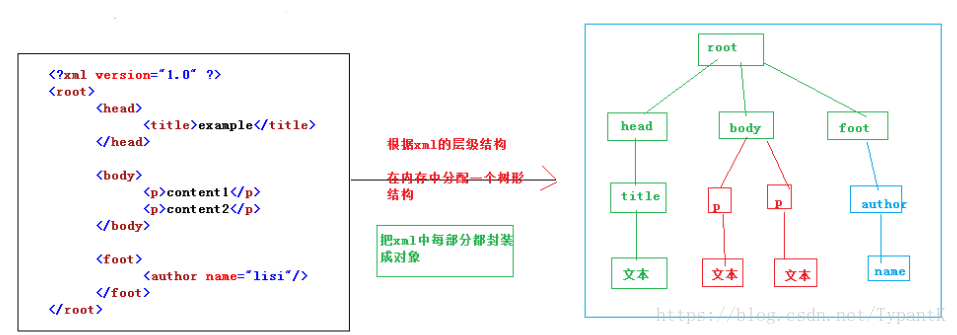
1.xml parsing method (technical): dom and sax >>dom way to parse: Allocate a tree structure in memory according to the hierarchical structure of xml, and encapsulate the tags, attributes and tex...
DOM, SAX, DOM4J, JDOM, StAX generate an XML string and returns XML
used herein, DOM, SAX, DOM4J, JDOM and in JDK1.6 StAX generate new XML data format, and returns an XML string. Said here about StAX way. New features JDK6 of StAX (JSR 173) API JDK6.0 is in addition t...