ubuntu1604 python3.6 pdfkit html to pdf
1. Install wkhtmltopdf
pdfkit is a package of python for wkhtmlpdf, so you need to install the wkhtmltopdf package on the environment first
download link: https://wkhtmltopdf.org/downloads.html

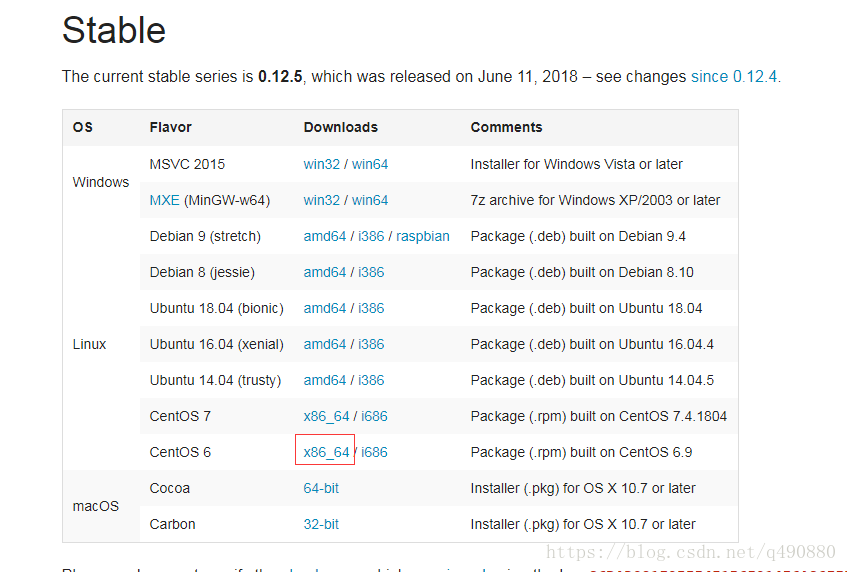
(1) uname -m view system architecture

(2) x86_64 selection Ubuntu 16.04 (xenial)amd6, Right click to copy the download link.
Download, wgethttps://downloads.wkhtmltopdf.org/0.12/0.12.5/wkhtmltox_0.12.5-1.xenial_amd64.deb
(3) Installation
dpkg -i wkhtmltox_0.12.5-1.xenial_amd64.deb
(4) Test
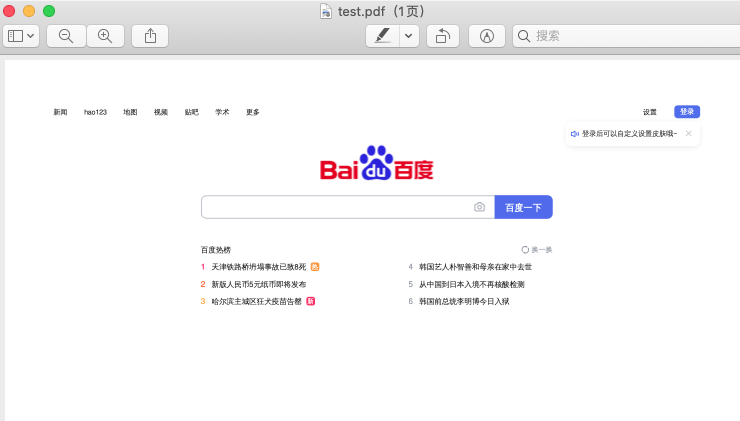
wkhtmltopdf "www.baidu.com" test.pdf
2. Install pdfkit
pip install pdfkit
3. Python coding
In order to implement the web interface "export file as pdf", I use the restful, tornado framework.
To export files, you need to set the content-type and content-disposition of the header.
MIME:https://developer.mozilla.org/zh-CN/docs/Web/HTTP/Basics_of_HTTP/MIME_types
Content-Disposition: https://developer.mozilla.org/zh-CN/docs/Web/HTTP/Headers/Content-Disposition
(1)content-type : application/pdf
(2)Content-Disposition: "attachment; filename.pdf"
@Route(r'contract/exporttopdf')
class ExportContractHandler(BaseContractHandler):
    @coroutine
    def get(self):
                 # Query saved html string
        html_str = yield self.query_contract_edit_info()

                 # Convert to pdf, set title
        pdf = self.pdfkit_str(html_str=html_str, title="my contract")

                 # Set the header to download the attachment, and set the name of the downloaded file
        self.set_header("content_type", "application/pdf")
        self.set_header("Content-Disposition", 'attachment; filename=contract-{}.pdf'.format(int(time.time())))
        self.write(pdf)


@staticmethod
def pdfkit_str(html_str, title):
    options = {
                 "title": title, # document title
                 'page-size':'A4', # A4 paper
        'margin-top': '0in',
        'margin-right': '0in',
        'margin-bottom': '0in',
        'margin-left': '0in',
                 'encoding': "UTF-8", # Chinese
        # 'custom-header': [
        #     ('Accept-Encoding', 'gzip')
        # ],
                 'quiet':'', # By default, all wkhtmltopdf output will be displayed, do not want to see the need to pass quiet options
        # 'cookie': [
        #     ('cookie-name1', 'cookie-value1'),
        #     ('cookie-name2', 'cookie-value2'),
        # ],
                 # "header-right": "Page [page] of [toPage]", # page
                 #'no-outline': None, # Don't list, outline depth is invalid
                 #'outline-depth': 5, # depth of outline
                 #'enable-forms': True # forms
    }
         cover = "" # cover
         css = "" # css style
         toc ='' # directory
    pdfkit.from_string(
        html_str,
        'temp.pdf',
        options=options,
        cover=cover,
        css=css,
        toc=toc
    )
    try:
        with open('temp.pdf', "rb") as f:
            return f.read()
    except:
        raise Exception("Read pdf file error")
4. Chinese font problem
One test found that all Chinese is spoken! What's going on?
One of the reasons: It turns out that ubuntu is missing Chinese fonts!

There is an article here for reference:
https://www.ostechnix.com/install-microsoft-windows-fonts-ubuntu-16-04/
I used to copy the font under window to ubuntu to solve
Install Chinese fonts:
         1. View the currently installed fonts: fc-list
         2. Create a directory: mkdir /usr/share/fonts/zh_CN
         3. Copy the Chinese font of C:\Windows\Fonts under windows to /usr/share/fonts/zh_CN
         4. Execute fc-cache -fv
         5. Check if fc-list is installed
After solving:

On the centos system, I tried Chinese and still had problems! NO! But still solved.
Reason 2: The character set of html needs to be set to utf8
<head><meta charset="UTF-8"></head>
Intelligent Recommendation
HTML is converted into a PDF tool -Wkhtmltopdf, Python generates PDF (PDFKIT library)
Article catalog First, HTML is converted into PDF tools - Wkhtmltopdf 1. What is wkhtmltopdf 2. How to use it? 3. Frequently Asked Questions error while loading shared libraries: libjpeg.so.62: cannot...
Python notes use the PDFKIT module to generate PDF (in the middle with HTML)
PDFKIT module installation example 1: run Code Example 2 run Code...
Ubuntu1604 installs Python3.6
First, the installation of python 3.6 Python download method one 1 wget https://www.python.org/ftp/python/3.6.5/Python-3.6.5.tar.xz 2 tar xf Python-3.6.5.tar.xz &...
PDF with Selenium, ChormeDriver and PDFKIT
principle: Using Selenium + Chromedriver opens the page, get the HTML source, then use PDFKIT to generate PDF concept: Selenium: Selenium is a tool for web application testing. Selenium test is...

PDFKIT generates PDF for Notebook
1. Install the PDFKIT library Enter the following command in the command line The above SUCCESSFULLY Installed Pdfkit-0.6.1 prompt appears, indicating that the installation is successful. 2. Installat...
More Recommendation
pdf pdfkit generated using python
1, the installation pdfkit pip install pdfkit 2, installation wkhtmltopdf download link:https://wkhtmltopdf.org/downloads.html According to their version download the installation package Install...
Generate PDF files with PDFKIT with Node.js
1. First install PDFKIT npm install pdfkit 2. New file pdfkittest.js Code: 3. Run node PDFKITTEST.js A PDF file will appear in the current directory, the file name is AIM.PDF ,....
Kinetic (ubuntu1604) Setting the default Python3 version is Python3.6 and Python3.6 download
Method 1: Direct change soft connection 1. View the current default Python version (open the terminal, enter python3) 2. Modify the default Python3 version The default Python3 version is changed from ...
pdfkit
Pdfkit reference: Problems encountered: Application of the project: ...

Use PDFKit to write a basic PDF reader
PDFKit related classes Load PDF document Display PDF documents Scroll control Zoom control Catalog view Document search Annotation End WWDC 2017 Apple released a new library about PDF—PDFKit, wh...