Python saves HTML as PDF-pdfkit
tags: Python
wkhtmltopdf can directly convert any webpage that can be browsed in the browser into a pdf
1. Download and install wkhtmltopdf
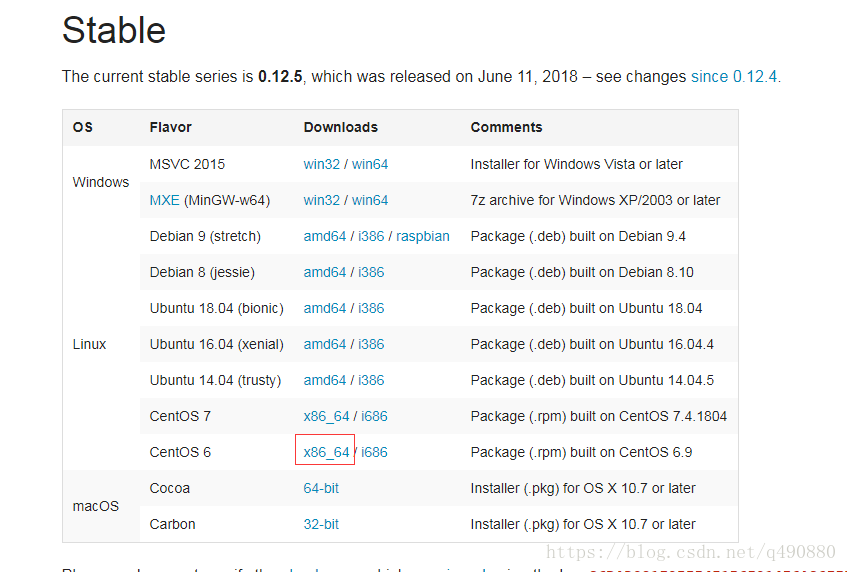
1. Download address: http://wkhtmltopdf.org/downloads.html as shown in the figure:

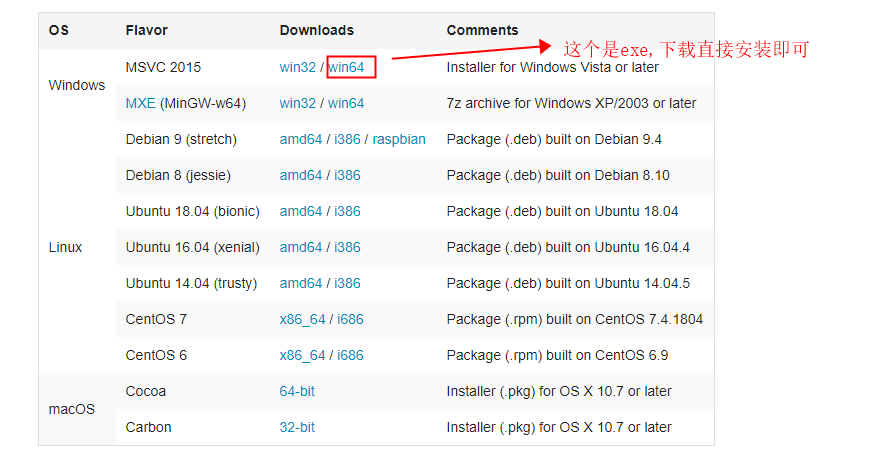
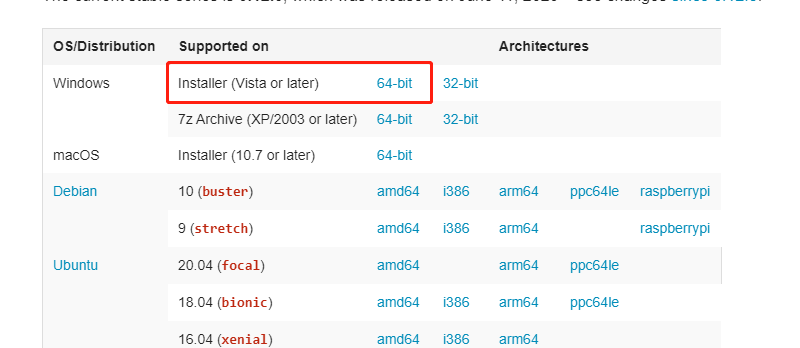
2. There are installation packages installed under various platforms. If the English is not good, please translate directly by Google. The following is an example of use on the windows7 platform. I downloaded the stable (stable version) version of wkhtmltopdf-0.12.3.2-installer.exe. I did not install and test on win7, win8 32-bit and 64-bit and win-sever. The problem is that the system downloads the installation packages of several people. After downloading, you can install it directly. Pay attention to the installation path, which will be used below.

3. After installation, you need to add after the system environment variable named "Path": ;D:\wkhtmltopdf\bin is the directory you installed. Restart the computer after installation.
The following figure shows how to set environment variables:
Open my computer right click properties
Click Advanced system settings
Find Advanced and click Environment Variables
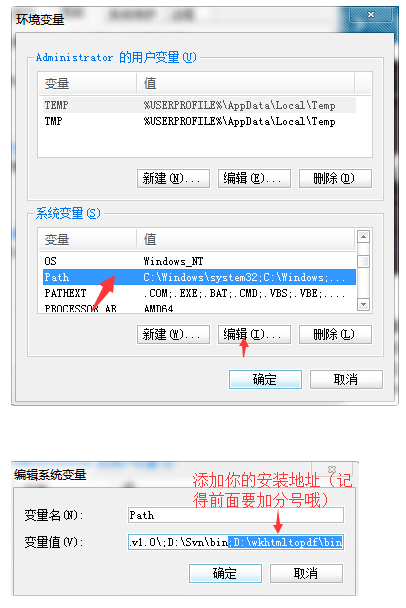
Find the path in the system variables, click Edit, copy the installation location just now to the end, remember to add a semicolon in front!
Two, test the effect
directly enter in cmd: wkhtmltopdf http://www.baidu.com/ D:website1.pdf (note there is a space in the middle)
The first is: the name of the running software (this is unchanged) The second is the URL and the third is the path and file name after generation. After you press Enter, is there a prompt to generate a progress bar? Congratulations on your success. Go to your generation directory to see if there is a newly generated pdf file.
Operation method: 1. Open the search box with windows key + r, enter cmd, and click OK
2. Enter directly in cmd: wkhtmltopdf http://www.baidu.com/ D:website1.pdf (note there is a space in the middle)

3. After you click Enter, you will see a progress bar, and then it will prompt the successful conversion!

Second, install the python library
pip install pdfkitAPI https://pypi.python.org/pypi/pdfkit
use:
import pdfkit

pdfkit.from_url('http://baidu.com', 'out.pdf')
pdfkit.from_file('test.html', 'out.pdf')
pdfkit.from_string('Hello!', 'out.pdf')
Intelligent Recommendation
pdf pdfkit generated using python
1, the installation pdfkit pip install pdfkit 2, installation wkhtmltopdf download link:https://wkhtmltopdf.org/downloads.html According to their version download the installation package Install...
pdfkit batch conversion HTML file is PDF
The simplest EPUB file is converted to the PDF file method to use the e -book management tool Calibre, but Calibre needs to add the file to the library to change it. When it is added to the library Es...
Python saves html as a PDF study notes
Article Directory Description: 1. Environment configuration: 1. Download address of wkhtmltopdf for window == Remember to install the bin directory of the installation location into the environment va...
PDF of pdfkit
Speaking pdf think of a very practical tool, that is pdfkit, a few days in the previous projects, there is a feature to implement in order to achieve this function, so I vast sea of information on...
Python generates PDF data through pdfkit
wkhtmltopdf download address Remember to install pdfkit pip install pdfkit Pay attention to the garbled characters in the following figure, it must be the following three wrong methods operatio...
More Recommendation
Python-Web Page PDF Toolkit Pdfkit
Pdfkit (https://pypi.org/project/pdfkit/ ) Python 2 and 3 wrapper for wkhtmltopdf utility to convert HTML to PDF using Webkit. Install: PIP Install Pdfkit is installed ( )。 Note: The too...
PDFKIT deployment (export Python plugin for PDF)
1, PDFKIT installation 2, Python uses PDFKIT, call pdfkit.from_string, etc., the following error will occur. And if you use PIP InstallwkhtmltopdfThis problem occurs if it is installed. 3, download th...
WKHTMLTOPDF saves HTML as PDF
One. Download Direct Baidu to official website download Second. Installation After installation, the directory to bin is configured to environment variables. III. Code use ** Notice: The output path i...
HTML saves the DIV in the page as PDF
Pure front -end method to signed a page of the page to PDF Use a third -party plug -in to save the screenshot of the canvas of H5 as the PDF method This method quotes CDN's JS HTML code javascript cod...