Andrews best screen adaptation scheme
Andrews screen adaptation has always been a troublesome problem, relative to the adapter end of the phone is, TV-side comparison in terms of adaptation will be more trouble. A recent find is relatively perfect adaptation program in a new TV adaptation of the process, only to do the following records to facilitate future work.
From the conversion formula dp and px of:px = dp * density
As can be seen, if the design width 360dp, want to ensure that both happened to be in px screen width value calculated for all devices, we can only modify the value of density.
By reading the source code, we can see that, density is a member variable DisplayMetrics in, and DisplayMetrics instance byResources#getDisplayMetricsCan be obtained, and Resouces by Activity or Application of Context to obtain.
DisplayMetrics first to become familiar with several variables and adaptation related to:
-
DisplayMetrics#density The density is above
-
DisplayMetrics#densityDpi That is, the above-mentioned dpi
-
DisplayMetrics#scaledDensityFont scaling factor, and density under normal circumstances equal, but the control system will change the font size values
It is not all dp px and the conversions are calculated DisplayMetrics the relevant values passed?
First, let's look at the layout file dp conversion, ultimately callingTypedValue#applyDimension(Int unit, float value, DisplayMetrics metrics) to convert:

It is used here DisplayMetrics obtained from the Resources.
Look at the picture decode,BitmapFactory#decodeResourceStreammethod:

Visible is the value calculated by the DisplayMetrics.
Of course, some other dp converted scene, basically calculated by DisplayMetrics, not described in detail here. So, we want to meet these requirements, we only need to modify variables DisplayMetrics and dp related to the conversion.
The final proposal
The following design assumptions FIG width 360px, be adapted to a wide dimension.
= Density then the adapted equipment's real width (unit px) / 360, we only need the following modifications to the calculated density in the system, the code is implemented as follows:

At the same timeActivity#onCreateMethod invoked. Code is relatively simple, does not address issues of non-public api call system, so in theory, will not affect the stability of the app.
So after modifying the gray line on a test version, stability in line with expectations, did not receive the resulting crash, but received a lot of feedback font is too small:

The reason is that above adaptation, we ignoreDisplayMetrics#scaledDensityParticularity, theDisplayMetrics#scaledDensitywithDisplayMetrics#densitySet to the same value, so that some users to modify the font size in the system fails, but we can not directly use the original scaledDensity, it may result directly over some text display area, before we can calculate and scaledDensity density than now to get the scaledDensity, as follows:

But after tests found another problem is that if you switch fonts in the system settings, then return to the application, the font has not changed. So have to monitor a font switch, callApplication#registerComponentCallbacksRegister at onConfigurationChanged listening to.
Thus the final solution are as follows:

This article is reproduced from:Today's headlines technical team!
Intelligent Recommendation
Mobile multi-screen adaptation scheme
Transfer from:https://div.io/topic/1092 ...

Car screen adaptation scheme summary
basic concept: 1、px The pixel unit, which is the smallest unit of the picture, and 1px is equivalent to one physical pixel of the screen. 2, resolution Pixels on the width of the screen * Pixels on th...
One kind of screen adaptation scheme
Zoom level program launched modify DisplayMetrics the headlines, invasive low, but it requires that all UI plans to lay out according to the same set of design size, in this case, if your project ther...

Today's headlines screen adaptation scheme
= Density then the adapted equipment's real width (unit px) / 360, we only need the following modifications to the calculated density in the system, the code is implemented as follows: At the same tim...
Android simple screen adaptation scheme
Has recently been tortured screen adaptation problems uncomfortable, I happened to see one of today's headlines to the screen adaptation program, feel good, to share with you 1. New Density 2. Here is...
More Recommendation
Vue project screen adaptation scheme
Lib-flexible installation Vue project introducedlib-flexible。 main.js: Installation px2rem loader Modify the configuration file /build/util.js: Finally, rebuild the project, you can see the size of th...
Android screen adaptation scheme 100%
Android screen adaptation scheme 100% First, create a class UiUtils tool for scaling calculated control Computing device actual height The method of obtaining the height of the state of the two ...
Android screen adaptation scheme [Finishing]
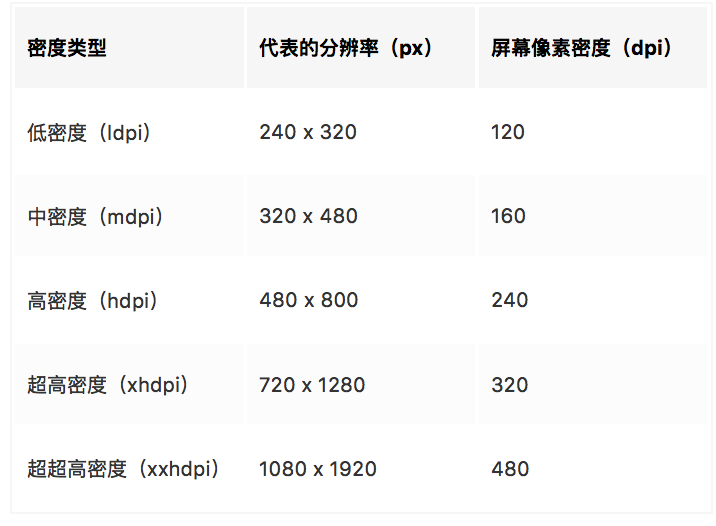
Adaptation of technical terms Screen pixel density (dpi) 1 pixel density = pixels / size (dpi = px / in) 2 density-independent pixels (dp) Unit: dp, which can guarantee the same effect on devices with...
Today's headline screen adaptation scheme
read: Android's current stable and efficient UI adaptation scheme Foreword: No matter what unit you fill in the layout file, it will eventually be converted topx, The system uses the above method to c...
android a new screen adaptation scheme
I recently studied the Android screen adaptation scheme. In fact, there are a lot of adaptations on the Internet, but I feel that the writing is very tall, but when I use it, various layouts are disor...