SpringBoot integrates dynamic changes and registered and discovery of NACOS to achieve configuration configuration
tags: nacos SpringBoot Idea tool spring boot java
Articles directory
Foreword
Recently, watching NACOS configuration management and service registration and discovery. When performing the dynamic changes and discovery of NACOS in integrating NACOS to complete the configuration of NACOS, I encountered some various pits. Summary here.
1. NACOS configuration management
Refer to the official NACOS document:
https://nacos.io/zh-cn/docs/quick-start-spring-boot.html
1. Project structure:
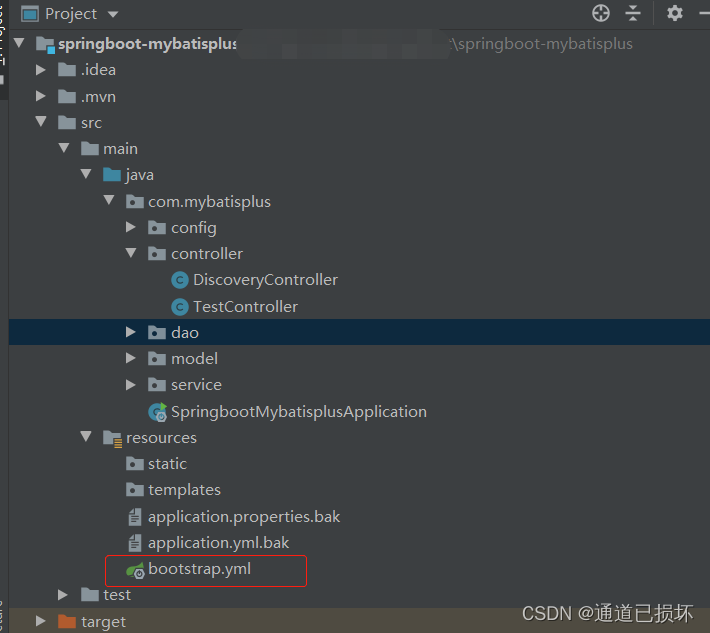
2. Introduce dependency package
Pay attention to the version number problem here. Version 0.2.X.release corresponds to the Spring Boot 2.x version, and the version 0.1.x.release corresponds to the Spring Boot 1.x version.
		<dependency>
            <groupId>com.alibaba.boot</groupId>
            <artifactId>nacos-config-spring-boot-starter</artifactId>
            <version>0.2.7</version>
        </dependency>
        <dependency>
            <groupId>com.alibaba.boot</groupId>
            <artifactId>nacos-discovery-spring-boot-starter</artifactId>
            <version>0.2.7</version>
        </dependency>
3. Configure bootstrap.yml file
spring:
  application:
    name: nacos-demo-service
  profiles:
    active: local
nacos:
  config:
    server-addr: 127.0.0.1:8848
    file-extension: yaml #properties
    namespace:
  discovery:
    server-addr: 127.0.0.1:8848
If Idea new Bootstrap.yml file does not display the leaf icon, please refer to:
https://blog.csdn.net/weixin_42957931/article/details/115962689
4. Start the local Windows version of NOCOS service
What I use here is version of NACOS-1.2.1.
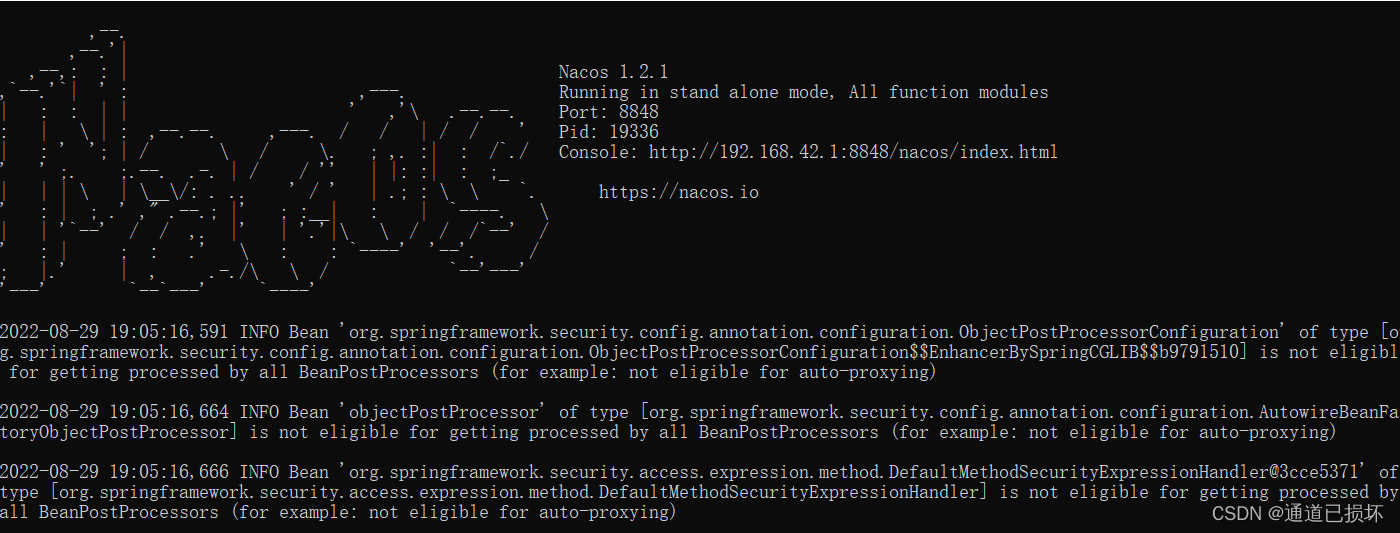
5. Browsers access NACOS and create configuration
(1) Visit URL: http://127.0.0.1:8848/nacos/
(2) Default account / password: NACOS / NACOS login
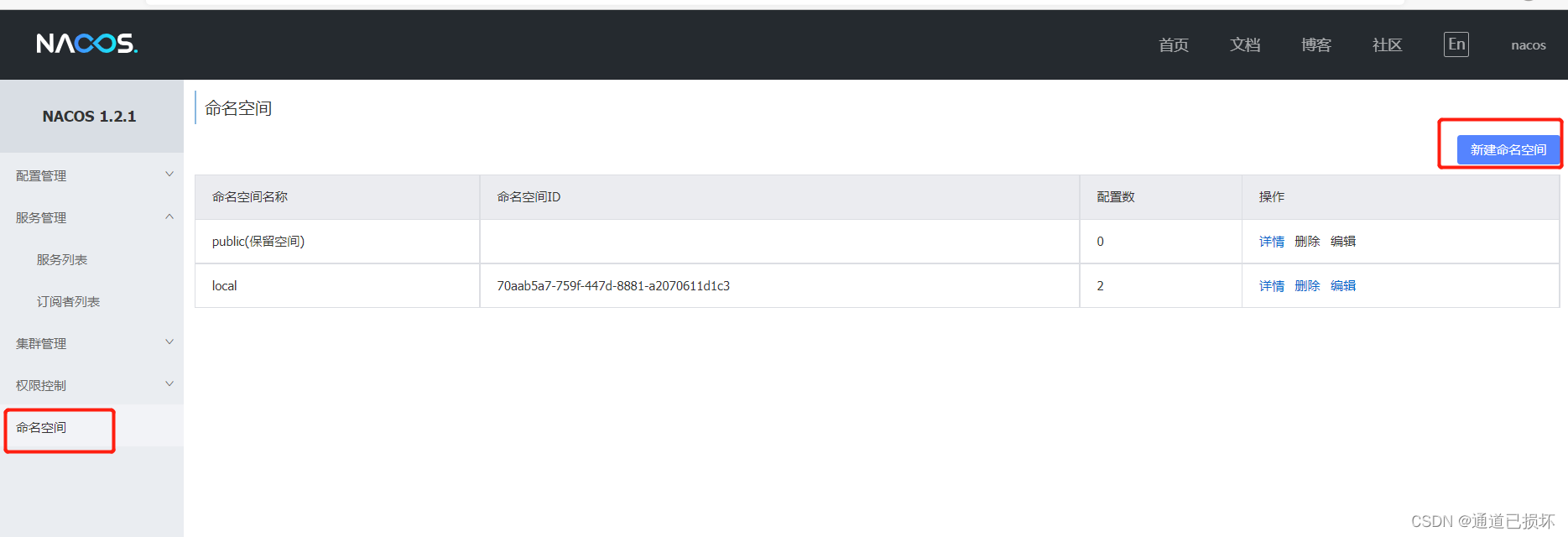
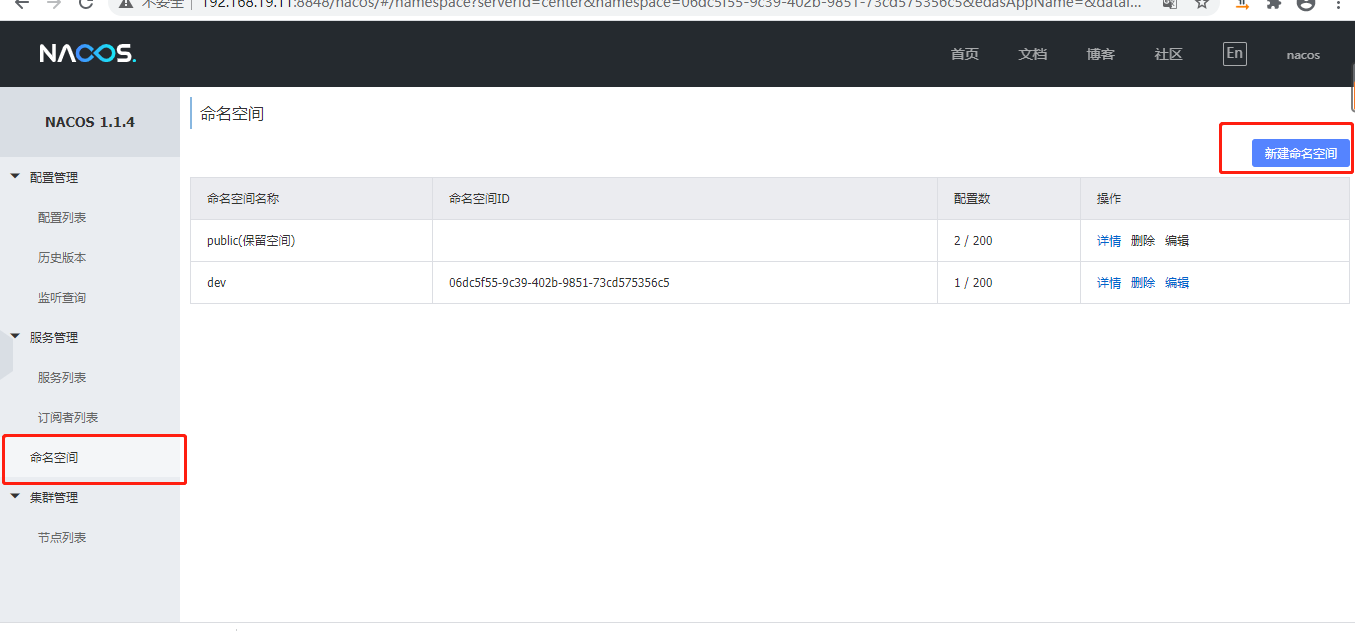
(3) Create a new name space. The named space ID does not need to be filled, and it will automatically generate:
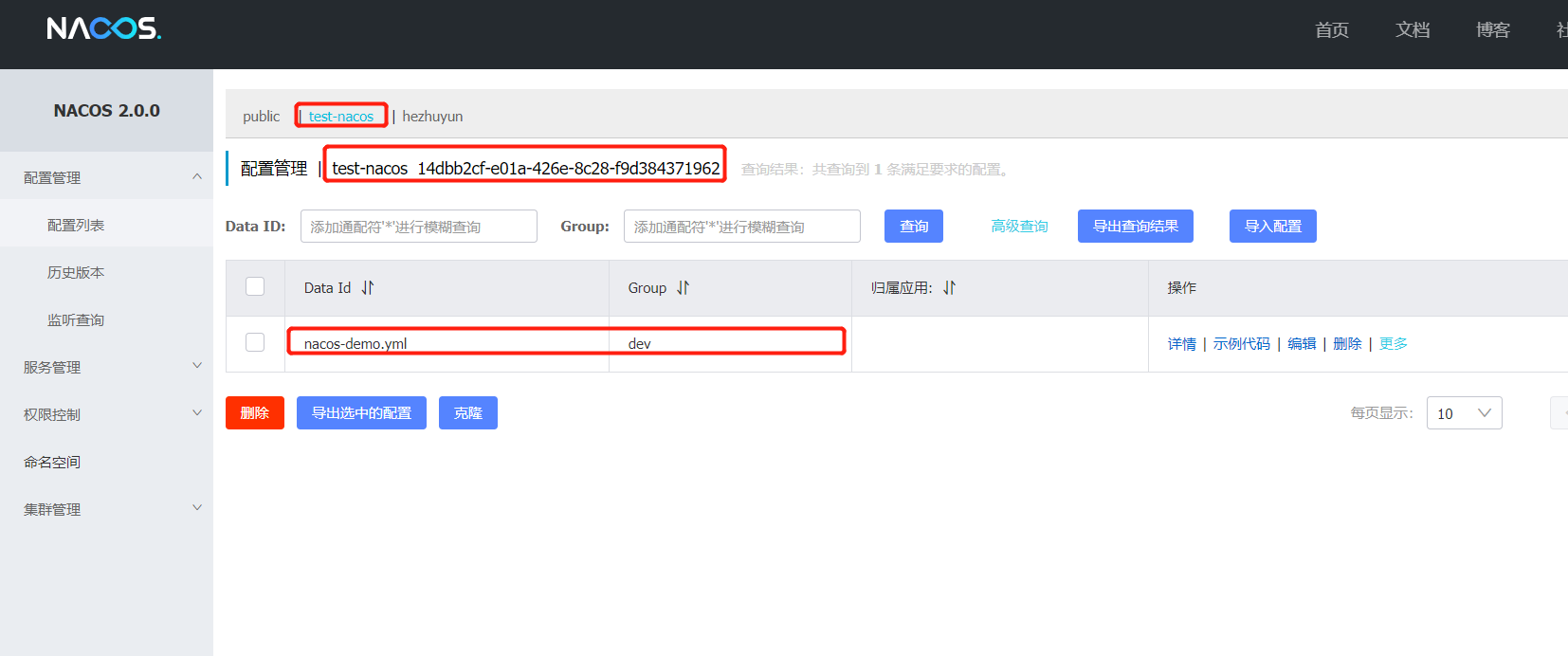
(4) Configuration list-Configuration files of a new project
I choose to create a new YAML configuration file here:
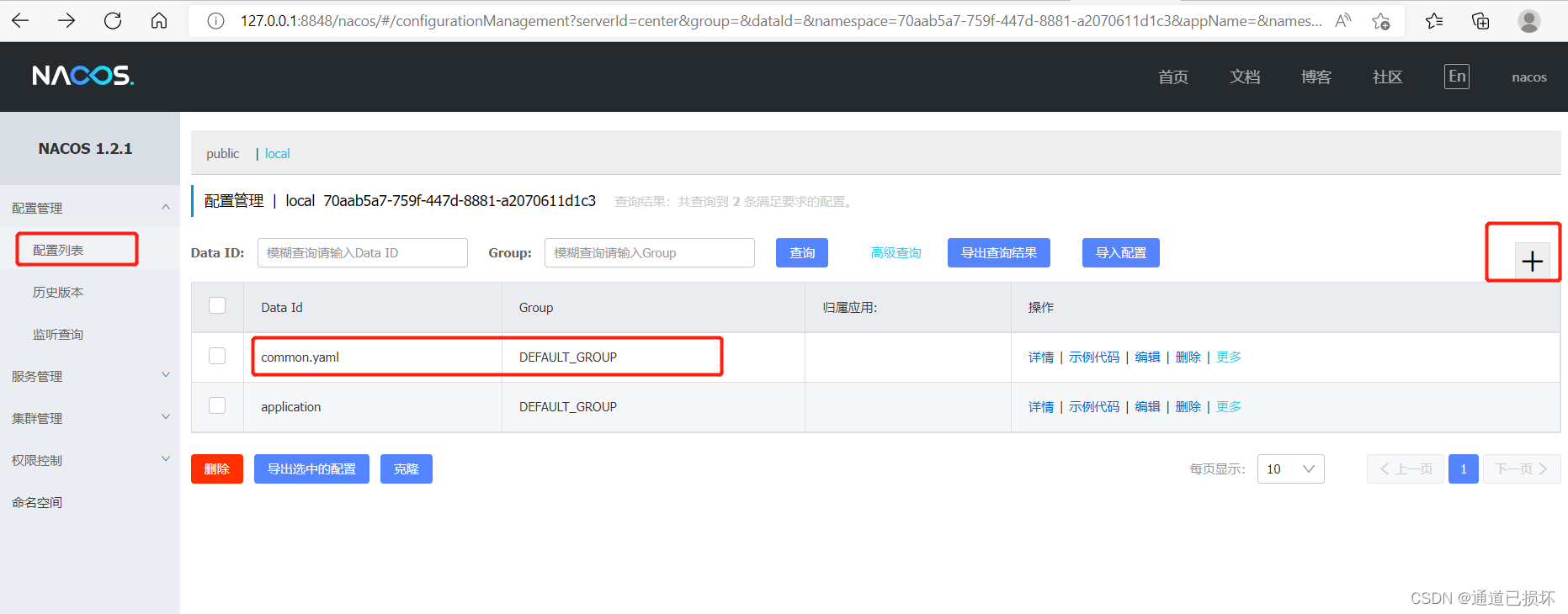
common.yaml configuration file content:
user:
  allName: HELLO
  fullAge: 77
  age: 23
  name: shanxian
userInfo:
  age: 55
  name: zhushan

spring:
  application:
    name: nacos-demo-service
 #Server port and context
server:
  Port: 8088
  servlet:
    context-path: /project-dev

 #Database information
spring:
  datasource:
    dynamic:
      primary:  Master #Set the default data source or data source group,The default value is Master
      datasource:
        master:
          username: root
          password: 123456
          url: jdbc:mysql://127.0.0.1:3306/sasac?characterEncoding=utf8&serverTimezone=Asia/Shanghai&useSSL=false&zeroDateTimeBehavior=convertToNull&rewriteBatchedStatements=true
          driver-class-name: com.mysql.cj.jdbc.Driver
        slave_1:
          username: root
          password: 123456
          url: jdbc:mysql://127.0.0.1:3306/sasac?characterEncoding=utf8&serverTimezone=Asia/Shanghai&useSSL=false&zeroDateTimeBehavior=convertToNull&rewriteBatchedStatements=true
          driver-class-name: com.mysql.cj.jdbc.Driver
(5) Update bootstrap.yml file
spring:
  application:
    name: nacos-demo-service
  profiles:
    active: local
nacos:
  config:
    server-addr: 127.0.0.1:8848
    file-extension: yaml #properties
    namespace: 70aab5a7-759f-447d-8881-a2070611d1c3
    shared-dataids: common.yaml
  discovery:
    server-addr: 127.0.0.1:8848
(6) Create a test method to create a test method to verify the configuration information acquisition and configuration dynamic refresh:
package com.mybatisplus.controller;

import com.alibaba.nacos.api.annotation.NacosProperties;
import com.alibaba.nacos.api.config.annotation.NacosValue;
import com.alibaba.nacos.spring.context.annotation.config.EnableNacosConfig;
import com.alibaba.nacos.spring.context.annotation.config.NacosPropertySource;
import com.mybatisplus.config.UserProperties;
import io.swagger.annotations.Api;
import io.swagger.annotations.ApiOperation;
import org.springframework.beans.factory.annotation.Autowired;
import org.springframework.beans.factory.annotation.Value;
import org.springframework.boot.context.properties.EnableConfigurationProperties;
import org.springframework.web.bind.annotation.GetMapping;
import org.springframework.web.bind.annotation.RequestMapping;
import org.springframework.web.bind.annotation.RestController;

@RestController
@RequestMapping(value = "/test")
@Api(tags = "Test interface")
@NacosPropertySource(dataId = "common.yaml" , groupId="DEFAULT_GROUP", autoRefreshed = true)
public class TestController {
    @Autowired
    private UserProperties userProperties;

    @NacosValue(value = "${server.Port}",autoRefreshed = true)
    private String port;
    @NacosValue(value = "${user.allName}",autoRefreshed = true)
    private String allName;
    @NacosValue(value = "${user.fullAge}",autoRefreshed = true)
    private String fullAge;
    @NacosValue(value = "${userInfo.age}",autoRefreshed = true)
    private String ageInfo;
    @NacosValue(value = "${userInfo.name}",autoRefreshed = true)
    private String nameInfo;

    @GetMapping(value = "/config")
    @ApiOperation(value = "Configuration Information Get")
    public  void getConfig(){
        System.out.println("-----------user ---------");
        System.out.println("port:"+port);
        System.out.println("Age Fullage:"+fullAge);
        System.out.println("Name allName:"+allName);

        System.out.println("------------ UserInfo automatically refresh configuration ------------");
        System.out.println("UserInfo Age:"+ageInfo);
        System.out.println("userInfo name name:" "+nameInfo);

        System.out.println("----------- Non-automatic refresh configuration ---------------------);
        System.out.println("Userproperties Age:"+userProperties.getAge());
        System.out.println("Userproperties name name:"+userProperties.getName());
        System.out.println("------------------------------Dividing line----------------- ------ "");

    }
}
@NacospRopertySource annotations are used to specify the configuration source file. The Autorefreshd property is used to configure whether to dynamically refresh the configuration.
@Nacosvalue annotation is used to obtain configuration information
The attribute class of the control group Userproperties is as follows:
package com.mybatisplus.config;

import lombok.Data;
import org.springframework.boot.context.properties.ConfigurationProperties;
import org.springframework.stereotype.Component;

@Data
@Component
@ConfigurationProperties(prefix = "user-info")
public class UserProperties {
    private String name;
    private String age;
    private String allName;

    public String getAllName() {
        return allName;
    }

    public void setAllName(String allName) {
        this.allName = allName;
    }

    public String getName() {
        return name;
    }

    public void setName(String name) {
        this.name = name;
    }

    public String getAge() {
        return age;
    }

    public void setAge(String age) {
        this.age = age;
    }


}
6. Start the project
Start the error, and you can't find the corresponding configuration file information:
Injection of @com.alibaba.nacos.api.config.annotation.NacosValue dependencies is failed; nested exception is java.lang.IllegalArgumentException: Could not resolve placeholder ‘server.Port’ in value “${server.Port}”

I checked a lot of blogs, and later found that the lack of configuration files:
The difference between Application.yml and Bootstrap.yml is not just a priority issue.
If the SpringBoot project does not rely on Spring-Cloud-Context, it will not read the bootstrap.properties file.
In other words, the bootstrap.yml configuration is only used by the SpringCloud project.
If your project is just a SpringBoot project, you will only identify the Application.yml configuration file.
Since SpringCloud is constructed based on SpringBoot, all SpringCloud projects will be identified. At this time, there will be priority. The SpringCloud project will give priority to the Bootstrap configuration in the Application configuration.
Add dependencies:
		<parent>
	        <groupId>org.springframework.boot</groupId>
	        <artifactId>spring-boot-starter-parent</artifactId>
	        <version>2.3.5.RELEASE</version>
	        <relativePath/>
	    </parent>

        <!--You need to introduce this jar to make the bootstrap configuration file take effect-->
        <dependency>
            <groupId>org.springframework.cloud</groupId>
            <artifactId>spring-cloud-context</artifactId>
            <version>3.0.1.RELEASE</version>
        </dependency>
If you report the following errors, it means that Spring-Cloud-Context version number is too high, try to reduce the dependent version number!
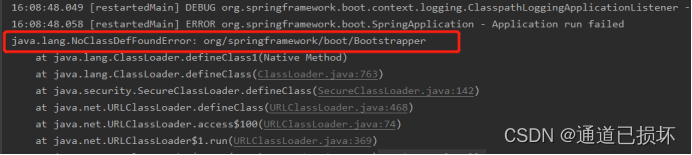
#Low the dependent version number and start successfully:
<dependency>
    <groupId>org.springframework.cloud</groupId>
    <artifactId>spring-cloud-context</artifactId>
    <version>2.2.5.RELEASE</version>
</dependency>
Or add the following dependencies, or you can read the bootstrap.yml configuration information first.
<dependency>
    <groupId>org.springframework.cloud</groupId>
    <artifactId>spring-cloud-starter-bootstrap</artifactId>
    <version>3.0.1</version>
</dependency>
Here we should also pay attention to the compatibility of the version number.
Then restart the project:
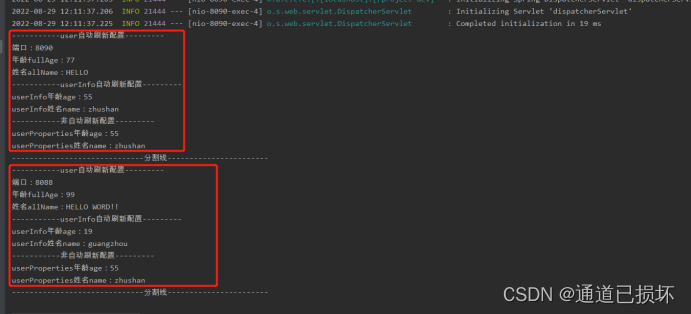
First postman calls a test interface, then modify the yaml file configuration information of the NACOS configuration workbench, and then call it again to observe the automatic refresh status:
2. Service registration and discovery
Automatic registration service:
1. Introduce dependencies
The code is as follows (example):
        <dependency>
            <groupId>com.alibaba.boot</groupId>
            <artifactId>nacos-discovery-spring-boot-starter</artifactId>
            <version>0.2.7</version>
        </dependency>
2. Configure bootstrap.yml file
nacos:
  config:
    server-addr: 127.0.0.1:8848
    file-extension: yaml #properties
    namespace: 70aab5a7-759f-447d-8881-a2070611d1c3
    shared-dataids: common.yaml
  discovery:
    server-addr: 127.0.0.1:8848
    namespace: 70aab5a7-759f-447d-8881-a2070611d1c3
    register:
      groupName: DEFAULT_GROUP
    autoRegister: true #Registered service to NACOS
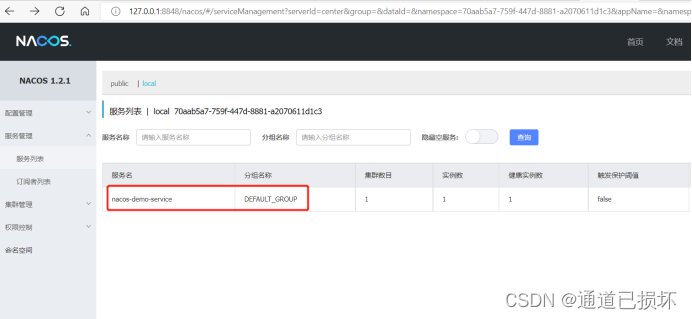
After starting the service, check the panel and find that the local service has been registered to NACOS:
3. Manual registration service:
3.1 Build a DiscoveryController class for querying services:
package com.mybatisplus.controller;

import com.alibaba.nacos.api.annotation.NacosInjected;
import com.alibaba.nacos.api.exception.NacosException;
import com.alibaba.nacos.api.naming.NamingService;
import com.alibaba.nacos.api.naming.pojo.Instance;
import org.springframework.stereotype.Controller;
import org.springframework.web.bind.annotation.RequestMapping;
import org.springframework.web.bind.annotation.RequestMethod;
import org.springframework.web.bind.annotation.RequestParam;
import org.springframework.web.bind.annotation.ResponseBody;

import java.util.List;

@Controller
@RequestMapping("discovery")
public class DiscoveryController {

    @NacosInjected
    private NamingService namingService;

    @RequestMapping(value = "/get", method = RequestMethod.GET)
    @ResponseBody
    public List<Instance> get(@RequestParam String serviceName) throws NacosException {
        return namingService.getAllInstances(serviceName);
    }
}
3.2 Start local service
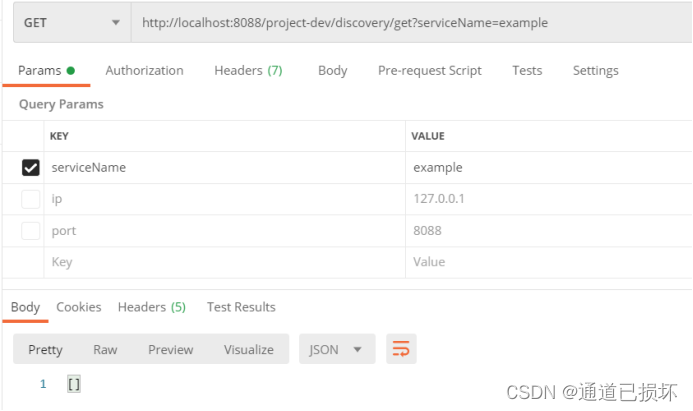
Call: http: // localhost: 8088/Project-Dev/Discovery/get? ServiceName = Example, then returned to the air JSON array [].
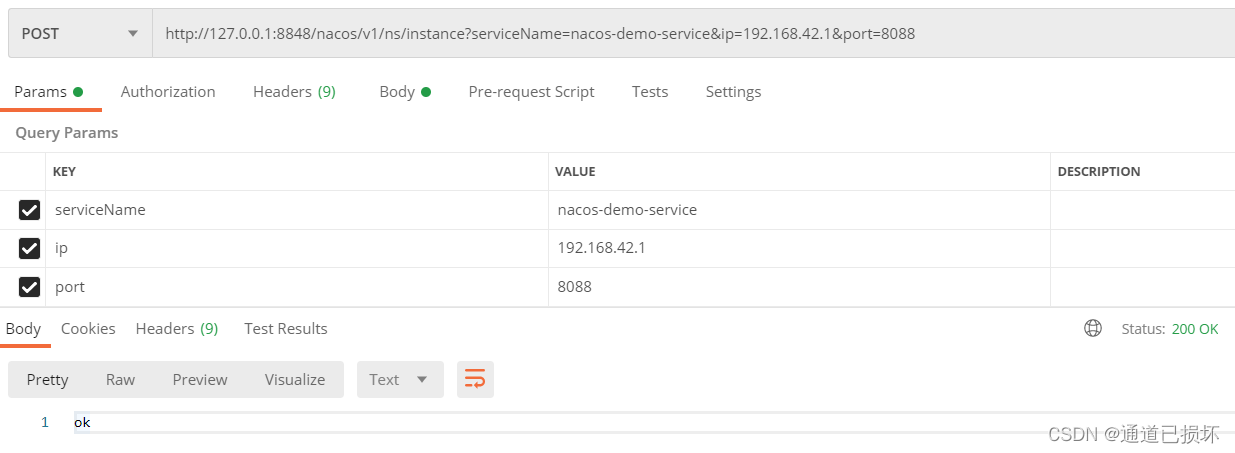
3.3 Service registration
By calling Nacos Open API, register a name for the EXAMPLE service to Nacos Server:
POST: http://127.0.0.1:8848/nacos/v1/ns/instance?serviceName=nacos-demo-service&ip=192.168.42.1&port=8088
3.4 Service Discovery:
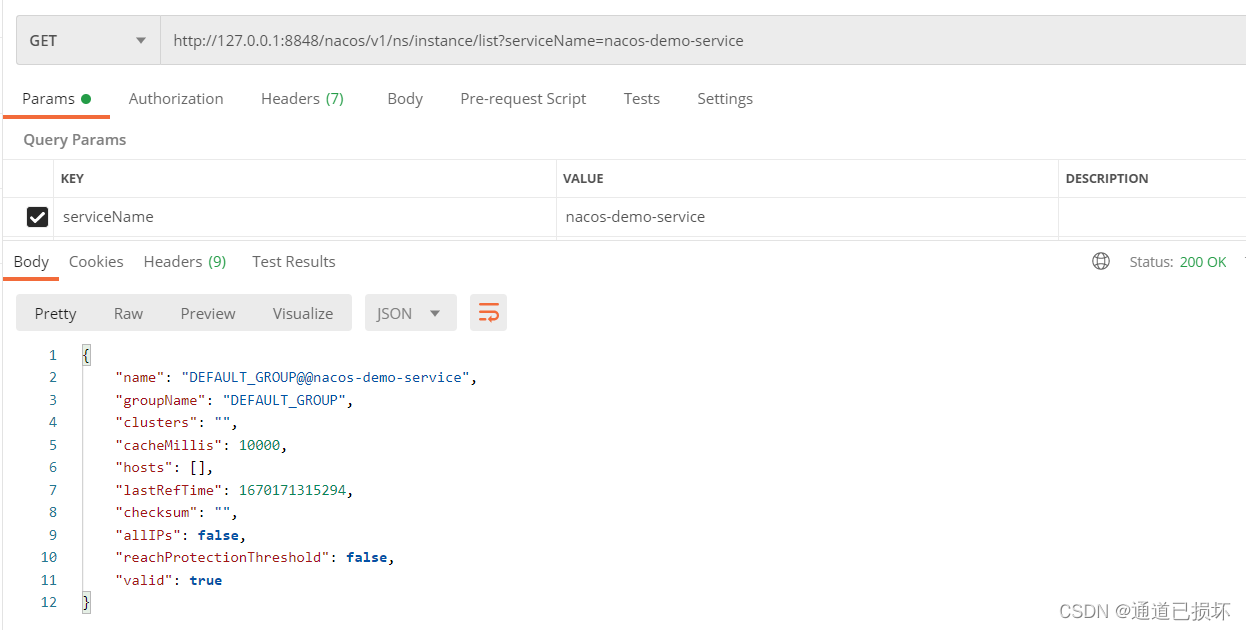
Get the relevant information of the name of the Example service:
GET : http://127.0.0.1:8848/nacos/v1/ns/instance/list?serviceName=example
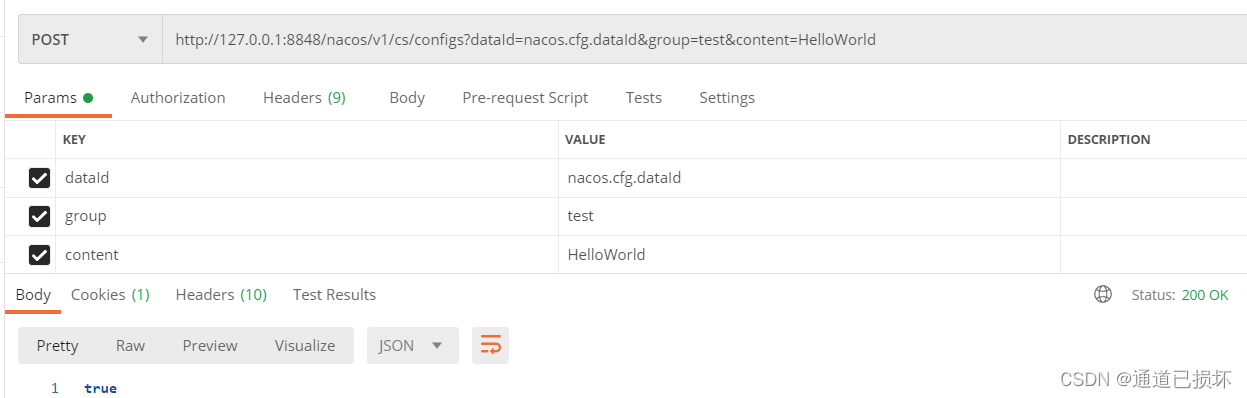
3.5 Release configuration
POST: http://127.0.0.1:8848/nacos/v1/cs/configs?dataId=nacos.cfg.dataId&group=test&content=HelloWorld
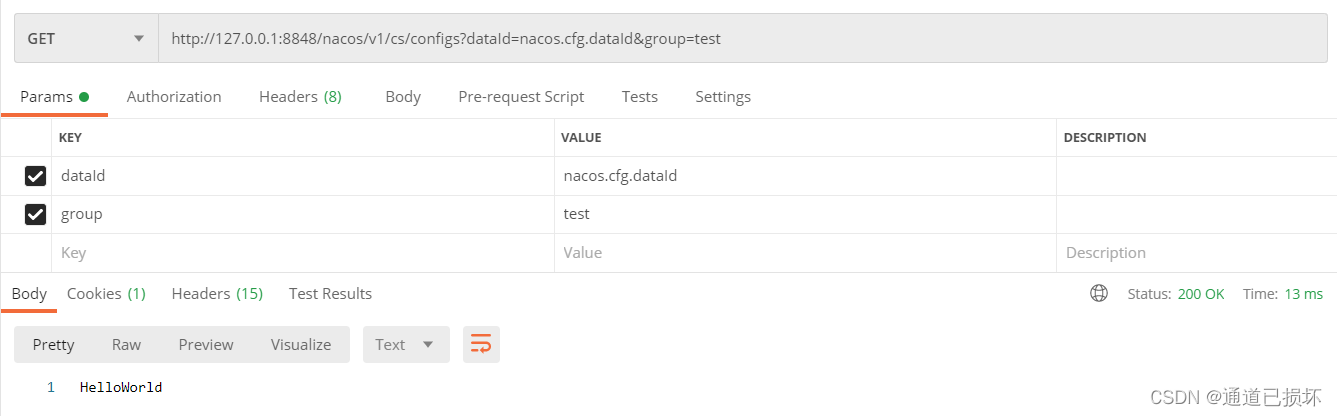
3.6 Get configuration
GET: http://127.0.0.1:8848/nacos/v1/cs/configs?dataId=nacos.cfg.dataId&group=test
Summarize
Reference article:
- https://blog.csdn.net/he__xu/article/details/120893044?utm_medium=distribute.pc_aggpage_search_result.none-task-blog-2aggregatepagefirst_rank_ecpm_v1~rank_v31_ecpm-3-120893044-null-null.pc_agg_new_rank&utm_term=bootstrap.yml%20%E9%85%8D%E7%BD%AE&spm=1000.2123.3001.4430
- https://www.jianshu.com/p/491db5791bf7?ivk_sa=1024320u
- https://blog.csdn.net/he__xu/article/details/120893044?utm_medium=distribute.pc_aggpage_search_result.none-task-blog-2aggregatepagefirst_rank_ecpm_v1~rank_v31_ecpm-3-120893044-null-null.pc_agg_new_rank&utm_term=bootstrap.yml%20%E9%85%8D%E7%BD%AE&spm=1000.2123.3001.4430
Intelligent Recommendation
Springboot integrates Nacos multi-environment and dynamic reading of project configuration files
Introduction to Nacos Reference link Nacos official website Install Nacos in CentOS Nacos Config multi-environment configuration Nacos has four main functions: Service discovery and service health mon...
Flink integrates Nacos and dynamically changes job configuration!
We know that the configuration of Flink jobs is generally passed through parameters when the job is started, or by reading the parameters of the configuration file. If the job configuration is initial...
SpringBoot Project Configuration NACOS Registered Service Center
1. Guide SpringCloudalibaba version dependency manager 2. Guide NACOS 3. Adjubes in the startup class 4. Configuration...
Use nacos to realize service discovery and dynamic configuration
Required dependencies Configuration in bootstrap Note: file-extension is the configuration file type, consistent with the configuration file type created in nacos, prefix is the configuration file p...
SpringBoot + Nacos Configuration Center + Service Registration and Discovery
SpringBoot+Nacos Dynamic changes to the configuration through NaCOS Server and Spring-Cloud-Starter-Alibaba-Nacos-Config. Registration and discovery of service through NaCOS Server and Spring-Cloud-St...
More Recommendation
Springboot NACOS implementation service registration and discovery, dynamic configuration, real-time update configuration
surroundings NACOS version: NACOS1.4.0 How to install NACOS, Baidu can. rely Local configuration Related class Test class NACOS configuration test 1. Start the service, see the NACOS service registrat...

Use Nacos Configuration Center and Springboot to achieve dynamic task scheduling
It is well known that SpringBoot can use timed tasks through @Scheduled, but we need to dynamically export reports regularly. What can we do? Of course, there are many task schedulers on the market th...
[JAVA] SpringCloud-Alibaba combined with Nacos to achieve dynamic configuration refresh and service registration discovery
Preface SpringCloud usually refers to Netflix. Today we are talking about SpringCloud-Alibaba, which is endorsed by major manufacturers. I choose to believe that, and the complexity of Alibaba’s...
Springboot integrates quartz to achieve dynamic timing task configuration examples
I refer to some documents on the Internet, and found that the writing is very detailed, and there is no source code for a completed example. I hereby wrote an example and uploaded it to github for you...

Configuration of NACOS Dynamic Routing in SpringBoot
Nacos dynamic routes in Springboot I don't say anything, SpringBoot-Nacos does not understand, I will have a self-disciplined code directly! ! ! ! ! ! ! ! ! ! ! ! ! ! ! ! ! ! ! ! ! ! ! ! ! first of al...