Solution error: no module named 'yaml'
tags: Development problem collector ha! c++ python C language
An error coming from ODRIVE Open Source Project
Reporting the original text
Pu'LiCe@DESKTOP-OIVHV6C MINGW64 /d/DWorkGrowup/Git/ODrive/Firmware (master)
$ make
board version: v3.5-24V
Firmware version 0.5.2-dev (fw-v0.5.2-21-g19e9b39b*)
* ~ 0% 102) python -B interface_generator_stub.py --definitions odrive-interface.yaml --template fibre-cpp/function_stubs_template.j2 --output autogen/function_stubs.hpp
No module named 'yaml'
Note that there are new compile-time dependencies since around v0.5.1.
Check out
............................................................
...........................................................
..........................................................
https://github.com/madcowswe/ODrive/blob/devel/docs/developer-guide.md#prerequisites for details.
 *** tup messages ***
 *** Command ID=413 failed with return value 1
* ~ 3%  99) python -B interface_generator_stub.py --definitions odrive-interface.yaml --generate-endpoints ODrive3 --template fibre-cpp/endpoints_template.j2 --output autogen/endpoints.hpp
No module named 'yaml'
Note that there are new compile-time dependencies since around v0.5.1.
Check out https://github.com/madcowswe/ODrive/blob/devel/docs/developer-guide.md#prerequisites for details.
 *** tup messages ***
 *** Command ID=417 failed with return value 1
 *** tup: 4 jobs failed.
make: *** [Makefile:33: all] Error 1
Reporting the reason and my analysis process
NoticeWhen this error, my platform is Windows10. I have installed the ARM development tool chain and TUP in accordance with the requirements of the development document before the error, but all the tools installed are basically much higher than the version of the development document. I have seen an error I have a little panic.
because IThe installed tool is at least four or five possible places too much.Later, I migrated the source code to my Linux virtual machine for the new deployment, install a tool, I will make Make.When I installed Python3At the time, there was a way as WINDOW10.Error messageThis determination of the error must be a problem here.
Solve the problem
The solution is actually written in the development documentation., Just when I installed Python3, I didn't understand.
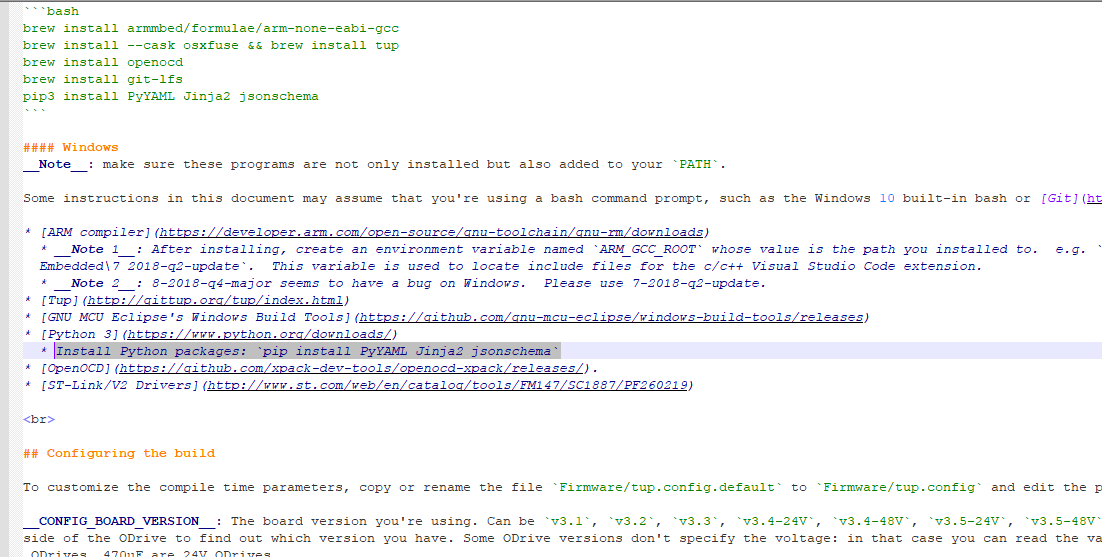
* Install Python packages: `pip install PyYAML Jinja2 jsonschema`
So we only need to run this in the command line.pip install PyYAML Jinja2 jsonschemaYes, ok! At first I thought it would be so simple to solve the problem.
But after I run this command, add the path of this newly downloaded package toEnvironment variableGo backmakeresultWhat is the problem?
Clumsy approach
Give me anxious that I saw the newly installed package address will directly copy all the tools to my Python3 installation address.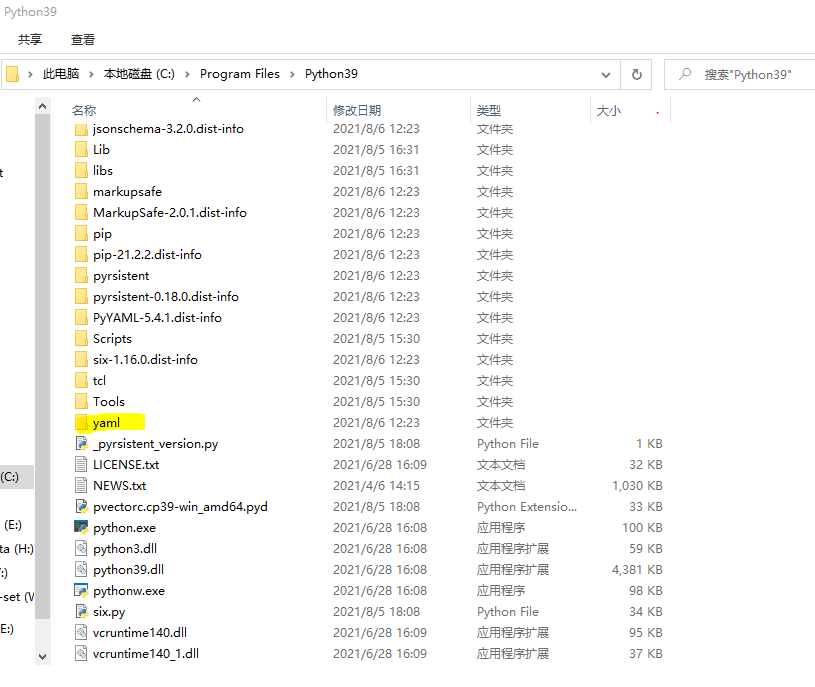
Go to Make successfully solved the problem
Pu'LiCe@DESKTOP-OIVHV6C MINGW64 /d/DWorkGrowup/Git/ODrive/Firmware (master)
$ make -j24
board version: v3.5-24V
Firmware version 0.5.2-dev (fw-v0.5.2-21-g19e9b39b*)
tup warning: generated file 'build\obj\fibre-cpp_legacy_protocolcpp.o' was deleted outside of tup. This file may be re-created on the next update.
..........................................
.........................................
.........................................
tup warning: generated file 'build\ODriveFirmware.bin' was deleted outside of tup. This file may be re-created on the next update.
  99%  1) [0.015s] arm-none-eabi-size build/ODriveFirmware.elf
   text    data     bss     dec     hex filename
 336920    3864  141976  482760   75dc8 build/ODriveFirmware.elf
Intelligent Recommendation
[Error Solution] No module named 'torchsummary'
[Error Solution] No module named 'torchsummary' solve: TorchSummary can do Pytorch visualization and output network related information. ...
An error solution to "No Module Named‘ Onnx.onnx_cpp2p2p2py_export ‘"
Error description: Solution:...

The terminal runs correctly, but pycharm reports an error No module named ‘yaml’
Problem description: Obviously installed the relevant package, run import yaml in the terminal and there is no error message, but in pycharm, it reports the error No module named'yaml' Use the relevan...
module not found error: no module named 'matplotlib' solution
1. Description of the problem In the run <machine learning practice> code book Ch02 when analyzing data: When using Matplotlib create scatter plots, there will be module not found error: no modu...
Error solution for polyglot(No module named 'icu'、No module named '_bz2' )
System environment redhat7.1 python3.6 polyglot 16.7.4 ICU_VERSION = subprocess.check_output((‘icu-config’, ‘–version’)).strip() Error 1 :No module named ‘icu&rsquo...
More Recommendation
[Report an error solution] No Module Named ‘Pywt’ and Modulenotfounderror: No Module Named ‘Skimage.metrics’
Solution: If the error is reported afterwards: ModuleNotFoundError: No module named ‘skimage.metrics‘ It is caused by the low Skimage version. It can be updated to the latest version (or 0...

Import Error:No module named 'yaml'
Solution: download the missing package on the official website, manually install download link:https://pypi.org/project/PyYAML/#files The download page is as shown below, choose the version that suits...
# Python # ModulenOTfounderror: no module named 'yaml'
Python package introduction error: wrong reason: Mousse Moudle YAML Solution: PIP installation can be installed. Special note: The instal...
[Python primary] no module named ‘yaml’
[Python primary] no module named 'yaml' 1. Background 2. Installation 1. Background YAML is a file format. Like JSON, it is usually used as a configuration file, which is simpler than the JSON format....

Scrapy error no module named win32api solution
Operating environment win7_64 python 3.6.4 pycharm 2017.3.4 Running scenario When running the crawler script of scrapy crawl test in Terminal in pycharm, the final program displays an error message: n...