ActiveMQ cluster configuration
source
- ActiveMQ Distributed Network (Forward Bridge)
- Network of broker
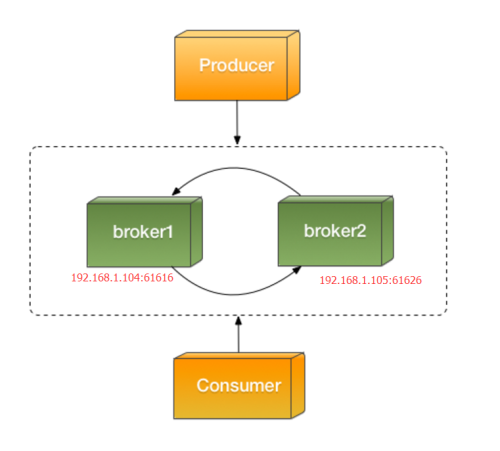
The ActiveMQ cluster configuration is widely used in the project, according to the official website and the information on the network:When ActiveMQ faces a large amount of message storage and a large number of client interactions, the performance consumption will reach a single broker limit, and we need to scale ActiveMQ horizontally. ActiveMQ provides a "network" mechanism that can "join" multiple broker instances together to form a "Forward Bridge" model (forward bridge). These Brokers are linked together by a networked network (networkerConnector) to form a broker cluster. Any Borker can interact with Client data. Messages will also "flow" in the Broker network until they are consumed. The reason is "flowing" because "producer "and "consumer" will link with different brokers, we think the "forward bridge" architecture mode is the solution for "larger" cluster data.
We used a non-persistent subscription, but in actual use we found that sometimes there was a message loss, that is, the producer sent the message to Broker A, the consumer connected to Broker B, but A did not forward the message to B. .
In the afternoon, I carefully looked at the ActiveMQ cluster configuration and hoped to find a solution. Let's tidy up the configuration of the cluster. The configuration used in the project is
    <networkConnectors>
      <networkConnector duplex="false" networkTTL="2" uri="static:(tcp://broker1:61616)"/>
    </networkConnectors>
Supported configurations are:
dynamicOnly: Used to indicate whether the connector only supports dynamic activation of "durable subscribers". The default is false, which means that after the networkConnector is successfully created, all "durable topic" will be activated immediately, even if there is no local Topic consumer (if the local broker already has The consumer, who will definitely be activated, will also create a "typical" subscriber and send the subscription information to the remote broker, after which the Topic messages received by the remote broker will be forwarded to the local broker. If true, then netwokrConnector will not activate them immediately (locally no consumer's durable Topic) until the activation message is obtained from the "Advisory" notification (with the creation of the Durable Consumer). It will have a significant impact on the timing of messages forwarded in the network in Durable Topic. Usually set to false to avoid the failure of the broker to migrate to the new broker nodes that have not received any "Advisory". However, if the network is stable, set dymanicOnly to true, which can effectively enhance Topic messages. Forwarding efficiency. This configuration should take effect for persistent subscriptions and is not covered in the project.
decreaseNetworkConsumerPriority: Whether to reduce the weight of the network consumer (Queue), the default is false, that is, the Consumers in the Remote Broker have the same weight as the local Consumer (default value = 0, we can assign weight to each consumer), the consumer "weight "Determining the priority of its acquisition of messages, consumers with higher weights will preferentially consume messages. If this value is true, then the Consumer in the remote broker will have the lowest priority (-7), then only if the Queue has no Consumer in the Local Broker, or all the Consumers are fully loaded (prefetch Buffe is full) The message is forwarded to the Consumer in the remote broker. This is a better tuning strategy, not only can reduce the cost of message forwarding, but also better to ensure the order of the message, usually we set to true, the only drawback is that it is not conducive to Queue consumers load balancing in the global scope. (This configuration can solve the problem: first ensure that the message is consumed by the consumer on the current broker, and only forward to the consumer on the remote broker when all local consumers are busy.)
Consider configuring it and try it out.networkTTL: The maximum lifetime of messages and subscriptions forwarded on the network. The default is 1, that is, messages will only be forwarded once in the network, and subscriptions will only be propagated once in the network. Each time a message is forwarded in the network, it will be TTL-1 and the current brokerId will be added to the routing information. When TTL=0 or the current brokerId is already in the routing table (this broker has forwarded this message to avoid loop), Then the message will not continue to be forwarded. Usually this value is small and the number of broker nodes. If the brokers in the cluster have a loopback network, it is recommended to be 1, for example: A->B, B->C, C->A. (Avoid the networkConnector is chained and has a loopback situation. Under a good architecture, it should be a star structure, that is, each broker establishes a connection with other brokers, not a chain structure--pipleline). In our project, the setting value is 2, mainly because when set to 1, it is often found that the cluster cannot be forwarded. Related issues are also available on AMQ's JIRA.split usage of networkTTL for mesh topology
I suspect that this configuration is a bit problematic. Next week, you can try to set the messageTTL to -1 (infinite loop).duplex: Whether the network is bidirectional, the default is false. If true, the remote broker is not only a "subscriber" but also a "producer" of the message, ie the remote broker also forwards messages to the Local Broker. We usually have a broker that establishes a one-way networkConnector with other brokers. For example, if there are three broker A/B/Cs, then configure two one-way ones on A: A->B, A->C, then Configuration on B: B->A, B->C, based on this theory.
alwaysSyncSend: Whether to always send synchronously when forwarding a message to remote broker. The default is false, which means that only persistent messages are sent synchronously; if true, synchronous transmissions are also used for non-persistent messages. The so-called synchronous sending, that is, the local broker sends the message to the remote broker through the networkerConnector, blocks and waits until the remote broker returns the ACK command. This is the way the message storage is guaranteed. We use the default value, which does not take effect for non-persistent topic subscriptions.
staticBridge: Whether it is a "static" bridge, the default is false, that is, the networkConnector can use the advisor notification to obtain the changes of the Consumer and adjust the forwarding policy. If true, the broker will not focus on any advisory (Consumer changes) and will only use the "staticallyIncludeDestination" configuration to create the necessary subscriptions.
To be continued
Intelligent Recommendation
ActiveMQ study notes (7) - ActiveMQ Master Slave cluster configuration
1 Introduction ActiveMQ Master / Slave cluster ActiveMQ high availability can be improved, a Broker been killed once, another Broker can quickly replaced. Master / Slave clustering does not support lo...
Centos activemq cluster configuration Networks of Brokers
1, install the JDK runtime environment Second, install and configure activemq Here we configure the Networks of Brokers cluster mode Activemq-1 and activemq-2 are the two masters. The messages sent to...

ActiveMQ message sending Server cluster configuration
1 Download activeMQ, then decompress it, call activemq.bat under the guest file to start the mq service, and then access the console under localhost: 61616. The default user name and password is admin...

ActiveMQ three server cluster configuration scheme and steps
Configure the server: Create a folder to store three activemq and a file kahadb folder: Instruction: mkdir activemq; mkdir kahadb; cp -rf apache-activemq-5.15.9 activemq/activemq-a; cp -rf apache-acti...

ActiveMQ high availability cluster installation and configuration
ActiveMQ high availability cluster installation, configuration, high availability test (ZooKeeper +LevelDB) From ActiveMQ 5.9At the beginning, the cluster implementation of Active...
More Recommendation

ActiveMQ+Zookeeper cluster configuration to achieve high availability
1.Install and configure the zookeeper cluster, see blog for detailsZookeeper cluster mode installation。 2.Download apache-activemq-5.15.2-bin.tar.gz, link:https://mirrors.tuna.tsinghua.edu.cn/apache/a...

Java message queue-activemq cluster and configuration
Master-slave cluster solution: Shared storage master/slave shared storage Replicated LevelDB Store Replicated LevelDB Store Principle of LevelDB Store based on replication The three configure the same...

ActiveMQ of the message queue series (JMS, cluster configuration)
1. Download and start ActiveMQ Go to http://activemq.apache.org/activemq-5152-release.html to download ActiveMQ Start the windows version: Run under win32 (32-bit system)/win64 (64-bit system) in the ...

JMS learning twelve (Spring+ActiveMQ cluster configuration)
ActiveMQ cluster ActiveMQ has a powerful and flexible cluster function, but many shortcomings will be found in the process of using it. ActiveMQ clusters mainly include two methods: Master-Slave and B...
ZooKeeper + ActiveMQ cluster configuration and Java call
Planning three nodes: 192.168.46.130 192.168.46.131 &n...