[hadoop] Installation notes
Preface
I usually use hadoop, hive and other tools in my work. This time I try to install it myself.
Configuration combination: virtual machine+ubuntu14+java1.7+hadoop2.9.1
Before installing Hadoop on the virtual machine, please adjust the amount of memory allocated to the virtual machine to 2 to the nth power of G, n is greater than 2
Experiments have proved that when the number of memory is less than 4, a simple MR task of finding letters will cause insufficient resources and cause tilt problems.
Installation reference to Lixing’s article:http://dblab.xmu.edu.cn/blog/install-hadoop/
0X00 Pseudo-distributed installation notes
-
The configuration file of Hadoop is located in /usr/local/hadoop/etc/hadoop/. For pseudo-distribution, two configuration files core-site.xml and hdfs-site.xml must be modified. The Hadoop configuration file is in xml format, and each configuration is implemented by declaring the name and value of the property. Switching from pseudo-distributed to non-distributed (stand-alone mode) only needs to delete the configuration of the above two configuration files.
-
NameNode formatting:
./bin/hdfs namenode -format -
Start the daemon (NameNode and DataNode) process:
./sbin/start-dfs.sh -
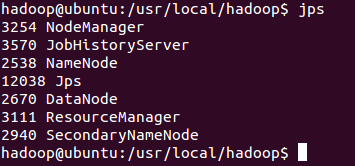
After the startup is complete, you can use the command jps to determine whether the startup is successful. If it is successfully started, the following processes will be listed: "NameNode", "DataNode" and "SecondaryNameNode" (If SecondaryNameNode is not started, please run sbin/stop-dfs.sh Close the process, and then try to start again). If there is no NameNode or DataNode, the configuration is unsuccessful. Please check the previous steps carefully or check the cause by viewing the startup log.
-
Restart the pseudo-distributed method: (when there is no need to clear the temporary information recorded after HDFS and hadoop started, the second step is not performed)
./sbin/stop-dfs.sh # Close
rm -r ./tmp # Delete the tmp file, note that this will delete all the original data in HDFS
./bin/hdfs namenode -format # reformat the NameNode
./sbin/start-dfs.sh # restart -
After successful startup, you can access the web interfacehttp://localhost:50070 View NameNode and Datanode information, you can also view files in HDFS online.
-
Hadoop fs is suitable for any different file system, such as local file system and HDFS file system
hadoop dfs can only be applied to HDFS file system
hdfs dfs has the same function as hadoop dfs, and it can only be applied to HDFS file system
0X01 Yarn
YARN is separated from MapReduce and is responsible for resource management and task scheduling. YARN runs on MapReduce and provides high availability and high scalability. More introduction of YARN will not be expanded here. Those who are interested can refer to related materials. (If you don’t want to start YARN, you must rename the configuration file mapred-site.xml to mapred-site.xml.template, and change it back when needed. Otherwise, if the configuration file exists and YARN is not turned on, run The program will prompt "Retrying connect to server: 0.0.0.0/0.0.0.0:8032" error, which is why the initial file name of the configuration file is mapred-site.xml.template.)
-
Rename mapred-site.xml.template to mapred-site.xml, and configure it in the file (for details, please refer to the article for Lixing)
-
Modify the configuration file yarn-site.xml (for details, please refer to the article of Lixing)
-
Start Yarn:
./sbin/start-yarn.sh # Start YARN
./sbin/mr-jobhistory-daemon.sh start historyserver # Enable the history server to view the task running status on the Web -
After configuring Yarn, you can open http://localhost:8088/cluster in the local browser to view the resource situation
-
jps command (must be all lowercase): View related NameNode, DataNode, Yarn related processes:
After starting the pseudo-distribution, there will be jps, NameNode, DataNode, SecondaryNameNde;
The remaining three appear after starting Yarn
0X02 Some problems solved
Start Hadoop to execute MR job test:
./bin/hadoop jar ./share/hadoop/mapreduce/hadoop-mapreduce-examples-*.jar grep ./input ./output 'dfs[a-z.]+'
An error occurred:
There are 0 datanode(s) running and no node(s) are excluded in this
operation.
Resolution process:
Use the jps command to check that the datanode is indeed not started
Solution: restart linux,Then use start-dfs.sh and start-yarn.sh Restart hadoop or find the current folder in hadoop-X.X.X/data/dfs/data in the hadoop installation directory and delete it, and then execute it againhadoop namenode -format,reusestart-dfs.shwithstart-yarn.sh Restart hadoop and use the jps command to see that the datanode has been started.
0X03 Configure PATH environment variable
1. Open the environment variable file:vim ~/.bashrc
2. Add this configuration to the top line of the text:
export PATH=$PATH:/usr/local/hadoop/sbin:/usr/local/hadoop/bin
3. Make environment variables take effect:source ~/.bashrc
4. Test code:hdfs dfs -ls input Orhadoop version
0X04 some hadoop commands
hadoop fs -mkdir /tmp/input Create a new folder on HDFS
 hadoop fs -put input1.txt /tmp/input transfer the local file input1.txt to the /tmp/input directory of HDFS
 hadoop fs -get input1.txt /tmp/input/input1.txt Pull the HDFS file to the local
 hadoop fs -ls /tmp/output List a directory in HDFS
 hadoop fs -cat /tmp/ouput/output1.txt View files on HDFS
 hadoop fs -rmr /home/less/hadoop/tmp/output Delete the directory on HDFS
 hadoop dfsadmin -report View HDFS status, such as which datanodes are there, and the situation of each datanode
 hadoop dfsadmin -safemode leave leave safe mode
 hadoop dfsadmin -safemode enter enter safe mode
 Check for bad blocks:
hadoop fsck /XXX/XXXX/XXXXXX
 hadoop fsck -delete /XXXXX/XXXXX/XXXXX delete bad block files
Intelligent Recommendation
#Hadoop notes _1 #hadoop introduction and installation
Because the article is too long, the rest is in my other blogs! Part II: HDFS Part III: MapReduce Part IV: Project Cases 《Hadoop》 Hadoop common command command Description jps View process service ipt...
Hadoop installation problem handling notes
A few days ago, Hadoop was installed on Windows and Linux hosts. The version is hadoop-0.21.0. Some environmental problems have appeared. Record it and make a note. 1. When cygwin starts Hadoop...
Hadoop study notes Hive installation
operating system Hadoop cluster version MySQL version CentOS 7 Hadoop-2.7.7 MySQL5.7 Hadoop study notes Hive installation 1 Install and configure MySQL 1.1 Purify the MySQL environment 1.1.1 Check if ...
hadoop-2.7.2-HA installation notes
Configuration shown in Figure NN DN ZK ZKFC JN RM NM (Task Manager) HMaster Region Server Node1 1 1 1 1 1 Node2 1 1 1 1 1 1 1 N...
Hadoop study notes - single installation
Environmental parameters project parameter Remark operating system CentOS7 1908 JDK 1.8.0_212 hadoop 3.1.3 Preparation CentOS 1908 single installation 1) Configure IP, etc. 2) Install EPEL-RELEASE Not...
More Recommendation
Hadoop installation virtual machine and moba installation notes
Install the virtual machine Modify the host name (the host name of the current virtual machine) View the current host name Command: hostname Modify the host name Command: vi /etc/hostname Be sure to b...
Hadoop study notes (a): zero base Linux installation process hadoop notes
Original address: Hadoop study notes (a): zero base Linux installation process hadoop notes Environmental and objectives: - system:VMWare / Ubuntu 12.04 - Hadoopversion:0.20.2 - My node configuration ...
Use Hadoop installation notes three --hadoop environmental issues Summary
NOTE: linux server username / password: root / lijian 1. Prepare the Linux environment VMware 1.0 Click the shortcut, right-open the location of the files -> Double-click vmnetcfg.exe -> VMnet1 ...
Hadoop study notes (1) Hadoop single node installation
To learn more about the Hadoop distributed file system, you first need to build a Hadoop experimental environment. Hadoop has two installation modes, namely single-node cluster mode installation (also...

(2) Hadoop notes: installation of hadoop-eclipse-plugin and mapReduce Xiaolizi
Note: 1. The environment where eclipse is located is windows 2. hadoop version 2.8.3 3. hadoop-eclipse-plugin version 2.8.3 4. eclipse version Luna Service Release 1 (4.4.1) 5.JDK 1.7 Plug-in installa...