Use Hadoop installation notes three --hadoop environmental issues Summary
1. Prepare the Linux environment
VMware 1.0 Click the shortcut, right-open the location of the files -> Double-click vmnetcfg.exe -> VMnet1 host-only -> Modify subnet ip settings segments: 192.168.8.0 Subnet Mask: 255.255.255.0 -> apply -> ok
Back windows -> Open Network and Sharing Center -> Change Adapter Settings -> Right VMnet1 -> Properties -> Double-click IPv4 -> Set windows of IP: 192.168.8.100 Subnet Mask: 255.255.255.0 -> Click OK
On the virtualization software --My Computer -> Select Virtual Machine -> Right -> settings -> network adapter -> host only -> ok
1.1 modify the hostname
vim /etc/sysconfig/network

		NETWORKING=yes
		HOSTNAME=itcast01    ###
1.2 modify IP
In two ways:
The first: to be modified by the Linux graphical interface (highly recommended)
			Into the Linux graphical interface -> Right click on the top right of two small computer -> click Edit connections -> select the current network System eth0 -> click on the edit button -> select IPv4 -> method selected for the manual -> Click on the add button -> Add IP: 192.168.8.118 Subnet Mask: 255.255.255.0 gateway: 192.168.1.1 -> apply

		The second: the way modify the configuration file (program ape Cock wire dedicated)
			vim /etc/sysconfig/network-scripts/ifcfg-eth0

			DEVICE="eth0"
			BOOTPROTO="static"               ###
			HWADDR="00:0C:29:3C:BF:E7"
			IPV6INIT="yes"
			NM_CONTROLLED="yes"
			ONBOOT="yes"
			TYPE="Ethernet"
			UUID="ce22eeca-ecde-4536-8cc2-ef0dc36d4a8c"
			IPADDR="192.168.8.118"           ###
			NETMASK="255.255.255.0"          ###
			GATEWAY="192.168.8.1"            ###
1.3 modify the mapping between host names and IP
vim /etc/hosts

		192.168.8.118	itcast01
1.4 turn off the firewall
# Check firewall status
		service iptables status
		# Turn off the firewall
		service iptables stop
		# View firewall boot state
		chkconfig iptables --list
		# Turn off the firewall boot
		chkconfig iptables off
Restart Linux 1.5
reboot
2. Install the JDK
2.1 Upload
2.2 decompression jdk
# Create a folder
		mkdir /usr/java
		# Unzip
		tar -zxvf jdk-7u55-linux-i586.tar.gz -C /usr/java/
2.3 will be added to the java environment variable
vim /etc/profile
		# In the file add
		export JAVA_HOME=/usr/java/jdk1.7.0_55
		export PATH=$PATH:$JAVA_HOME/bin

		# Refresh configuration
		source /etc/profile
3. Install hadoop2.4.1
Note: hadoop2.x configuration file $ HADOOP_HOME / etc / hadoop
Pseudo-distributed configuration files need to be modified 5
3.1 Configuration hadoop
First:
hadoop-env.sh
		vim hadoop-env.sh
		# Line 27
		export JAVA_HOME=/usr/java/jdk1.7.0_65
the second:
core-site.xml
		<! - developed HDFS boss (NameNode) address ->
		<property>
			<name>fs.defaultFS</name>
			<value>hdfs://itcast01:9000</value>
		</property>
		<! - generated file when run hadoop designated storage directory ->
		<property>
			<name>hadoop.tmp.dir</name>
			<value>/itcast/hadoop-2.4.1/tmp</value>
        </property>
The third:
hdfs-site.xml
		<! - Specifies the number of copies of HDFS ->
		<property>
			<name>dfs.replication</name>
			<value>1</value>
        </property>
the fourth:
mapred-site.xml (mv mapred-site.xml.template mapred-site.xml)
		mv mapred-site.xml.template mapred-site.xml
		vim mapred-site.xml
		<-! Mr designated to run on yarn ->
		<property>
			<name>mapreduce.framework.name</name>
			<value>yarn</value>
        </property>
the fifth:
yarn-site.xml
		<! - Specifies the YARN boss (ResourceManager) address ->
		<property>
			<name>yarn.resourcemanager.hostname</name>
			<value>itcast01</value>
        </property>
		<-! Reducer way to get data ->
        <property>
			<name>yarn.nodemanager.aux-services</name>
			<value>mapreduce_shuffle</value>
        </property>
3.2 hadoop added to the environment variable
vim /etc/proflie
		export JAVA_HOME=/usr/java/jdk1.7.0_65
		export HADOOP_HOME=/itcast/hadoop-2.4.1
		export PATH=$PATH:$JAVA_HOME/bin:$HADOOP_HOME/bin:$HADOOP_HOME/sbin

	source /etc/profile
3.3 Formatting namenode (namenode is initialized)
hdfs namenode -format (hadoop namenode -format)3.4 start hadoop
First start HDFS
		sbin/start-dfs.sh

		Restart YARN
		sbin/start-yarn.sh
3.5 Verify successful start
Use command to verify jps
		27408 NameNode
		28218 Jps
		27643 SecondaryNameNode
		28066 NodeManager
		27803 ResourceManager
		27512 DataNode

		http://192.168.8.118:50070 (HDFS Management Interface)
		http://192.168.8.118:50030 (MR Management Interface)
4. Configure ssh-free landing
# Ssh-free landing key generation
# Into my home directory
	cd ~/.ssh

	ssh-keygen -t rsa (four carriage return)
	After executing this command, two files are generated id_rsa (private), id_rsa.pub (public key)
	To copy the public key to avoid landing on the machine
ssh-copy-id localhostIntelligent Recommendation
Three, hadoop notes
Cluster node namenode master node datanode slave node The master node of resourcemanager yarn slave node of nodemanager yarn Cluster construction Use three machines shizhan01 NameNode ResourceManager ...
Big Data Cluster Installation (three) Hadoop Apache cluster installation deployment details (including environmental and ready to install Zookeeper)
The test three clusters (node1 (192.168.1.2), node2 (192.168.1.4), node3 (192.168.1.6)), all of the main services are installed on node1 node operating system CentOS7.6 Environmental preparation Refer...

Installation and use of win under Hadoop study notes
1. Download hadoop Download address:http://hadoop.apache.org (1) Found under Getting Started: Download (2) Find the following under To verify Hadoop releases using GPG: mirror site (3) Enter the conne...
Several issues and summary of Hadoop and HBase use under large data
project instruction First, it is necessary to explain the Hadoop cluster. There is a total of 5 servers, one of which as Namenode, and the other is a Datenode node. The specific content is inconvenien...

Hadoop installation issue summary
My experience is to remember three points First, learn to see the log: example: cat /usr/local/hbase-1.1.2/logs/hbase-root-master-hadoop1.log The second is to ensure that each of the time synchronizat...
More Recommendation

Hadoop installation problem summary
1. The following error occurs when hdfs namenode -format Reason analysis: According to the error, I am here because the Hadoopdata directory cannot be created, the reason is the problem of defining da...
Hadoop installation error summary
The following is a personal summary of the error I reported when installing Hadoop! ! ! Hadoop version: hadoop-3.1.0 Official website:http://hadoop.apache.org/releases.html Error: Solution: Since the ...
Summary of Hadoop installation
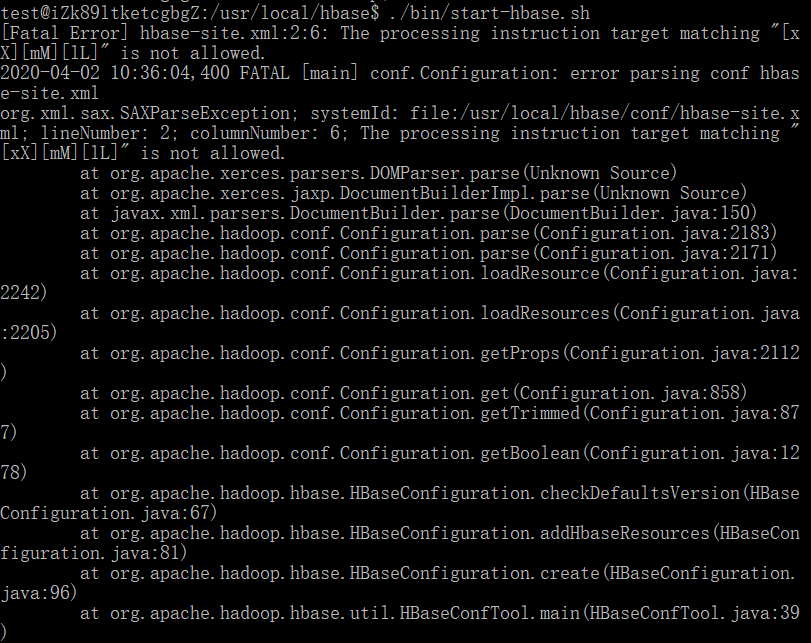
Summary of Hadoop installation Configuration file matching Remember to follow the format, otherwise he will have a reminder At this time, you only need to delete the space at the beginning of the rele...
Linux installation hadoop summary
Install jdk first Set environment variables Download hadoop Modify jdk profile, add HADOOP_HOME Modify 4 files under hadoop hadoop-env.sh core-site.xml hdfs-site.xml mapred-site.xml format Turn on Ano...
Hadoop Summary in Ubantukylin installation
1, IP problem: Ifconfig does not display the IP of Enp3S0. After receiving the information, LO is a local loopback address, used for local and its own connectivity, does not take the network, if Hadoo...