JAVA OpenGL development IDEA configuration LWJGL
Recently, the company didn’t have any mobile phone projects, and I didn’t know what to do, so I studied JAVA development on PC. At first I studied OpenCV. I found that some OpenGL filters are processed very slowly with OpenCV, so I started to study OpenGL. After a while, I found that everyone recommends using LWJGL and try to learn.
Let me talk about the LWJGL version first.GithubThe download is the latest LWJGL 3.2.3
IDEA version is 2020.2
Start adding jar packages on IDEA
File->Project Structure
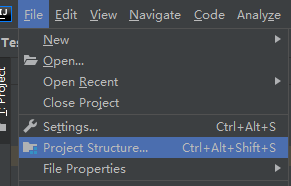
Click Libraries and click + to select java
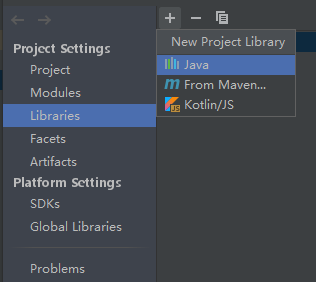
Add the required jar package
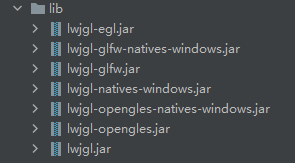
I developed it on Android, so I chose OpenGLES, which is relatively familiar on Android, to practice. When I get familiar with it, I will try other jar packages. I’m not familiar with IDEA and don’t know other configuration methods, so use it first.
Then I according to the officialDemoTry to change the code in it to several OpenGLES tool classes that I often use on Android
The first is EGLUtils.java
import org.lwjgl.egl.EGL;
import org.lwjgl.egl.EGLCapabilities;
import org.lwjgl.glfw.GLFWErrorCallback;
import org.lwjgl.opengles.GLES;
import org.lwjgl.opengles.GLESCapabilities;
import org.lwjgl.system.MemoryStack;

import java.lang.reflect.Field;
import java.nio.IntBuffer;

import static org.lwjgl.egl.EGL10.eglGetError;
import static org.lwjgl.egl.EGL10.eglInitialize;
import static org.lwjgl.glfw.Callbacks.glfwFreeCallbacks;
import static org.lwjgl.glfw.GLFW.*;
import static org.lwjgl.glfw.GLFWNativeEGL.glfwGetEGLDisplay;
import static org.lwjgl.opengles.GLES20.*;
import static org.lwjgl.system.MemoryStack.stackPush;
import static org.lwjgl.system.MemoryUtil.NULL;

public class EGLUtils {
    private long window = NULL;
    public void initEGL(int width,int height,String title){
        GLFWErrorCallback.createPrint().set();
        if (!glfwInit()) {
            throw new IllegalStateException("Unable to initialize glfw");
        }

        glfwDefaultWindowHints();
        glfwWindowHint(GLFW_VISIBLE, GLFW_FALSE);
        glfwWindowHint(GLFW_RESIZABLE, GLFW_TRUE);

        // GLFW setup for EGL & OpenGL ES
        glfwWindowHint(GLFW_CONTEXT_CREATION_API, GLFW_EGL_CONTEXT_API);
        glfwWindowHint(GLFW_CLIENT_API, GLFW_OPENGL_ES_API);
        glfwWindowHint(GLFW_CONTEXT_VERSION_MAJOR, 2);
        glfwWindowHint(GLFW_CONTEXT_VERSION_MINOR, 0);

        int WIDTH  = 300;
        int HEIGHT = 300;
        if(width != 0 && width != WIDTH){
            WIDTH = width;
        }
        if(height != 0 && height != HEIGHT){
            HEIGHT = height;
        }

        String t = "";
        if(title != null){
            t = title;
        }

        window = glfwCreateWindow(WIDTH, HEIGHT, t, NULL, NULL);
        if (window == NULL) {
            throw new RuntimeException("Failed to create the GLFW window");
        }

        glfwSetKeyCallback(window, (windowHnd, key, scancode, action, mods) -> {
            if (action == GLFW_RELEASE && key == GLFW_KEY_ESCAPE) {
                glfwSetWindowShouldClose(windowHnd, true);
            }
        });

        // EGL capabilities
        long dpy = glfwGetEGLDisplay();
        EGLCapabilities egl;
        try (MemoryStack stack = stackPush()) {
            IntBuffer major = stack.mallocInt(1);
            IntBuffer minor = stack.mallocInt(1);
            if (!eglInitialize(dpy, major, minor)) {
                throw new IllegalStateException(String.format("Failed to initialize EGL [0x%X]", eglGetError()));
            }
            egl = EGL.createDisplayCapabilities(dpy, major.get(0), minor.get(0));
        }
        try {
            System.out.println("EGL Capabilities:");
            for (Field f : EGLCapabilities.class.getFields()) {
                if (f.getType() == boolean.class) {
                    if (f.get(egl).equals(Boolean.TRUE)) {
                        System.out.println("\t" + f.getName());
                    }
                }
            }
        } catch (IllegalAccessException e) {
            e.printStackTrace();
        }

        // OpenGL ES capabilities
        glfwMakeContextCurrent(window);
        GLESCapabilities gles = GLES.createCapabilities();

        try {
            System.out.println("OpenGL ES Capabilities:");
            for (Field f : GLESCapabilities.class.getFields()) {
                if (f.getType() == boolean.class) {
                    if (f.get(gles).equals(Boolean.TRUE)) {
                        System.out.println("\t" + f.getName());
                    }
                }
            }
        } catch (IllegalAccessException e) {
            e.printStackTrace();
        }

        System.out.println("GL_VENDOR: " + glGetString(GL_VENDOR));
        System.out.println("GL_VERSION: " + glGetString(GL_VERSION));
        System.out.println("GL_RENDERER: " + glGetString(GL_RENDERER));

        // Render with OpenGL ES
        glfwShowWindow(window);
    }
    public void setWindowSize(int width,int height){
        if(window == NULL){
            return;
        }
        glfwSetWindowSize(window,width,height);
    }
    public int getWindowWidth(){
        if(window == NULL){
            return 0;
        }
        int[] width = new int[1];
        int[] height = new int[1];
        glfwGetWindowSize(window,width,height);
        return width[0];
    }
    public int getWindowHeight(){
        if(window == NULL){
            return 0;
        }
        int[] width = new int[1];
        int[] height = new int[1];
        glfwGetWindowSize(window,width,height);
        return height[0];
    }
    public int[] getWindowSize(){
        if(window == NULL){
            return null;
        }
        int[] width = new int[1];
        int[] height = new int[1];
        glfwGetWindowSize(window,width,height);
        return new int[]{width[0],height[0]};
    }

    public void setWindowTitle(String title){
        if(window == NULL){
            return;
        }
        glfwSetWindowTitle(window,title);
    }
    public boolean isClose(){
        if(window == NULL){
            return true;
        }
        return glfwWindowShouldClose(window);
    }
    public void glPollEvents(){
        glfwPollEvents();
    }
    public void glWaitEvents(){
        glfwWaitEvents();
    }
    public void swap() {
        if(window == NULL){
            return;
        }
        glfwSwapBuffers(window);
    }
    public void release(){
        GLES.setCapabilities(null);
        glfwFreeCallbacks(window);
        glfwTerminate();
        window = NULL;
    }
}
Then ShaderUtils.java
import org.lwjgl.opengles.GLES20;

public class ShaderUtils {
    public static void checkGlError(String label) {
        int error;
        while ((error = GLES20.glGetError()) != GLES20.GL_NO_ERROR) {
            System.out.println(label + ": glError " + error);
            throw new RuntimeException(label + ": glError " + error);
        }
    }

    public static int createProgram(String vertexSource, String fragmentSource) {
        int vertexShader = loadShader(GLES20.GL_VERTEX_SHADER, vertexSource);
        if (vertexShader == 0) {
            return 0;
        }
        int pixelShader = loadShader(GLES20.GL_FRAGMENT_SHADER, fragmentSource);
        if (pixelShader == 0) {
            return 0;
        }
        int program = GLES20.glCreateProgram();
        if (program != 0) {
            GLES20.glAttachShader(program, vertexShader);
            checkGlError("glAttachShader");
            GLES20.glAttachShader(program, pixelShader);
            checkGlError("glAttachShader");
            GLES20.glLinkProgram(program);
            int[] linkStatus = new int[1];
            GLES20.glGetProgramiv(program, GLES20.GL_LINK_STATUS, linkStatus);
            if (linkStatus[0] != GLES20.GL_TRUE) {
                System.out.println( "Could not link program: ");
                System.out.println(GLES20.glGetProgramInfoLog(program));
                GLES20.glDeleteProgram(program);
                program = 0;
            }
        }
        return program;
    }


    public static int loadShader(int shaderType, String source) {
        int shader = GLES20.glCreateShader(shaderType);
        if (shader != 0) {
            GLES20.glShaderSource(shader, source);
            GLES20.glCompileShader(shader);
            int[] compiled = new int[1];
            GLES20.glGetShaderiv(shader, GLES20.GL_COMPILE_STATUS, compiled);
            if (compiled[0] == 0) {
                System.out.println("Could not compile shader " + shaderType + ":");
                System.out.println(GLES20.glGetShaderInfoLog(shader));
                GLES20.glDeleteShader(shader);
                shader = 0;
            }
        }
        return shader;
    }
}
The last is GLRenderer.java
import org.lwjgl.BufferUtils;
import org.lwjgl.opengles.GLES20;

import java.awt.image.BufferedImage;
import java.nio.ByteBuffer;
import java.nio.ByteOrder;
import java.nio.FloatBuffer;

public class GLRenderer {

    private int[] textures = new int[1];

    private int[] bos = new int[2];

    private int programId;
    private int aPositionHandle;
    private int aTextureCoordHandle;
    private int uTextureSamplerHandle;


    private int imageWidth,imageHeight;

    public void initShader(BufferedImage image){
        imageWidth = image.getWidth();
        imageHeight = image.getHeight();
        String vertexShader = "attribute vec4 aPosition;\n" +
                "attribute vec2 aTexCoord;\n" +
                "varying vec2 vTexCoord;\n" +
                "void main() {\n" +
                "  vTexCoord = aTexCoord;\n" +
                "  gl_Position = aPosition;\n" +
                "}";
        String fragmentShader = "varying highp vec2 vTexCoord;\n" +
                "uniform highp sampler2D uTexture;\n" +
                "void main() {\n" +
                "    highp vec4 color = texture2D(uTexture, vec2(vTexCoord.x,1.0-vTexCoord.y));\n" +
                "    gl_FragColor = color;\n" +
                "}";
        programId = ShaderUtils.createProgram(vertexShader, fragmentShader);
        aPositionHandle = GLES20.glGetAttribLocation(programId, "aPosition");
        aTextureCoordHandle = GLES20.glGetAttribLocation(programId, "aTexCoord");
        uTextureSamplerHandle = GLES20.glGetUniformLocation(programId, "uTexture");

        final float[] vertexData = {
                1f, -1f, 0f,
                -1f, -1f, 0f,
                1f, 1f, 0f,
                -1f, 1f, 0f
        };


        final float[] textureVertexData = {
                1f, 0f,
                0f, 0f,
                1f, 1f,
                0f, 1f
        };
        FloatBuffer vertexBuffer = ByteBuffer.allocateDirect(vertexData.length * 4)
                .order(ByteOrder.nativeOrder())
                .asFloatBuffer()
                .put(vertexData);
        vertexBuffer.position(0);

        FloatBuffer textureVertexBuffer = ByteBuffer.allocateDirect(textureVertexData.length * 4)
                .order(ByteOrder.nativeOrder())
                .asFloatBuffer()
                .put(textureVertexData);
        textureVertexBuffer.position(0);

        GLES20.glGenBuffers(bos);
        GLES20.glBindBuffer(GLES20.GL_ARRAY_BUFFER, bos[0]);
        GLES20.glBufferData(GLES20.GL_ARRAY_BUFFER, vertexBuffer, GLES20.GL_STATIC_DRAW);
        GLES20.glBindBuffer(GLES20.GL_ARRAY_BUFFER, bos[1]);
        GLES20.glBufferData(GLES20.GL_ARRAY_BUFFER,  textureVertexBuffer, GLES20.GL_STATIC_DRAW);
        GLES20.glBindBuffer(GLES20.GL_ARRAY_BUFFER, 0);


        GLES20.glGenTextures(textures);
        GLES20.glBindTexture(GLES20.GL_TEXTURE_2D, textures[0]);
        GLES20.glTexParameterf(GLES20.GL_TEXTURE_2D, GLES20.GL_TEXTURE_MIN_FILTER, GLES20.GL_LINEAR);
        GLES20.glTexParameterf(GLES20.GL_TEXTURE_2D, GLES20.GL_TEXTURE_MAG_FILTER, GLES20.GL_LINEAR);
        GLES20.glTexParameteri(GLES20.GL_TEXTURE_2D, GLES20.GL_TEXTURE_WRAP_S, GLES20.GL_CLAMP_TO_EDGE);
        GLES20.glTexParameteri(GLES20.GL_TEXTURE_2D, GLES20.GL_TEXTURE_WRAP_T, GLES20.GL_CLAMP_TO_EDGE);
        GLES20.glTexImage2D(GLES20.GL_TEXTURE_2D, 0, GLES20.GL_RGBA, imageWidth, imageHeight,0, GLES20.GL_RGBA, GLES20.GL_UNSIGNED_BYTE, imageToBuffer(image));
        GLES20.glBindTexture(GLES20.GL_TEXTURE_2D, 0);
    }

    private void viewportSize(int screenWidth,int screenHeight,int width,int height) {
        int left, top, viewWidth, viewHeight;
        float sh = screenWidth * 1.0f / screenHeight;
        float vh = width * 1.0f / height;
        if (sh < vh) {
            left = 0;
            viewWidth = screenWidth;
            viewHeight = (int) (height * 1.0f / width * viewWidth);
            top = (screenHeight - viewHeight) / 2;
        } else {
            top = 0;
            viewHeight = screenHeight;
            viewWidth = (int) (width * 1.0f / height * viewHeight);
            left = (screenWidth - viewWidth) / 2;
        }
        GLES20.glViewport(left, top, viewWidth, viewHeight);
    }

    public void drawFrame(int screenWidth,int screenHeight){
        viewportSize(screenWidth,screenHeight,imageWidth,imageHeight);
        GLES20.glClear(GLES20.GL_DEPTH_BUFFER_BIT | GLES20.GL_COLOR_BUFFER_BIT);
        GLES20.glClearColor(1.0f,1.0f,1.0f,1.0f);

        GLES20.glUseProgram(programId);

        GLES20.glActiveTexture(GLES20.GL_TEXTURE0);
        GLES20.glBindTexture(GLES20.GL_TEXTURE_2D, textures[0]);
        GLES20.glUniform1i(uTextureSamplerHandle, 0);

        GLES20.glBindBuffer(GLES20.GL_ARRAY_BUFFER, bos[0]);
        GLES20.glEnableVertexAttribArray(aPositionHandle);
        GLES20.glVertexAttribPointer(aPositionHandle, 3, GLES20.GL_FLOAT, false,
                0, 0);
        GLES20.glBindBuffer(GLES20.GL_ARRAY_BUFFER, bos[1]);
        GLES20.glEnableVertexAttribArray(aTextureCoordHandle);
        GLES20.glVertexAttribPointer(aTextureCoordHandle, 2, GLES20.GL_FLOAT, false, 0, 0);


        GLES20.glDrawArrays(GLES20.GL_TRIANGLE_STRIP, 0, 4);

        GLES20.glBindBuffer(GLES20.GL_ARRAY_BUFFER, 0);
        GLES20.glBindTexture(GLES20.GL_TEXTURE_2D, 0);
        GLES20.glUseProgram(0);
    }

    public static ByteBuffer imageToBuffer(BufferedImage image) {
        int width = image.getWidth();
        int height = image.getHeight();
        int[] pixels = new int[width * height];
        image.getRGB(0, 0, width, height, pixels, 0, width);
        ByteBuffer buffer = BufferUtils.createByteBuffer(width * height * 4);
        for (int y = 0; y < height; y++) {
            for (int x = 0; x < width; x++) {
                int pixel = pixels[y * width + x];
                buffer.put((byte) ((pixel >> 16) & 0xFF));
                buffer.put((byte) ((pixel >> 8) & 0xFF));
                buffer.put((byte) (pixel & 0xFF));
                buffer.put((byte) ((pixel >> 24) & 0xFF));
            }
        }
        buffer.flip();
        return buffer;
    }
}
The code is very similar to Android, run it in main
public static void main(String[] args) {
	// write your code here
        new Thread(){
            @Override
            public void run() {
                super.run();
                EGLUtils eglUtils = new EGLUtils();
                GLRenderer renderer = new GLRenderer();
                eglUtils.initEGL(500,500,"test");
                BufferedImage image = null;
                try {
                    image = ImageIO.read(new File("X:\\test\\ic_car.jpg"));
                } catch (IOException e) {
                    e.printStackTrace();
                }
                if(image != null){
                    renderer.initShader(image);
                    while (!eglUtils.isClose()){
                        eglUtils.glPollEvents();
                        int[] size = eglUtils.getWindowSize();
                        renderer.drawFrame(size[0],size[1]);
                        eglUtils.swap();
                    }
                }
                eglUtils.release();
            }
        }.start();
    }
effect
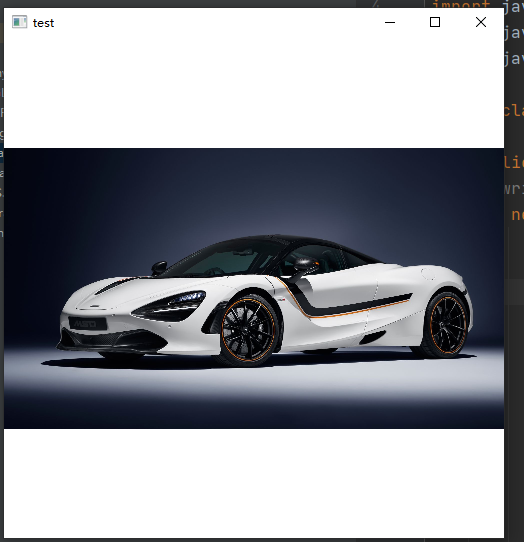
Since I don’t know how to upload the code to Github using IDEA, I posted the code.
Intelligent Recommendation

IntelliJ IDEA Java development environment configuration
01 IntelliJ IDEA Java development environment configuration 1. jdk installation and configuration of environment variables: Go to the official website to download jdk Go to Baidu search how to d...

Idea Java development modified configuration summary.
1. Download Idea to do Java coding. First set the font. It’s ugly. two. Idea configuration maven 1. This is the apache maven location you downloaded. 2. This is the location of your settings pro...

JAVA development artifact IDEA installation, configuration and use
1. Introduction of IntelliJ IDEA IDEA, the full name of IntelliJ IDEA, is an integrated development environment for the Java language. IDEA is recognized as one of the best Java development tools in t...
Centos7 IntelliJ IDEA configuration java development environment
First, install jdk Check if your own machine already has openjdk Provide Oracle account only for jdk download Second, Centos7 installs Maven Third, Centos7 install Git Fourth, install IDEA on the Cent...

Common configuration of Java development tool IDEA
Common configuration summary open a file The default setting is that when you open idea, it will automatically open the last opened project. I do n’t want to open it ~, remove the reopen check b...
More Recommendation
[IntelliJ IDEA Java development configuration: continuous improvement]
It is recommended to read the official IntelliJ IDEA documentation before reading this article: https://www.jetbrains.com/help/idea/install-and-set-up-intellij-idea.html 1. IDEA version selection Vers...
ArcObject for Java Development Environment Configuration (IDEA)
First, system environment configuration 1, JDK version requirements You need to install 32-bit JDK, recommend JDK1.8. download link:https://www.oracle.com/java/technologies/javase/javase-jdk8-download...
Idea+Maven's Java development environment configuration
This article records the entire process of configuring the Hadoop+Java development environment on Windows. This experimental use system isWin10 The installation position of Maven isD: \ program file \...

About LWJGL run configuration and set a good jar package and so on
1. Configure the issue of LWJGL First, download the issue, you can go to the official website to download, lwjgl.jar, but download seems a bit messy, I am here to set up a folder, you can not go to st...
Java development environment deployment development tool Idea basic configuration and instructions
This article is for readers who are new to Idea development tools If you have not installed Idea, please read: [Idea installation and authorization of development tool deployed in Java development env...