FLUTTER Development - Animation - Transition Animation Hero
I. Overview
- Hero animation is also called transition animation
- Excessive animation: When the user clicks on a picture, switch to another page, this page also has this picture.
Di Hero
2.1 Constructor
class Hero extends StatefulWidget
const Hero({
    Key? key,
    required this.tag,
    this.createRectTween,
    this.flightShuttleBuilder,
    this.placeholderBuilder,
    this.transitionOnUserGestures = false,
    required this.child,
  })
2.2 Common Properties Description
| Attributes | Description | Value |
|---|---|---|
| tag | Mark value of transition element components | Object |
| createRectTween | Position animation | Tween<Rect?> Function |
| flightShuttleBuilder | Animation process component | Widget Function |
| placeholderBuilder | Tension component | Widget Function |
| transitionOnUserGestures | Whether to display an animation with a gesture | bool |
Note: 2 pages have HERO controls, andtagConsistent parameters
Three samples
3.1 code
Jump page
class MyApp extends StatelessWidget {
  @override
  Widget build(BuildContext context) {
    return MaterialApp(
      title: 'Flutter Demo',
      theme: ThemeData(primarySwatch: Colors.blue,),
      home: MyHomePage(title: 'Flutter Demo Home Page'),
    );
  }
}
class MyHomePage extends StatefulWidget {
  MyHomePage({Key key, this.title}) : super(key: key);
  final String title;
  @override
  _MyHomePageState createState() => _MyHomePageState();
}
class _MyHomePageState extends State<MyHomePage> {
@override
  Widget build(BuildContext context) {
    _getLocalFile();
    return Scaffold(
        appBar: AppBar(
          title: Text(widget.title),
          backgroundColor: Colors.orange,
          centerTitle: true,
          //actions: [],
          // Leading: Text ("left component"),
        ),
		body:Column(children: [
          Hero(tag: "HeroTag", child: Image.asset("images/img_1.jpg",width: 100,height: 100,),),
                     RaisedButton (Child: Text ("Jump"), onpressed: () {
            Navigator.of(context).push(MaterialPageRoute(builder: (context){
                             Return OtherPage (Title: "New Page",);
            }));
          })
        ],),
      )
}
Jump after the page
class OtherPage extends StatefulWidget{
  OtherPage({Key key,this.title}):super(key: key);
  final String title;
  @override
  State<StatefulWidget> createState() =>_OtherPageState();
}
class _OtherPageState extends State<OtherPage>
{
  @override
  Widget build(BuildContext context) {
    return Scaffold(
      appBar: AppBar(title: Text(widget.title),),
      body: Hero(tag: "HeroTag", child: Image.asset("images/img_1.jpg",width: 100,height: 100,),),
    );
  }
}
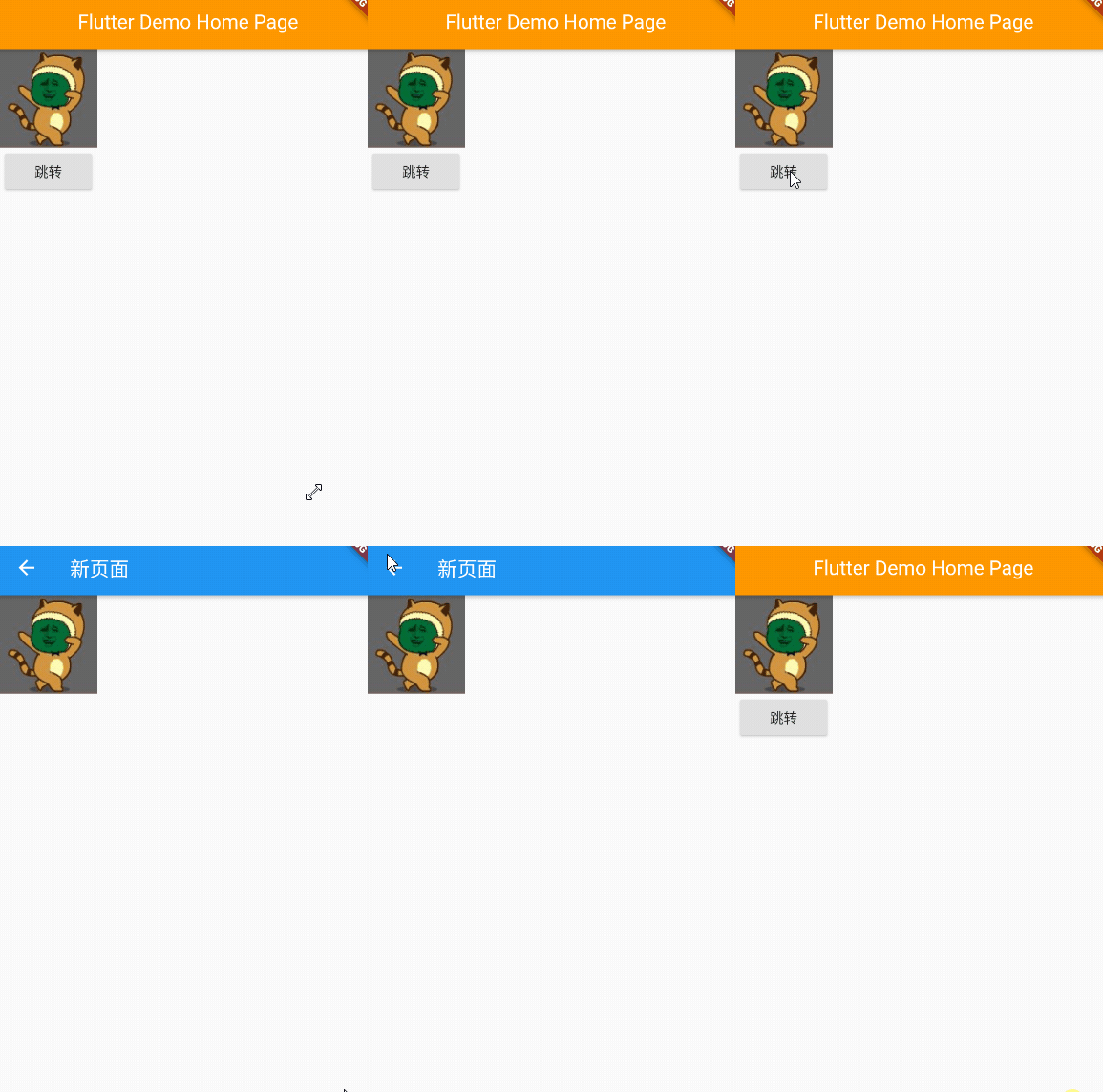
3.2 renderings
Intelligent Recommendation

Talk about the shared element animation in Flutter Hero
If you are an Android developer, you should be familiar with it.Shared Element TransitionThis concept, it can make a smooth transition animation between two Activity or Fragment through a few lines of...
Flutter Animation animation development-AnimatedBuilder
Source code analysis inFlutter Animation animation development-AnimatedWidgetIn this article we introduced the use of AnimatedWidget. The AnimatedBuilder to be introduced today actually inherits Anima...
Flutter Animation animation development-AnimatedWidget
inFlutter Animation animation development-the simplest animation introductionIn this article, we introduced the basic process of creating an animation, in which every creation of an animation must lis...

FLUTTER Development - Animation - Sequence Animation
An application scenario A component performs a sequence animation, performing the time of 5s When half of the front, long first, color changes, the back half of the time is changed Two use TWEEN anima...
FLUTTER Development - Animation - Custom Animation
Why do you want to customize an animation? When the animation provided by the system does not meet business needs, we need our own custom animation. Enhance the ability of custom components through cu...
More Recommendation
FLUTTER Development - Animation - Physics Animation
I. Overview TWEEN animation: give the starting value and end value of the animation, FLUTTER calculates the movie process Physical animation: Uncertain end value, animation simulation according to sta...
FLUTTER Development - Animation - GIF Animation
I. Overview Image component support loading GIF images GIF itself is a dynamic picture, which defines the total length of time and animation of each frame. Second Add GIF 2.1 material 2.2 Add GIF Add ...

Flutter Animation Animation Development Guide
Animation Animation Development Guide What types of animations are there in Flutter? How to use the basic class in the animation library to add animation to widget? How to add a monitor to animation? ...
Flutter Animation animation development-Curve animation curve
Introduction inFlutter Animation animation development-the simplest animation introductionIn this article we introduced the simplest animation development process Today we add an animation curve on th...
Flutter Animation animation development-the simplest animation introduction
In the following code, we have implemented an animation that changes the width and height of the green square from 100 to 500 within 5 seconds. to sum up: Create AnimationController and set the durati...