Springboot uses NACOS dynamic configuration data sources
tags: spring cloud java spring boot
After the SpringBoot / SpringCloud project is deployed, if you use a hard-coded method to define the data source, then if you need to replace the database, you can only reach your source by changing the source code and restarting.
And SpringCloud ecology has a configuration center, we can write data source connection properties in the configuration center, you need to modify the connection attribute to modify and release from the configuration center, so you can heat-modify the data source location without restart service
Then, the following actual meant explains how to configure data sources using NACOS configuration / registration centers (please note the comments I wrote to avoid pits)
First explain the version
- SpringBoot 2.2.0.RELEASE
- Druid 1.1.22 (when rewritten, the class will vary from the version)
- MySQL 8.0.18
- NACOS 1.3.1 (NACOS version is not very likely to step on the pit)
- IDEA 2020.3.2
- Mybatis 2.1.4 (useless, but if used does not conflict)
The article is longer, but most are copy paste operations, first explain the steps of the entire configuration.
- Create a SpringBoot project and introduce dependence (direct copy paste)
- Create a bootstrap.yml file (directly copy paste)
- Create a configuration class (directly copy paste)
- Rewrive the Druid DruidabStractDataSource class (this needs to be modified according to the version)
- New configuration in the NACOS Configuration Center
Complete the configuration project directory
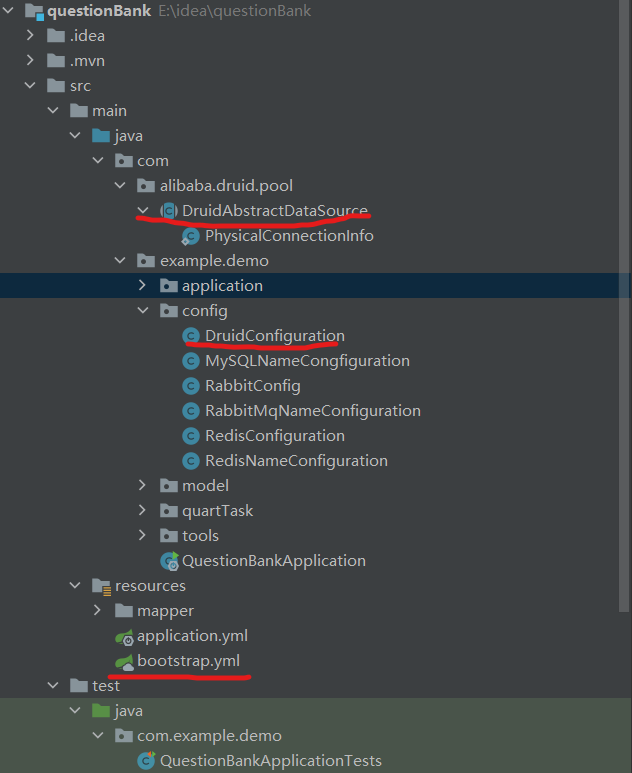
Please note: I will use Idea to create a SpringBoot project using IDEA, and you can install NACOS yourself.
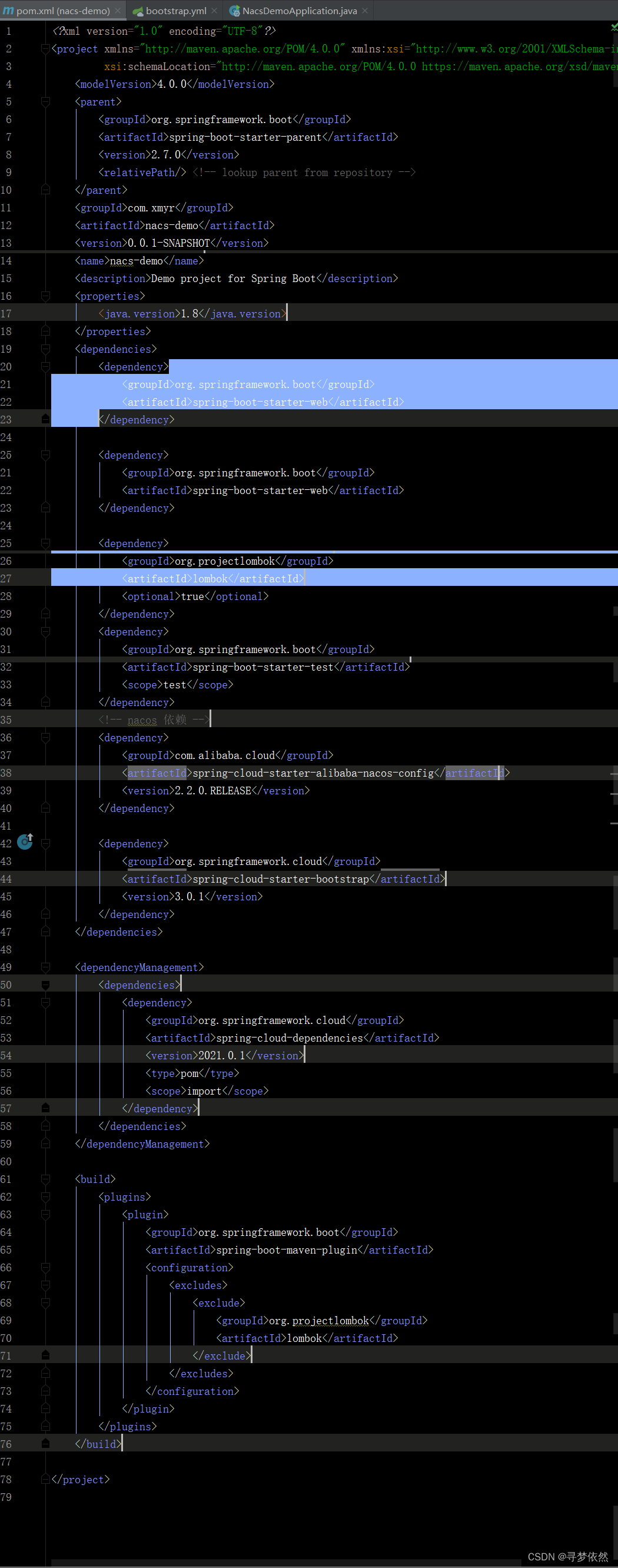
1.maven dependence
 	<properties>
        <project.build.sourceEncoding>UTF-8</project.build.sourceEncoding>
        <project.reporting.outputEncoding>UTF-8</project.reporting.outputEncoding>
        <java.version>1.8</java.version>
        <maven-jar-plugin.version>3.1.1</maven-jar-plugin.version>
    </properties>

    <dependencyManagement>
        <dependencies>
            <dependency>
                <groupId>com.alibaba.cloud</groupId>
                <artifactId>spring-cloud-alibaba-dependencies</artifactId>
                <version>2.1.1.RELEASE</version>
                <type>pom</type>
                <scope>import</scope>
            </dependency>
        </dependencies>
    </dependencyManagement>
    <dependencies>
        <dependency>
            <groupId>org.mybatis.spring.boot</groupId>
            <artifactId>mybatis-spring-boot-starter</artifactId>
            <version>2.1.4</version>
        </dependency>
        <dependency>
            <groupId>org.springframework.boot</groupId>
            <artifactId>spring-boot-starter-test</artifactId>
            <scope>test</scope>
            <exclusions>
                <exclusion>
                    <groupId>org.junit.vintage</groupId>
                    <artifactId>junit-vintage-engine</artifactId>
                </exclusion>
            </exclusions>
        </dependency>
        <dependency>
            <groupId>org.springframework.boot</groupId>
            <artifactId>spring-boot-starter-web</artifactId>
        </dependency>

        <dependency>
            <groupId>mysql</groupId>
            <artifactId>mysql-connector-java</artifactId>
            <scope>runtime</scope>
        </dependency>
        <dependency>
            <groupId>com.alibaba</groupId>
            <artifactId>druid-spring-boot-starter</artifactId>
            <version>1.1.22</version>
        </dependency>
        <dependency>
            <groupId>com.alibaba.cloud</groupId>
            <artifactId>spring-cloud-starter-alibaba-nacos-config</artifactId>
        </dependency>
        <dependency>
            <groupId>com.alibaba.cloud</groupId>
            <artifactId>spring-cloud-starter-alibaba-nacos-discovery</artifactId>
        </dependency>
        <dependency>
            <groupId>org.springframework.boot</groupId>
            <artifactId>spring-boot-configuration-processor</artifactId>
            <optional>true</optional>
        </dependency>
        <dependency>
            <groupId>org.projectlombok</groupId>
            <artifactId>lombok</artifactId>
            <optional>true</optional>
            <scope>provided</scope>
            <version>1.18.12</version>
        </dependency>
    </dependencies>
2.bootstrap.yml (this priority is higher than the Properties file for configuring NACOS)
If you need to distinguish the production environment or take NACOS to Mysql, please learn from the NACOS official document.
spring:
  application:
  	#       name with the lowermost file-extension:  Properties
  	   #   QuestionBank.Properties name is the name of the NACOS profile
    name: questionBank
  cloud:
    nacos:
             # Register Center
      discovery:
                 # Whether to enable
        enabled: true
                 # NACOS service address
        server-addr: 127.0.0.1:8848
                 # Service Name
        #service: ${spring.application.name}
                 # group name
        group: DEFAULT
                 # Weights
        weight: 2
                 #
        metadata:
          auth: sty
          version: 1.0
                 #
        log-name: ${spring.application.name}
                 # Whether to open Watch
        watch: true
                 # How long is pulled from the server?
        watch-delay: 30000
                 #   name
        cluster-name: DEFAULT
                 # Whether to open a registration, iffalseWill not register itself
        register-enabled: true
        # https
        secure: false
             # Configuration Center
      config:
        server-addr: 127.0.0.1:8848
                 #
        file-extension: properties
server:
  port: 8080
3. Configuration class: druidconfiguration (called )
import com.alibaba.druid.pool.DruidDataSource;
import lombok.Data;
import org.springframework.beans.factory.annotation.Value;
import org.springframework.cloud.context.config.annotation.RefreshScope;
import org.springframework.context.annotation.Bean;
import org.springframework.context.annotation.Configuration;
/**
 * @Author:STY
   * @Description: Data Source Get Configuration (Configuration Center)
 * @Date:2021/3/17
 */
@Configuration
@RefreshScope
@Data
public class DruidConfiguration {

    @Value("${spring.datasource.druid.url}")
    private String url;

    @Value("${spring.datasource.druid.username}")
    private String username;

    @Value("${spring.datasource.druid.password}")
    private String password;

    @Value("${spring.datasource.druid.url.driverClassName}")
    private String driverClassName;

    @Bean(name="datasource")
    @RefreshScope
    public DruidDataSource dataSource()
    {
        DruidDataSource datasource = new DruidDataSource();
        System.out.println(url);
        datasource.setUrl(this.url);
        datasource.setUsername(username);
        datasource.setPassword(password);
        datasource.setDriverClassName(driverClassName);
        return datasource;
    }
}
Attention please:@Refreshscope must be added! ! ! ! ! ! ! Otherwise, you will not be able to automatically refresh the new data released from the NACOS, because Lombok is more useful, @Data directly uses him.
4. Then is the most important step (this is modified as the Druid version)
Reiterate the Druid version I used to 1.1.22
Rewrite com.alibaba.druid.pool.druidabstractdataSource Class
Due to DruidOnly allow initialization onceSo you can only modify his source, and the version can cause this class and must be particularly payable when modifying the source code! ! ! ! ! !
Create alibaba.druid.pool under the COM package (the path is wrong)
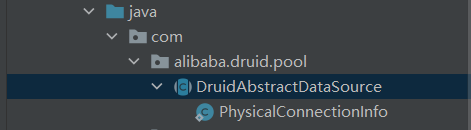
DruidabStractDataSource class directly copies
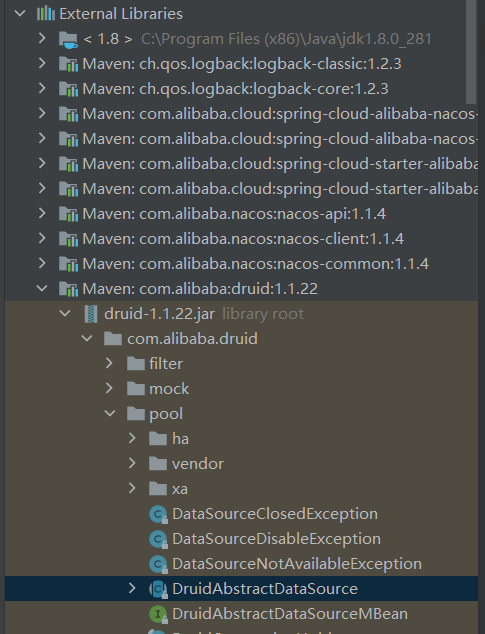
Then find the following two methods in the copy of the copy.
Note out of the painting position
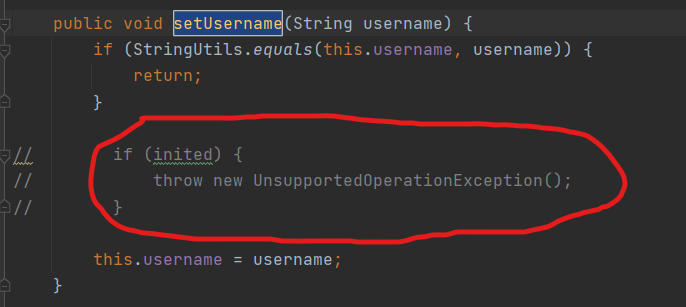
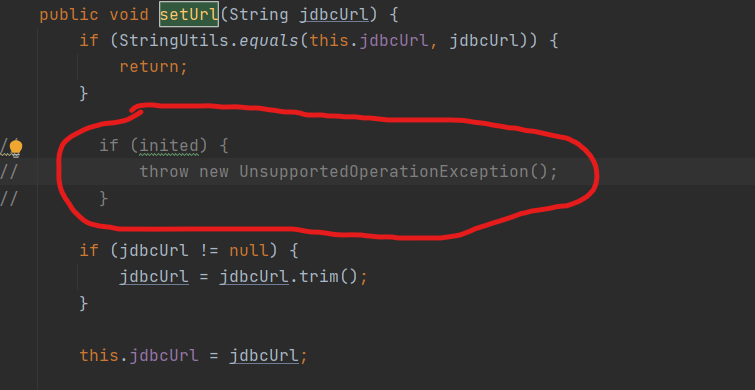
At this point, the local item has been configured, and the last step is left, create a configuration file on NACOS.
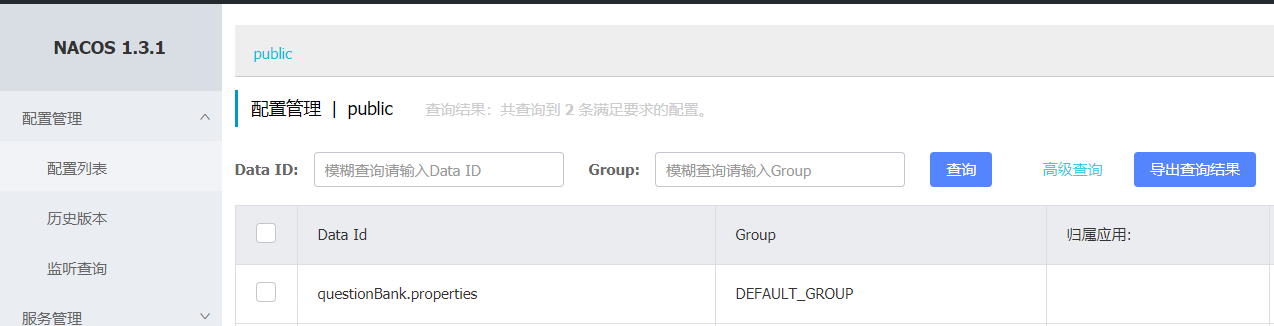
This DATA ID corresponds to the name of the name in the second step in the second step (notes the comment)
Configuring the format to check Properties
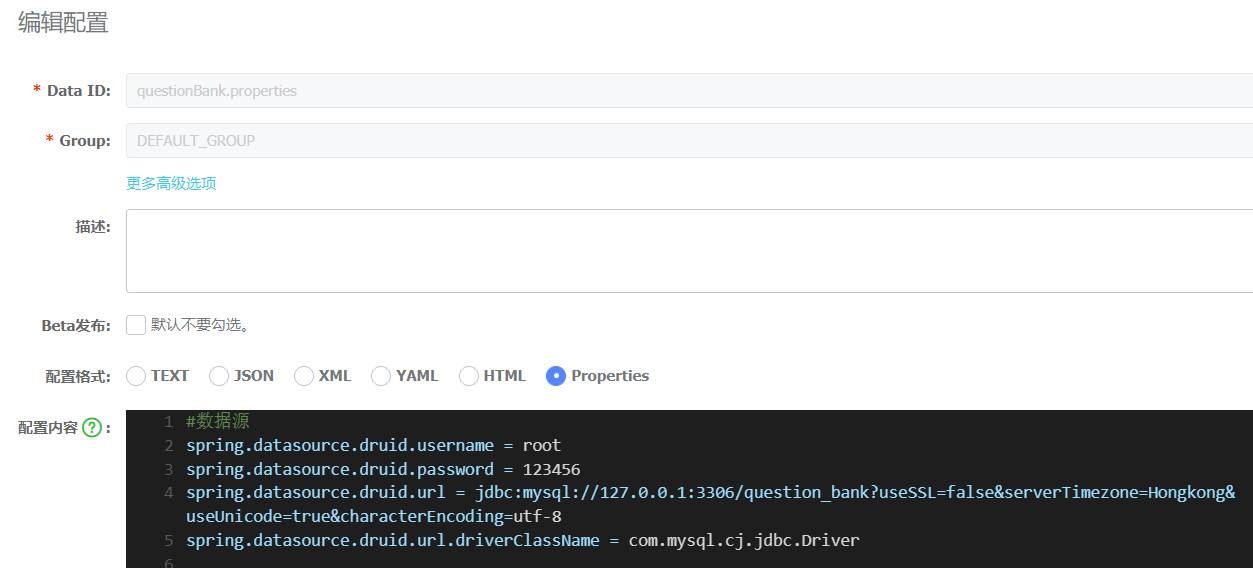
Click to release, get it!
Intelligent Recommendation
SpringBoot integrated NACOS for dynamic configuration
Table of contents What is NACOS? Windows installation NACOS? nacos configuration database SpringBoot integrated NACOS What is NACOS? What is nacos? I will not introduce it in detail, you can read it d...
SpringBoot dynamic data source switch (NACOS configuration center)
Articles directory Foreword 1 Project file structure 2 Configuration file and pom.xml file 2.1 pom.xml 2.2 bootstrap.yml 2.3 Configuration in nacos 3 java file content 3.1 ORG.Feng.DataSource 3.1.1 Dy...
SpringBoot uses Nacos Configuration Center
This article describes how SpringBoot uses Alibaba Nacos as a configuration center. 1. Introduction to Nacos Nacos is an easy-to-use platform for Alibaba Group's open source, designed for dynamic serv...
(Springboot uses Nacos as the configuration center)
Springboot uses Nacos as the configuration center surroundings Project configuration Advanced use Configure dev, prod, test environment Separate configuration between microservices Each microservice c...
Springboot uses nacos configuration problem
Nacos configuration issues Problem 1: The configuration does not take effect Clearly configured spring.cloud.nacos.config.server-addr=192.168.100.123:8846,192.168.100.123:8847,192.168.100.123:8848 Why...
More Recommendation
springboot uses nacos as the configuration center
1. Introduce dependencies 2. Create under the class path: bootstrap.properties, configuration: 3. Add a data set to the configuration center by default: Data ID: Application name.properties Default ru...
SpringBoot uses nacos as configuration center
Article Directory Preface 1. Key features of Nacos 2. Use steps 1. Download Nacos and start 2. Create SpringBoot Project Preface When we use SpringCloud, we will use a service called NacosNacos offici...
Springboot, configuration, multiple data sources
In the process of doing the project, it is inevitable to encounter this situation: a project needs data from two databases, I hope this article can help a little partner who encounters these problems....
Springboot configuration multiple data sources
In the project, sometimes you need to connect to multiple databases to find data, you need to configure multiple data sources. Here are the connections configured with three databases: application.yml...
Configuration of multiple data sources in SpringBoot
1. Configuration in application.properties 2.DataSourceConfig 3. MyBatis configuration Configure the data source 1----------- first obtain SqlSessionFactory —> then set SqlSessionTemplate Con...