Linux system view, set, get environment variables
tags: Linux
Environment variables of linux system
Operating system environment variables generally refer to some parameters used to specify the operating environment of the system
Common environment variables are:
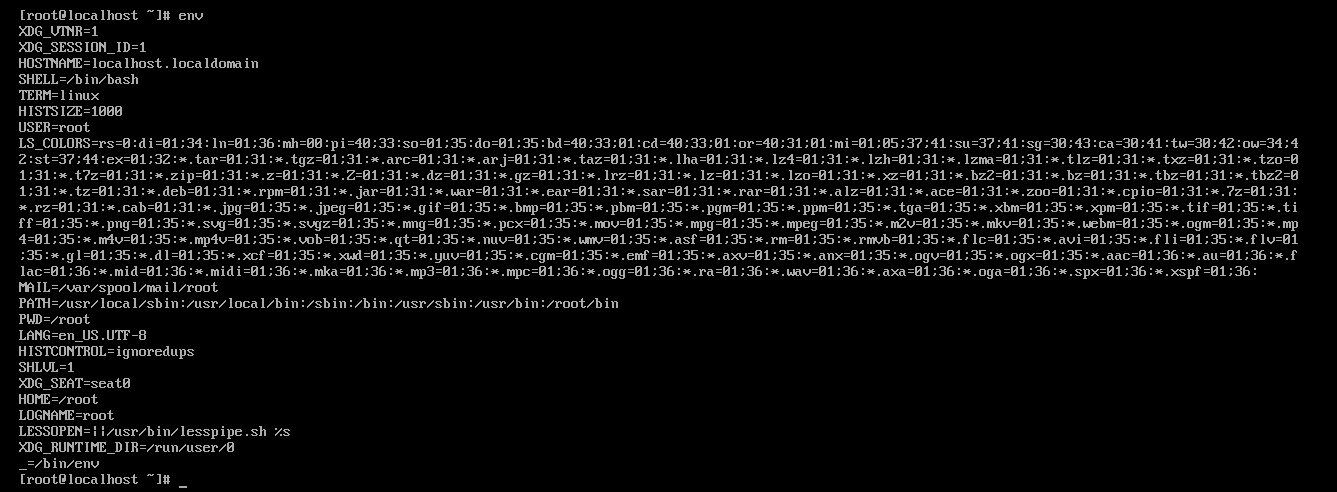
PATH: Specify the search path of the command
HISTSIZE: Number of records to save history commands
SHELL: the current shell, the value is usually bin\bash
HOME: Specify the user's main working directory
View environment variables:
Use the env command to view the environment of all systems
Use echo $NAME //NAME is the environment variable you specify
Use set to display locally defined environment variables and shell variables
Set the environment variables:
Set permanent environment variables
1. Edit under the /etc/profile file, the changed environment variables are for all users
 export CLASSPATH = /../... The path is an absolute path

 2. Modify in the ./barsh_profile file in the current user directory. If you modify it, it will only take effect for the current user.
vim /home/wens/.barshc
 export CLASSPATH = /../... The path is an absolute path

 Finally, use the source command to directly make the environment variables effective
 source /home/wens/.barshc //Directly follow the environment variable file
Set temporary environment variables
Use the export command to directly set the environment variables, but it is temporary and only works under the current shell

 export environment variable = path
Clear environment variables
Use the unset command to clear the environment variables directly
// unset PATH
How environmental variables are organized
Each program has an environment variable table. The environment variables are organized by an array of character pointers. Each pointer points to an environment variable string ending in ‘’/0’.
environ -> [-]--> PATH=/home/dsd\0
           [-]--> home=/DSD/SD\0
           [ ]--> ....
           [ ]
           [NULL]
Get environment variables through code
The third parameter through the command line
int main(int argc, cahr* argv[], char* env[]){
         //Environment variables are stored in the env array
}
Obtained through third-party variable environ
int main(int argc, cahr* argv[]){
    extern cahr ** environ;
             //environ points to the global environment variable table, does not exist in any file, can only be accessed through extern
           //Environ variables stored in the array of character pointers are environment variables
}
Get environment variables through system calls
putenv
int putenv(const char *name)
getenv
char *getenv(const char *name)


 Parameters must be given in the form of path=/../..
Environment variables are global and can be inherited by child processes
Intelligent Recommendation
C# set and get system environment variables
C# set and get environment variables 1 Introduction 2. Code Static methods under the Environment class Get environment variables: Set environment variables: PS: This method of setting environment vari...
Android guide to get and set system environment variables
Android Guide to Obtaining and Setting System Environment Variables Preface During the analysis of Android source code, System.getenv("xxx") and get...
Java get environment variables and get and set system variables
1. Java obtains environment variables The way Java gets environment variables is very simple: System.getEnv() Get all environment variables System.getEnv(key) Get the value of an environment variable ...
View and modify environment variables in Linux system
The environment variables in the Linux system are divided according to the life cycle and can be divided into two categories: permanent: The configuration file needs to be modified, and the variables ...
How to set python environment variables on linux system
For example, if you have a new Python version, we want to let the system use this version by default when running the task. You can do this: Execute the following command on xshell: Add the following ...
More Recommendation
linux set system environment variables sinkhole
In the set system environment variables, that is, .bash_profile or / etc / proflie .bashrc or in the wrong path or wrong format to set the system environment variables! meeting resulting in The...
View and set of variables - Linux
printenv - print all or part of environment Display all variables:print show a variable:print <variable name> Orecho $<variable name> env --- display / Set the current user variables User ...
View the Linux environment variables
Members Keguan Well, recently a new crown virus outbreak is more serious, you also want to go and a lot of precautions, be sure to wear a mask! ! ! Next, the relevant knowledge to talk about environme...

linux view environment variables
When the application is executed, it receives a set of environment variables. You can use the env command to view all environment variables related to the terminal. For a process, its runtime environm...
Linux view java jdk installation path and set environment variables
When the tomcat was paused on the recent project, the following error occurred. It is determined that the java environment variable configuration error is caused. The correct path: /usr/lib/jvm/java-7...