Installation tutorial: python3.5+win7+Scrapy
Directly install through pip3 install Scrapy, generally will report an error:error: Unable to find vcvarsall.bat
There are 2 solutions on the Internet:
- Install lxml.whl and twisted.whl through wheel
- Install vs2015 and check various options that support python
Here, Method 1 is chosen decisively. After all, the installation package for Method 1 is small and convenient.
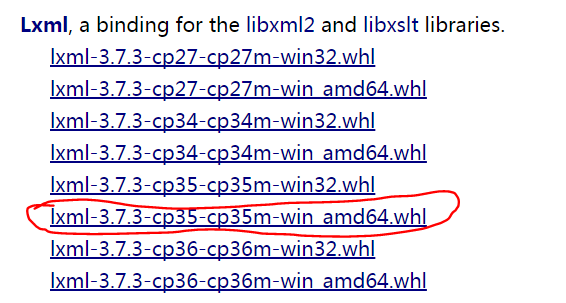
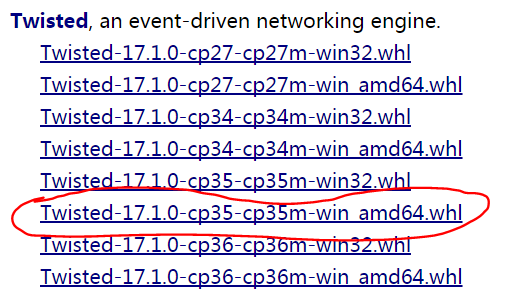
Note: CP35 is the python3.5 version amd 64 is a 64-bit operating system.
- At this URLhttp://www.lfd.uci.edu/~gohlke/pythonlibs/Download lxml.whl and twisted.whl corresponding to the windows version and python version files (as shown):
- Install the wheel module: pip3 install wheel
- Enter the download directory of the above package and install it (I downloaded it under d://py35//download):
- d:
- cd py35/download
- pip3 install lxml-3.7.3-cp35-cp35m-win_amd64.whl
- pip3 install Twisted-17.1.0-cp35-cp35m-win_amd64.whl
- Just install Scrapy: pip3 install Scrapy

</article>
5. After installation
Successfully! Don’t rush to distribute flowers first. If the installation is successful, you need to verify, type scrapy -h
Intelligent Recommendation
Solutions to the problems encountered when based on Win7, python3.5 installation keras, and installation
Keras is a compatible Theano and Tensorflow advanced neural network package, he can use a neural network to quickly assembly. With tensorflow ortheanoAfter the foundation, you can learn to use keras, ...
Install OpenCV tutorial under Win7, Anaconda3, python3.5, pycharm2017.1 platform
surroundings win7 64 bit Anaconda3 4.2.0(python3.5) Pycharm 2017.1 Install OPENCV Configure Tsinghua source After configuring as Tsinghua source first, install it, otherwise it will be stuck when inst...
Anaconda python3.5 tensorflow1.2 version installation tutorial
Write a custom catalog title here Anaconda python3.5 tensorflow1.2 version installation tutorial Anaconda python3.5 tensorflow1.2 version installation tutorial The whole process is really a history of...
Window10+Anaconda+python3.5+pycharm+tensorflow_cpu installation tutorial
1 Anaconda 1.1 Download and install Anaconda and Python3.5 Official website:https://www.anaconda.com Method①: Download and install the latest Anaconda version, and enter it in the Anaconda Prompt comm...
python3.5 + win10 installation scrapy error error: Unable to find vcvarsall.bat solution
Installation scrapy error error: Unable to find vcvarsall.bat solution Installation Environment: operating system:win10 64 Wei python version:Python 3.5.4 64 bit (AMD64) Solution When online to find a...
More Recommendation

Node.js installation tutorial (Win7)
1. git download and install download link:git download The installation process is not explained. Check whether the installation is successful: If the above message does not appear, please go to the s...

Laragon installation tutorial in Win7
laragon official websitehttps://laragon.org/ laragon's official Chinese website www.laragon.com.cn/ laragon community forum.laragon.org/ 1. Download:https://laragon.org/download.html Select the full v...
Win7 system installation tutorial
Installation preparation ● Download win7 CD image file in advance ● Unzip tool ● Make a backup of important files (data is priceless) ● Prepare the network card driver in advance installation steps 1....

win7 python3.5 start tensorboard
Recently I learned tensorflow and learned fully_connected_feed.py according to the manual. There is a visual tensorboard inside, you can view graph, loss, this function is very useful. So I want to us...

Scrapy installation tutorial in Pycharm
Reptile needs to be installedScrapyModules, books, and online are manyLinux environmentunder Found online atThe scrapy installation tutorial in Pycharm,Record this Thanks to the author for sharingScra...