Vue + PDFKIT + WKHTMLTOPDF Exports PDF encountered problems
First, style problem
1. When using Vue + Elementui, it is found that some components cannot export PDF, which can only use traditional HTML and CSS layout, which exported PDF clearer
2, you need to put the CSS in the template file, then replace the selected export module to the template
Second, export Table, turn the header repeat problem
Solution:
 thead {
            display: table-row-group;// Display the header per page using thead default
        }
Third, implementation
rear end
templateexport_file.txt:
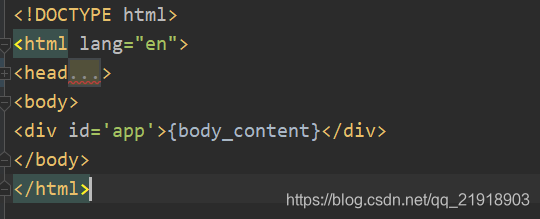
EXPORT_FILE = os.path.join(PROJECT_ROOT, 'fixtures/export_file.txt')
@csrf_exempt
def export_pdf(request):
try:
# params = json.loads(request.body)
# report_id = params.get('report_id', '')
# path = params.get('path', '')
content = request.POST.get("content")
html_string = format_export_string(content)
report_id = request.GET["report_id"]
check_report = CheckReport.objects.get(id=report_id)
file_name = check_report.task_name + "-" + check_report.created_time + ".pdf"
options = {
'page-size': 'A4',
'encoding': "UTF-8",
"javascript-delay": "5000",
"margin-top": "0",
"margin-bottom": "0",
"margin-left": "0",
"margin-right": "0",
'quiet': "",
}
if settings.DEBUG:
configuration = pdfkit.configuration(wkhtmltopdf=r'E:\wkhtmltopdf\bin\wkhtmltopdf.exe')
else:
configuration = pdfkit.configuration(wkhtmltopdf='/usr/bin/wkhtmltopdf')
pdf_path = False
pdf_file = pdfkit.from_string(html_string, pdf_path, options=options, configuration=configuration)
# Pdf.objects.create(report_id=report_id, name=file_name, status=True, operator=request.user.username,
# value=pdf_file)
return download_file(pdf_file, file_name)
except Exception as e:
return JsonResponse({"result": False, "message": str(e)})
def format_export_string(content):
export_file = open(EXPORT_FILE, encoding='utf-8')
file_content = export_file.read()
export_file.close()
html_content = content.replace("&", "&").replace(">", ">") \
.replace('"', '"') \
.replace("'", r"'") \
.replace("<", "<") \
.replace(" ", " ") \
.replace("\n", '') \
.replace("\r", "").strip()
return str(file_content).replace('{body_content}', html_content)
def download_file(file_buffer, file_name):
response = HttpResponse(file_buffer, content_type='APPLICATION/OCTET-STREAM')
response['Content-Disposition'] = 'attachment; filename=' + file_name
response['Content-Length'] = len(file_buffer)
return response
front end
In the Vue project, the CSS style is placed in the public SCSS, do not place in the style of the Vue file.
downLoadPdf() {
      const VueEnv = process.env.NODE_ENV
      const ApiUrl = VueEnv === 'production' ? window.siteUrl : 'http://127.0.0.1:8083/'
      const eleForm = document.createElement('form')
      eleForm.id = 'eleForm'
      eleForm.method = 'post'
      eleForm.action = ApiUrl + 'check/export_detail_pdf/?report_id=' + this.reportId + '&ip=' + this.ipAddress
      eleForm.target = 'Export Report'
      const eleInput = document.createElement('input')
      eleInput.type = 'hidden'
      eleInput.name = 'content'
      eleInput.value = $('#export-pdf').html()
      eleForm.appendChild(eleInput)
      eleForm.addEventListener('onsubmit', function() {
        this.$message.success('Export Report')
      })
      document.body.appendChild(eleForm)
      eleForm.submit()
      document.body.removeChild(eleForm)
    },
Intelligent Recommendation
VUE exports PDF format
First, VUE exports PDF format Download two modules The code is as follows (example): 2. Define global functions to create an HTMLTOPDF.js file in the specified location. The code is as follows (exampl...
Vue exports the page as PDF
Download dependence 2. Find the DOM you need to download Multi-block elements can customize a DIV custom one ID facilitating GET to this DOM willprintOutThis method is putmethods Call If you print the...
VUE exports PDF files
Simple logging VUE exports PDF file 1, download package: npm install html2canvas npm install jspdf 2, write JS import html2Canvas from ‘html2canvas’ import JsPDF from ‘jspdf’ d...
VUE exports PDF
environment vue3.4.0 rely Tools export-pdf.js use .end...
Vue exports PDF documentation
Vue exports PDF documentation Install Import Or in the global main.js global introduction Export PDF 1. Package into a public component 2. Call html...
More Recommendation
Ruoyi-Vue exports PDF
I. Back code Introduced 2. Business code Tools Service Controller Two. Front end code api.js Notice: responseType:'blob' Must be added, otherwise the export will report the error. VUE component Three ...
Vue page exports PDF
Vue page exports PDF Download dependence YARN ADD HTML2CANVAS // Convert page HTML to a picture YARN ADD JSPDF // Generate PDF Define global functions, create htmltopdf.js files Use in main.js Page ca...
PDF with Selenium, ChormeDriver and PDFKIT
principle: Using Selenium + Chromedriver opens the page, get the HTML source, then use PDFKIT to generate PDF concept: Selenium: Selenium is a tool for web application testing. Selenium test is...

PDFKIT generates PDF for Notebook
1. Install the PDFKIT library Enter the following command in the command line The above SUCCESSFULLY Installed Pdfkit-0.6.1 prompt appears, indicating that the installation is successful. 2. Installat...

Pdf generation tool - wkhtmltopdf encountered pit in linux environment
I will generate a pdf document on the online webpage. At present, I find the wkhtmltopdf tool. The tool has not been maintained for many years. Recently, it has been maintained, and the directory disp...