JMS (ActiveMQ) installation problems and introduction
1 Introduction
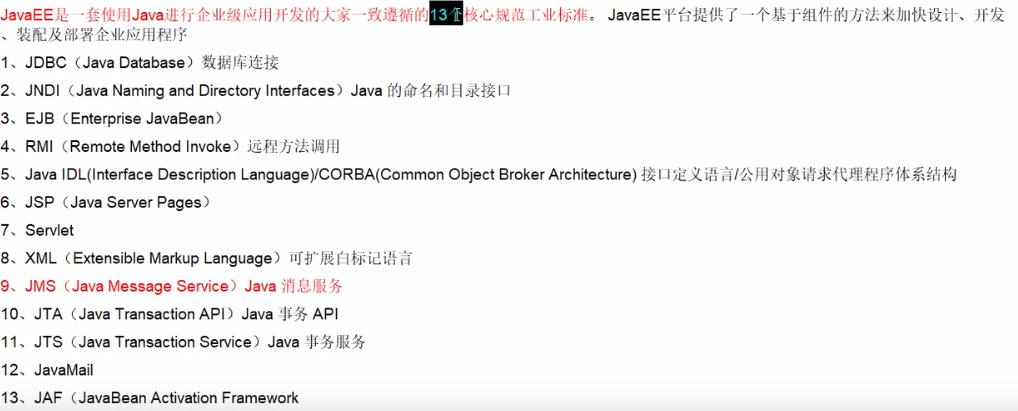
JMS is a set of standard APIs for accessing MOM (Message-Oriented-Middleware) message service middleware developed by SUN. MON provides services for receiving and forwarding messages. It caches and persists messages to ensure message security. JMS allows Development can send messages to MOM via JMS without knowing the details of remote procedure calls and the details of the network communication protocol. With the help of messages, we can integrate different applications in a loosely coupled way.
ActiveMQIs produced by Apache, the most popular and powerfulInstant messagingAnd integrated mode open sourceserver. ActiveMQ is a JMS Provider implementation that fully supports the JMS 1.1 and J2EE 1.4 specifications. Provides client support across languages and protocols, with easy support in JMS 1.1 and 1.4 using J2EE Enterprise Integration mode and many advanced features. (ActiveMQ is just an implementation service for JMS, others have jboss, etc.)
2. Environmental installation
1. Download ActiveMQ, download address:http://activemq.apache.org/activemq-5100-release.html
2, unzip apache-activemq-5.8.0.zip to complete the installation of ActiveMQ
3, run bin/activemq.bat
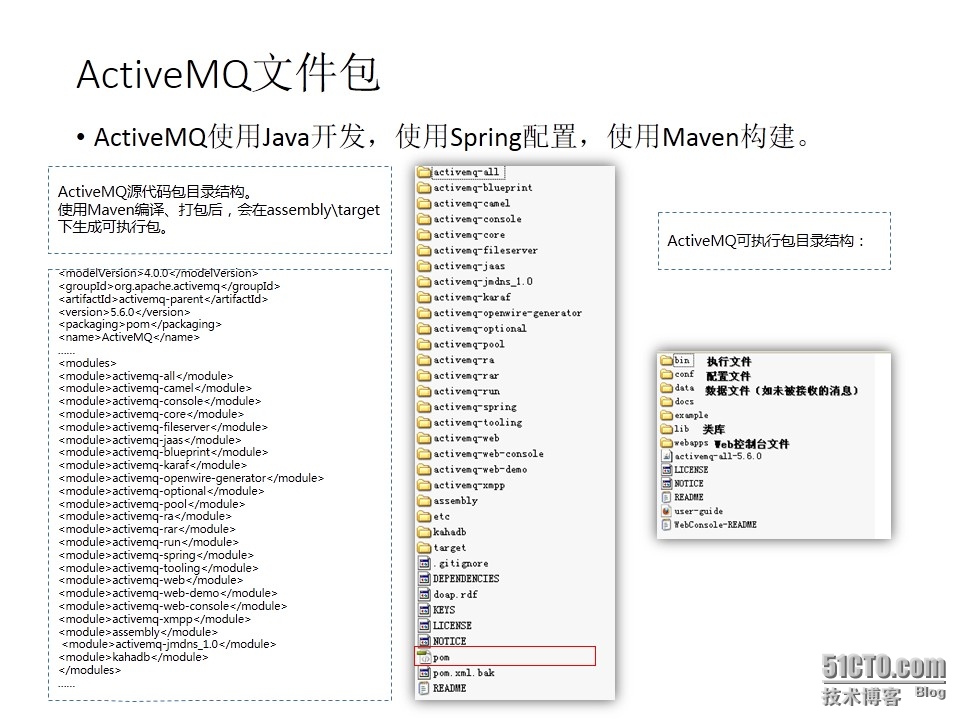
+bin (bas below bas and unix/linux below sh) Start ActiveMQ startup service is here
+conf (activeMQ configuration directory, including the most basic activeMQ configuration file)
+data (default is empty)
+docs (index, there is no document in the version of replease)
+example (several examples)
+lib (lib used by activeMQ)
+webapps (system administrator console code)
+webapps-demo (system sample code)
-activemq-all-5.8.0.jar (activeMQ binary)
-user-guide.html (deployment guide)
3. Start the service
If this exception is reported:
| Caused by: java.io.IOException: Failed to bind to server socket: tcp://0.0.0.0:61616?maximumConnections=1000&wireformat.maxFrameSize=104857600 due to: java.net.SocketException: Unrecognized Windows Sockets error: 0: JVM_Bind |
Explain that the 61616 port used by mq is occupied by default. In most cases, the Internet access Sharing (ICS) Windows service is used for port 61616. You only need to stop it to start ActiveMQ.
If this exception is reported:
|
ERROR | Failed to start Apache ActiveMQ (localhost, ID:mac-4363-1389937469328-0:1). Reason: java.io.IOException: Transport Connector could not be registered in JMX: Failed to bind to server socket: amqp://0.0.0.0:5672?maximumConnections=1000&wireformat.maxFrameSize=104857600 due to: java.net.BindException: Address already in use: JVM_Bind |
I don't know what caused the above. It can't be started on my computer. I look at the port like 5672, but my 5672 is actually a java. I don't know who is using it. I stopped the process and it was created again, so I modified the conf/activemq.xml
<transportConnector name="amqp" uri="amqp://0.0.0.0:5672?maximumConnections=1000&wireformat.maxFrameSize=104857600"/>
Just comment it out, this other document should be a connection, just like the above tcp (not used here, do not go deeper).
4. Management interface
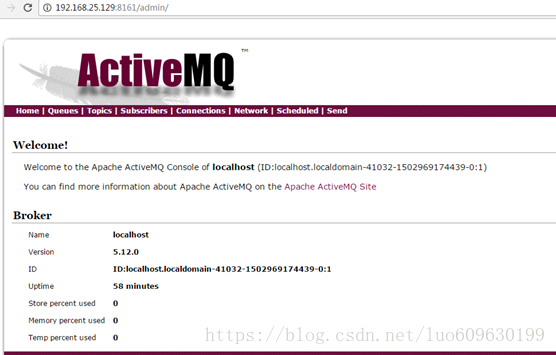
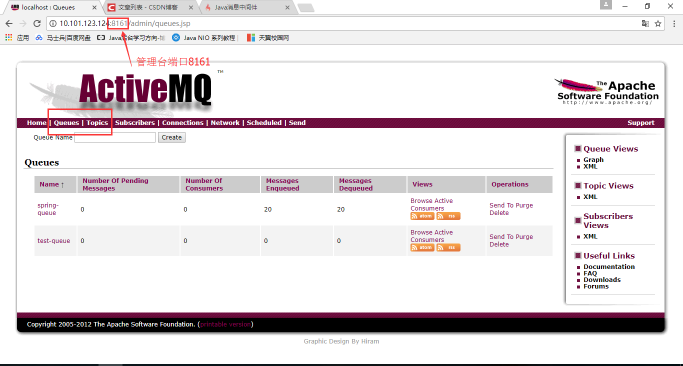
Once started, you can access the administrator interface:http://localhost:8161/admin, the default username and password admin/admin. If you want to change the username and password, modify it in conf/jetty-realm.properties.
Among them, in the navigation menu, Queues is a queue mode message. Topics is the subject mode message. The Subscribers message subscribes to the monitoring query. Connections can view the number of links, which can be viewed xmpp, ssl, stomp, openwire, ws, and network links. Network is the number of network link monitoring. Send can send message data.
5. Code implementation (only with point-to-point queue implementation)
First join the activemq.jar package
receiver:
package JMSTest;


import javax.jms.Connection;

import javax.jms.ConnectionFactory;

import javax.jms.Message;

import javax.jms.MessageConsumer;

import javax.jms.MessageListener;

import javax.jms.Queue;

import javax.jms.Session;

import javax.naming.Context;

import javax.naming.InitialContext;

import org.apache.activemq.ActiveMQConnection;

import org.apache.activemq.ActiveMQConnectionFactory;


public class JMSReceiver {

public static void main(String args[]){

try{

ConnectionFactory factory=new ActiveMQConnectionFactory(ActiveMQConnection.DEFAULT_USER,ActiveMQConnection.DEFAULT_PASSWORD,"tcp://127.0.0.1:61616");

Connection connection=factory.createConnection();

Session session=connection.createSession(false, Session.AUTO_ACKNOWLEDGE);

Queue queue=session.createQueue("SecondQueue");

// Context xtx=new InitialContext();

// System.out.println(xtx.lookup("jndi/jmsConn"));

MessageConsumer consumer=session.createConsumer(queue);

connection.start();

consumer.setMessageListener(new MessageListener() {


@Override

public void onMessage(Message msg) {

System.out.println("Hello"+msg);

}

});

}catch(Exception e){

System.out.println(e);

}

}

}
sender:
package JMSTest;


import javax.jms.Connection;

import javax.jms.ConnectionFactory;

import javax.jms.MessageProducer;

import javax.jms.Queue;

import javax.jms.Session;

import javax.jms.TextMessage;

import org.apache.activemq.ActiveMQConnection;

import org.apache.activemq.ActiveMQConnectionFactory;


public class JMSSender {

public static void main(String args[]){

try{

ConnectionFactory connectionFactory=new ActiveMQConnectionFactory(ActiveMQConnection.DEFAULT_USER,ActiveMQConnection.DEFAULT_PASSWORD,ActiveMQConnection.DEFAULT_BROKER_URL);

Connection connection=connectionFactory.createConnection();

Session session=connection.createSession(false,Session.AUTO_ACKNOWLEDGE);

Queue queue=session.createQueue("SecondQueue");

MessageProducer messageProducer=session.createProducer(queue);

TextMessage textMessage=session.createTextMessage("It is a test");

messageProducer.send(textMessage);

session.close();

connection.close();

}catch(Exception e){

System.out.println(e);

}

}

}
The above does not matter which one to start first, but must first start activemq.bat (equivalent to the middle server)
6. Code Analysis
ConnectionFactory interface (connection factory) A managed object that a user uses to create a connection to a JMS provider. JMS clients access the connection through a portable interface so that the code does not need to be modified when the underlying implementation changes. The administrator configures the connection factory in the JNDI namespace so that JMS clients can find them. Depending on the type of message, the user will use the queue to connect to the factory, or the subject to connect to the factory.
The Connection interface (connection) connection represents the communication link between the application and the message server. Once you have the connection factory, you can create a connection to the JMS provider. Depending on the type of connection, the connection allows the user to create a session to send and receive queues and topics to the target.
Destination Interface (Target) A target is a managed object that wraps a message destination identifier. The message destination is the location where the message was posted and received, either a queue or a subject. The JMS administrator creates these objects and the user discovers them through JNDI. Like a connection factory, an administrator can create two types of targets, a queue for a peer-to-peer model, and a theme for the publisher/subscriber model.
MessageConsumer interface (message consumer) An object created by a session to receive messages sent to the destination. Consumers can receive queue and topic type messages synchronously (blocking mode) or asynchronously (non-blocking).
MessageProducer interface (message producer) An object created by a session to send a message to a destination. Users can create a sender of a target, or they can create a generic sender that specifies the target when sending a message.
A Message interface (message) is an object that is transferred between a consumer and a producer, that is, from one application to another. A message has three main parts: Message Header (required): Contains the action settings used to identify and route the message. A set of message attributes (optional): Contains additional attributes to support compatibility between other providers and users. Custom fields and filters (message selectors) can be created. A message body (optional): Allows users to create five types of messages (text messages, map messages, byte messages, stream messages, and object messages). The message interface is very flexible and provides many ways to customize the content of the message.
The Session interface (session) represents a single-threaded context for sending and receiving messages. Since the session is single-threaded, the messages are contiguous, meaning that the messages are received one by one in the order in which they were sent. The advantage of a session is that it supports transactions. If the user selects transaction support, the session context will hold a set of messages that will not be sent until the transaction is committed. Users can cancel these messages using a rollback operation before committing the transaction. A session allows a user to create a message producer to send a message and a message consumer to receive the message.
ActiviteMQ message has 3 forms
| JMS public |
Point-to-point domain |
Publish/subscribe domain |
| ConnectionFactory |
QueueConnectionFactory |
TopicConnectionFactory |
| Connection |
QueueConnection |
TopicConnection |
| Destination |
Queue |
Topic |
| Session |
QueueSession |
TopicSession |
| MessageProducer |
QueueSender |
TopicPublisher |
| MessageConsumer |
QueueReceiver |
TopicSubscriber |
(1), point-to-point (point-to-point)
Peer-to-peer messaging is mainly based on Message Queue, Sender, reciever, Message Queue stores messages, Sneder sends messages, receive receives messages. The specific point is that Sender Client sends Message Queue, and Receiver Cliernt receives messages from Queue and "sends" The message has been accepted "to Quere, confirming the receipt of the message. There is no time dependency between the messaging client and the receiving client. The sending client can send information to the Queue at any time without knowing if the receiving client is running.
(2), publish/subscriber mode (publish/subscriber Messaging)
The publish/subscribe mode is used to receive more clients. As a way of publishing subscriptions, there may be multiple receiving clients, and the receiving client and the sending client have time dependencies. A receiving end can only receive information sent by the sending client after it is created. As a subscriber, there are two ways to receive a message, the receive method of the destination, and the onMessage method that implements the message listener interface.
Basic steps to send a message:
(1), create a factory class JMS ConnectionFactory used by the connection
(2), use the management object JMS ConnectionFactory to establish a connection Connection, and start
(3), use the connection Connection to establish a session session
(4) Create a message producer MessageSender using session session and management object Destination
(5), using the message producer MessageSender to send a message
Steps for the message recipient to accept the message from JMS
(1), create a factory class JMS ConnectionFactory used by the connection
(2), use the management object JMS ConnectionFactory to establish a connection Connection, and start
(3), use the connection Connection to establish a session session
(4), create a message using session session and management object DestinationreceiveMessageReceiver
(5), using the message receiver MessageReceiver to accept the message, you need to use the setMessageListener to bind the MessageListener interface to the MessageReceiver message Receiver must implement the MessageListener interface, you need to define the onMessage event method.
There are three ways to get the ConnectionFactory above:
1. When using the spring container
ApplicationContext ctx = new FileSystemXmlApplicationContext("src/cn/com/snt/jms/applicationContext.xml");

ConnectionFactory factory=(ConnectionFactory) ctx.getBean("connectionFactory");
2. When using the jndi container
Context ctx=new InitialContext();

ConnectionFactory factory=(ConnectionFactory)ctx.lookup("jndi/jmsConn");
3. Directly call
ConnectionFactory connectionFactory =  new
     ActiveMQConnectionFactory(ActiveMQConnection.DEFAULT_USER,
     ActiveMQConnection.DEFAULT_PASSWORD,new
     ActiveMQConnectionFactory(ActiveMQConnection.DEFAULT_USER,
     ActiveMQConnection.DEFAULT_PASSWORD,
    ActiveMQConnection.DEFAULT_BROKER_URL);
(The above is the default with the configuration file, the last uri can be failover://tcp://localhost:61616 or tcp://localhost:61616 (when using tcp to connect), the difference is that plus failover can Make a backup connection. If the first connection fails, you can connect to failover for the second time: (tcp://primary:61616,tcp://secondary:61616)?randomize=false )
4. Pay attention to the connection.start() in the recipient; this must be there, it is best to open it after the consumer creates it, in order to save resources.
5. Among the recipients, there are two ways to accept, one is the synchronous method consumer.receive() or consumer.receive(long), the above method is blocking, and consumer.receive(long) can be set to wait. Time, if it is 0, it will never time out. The second way is asynchronous, which is the above method of consumer.setMessageListener(new MessageListener() {...}, which is used more.
Original link:
Intelligent Recommendation
ActiveMQ Sharing (1) Introduction to JMS
[b] I. Overview[/b] Message, the message. Information is passed between people through messages. Words, eyes, and physical movements can all be regarded as messages. Of course, there are emails and te...
Introduction to JMS and ActiveMQ (3)_ActiveMQ
First, let's briefly introduce ActiveMQ. ActiveMQ is an open source free messaging server provided by the Apache Software Foundation. The current version is 5.8.0. ActiveMQ has the following features:...
The simplest introduction to learning JMS and ActiveMQ
1. What is message middleware 1, Message middleware utilizes an efficient and reliable message passing mechanism for platform-independent data exchange, and integrates distributed systems...
ActiveMQ notes (2) JMS introduction
1. Introduction to JMS 1.1 What is JavaEE 1.2 JMS 1.3 Comparison of landing products Two JMS Message 2.1 Message header JMSdesination The destination of the message, mainly refers to Queue and Topic J...
Introduction to JMS and activeMQ, messaging middleware
What is middleware Middleware is a technical component between the operating system and the application The role of middleware extracts the common parts, shields the underlying communication, interact...
More Recommendation
ActiveMQ details 1 - JMS introduction
1. JMS overview Information exchange between different systems, there are various ways. Sun proposes a detailed middleware service - JMS, Java message service, is one of Javaee's standard / spe...
Problems encountered by using Spring-JMS to listen to ActiveMQ
2019 Unicorn Enterprise Heavy Glour Recruitment Python Engineer Standard >>> When using Spring to configure the ActiveMQ listening message, it is found that each message is always repeated, e...

JMS study notes (1)-Introduction to JMS install ActiveMQ
Recently I saw that JMS was used in the company’s projects. I used JMS to send messages when writing code, but the things I used were packaged by the boss. I don’t know what JMS is all abo...

ActiveMQ: Introduction to the JMS Open Source Framework
JMS provides an intelligent messaging system for enterprise applications. JMS defines a set of enterprise-level messaging concepts and tools to minimize the Java language concept to maximize enterpris...
JMS study notes (5) - Introduction to ActiveMQ
1.Introduction ActiveMQ YesApacheProduced, the most popular, powerful open source message bus.ActiveMQ Is a full supportJMS1.1withJ2EE 1.4Normative JMS ProviderRealize, thoughJMSThe introduction of th...