(1) ActiveMQ introduction, installation and testing
tags: Middleware # ActiveMQ activemq java
ActiveMQ introduction, installation and testing
ActiveMQ introduction and installation
MQ is a message middleware, a medium through which applications can deliver messages in a distributed system. The commonly used ones are Kafka, RabbitMQ, RocketMQ, and ActiveMQ.
The ActiveMQ we are going to introduce is an open source project under Apache. It can be said that after learning ActiveMQ, we can learn several other middleware horizontally and it will become easy.
Download the compressed package of activemq and upload it to the Linux server,
After decompressing with the tar command,
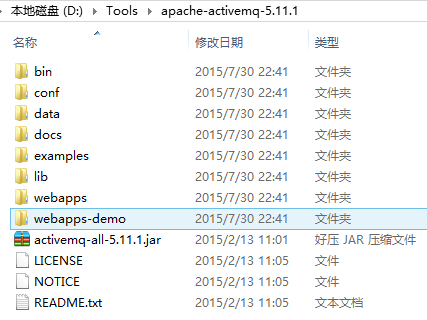
You can see the following directories:

The activemq startup script is stored in the bin directory. Activemq as shown in the figure

Some configuration files are stored under the conf directory, such as configuration user name, password, port and other information.
Development documents are stored in the docs directory.
The data directory is where ActiveMQ stores messages for persistence. Kahadb is used by default. Of course, we can use leveldb or JDBC to store it in MySQL.
Activemq port number: 61616
Related commands:
Start: ./activemq start
 Start with log: ./activemq start> /myactiveMQ/run_activemq.log
 Restart: ./activemq restart
 Shut down: ./activemq stop
 Check the status: ps -ef | grep activemq | grep -v grep
			netstat -anp | grep 61616
			lsof -i:61616
If you want other servers to access, you also need the following configuration:
Need to modify the conf/jetty.xml file:
	 The IP address of jettyPort is 0.0.0.0

 Set the ports that can pass through the firewall:
	firewall-cmd --zone=public --add-port=61616/tcp --permanent
	firewall-cmd --zone=public --add-port=8161/tcp --permanent
 Firewall open ports:
	firewall-cmd --list-ports
 Restart the firewall:
	firewall-cmd --reload
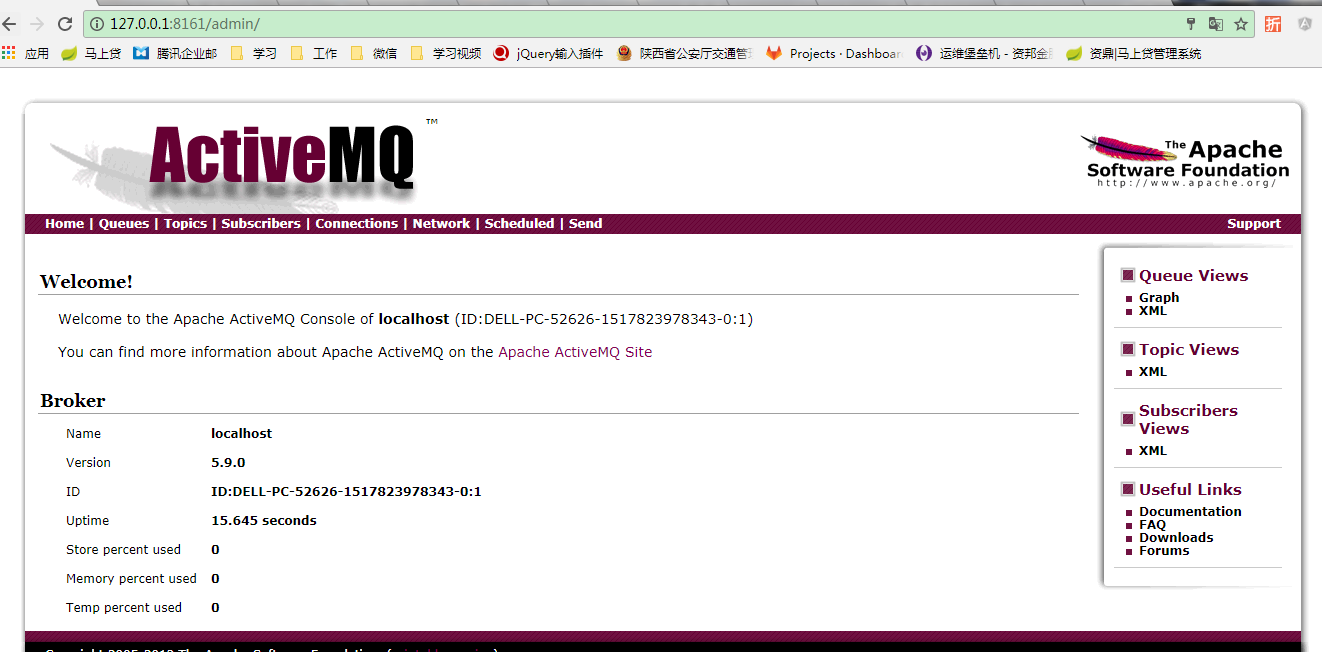
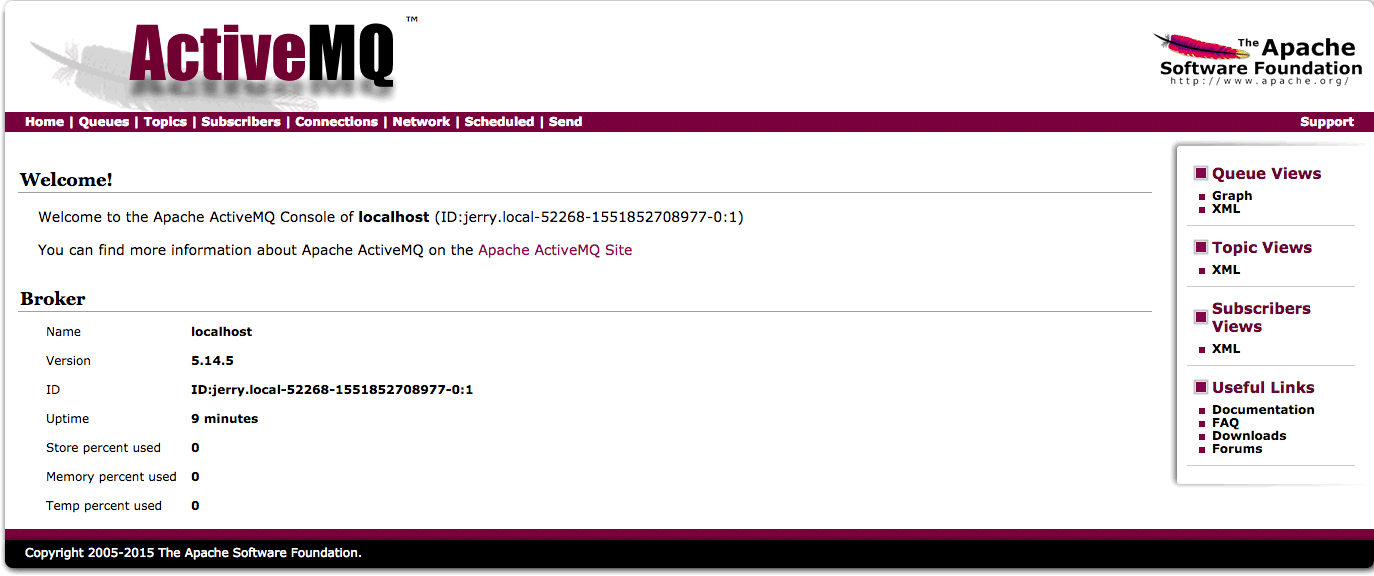
Next open the Apache ActiveMQ console:
http://server ip address:8161/admin
 Default username: admin
 Default password: admin

 Remarks:
	 Provide JMS service using port 61616
	 Use 8161 port to provide management console service
As shown in the figure below, the installation has been successful.

In what scenarios is messaging middleware used?
Why use messaging middleware? Let us give an example.
If a student needs to ask the teacher a question, the teacher will answer the question for the student, and the teacher can only answer one student at a time, so the students behind can only wait. As shown below
 If our system is like this, when a large number of tasks need to be processed, it will cause blockage and seriously affect efficiency.
Now we add a role monitor (MQ) to this example, so that students who need to ask questions go directly to the monitor. The monitor is responsible for statistics of students' questions, student names and other information. In this way, every student who asks a question can be counted by the monitor and can leave without waiting.
As shown below
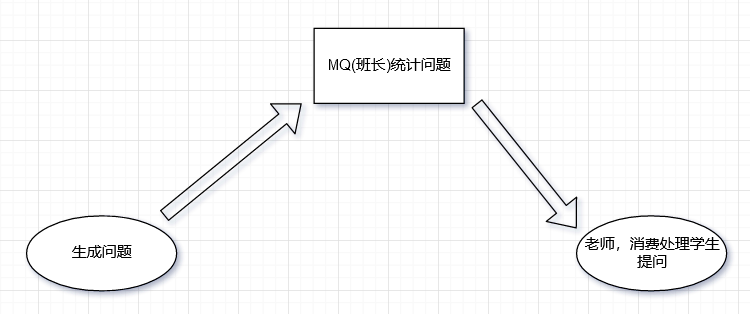 In this way, our execution efficiency has improved a lot.
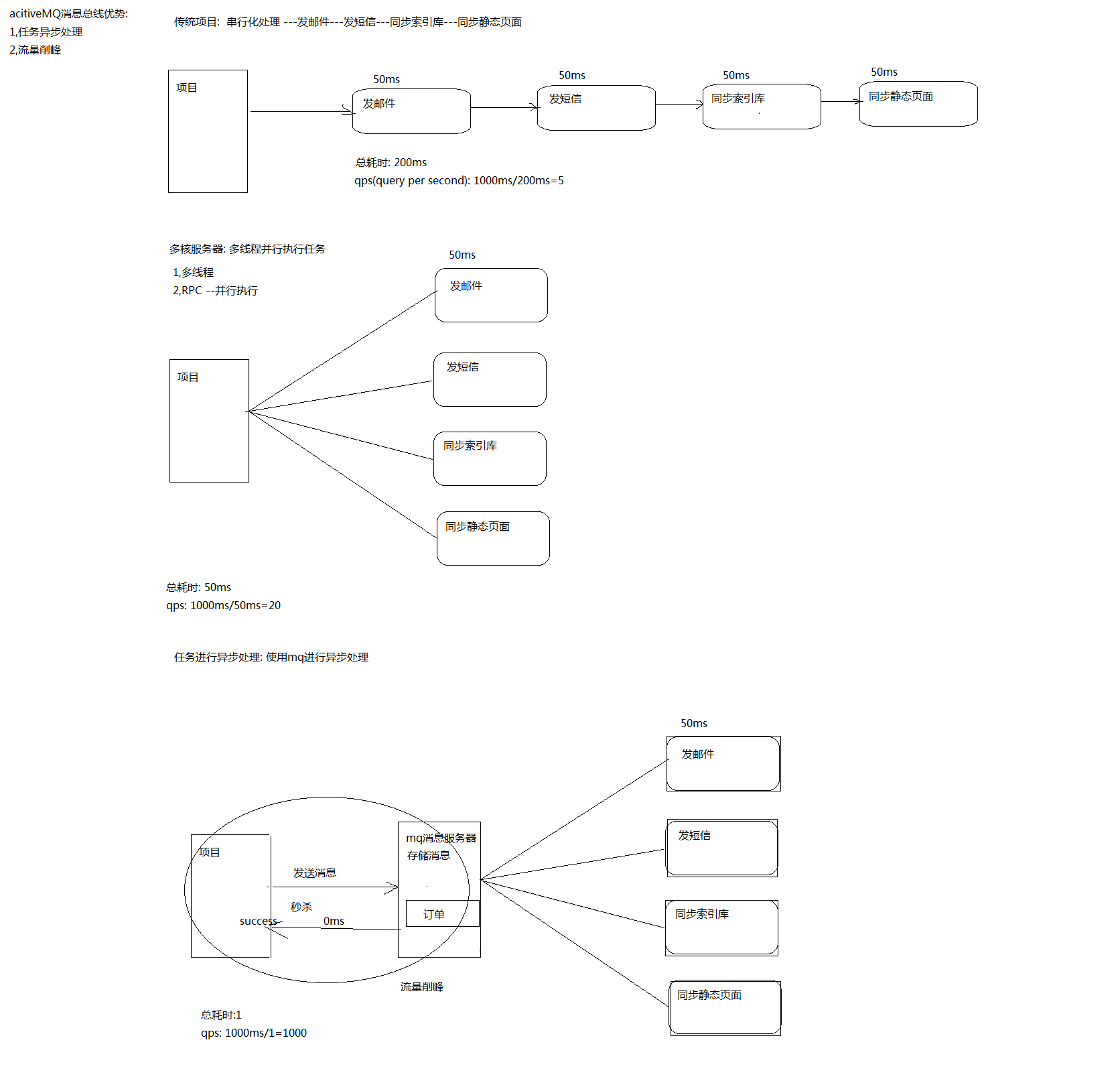
What can message middleware do
As can be seen from the above example:
- Decoupling: Solve the problem of coupled calls. Separate students' questions from teachers' answers.
- Asynchronous: Asynchronous model. Students ask questions without waiting for the teacher to answer and get stuck, and leave directly after asking questions.
- Peak shaving: Resist the peak traffic and achieve the purpose of protecting the main business. The middleware provides a buffer.
When designing the system, it is clear that the goal can be achieved
- To achieve decoupling of the system, when a new module comes in, you can go to the left to the smallest code change and be able to decouple
- Setting the traffic buffer pool allows the back-end system to consume according to its own throughput capacity, without being overwhelmed, and able to cut peaks.
- Combining strong and weak dependencies can asynchronousize the operation of non-critical call links and improve the throughput of the overall system. It can be asynchronous.
In the point-to-point messaging domain, the destination is called a queue
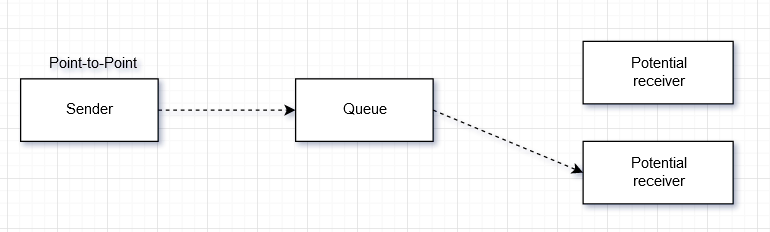
In the publish-subscribe messaging domain, the destination is called a topic (topic)

ActiveMQ test
JMS coding overall architecture
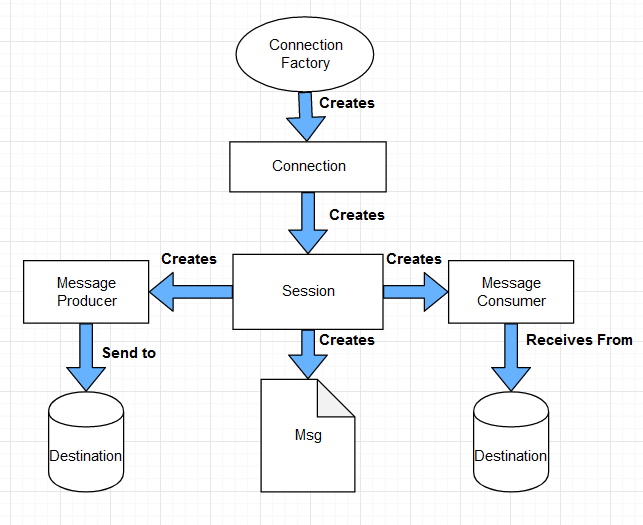
- Create a maven project and import the following jar package:
 <dependency>
		<groupId>org.apache.activemq</groupId>
		<artifactId>activemq-all</artifactId>
		<version>5.15.9</version>
</dependency>
<dependency>
		<groupId>org.apache.xbean</groupId>
		<artifactId>xbean-spring</artifactId>
		<version>3.4</version>
</dependency>
- Message producer test code:
import javax.jms.Connection;
import javax.jms.JMSException;
import javax.jms.MessageProducer;
import javax.jms.Queue;
import javax.jms.Session;
import javax.jms.TextMessage;

import org.apache.activemq.ActiveMQConnectionFactory;
/**
 * Message producer
 * @author ZXG
 */
public class JmsProduce {
	public static final String ACTIVEMQ_URL = "tcp://129.*.*.143:61616";	//server address
	public static final String QUEUE_NAME = "queue01";	//Queue name

	public static void main(String[] args) throws JMSException {
		// 1 Create a connection factory and use the default username and password according to the given url address
		ActiveMQConnectionFactory activeMQConnectionFactory = new ActiveMQConnectionFactory(ACTIVEMQ_URL);

		// 2 Through the connection project, get the connection Connection
		Connection connection = activeMQConnectionFactory.createConnection();

		// start up
		connection.start();

		// 3 Create Session Session
		// Parameter: transaction/signature
		Session session = connection.createSession(false, Session.AUTO_ACKNOWLEDGE);

		// 4 Create a destination (specifically, queue or topic topic)
		Queue queue = session.createQueue(QUEUE_NAME);

		//5 Create the producer of the message
		MessageProducer messageProducer = session.createProducer(queue);

		//6 By using messageProducer to produce 3 messages and send them to the message queue of MQ
		for(int i=0;i<3;i++) {
			//7 Create a message, like a message written by a student as required
			TextMessage message = session.createTextMessage("test msg:"+i);  //Can be understood as a string

			//8 Released by message producer messageProducer
			messageProducer.send(message);
		}

		//9 Close the resource
		//The created one is closed first
		messageProducer.close();
		session.close();
		connection.close();

		System.out.println("News release completed");
	}
}
Looking at the console after running, we can already see the queues we created, the number of mails to be processed, the number of consumers, the number of queues and dequeues, and the operation mode.
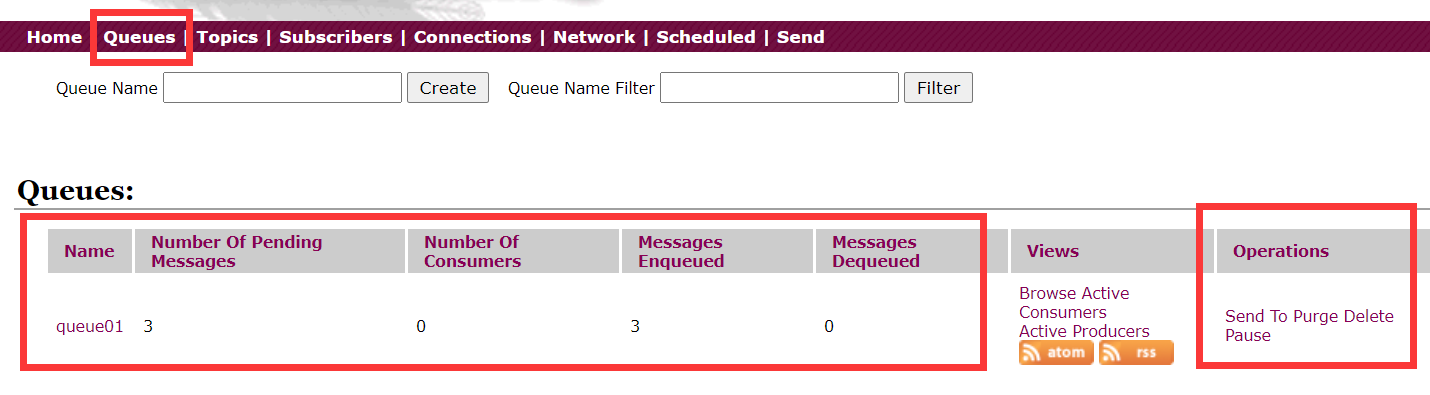
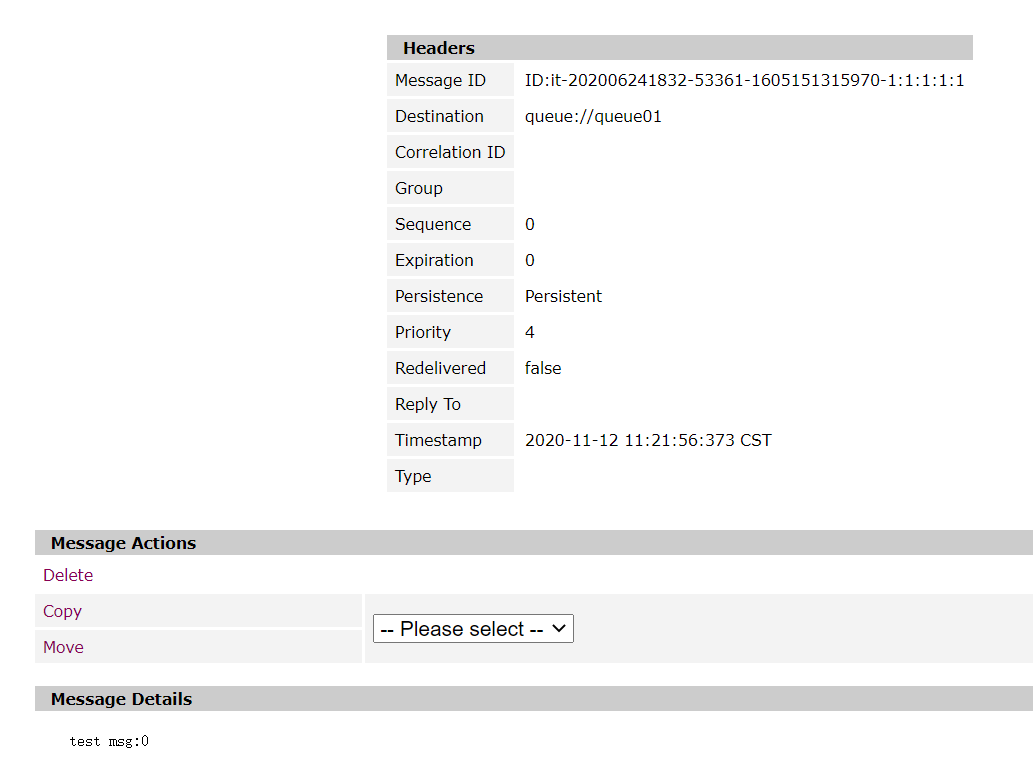
Check the specific message of queue01 again.
 View our message content:
 3. Message consumer test code
import javax.jms.Connection;
import javax.jms.JMSException;
import javax.jms.MessageConsumer;
import javax.jms.Queue;
import javax.jms.Session;
import javax.jms.TextMessage;

import org.apache.activemq.ActiveMQConnectionFactory;

/**
   * Message consumer
 * @author ZXG
 */
public class JmsConsumer {
	public static final String ACTIVEMQ_URL = "tcp://129.*.*.143:61616";
	public static final String QUEUE_NAME = "queue01";

	public static void main(String[] args) throws JMSException {
		// 1 Create a connection factory and use the default username and password according to the given url address
		ActiveMQConnectionFactory activeMQConnectionFactory = new ActiveMQConnectionFactory(ACTIVEMQ_URL);

		// 2 Through the connection project, get the connection Connection
		Connection connection = activeMQConnectionFactory.createConnection();

		// start up
		connection.start();

		// 3 Create Session Session
		// Parameter: transaction/signature
		Session session = connection.createSession(false, Session.AUTO_ACKNOWLEDGE);

		// 4 Create a destination (specifically, queue or topic topic)
		Queue queue = session.createQueue(QUEUE_NAME);

		//5 Create a consumer
		MessageConsumer messageConsumer = session.createConsumer(queue);

		while(true) {
			//6 Get the message
			TextMessage textMessage = (TextMessage) messageConsumer.receive();	// keep waiting
			//messageConsumer.receive(timeout); //Set the waiting time
			if(null==textMessage) {
				break;
			}
			System.out.println("The message received by the consumer:"+textMessage.getText());
		}

		//7 Close the resource
		messageConsumer.close();
		session.close();
		connection.close();
	}

}
First view the results of the console operation:
 This happens to be the news released by our news producer.
At this time, our program has not finished running, because messageConsumer.receive(); will keep waiting.
 It is found that the number of consumers is 1, and the program is manually closed. At this time, the number of consumers has become 0. You can also set parameters for this method, messageConsumer.receive(4000L); it will return automatically after waiting for the set time.
Intelligent Recommendation
ActiveMQ tutorial (1)-ActiveMQ installation
ActiveMQ is an open source product of the Apache Software Foundation. It supports multiple messaging protocols such as AMQP, MQTT (similar to XMPP), Openwire and Stomp. And ActiveMQ fully supports the...
Introduction to activemq installation and application
First, the introduction Introduction Introduction & Application Scenario Second, the components 1. Destination The destination, the JMS Provider, is responsible for maintaining the objects that ar...
[] Introduction and installation ActiveMQ
[Introduction] Previous blog talked aboutJMS messaging specificationWhile Cipian to explain the specific implementation of the JMS specification --ActiveMQ 1. From what Apache ActiveMQ is produced, mo...
A, activemq Introduction and Installation
1. ActiveMQ Profile Apache ActiveMQ is provided by an open source messaging system completely implemented in Java, so it is a good support for J2EE proposed JMS (Java Message Service, the Java Message...
ActiveMQ introduction, installation, startup
Introduction to ActiveMQ What is ActiveMQ ActiveMQ is launched by Apache, an open source, fully supports Message Oriented Middleware (MOM) implemented by JMS Provider of JMS1.1 and J2EE 1.4 specificat...
More Recommendation
ActiveMQ Introduction Installation Configuration
ActiveMQ Introduction Installation Configuration See more (www.omob.cc) Introduction to MQ: MQ is calledMessage Queue, Message Queuing (MQ) is an application-to-application communication method...
Introduction of Windows installation ActiveMQ
Message middleware Let's briefly introduce the message middleware, just have a basic understanding of it, the message middleware (MOM: Message Orient middleware). Message middleware has many uses and ...
ActiveMQ 5.15.3 introduction and installation
ActiveMQ introduction Official website description Apache ActiveMQ ™ is the most popular and powerful open source messaging and Integration Patterns server. Apache ActiveMQ is fast, supports man...
ActiveMQ introduction and installation
1. Introduction to JMS Full name: Java Message Service Chinese: Java Message Service. JMS is a set of Java API standards. The original purpose is to enable applications to acce...
ActiveMQ introduction and installation and deployment
ActiveMQ introduction ActiveMQ is the most popular and powerful open source message bus produced by Apache. ActiveMQ is a JMS Provider implementation that fully supports the JMS1.1 and J2EE 1.4 specif...