vue-element-admin framework applicationOne
tags: vue javascript
Recently, the company has to sit in the background system-originally used react, but the technology greatly decided to use vue, so I used this framework, talk about my understanding of this framework, to help novices to get started quickly
Let's look at the code first~~
Official documentation:https://github.com/PanJiaChen/vue-element-admin/blob/master/README.zh-CN.md
git download
# Clone project
git clone https://github.com/PanJiaChen/vue-element-admin.git

# Install dependencies
npm install

# It is recommended not to install with cnpm. There will be various strange bugs. The problem of slow download speed of npm can be solved by the following operations
# My personal yarn
npm install --registry=https://registry.npm.taobao.org

# Start the service
npm run dev
Open the interface
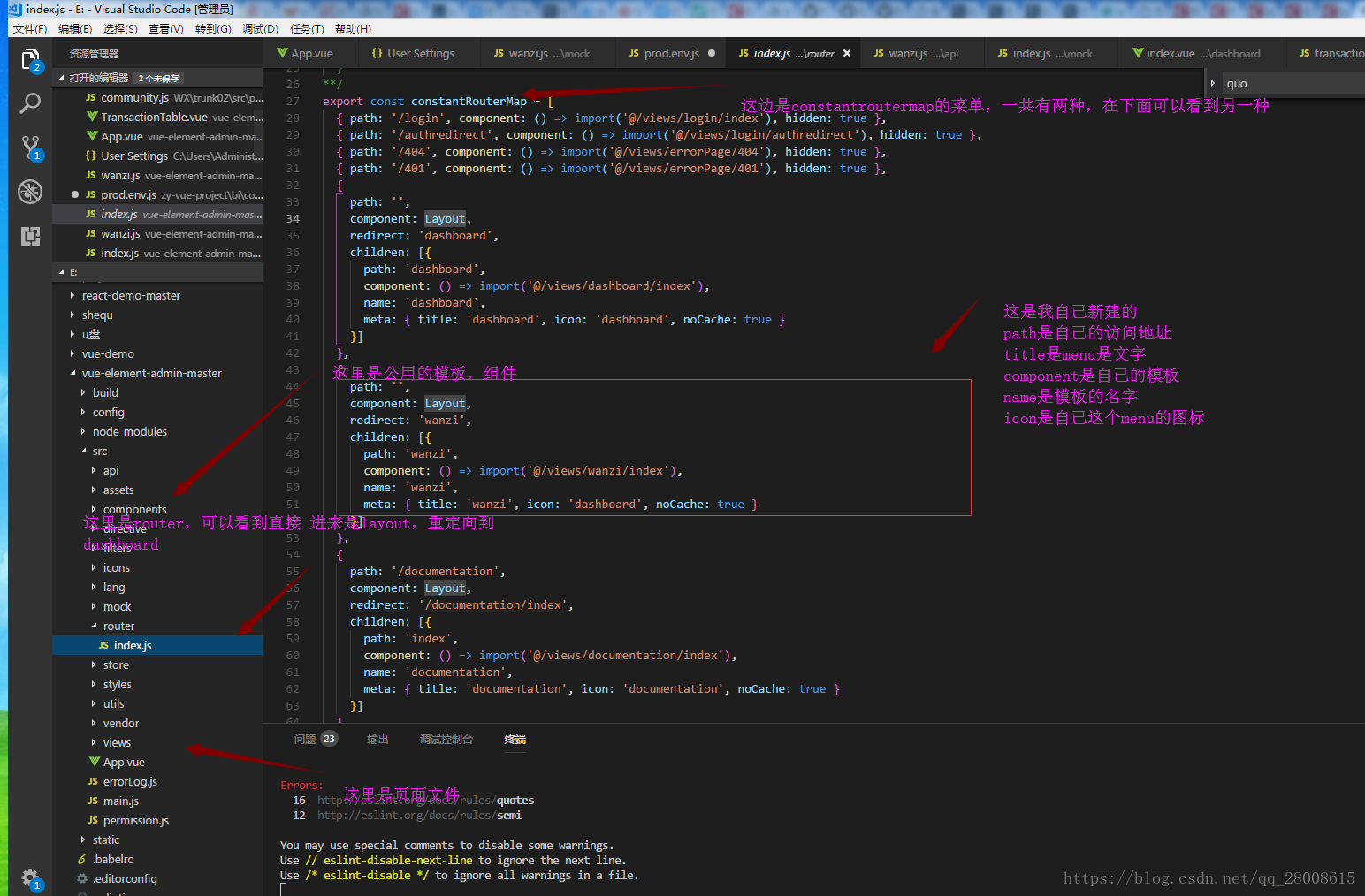
Look at the local code and my own explanation of the code
Access control
We now open src/router/index.js and search for admin
  {
    path: '/permission',
    component: Layout,
    redirect: '/permission/index',
    alwaysShow: true, // will always show the root menu
    meta: {
      title: 'permission',
      icon: 'lock',
      roles: ['admin', 'editor'] // This is the permission,
    },
    children: [{
      path: 'page',
      component: () => import('@/views/permission/page'),
      name: 'pagePermission',
      meta: {
        title: 'pagePermission',
        roles: ['admin'] //  Here only admin can access
      }
    }, {
      path: 'directive',
      component: () => import('@/views/permission/directive'),
      name: 'directivePermission',
      meta: {
        title: 'directivePermission'
        // if do not set roles, means: this page does not require permission
      }
    }]
  },
The above is to control the permissions in the menu.
How do we control permissions on the page? ?
Open src/views/dashboard/index.vue
<template>
  <div class="dashboard-container">
    <!-- {{console.log('343434')}} -->

    <!-- {{this.data |json}} -->
         //Switch component
    <component :is="currentRole"></component>
  </div>
</template>

<script>
import { mapGetters } from 'vuex'
import adminDashboard from './admin'
import editorDashboard from './editor'

export default {
  name: 'dashboard',
  components: { adminDashboard, editorDashboard },
  data() {
    return {
      currentRole: 'adminDashboard'
    }
  },
  computed: {
    ...mapGetters([
      'roles' //This is to obtain roles from vuex, the permissions are stored in vuex, which will be introduced later
    ])
  },
  created() {
    console.log(this.roles)
    if (!this.roles.includes('admin')) {//If roles is not admin, just assign currentRole, then our component will change
      this.currentRole = 'editorDashboard'
    }
  }
}
</script>
mock data
Open src/mock/transaction.js
import Mock from 'mockjs'

const List = []
const count = 20

for (let i = 0; i < count; i++) {
  List.push(Mock.mock({
    date: +Mock.Random.date('yyyy-MM-dd'),
    order_no: '@guid()',
    timestamp: +Mock.Random.date('T'),
    username: '@name()',
    price: '@float(1000, 15000, 0, 2)',
    'status|1': ['success', 'pending']
  }))
}

export default {
  getList: () => {
    return {
      total: List.length,
      items: List
    }
  }
}
Here is the data that mocked a transaction
Open src/mock/index.js
import Mock from 'mockjs'
import loginAPI from './login'
import articleAPI from './article'
import remoteSearchAPI from './remoteSearch'
import transactionAPI from './transaction'
import wanziAPI from './wanzi'


// Mock.setup({
//   timeout: '350-600'
// })

// login related
Mock.mock(/\/login\/login/, 'post', loginAPI.loginByUsername)
Mock.mock(/\/login\/logout/, 'post', loginAPI.logout)
Mock.mock(/\/user\/info\.*/, 'get', loginAPI.getUserInfo)

// Article related
Mock.mock(/\/article\/list/, 'get', articleAPI.getList)
Mock.mock(/\/article\/detail/, 'get', articleAPI.getArticle)
Mock.mock(/\/article\/pv/, 'get', articleAPI.getPv)
Mock.mock(/\/article\/create/, 'post', articleAPI.createArticle)
Mock.mock(/\/article\/update/, 'post', articleAPI.updateArticle)

// search related
Mock.mock(/\/search\/user/, 'get', remoteSearchAPI.searchUser)

// bill related
Mock.mock(/\/transaction\/list/, 'get', transactionAPI.getList)

// Maruko
Mock.mock(/\/wanzi\/list/, 'get', wanziAPI.getList)

export default Mock
Remember to intercept here~~
=》vue-element-admin framework application 2
Intelligent Recommendation
Questions about Vue-Admin-Element framework
The Vue-Admin-Element framework is required for the form of the packaged API /* GET request use param POST request uses DATA */ About POST request, If the transfer parameter can be empty, the adjustme...
Vue-element-admin framework install failed problem
Vue-element-admin framework install failed problem Final solution Problem environment Error Description / Log Fill 1、node-gyp 2, Python version 3、canvas Final solution Final solution Project Issuse, c...
Vue-Element-Admin framework dynamic routing (2)
Reference: https://www.cnblogs.com/haoxianrui/p/13676619.html File modification Specific modification and changes can be compared to the original file, minimal changes to the framework. Interface requ...
vue-element-admin framework login (I)
Get started quickly Official document: https://panjiachen.github.io/vue-element-admin-site/zh/guide/ Note: If you need Chinese, please select the i18n branch; it is recommended to use npm Modify the f...

Novice Getting Started Vue-Element-Admin Frame (2): Installing and running the Vue-Element-Admin Framework
Preface: (1) Environment configuration: The second part is initially exposed to the Vue-Element-Admin Framework This section describes the process of installing and running the Vue-Element-Admi...
More Recommendation
Advanced Vue (9)-Integration of Vue Framework Element-ui-admin
Element-ui-admin Vue-element-admin is an integrated solution based on element-ui background management Official website:https://panjiachen.github.io/vue-element-admin-site/zh/ 1. Installation 2. Analy...
Vue Framework Vue-Element-Admin-Master Exports Excel Table Data
Preface: Welcome to my personal blog, there are more dry goods ~~:Click to access During this time, when you do a background management system, you need to export all the data obtained from the remote...
vue-admin-element framework-level menu Jump issue
Problems encountered: When the project route write three menu; breadcrumbs changed after the jump for the three, but no more than a page to jump (but have to show three bread crumbs; but also jump pag...
How to change various titles when using vue-element-admin framework
1. Landing page title Modification method: src>views>login>index.vue Change in this page as follows 2. Tab name Modification method: src>views>settings.js 3. Whether to display the side...
The vue-element-admin framework secondary development learning content finishing
The vue-element-admin framework secondary development learning content finishing installation release Understand the project structure About the agent About cross-domain Knowledge points Project BUG P...