Nacos (1) SpringBoot reads Nacos configuration center configuration file information
tags: Registry nacos Microservice
Application.properties file configuration:
spring.application.name=service-provider
server.port=8081

spring.cloud.nacos.discovery.service=${spring.application.name}
spring.cloud.nacos.config.server-addr=127.0.0.1:8848
nacos configuration:
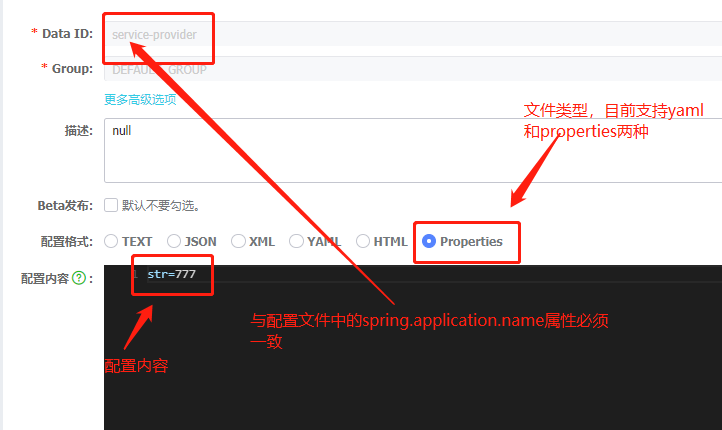
note! ! ! !At the beginning, I named the Data Id of the nacos configuration center service-provider.properties, and the value of my spring.application.name property was service-provider, which caused the reading to fail. When I changed the value of spring.application.name change into
service-provider.properties was read successfully,So pay attention to spring.application.name and data id must be consistent
The following code of the control layer is as follows:
@RestController
@RefreshScope
public class ProviderController {

    @Value("${str}")
    private String java;

    @RequestMapping("/getConfig")
    public String getConfig() {
        return java;
    }
}
pom file
<dependency>
            <groupId>com.alibaba.cloud</groupId>
            <artifactId>spring-cloud-starter-alibaba-nacos-config</artifactId>
            <version>2.2.1.RELEASE</version>
        </dependency>

        <dependency>
            <groupId>org.springframework.boot</groupId>
            <artifactId>spring-boot-dependencies</artifactId>
            <type>pom</type>
        </dependency>

        <!-- https://mvnrepository.com/artifact/com.alibaba.cloud/spring-cloud-starter-alibaba-nacos-discovery -->
        <dependency>
            <groupId>com.alibaba.cloud</groupId>
            <artifactId>spring-cloud-starter-alibaba-nacos-discovery</artifactId>
            <version>2.2.1.RELEASE</version>
        </dependency>


        <dependency>
            <groupId>org.springframework.boot</groupId>
            <artifactId>spring-boot-starter-web</artifactId>
            <version>${springboot.version}</version>
        </dependency>
        <dependency>
            <groupId>org.springframework.boot</groupId>
            <artifactId>spring-boot-autoconfigure</artifactId>
            <version>${springboot.version}</version>
        </dependency>
Intelligent Recommendation
Read the collection of configuration file configuration (springboot nacos configuration center as an example)
How to read the set of objects configured in the configuration file of the springboot project Configuration file Create object Get configuration file content Note: Listnumberinfo =new ArrayList<>...
(1) NACOS Cognition - Nacos Config Configuration Center
table of Contents 1. Micro Service Configuration Center Background 1.1 micro service profile problem 1.2 Configuration Center Solving Thoughts 1.3 Configuration Center Architecture Map 1.4 Example of ...
SpringBoot uses Nacos Configuration Center
This article describes how SpringBoot uses Alibaba Nacos as a configuration center. 1. Introduction to Nacos Nacos is an easy-to-use platform for Alibaba Group's open source, designed for dynamic serv...
SpringBoot use Nacos Configuration Center
alibaba This article describes how to use SpringBoot do Alibaba Nacos distribution center. 1.Nacos Profile Nacos platform Alibaba Group, an easy to use open source, designed for dynamic service discov...

Use of nacos-springboot configuration center
firstStart nacos service The case is as follows: Combine springboot, application.properties configuration: pom configuration: Start the main class: NacosConfigApplication.java Test demo: ConfigControl...
More Recommendation
(Springboot uses Nacos as the configuration center)
Springboot uses Nacos as the configuration center surroundings Project configuration Advanced use Configure dev, prod, test environment Separate configuration between microservices Each microservice c...
springboot uses nacos as the configuration center
1. Introduce dependencies 2. Create under the class path: bootstrap.properties, configuration: 3. Add a data set to the configuration center by default: Data ID: Application name.properties Default ru...
Springboot integrated NACOS as a configuration center
NACOS official Chinese documentation:https://nacos.io/zh-cn/docs/quick-start.html Description Ali's official document is relatively pit, and Springboot integrates NACOS to run. Cases on this ar...
Springboot integrated NACOS configuration center
1.NacOS Add configuration 2. Project introduction 3. Configuration 4. Get...
SpringBoot Integration NACOS as the configuration center
1. Introduce NACOS dependencies The latest version of NACOS is used here. 2. Add bootstrap.yml file The configuration here is based on the latest NACOS. Many configurations on the Internet have been a...