Python uses tkinter to make a listview with checkboxes so simple
tags: python tkinter listview treeview
tkinter is a standard package of python and does not require additional installation. So today I will use tkinter to make a listview to practice.
The treeview in tkinter is mainly used. The main function statements used are:
Statement 1: Insert a row
tree.insert('', 'end', values=values)Statement 2: Get all the rows of the table
items = self.tree.get_children()Statement 3: Get all the rows of the table
tree.set(item, column=2, value='a')Realize function:
- Dynamically add, modify, delete data (one table, one row, one column). You can specify the row number and column number to modify the corresponding content
- Click on the row to change the check status
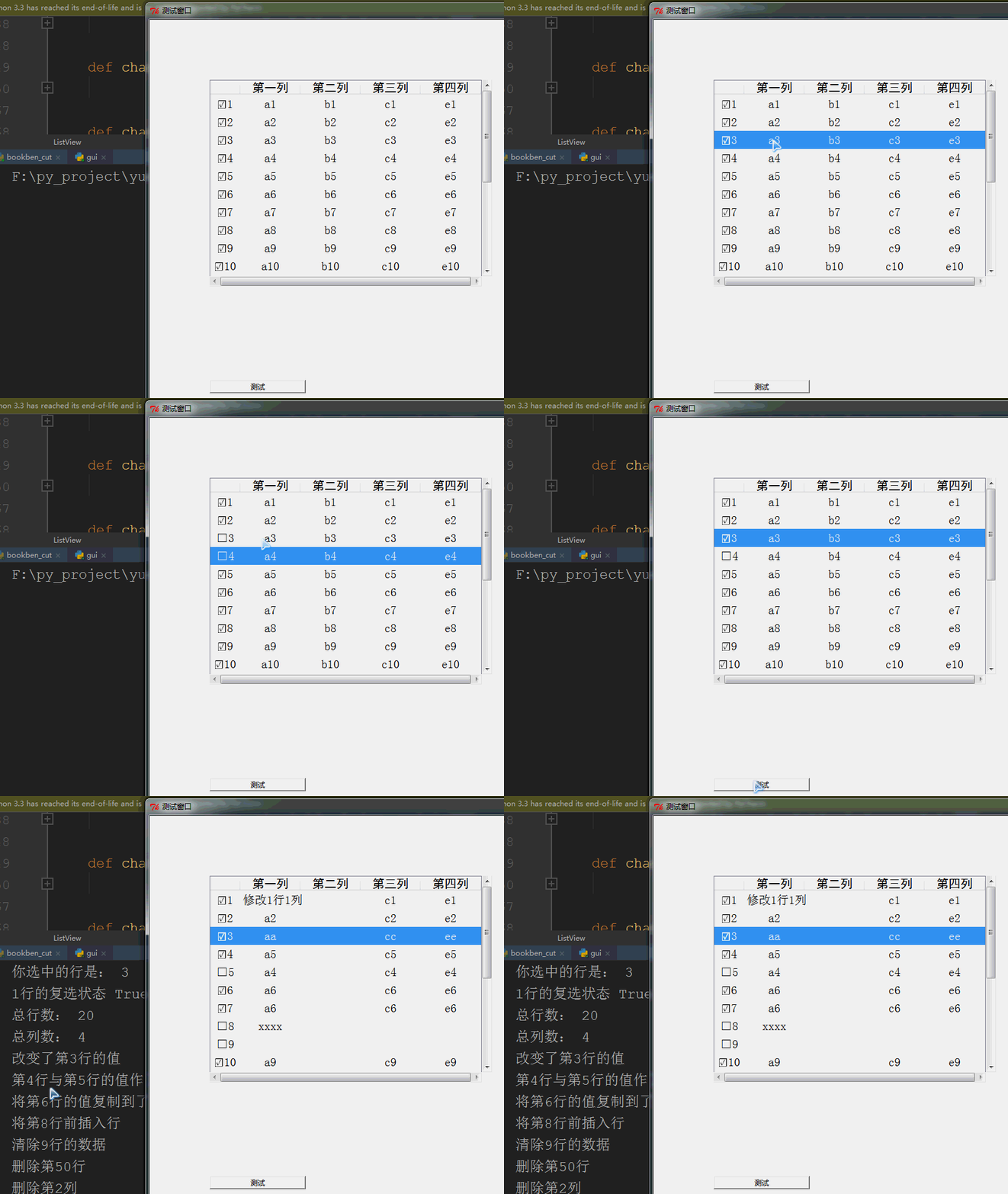
Other auxiliary sentences used: mainly beautifying
Statement 1: Change the column width
tree.column("#%d" % col_num, width=width)Statement 2: Set the font and size of the header
style = ttk.Style()

style.configure("Treeview.Heading", font=(font, size))
Statement 3: Set table row height and font
s = ttk.Style()

s.configure('Treeview', rowheight=height, font=(None, font))
Design idea: (Because there is no in-depth research on tkinter, although the function is realized, it is certainly not perfect. Let's continue to learn python and further understand tkinter in the future), use the character to identify the state, and use the first column of the data as Identification, other columns store data
The following is the complete code:
# !/usr/bin/python3
# -*-coding:utf-8 -*-
"""
@author Kwina
@desc This module is a package gui control
@date 20200519
@version 1.0
Description:
classes:
1.ListView():
1.version:1.0
2. Function: realize the visual list check box, and add, delete, modify and check list data
3. Design idea: use python's standard package tkinter to achieve. There is no encapsulation of treeview here,
Just use the treeview data to modify the realized function
The function of the check box is realized by the change of the character □
4.vals: The vals of a row are a data collection that does not contain the header information
5.values: A values is a data collection containing row header information
6. The checkbox and index of the row occupy the first column of the item data,
So the addition, deletion, modification, and checking of data are repackaged into functions
7.cleare...: This type of method only clears the data, that is, changes the data to empty
8.delete...: This type of method is to delete the entire line
"""
from tkinter import *
from tkinter import ttk
class ListView():
char_ct ='' # Check box selected identifier
chat_cf ='□' # Check box is not checked identifier
def __init__(self, tk, x=0, y=0, height=400, width=600):
self.tk = tk
self.x = x
self.y = y
self.height = height
self.width = width
self.rows_count = 0
self.cols_count = 0
self.head_tags = ['index']
self.head_widths = [50]
self.head_texts = ['']
self.tree = None
self.__created = False # After the control table is created, some methods are disabled
self.__check_boxes = True # Identify whether there is a check box function
self.__show_index = True # Identify whether to display the line number
def create_listview(self):
"""
After setting the column, execute this function to display the control
"""
if self.__created:
print('Cannot create again!')
else:
self.__created = True
self.cols_count = len(self.head_tags)-1 # The first column is used as an index
frame1 = Frame(self.tk, relief=RAISED)
frame1.place(height=self.height, width=self.width, x=self.x, y=self.y)
frame1.propagate(0) # Make the size of the component unchanged, then width will work
# Define listview
self.tree = ttk.Treeview(frame1, columns=self.head_tags, show='headings')
self.tree.column(self.head_tags[0], width=self.head_widths[0], anchor='center') # stretch=YES how to use
for i in range(1, len(self.head_tags)):
self.tree.column(self.head_tags[i], width=self.head_widths[i], anchor='center')
self.tree.heading(self.head_tags[i], text=self.head_texts[i])
# Set vertical scroll bar
vbar = ttk.Scrollbar(frame1, orient=VERTICAL, command=self.tree.yview)
self.tree.configure(yscrollcommand=vbar.set)
# self.tree.grid(row=0, column=0, sticky=NSEW)
self.tree.grid(row=0, column=0)
vbar.grid(row=0, column=1, sticky=NS)
# Set the horizontal scroll bar
hbar = ttk.Scrollbar(frame1, orient=HORIZONTAL, command=self.tree.xview)
self.tree.configure(xscrollcommand=hbar.set)
hbar.grid(row=1, column=0, sticky=EW)
# Binding event
self.tree.bind('<ButtonRelease-1>', self.on_click) # Bind row click event
self.tree.bind("<Double-1>", self.on_db_click) # Bind double-click event
def add_column(self, text='', width=100):
"""
Add a column, it should be set before show(), and it will be invalid afterwards
:param text: header text
:param width: column width
"""
if self.__created:
print('The table has been created, and the added column is invalid!')
else:
self.head_tags.append(len(self.head_tags))
self.head_widths.append(width)
self.head_texts.append(text)
def add_row_char(self, check_char=char_ct, vals=''):
"""
Add a line at the end
"""
if self.__check_boxes:
if check_char != ListView.char_ct:
check_char = ListView.chat_cf
index = '%s%d' % (check_char, self.rows_count + 1)
else:
index = self.rows_count + 1
values = [index]
for v in vals:
values.append(v)
self.tree.insert('', 'end', values=values)
self.rows_count += 1
def add_row(self, check_bl=True, vals=''):
"""
Add a line at the end
"""
check_char = self.check_bl2char(check_bl)
self.add_row_char(check_char, vals)
def set_check(self, state=True):
"""
Set whether there is a check function
"""
if self.__created:
print('After the table is created, the check state cannot be set!')
else:
self.__check_boxes = state
def set_width(self, col_num, width):
"""
Set column width
:param col_num: column number
:param width: width
"""
self.tree.column("#%d"% col_num, width=width) # column width can be changed dynamically
def set_head_font(self, font=' ', size=15):
# Set the font size of the header
style = ttk.Style()
style.configure("Treeview.Heading", font=(font, size))
def set_rows_height(self, height=30):
"""
Set row height
:param height: row height
"""
s = ttk.Style()
s.configure('Treeview', rowheight=height)
def set_rows_fontsize(self, font=15):
"""
Set font size
:param font: font size
"""
s = ttk.Style()
s.configure('Treeview', font=(None, font))
def set_rows_height_fontsize(self, height=30, font=15):
"""
Set line height and font size
:param height: row height
:param font: font size
"""
s = ttk.Style()
s.configure('Treeview', rowheight=height, font=(None, font))
def get_row(self, row_num):
"""
Get the object of a row for tree.item to call
:param row_num: row number
:return: row object
"""
if row_num in range(1, self.rows_count+1):
items = self.tree.get_children()
for it in items:
index = self.get_index_by_item(it)
if int(index) == int(row_num):
return it
def get_row_values_by_item(self, item):
"""
Get the value content of a row, including row header information
:param row_num: row number
:return: tuple, 1 is the header information, after 1 is the table information
"""
values = self.tree.item(item, 'values')
return values
def get_row_vals_head(self, row_num):
"""
Get the value content of a row, including row header information
:param row_num: row number
:return: tuple, 1 is the header information, after 1 is the table information
"""
item = self.get_row(row_num)
return self.get_row_values_by_item(item)
def get_row_vals_by_item(self, item):
"""
Get the table content of a row
:param item: object
:return: list, index starts from 0
"""
values = self.tree.item(item, 'values')
vals = []
for i in range(1, len(values)):
vals.append(values[i])
return vals
def get_row_vals(self, row_num):
"""
Get the table content of a row
:param row_num: row number
:return: list, index starts from 0
"""
item = self.get_row(row_num)
return self.get_row_vals_by_item(item)
def get_row_head(self, row_num):
"""
Get the header content of a row, including checkboxes and indexes
:param row_num: row number
:return: string
"""
row_vals = self.get_row_vals_head(row_num)
return row_vals[1]
def get_index_by_values(self, values):
"""
Get the index of a row
:param values: line data (including line header information)
:return: index (integer)
"""
if self.__check_boxes:
index = values[0][1:]
else:
index = values[0]
return index
def get_index_by_item(self, item):
"""
Get the index of a row
:param by_item: line object
:return: index (integer)
"""
values = self.tree.item(item, 'values')
return self.get_index_by_values(values)
def get_index(self, row_num):
"""
Get the index of a row
:param row_num: row number
:return: index (integer)
"""
item = self.get_row(row_num)
return self.get_index_by_item(item)
def get_index_select(self):
"""
Get the row number of the selected row
:return: line number
"""
try:
item = self.tree.selection()[0] # Get row object
except Exception:
return 1
return self.get_index_by_item(item)
def get_cell_by_item(self, col_num, item):
"""
Get the value of the specified cell
:param col_num: column number
:param item: line object
:return: value
"""
if col_num in range(1, self.cols_count + 1):
values = self.get_row_values_by_item(item)
return values[col_num + 1]
def get_cell(self, row_num, col_num):
"""
Get the value of the specified cell
:param row_num: row number
:param col_num: column number
:return: value
"""
item = self.get_row(row_num)
return self.get_cell_by_item(col_num, item)
def get_cell_selectrow(self, col_num):
"""
Get the data of a column in the selected row
:param col_num: column
:return: the value of a cell
"""
item = self.tree.selection()[0] # Get row object
return self.get_cell_by_item(col_num, item)
def get_checkbl_by_values(self, values):
"""
Get the check status of a row
:param values: line data (including line header information)
"""
if self.__check_boxes:
check_str = values[0][0:1]
if check_str == ListView.char_ct:
return True
else:
return False
def get_checkbl_by_item(self, item):
"""
Get the check status of a row
:param item: line object
"""
values = self.get_row_values_by_item(item)
return self.get_checkbl_by_values(values)
def get_check_bl(self, row_num):
"""
Get the check status of a row
:param row_num: row number
"""
item = self.get_row(row_num)
return self.get_checkbl_by_item(item)
def get_checkchar_by_values(self, values):
"""
Get the check mark of a row
:param item: line data (including line header information)
"""
if self.__check_boxes:
check_str = values[0][0:1]
else:
check_str = ''
return check_str
def get_checkchar_by_item(self, item):
"""
Get the check mark of a row
:param item: line object
"""
values = self.get_row_values_by_item(item)
return self.get_checkchar_by_values(values)
def get_check_char(self, row_num):
"""
Get the check mark of a row
:param item: line object
"""
item = self.get_row(row_num)
return self.get_checkchar_by_item(item)
def change_check_by_item(self, item, check_bl=True):
"""
Modify the check status of a row
:param item: line object
:param check_bl: check status
"""
if self.__check_boxes:
check_char = self.check_bl2char(check_bl)
index = self.get_index_by_item(item)
value = '%s%s' % (check_char, index)
col_str = '#%d' % 1
self.tree.set(item, column=col_str, value=value)
def change_check_by_item_char(self, item, check_char=char_ct):
"""
Modify the check status of a row
:param item: line object
:param check_char: check character
"""
if self.__check_boxes:
index = self.get_index_by_item(item)
value = '%s%s' % (check_char, index)
col_str = '#%d' % 1
self.tree.set(item, column=col_str, value=value)
def exchange_check_by_item(self, item):
"""
Change the check state of a row
"""
if self.__check_boxes:
vals = self.get_row_values_by_item(item)
check_str = vals[0][0:1]
index = vals[0][1:]
if check_str == ListView.char_ct:
value = ListView.chat_cf + index
else:
value = ListView.char_ct + index
col_str = '#%d' % 1
self.tree.set(item, column=col_str, value=value) # modify the value of the cell
def exchange_check(self, row_num):
"""
Change the check state of a row
"""
item = self.get_row(row_num)
self.exchange_check_by_item(item)
def change_check_on_select(self):
"""
Change the check state of the selected row
"""
try:
item = self.tree.selection()[0] # Get row object
except Exception:
pass
else:
self.exchange_check_by_item(item)
def change_head_by_item(self, item, check_char, index):
"""
Modify the header information of a line
:param item:
:param check_char: check box symbol
:param index: line number
"""
value = '%s%s' % (check_char, index)
col_str = '#%d' % 1
self.tree.set(item, column=col_str, value=value)
def change_head(self, row_num, check_char, index):
"""
Modify the header information of a line
:param item:
:param check_char: check box symbol
:param index: line number
"""
item = self.get_row(row_num)
value = '%s%s' % (check_char, index)
col_str = '#%d' % 1
self.tree.set(item, column=col_str, value=value)
def change_row_by_vals_item(self, item, vals, check_char=char_ct):
"""
Modify the value of an entire row
:param item: line object
:param vals: list of table values (vals does not contain row header information)
"""
self.change_check_by_item_char(item, check_char)
end_col = len(vals)
if self.cols_count < len(vals):
end_col = self.cols_count
for i in range(0, end_col):
col_str = '#%d' % (i+2)
self.tree.set(item, column=col_str, value=vals[i])
def change_row_by_vals(self, row_num, vals, check_char=char_ct):
"""
Modify the value of an entire row
:param row_num: row number
:param vals: list of values
"""
item = self.get_row(row_num)
self.change_row_by_vals_item(item, vals, check_char)
def change_row_check_values_by_item(self, item, values):
"""
Modify the value of an entire row
:param item: line object
:param values: list of table values (including row header information)
"""
end_col = len(values) - 1
if self.cols_count < len(values) - 1:
end_col = self.cols_count
# Write header information
check_char = self.get_checkchar_by_values(values)
index = self.get_index_by_item(item)
self.change_head_by_item(item, check_char, index)
# Write row table content
for i in range(0, end_col):
col_str = '#%d' % (i+2)
self.tree.set(item, column=col_str, value=values[i+1])
def change_row_check_vals_by_item_char(self, item, check_char, vals):
"""
Modify the value of an entire row
:param item: line object
:param check_char: check box symbol
:param vals: list of table values (not including row header information)
:return:
"""
end_col = len(vals)
if self.cols_count < len(vals):
end_col = self.cols_count
# Write header information
index = self.get_index_by_item(item)
self.change_head_by_item(item, check_char, index)
# Write row table content
for i in range(0, end_col):
col_str = '#%d' % (i+2)
self.tree.set(item, column=col_str, value=vals[i])
def change_row_all_by_item_char(
self, item, check_char, index, vals):
"""
Modify the value of an entire row
:param item: line object
:param check_char: check box symbol
:param index: line number
:param vals: list of table values (not including row header information)
:return:
"""
end_col = len(vals)
if self.cols_count < len(vals):
end_col = self.cols_count
# Write header information
self.change_head_by_item(item, check_char, index)
# Write row table content
for i in range(0, end_col):
col_str = '#%d' % (i+2)
self.tree.set(item, column=col_str, value=vals[i])
def change_row_all_by_item_char_vals(
self, item, check_char, index, vals):
"""
Modify the value of an entire row
:param item: line object
:param check_char: check box symbol
:param index: line number
:param vals: list of table values (not including row header information)
"""
end_col = len(vals)
if self.cols_count < len(vals):
end_col = self.cols_count
# Write header information
self.change_head_by_item(item, check_char, index)
# Write row table content
for i in range(0, end_col):
col_str = '#%d' % (i+2)
self.tree.set(item, column=col_str, value=vals[i])
def change_row_all_by_item_bl_vals(
self, item, check_bl, index, vals):
"""
Modify the value of an entire row
:param item: line object
:param check_bl: check box status
:param index: line number
:param values: list of table values (including row header information)
"""
check_char = self.check_bl2char(check_bl)
self.change_row_all_by_item_char_vals(item, check_char, index, vals)
def change_row_all_by_item_char_values(
self, item, check_char, index, values):
"""
Modify the value of an entire row
:param item: line object
:param check_char: check box symbol
:param index: line number
:param values: list of table values (including row header information)
"""
end_col = len(values) - 1
if self.cols_count < len(values)-1:
end_col = self.cols_count
# Write header information
self.change_head_by_item(item, check_char, index)
# Write row table content
for i in range(0, end_col):
col_str = '#%d' % (i+2)
self.tree.set(item, column=col_str, value=values[i+1])
def change_row_all_by_item_bl_values(
self, item, check_bl, index, values):
"""
Modify the value of an entire row
:param item: line object
:param check_bl: check box status
:param index: line number
:param values: list of table values (including row header information)
"""
check_char = self.check_bl2char(check_bl)
self.change_row_all_by_item_char_values(item, check_char, index, values)
def change_row_all_by_item_bl(
self, item, check_bl, index, vals):
"""
Modify the value of an entire row
:param item: line object
:param check_bl: check box status
:param index: line number
:param vals: list of table values (not including row header information)
:return:
"""
check_char = self.check_bl2char(check_bl)
self.change_row_all_by_item_char(item, check_char, index, vals)
def change_row_check_vals(self, row_num, values):
"""
Modify the value of an entire row
:param row_num: row number
:param values: list of table values (including row header information)
"""
item = self.get_row(row_num)
self.change_row_check_values_by_item(item, values)
def change_cell_by_item(self, item, col_num, value):
"""
Modify the value of a single cell
:param item: line object
:param col_num: column number
:param value: value
"""
if col_num in range(1, self.cols_count+1):
col_str = '#%d' % (col_num+1)
self.tree.set(item, column=col_str, value=value)
def change_cell(self, row_num, col_num, value):
"""
Modify the value of a single cell
:param row_num: row number
:param col_num: column number
:param value: value
"""
item = self.get_row(row_num)
self.change_cell_by_item(item, col_num, value)
def check_bl2char(self, bl=True):
"""
Return check box symbol
:param bl: True means selected, False not selected
:return: checkbox
"""
if bl:
return ListView.char_ct
else:
return ListView.chat_cf
def check_char2bl(self, char=char_ct):
"""
Return check box symbol
:param char: represents selected
:return: checkbox
"""
if char == ListView.char_ct:
return True
else:
return False
def check_all(self):
"""
Check all rows
"""
if self.__check_boxes:
items = self.tree.get_children()
for it in items:
vals = self.tree.item(it, 'values')
index = vals[0][1:]
value = '%s' % index
col_str = '#%d' % 1
self.tree.set(it, column=col_str, value=value) # modify the value of the cell
def check_all_not(self):
"""
Uncheck all rows
"""
if self.__check_boxes:
items = self.tree.get_children()
for it in items:
vals = self.tree.item(it, 'values')
index = vals[0][1:]
value = '□%s' % index
col_str = '#%d' % 1
self.tree.set(it, column=col_str, value=value) # modify the value of the cell
def check_all_un(self):
"""
Invert the check of all rows
"""
if self.__check_boxes:
items = self.tree.get_children()
for it in items:
vals = self.tree.item(it, 'values')
check_str = vals[0][0:1]
index = vals[0][1:]
if check_str == ListView.char_ct:
value = ListView.chat_cf + index
else:
value = ListView.char_ct + index
col_str = '#%d' % 1
self.tree.set(it, column=col_str, value=value) # modify the value of the cell
def clear_row_by_item(self, item):
"""
Clear the contents of a line
:param item: line object
"""
self.change_check_by_item_char(item, ListView.chat_cf)
vals = []
for i in range(0, self.cols_count):
vals.append('')
for i in range(0, self.cols_count):
col_str = '#%d' % (i+2)
self.tree.set(item, column=col_str, value=vals[i])
def clear_row(self, row_num):
"""
Clear the contents of a line, not delete the entire line
:param row_num: row number
"""
item = self.get_row(row_num)
self.clear_row_by_item(item)
def clear_cell_by_item(self, item, col_num):
"""
Clear the value of a single cell
:param item: line object
:param col_num: column number
"""
if col_num in range(1, self.cols_count+1):
col_str = '#%d' % (col_num+1)
self.tree.set(item, column=col_str, value='')
def clear_cell(self, row_num, col_num):
"""
Clear the value of a single cell
:param row_num: row number
:param col_num: column number
"""
item = self.get_row(row_num)
self.clear_cell_by_item(item, col_num)
def clear_col(self, col_num):
"""
Clear a whole column of data
:param col_num: column number
"""
if col_num in range(1, self.cols_count + 1):
col_str = '#%d' % (col_num + 1)
items = self.tree.get_children()
for item in items:
self.tree.set(item, column=col_str, value='')
def delete_row(self, row_num):
"""
Delete the entire row, including data and checkboxes
:param row_num: row number
"""
items = self.tree.get_children()
if row_num < self.rows_count:
# The first step is to clear the data that needs to be deleted
self.clear_row_by_item(items[row_num-1])
# The second step, move all the data after the target row up
for i in range(row_num, self.rows_count):
check_char_temp = self.get_checkchar_by_item(items[i])
vals_temp = self.get_row_vals_by_item(items[i])
self.change_row_check_vals_by_item_char(
items[i-1], check_char_temp, vals_temp)
# The third step, delete the last line
self.tree.delete(items[self.rows_count-1])
def end_row(self):
"""
Line number of the last line
"""
return len(self.tree.get_children())
def inset_row(self, row_num, vals, check_char=char_ct):
"""
Insert a row before the specified row
:param row_num: insert before the row number
:param vals: line content
:param check_char: check symbol
"""
if row_num> self.rows_count: # add at the end
self.add_row_char(check_char, vals)
else:
# Add a blank line at the end
self.add_row_char()
# Cycle through all rows after the inserted row
items = self.tree.get_children()
for i in range(len(items)-1, row_num-1, -1):
check_char_temp = self.get_checkchar_by_item(items[i-1])
vals_temp = self.get_row_vals_by_item(items[i-1])
self.change_row_check_vals_by_item_char(
items[i], check_char_temp, vals_temp)
# Insert new content into the specified line number
self.clear_row_by_item(items[row_num-1])
self.change_row_check_vals_by_item_char(
items[row_num-1], check_char, vals)
def inset_row_bl(self, row_num, vals, check_bl=True):
"""
Insert a row before the specified row
:param row_num: insert before the row number
:param vals: line content
:param check_bl: check status
"""
check_char = self.check_bl2char(check_bl)
self.inset_row(row_num, vals, check_char)
def copy_row(self, target_num, to_num):
"""
Copy one line to another
:param row_num1: row number 1
:param row_num2: row number 2
"""
target_item = self.get_row(target_num)
target_check_str = self.get_checkchar_by_item(target_item)
target_vals = self.get_row_vals_by_item(target_item)
to_item = self.get_row(to_num)
to_index = self.get_index_by_item(to_item)
self.change_row_all_by_item_char_vals(
to_item, target_check_str, to_index, target_vals)
def exchange_row(self, row_num1, row_num2):
"""
Exchange two rows of data and check status
:param row_num1: row number 1
:param row_num2: row number 2
"""
item1 = self.get_row(row_num1)
item2 = self.get_row(row_num2)
self.exchange_row_by_item(item1, item2)
def exchange_row_by_item(self, item1, item2):
"""
Exchange two rows of data and check status
:param item1: line object
:param item2: line object
"""
values1 = self.get_row_values_by_item(item1)
values2 = self.get_row_values_by_item(item2)
check_char1 = self.get_checkchar_by_values(values1)
check_char2 = self.get_checkchar_by_values(values2)
index1 = self.get_index_by_values(values1)
index2 = self.get_index_by_values(values2)
self.change_row_all_by_item_char_values(item1, check_char2, index1, values2)
self.change_row_all_by_item_char_values(item2, check_char1, index2, values1)
def on_click(self, event):
"""
Row click event
"""
self.change_check_on_select()
def on_db_click(self, event):
item = self.tree.selection() # Get row object
# print("you clicked on ", tree.item(item, "values"))
# curItem = tree.focus()
print(self.tree.item(item, 'values'))
if __name__ == '__main__':
# Define window ---------------------------------------
win = Tk()
win.title('Test window')
win.geometry("%dx%d+%d+%d" % (1024, 800, 0, 0))
# Define listview---------------------------------------
lv = ListView(win, x=100, y=100, width=800, height=500)
lv.add_column('first column', 100)
lv.add_column('Second column', 100)
lv.add_column('third column', 100)
lv.add_column('fourth column', 100)
lv.set_rows_height_fontsize(30, 15)
lv.set_head_font('Heibody', 15)
lv.create_listview()
# adding data
for i in range(0, 20):
row = ['a%d' % (i + 1), 'b%d' % (i + 1), 'c%d' % (i + 1), 'e%d' % (i + 1)]
lv.add_row(True, row)
# Execute button---------------------------------------
def do_task():
lv.change_cell(1, 1,'Modify 1 row and 1 column')
# TODO debugging
print('The line you selected is:', lv.get_index_select())
print('Check status of 1 line', lv.get_check_bl(1))
print("Total number of rows:", lv.rows_count)
print("Total number of columns:", lv.cols_count)
value = ['aa', 'dd', 'cc', 'ee']
print("Change the value of line 3")
lv.change_row_by_vals(3, value)
print("The value of line 4 and line 5 are exchanged")
lv.exchange_row(4, 5)
print("Copy the value of line 6 to line 7")
lv.copy_row(6, 7)
print("Insert line before line 8")
vals = ['xxxx']
lv.inset_row_bl(8, vals, False)
print("Clear 9 rows of data")
lv.clear_row(9)
print("Delete line 50")
lv.delete_row(50)
print("Delete the second column")
lv.clear_col(2)
# self.exchange_row(3, 2)
# check_all()
# check_all_not()
# self.check_all_un()
# change_check(2, True)
do_button = Button(win, text='test', command=do_task)
do_button.place(height=22, width=160, x=100, y=600)
win.mainloop()
Intelligent Recommendation

Make a simple calculator with tkinter
The idea of complicating simple problems is adopted here, haha. Not much to say, the code is simple, and the principle is simple. The content and knowledge points are written in the code After runni...
[Python] Make a python EXE simple package software using Tkinter
Production On the one hand, I want to write a Tkinter window that is more simple, with more functions, in order to make a template for other programs in the future. On the other hand, the package exe ...
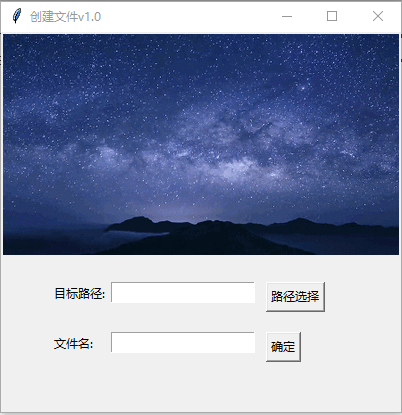
Python uses the Tkinter library to make file and folder creation functions
Python uses the Tkinter library to make file and folder creation functions I'm polite Article Directory Python uses the Tkinter library to make file and folder creation functions The first section lea...
Python Make GUI with Tkinter
Why can't 80% of the code farmers can't do architects? >>> What is GUI Since you want to make GUI, then you must first clarify what is GUI.wikiIt's so saying: Graphical User Inter...

Using Python to make execl reports is so simple
Execl reports that we use often, can make a variety of data and chart reports, below we use python to make a super simple execl file, this case is suitable for lovers who have just contacted Python as...
More Recommendation
Python: Use tkinter to make a simple number guessing game
Using tkinter, we can make a simple number guessing game~ It’s fun hahaha To start our game, just enter the guessed value in the box~ After the first guess, it reminds us that our guess is too s...
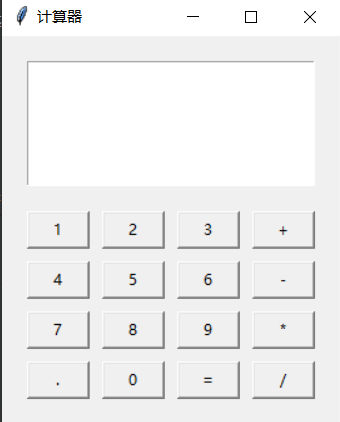
20 lines of Python programs, use tkinter to make a simple calculator
Renderings All procedures Direct modification of the width, high and width of the button does not affect the interface layout. Buttons increase or decrease directly to modify Text_arr, such as change ...
Use tkinter to make a simple timer
Use Tkinter to get a very basic timer, but no buttons...