CentOS7:Unit iptables.service not loaded
Today, I rented a few new cloud servers, configured the environment, and first set up a wave of Zookeeper clusters.
Like the previous machine, turn off the firewall service iptables stop first, and suddenly an error: Unit iptables.service not loaded...

Seeing this error, I instantly thought of the command replacement that may be caused by a version problem. I have been using CentOS6 before, and the service version rented this time is 7. After verification, it is indeed the problem. . In CentOS7, firewall management is controlled by firewalld.service, and iptables is a management method below version 7.
**
(1) Solution
**
[Many of the following commands are handwritten, so there may be missing spaces, please note]
There are two solutions to this problem:
The first is to manage according to the new management mechanism
Different from iptables service (static management firewall mode), firewalld.service is a dynamic firewall management service, through the port setting can control the data in and out, the use of the port. The specific steps are as follows:
Open a single port:
firewall-cmd --zone=public --add-port=80/tcp --permanent (--permanent takes effect permanently, make sure it is still valid after restart)
Open range ports (such as 500-1000):
firewall-cmd --zone=public --add-port=500-1000/tcp –permanent
Note: The tcp protocol is used here, but the udp protocol can also be used
Supplement: (Enter on demand)
Reload
firewall-cmd –reload (reload the firewall, interrupt the user's connection, clear the temporary configuration, and load the permanent configuration in the configuration file)
firewall–complete-reload (reload the firewall without interrupting the user's connection, used when the firewall has a serious failure)
firewall–panic-on (emergency mode, forcibly close all network connections, –panic-off is to close emergency mode)
View
firewall-cmd --zone=public --query-port=80/tcp
delete
firewall-cmd --zone=public --remove-port=80/tcp --permanent
The second is to revert to the old operating instructions
Many people are more accustomed to the original operation commands, and the second method can be implemented.
First, disable and log out the firewalld firewall service:
systemctl stop firewalld
systemctl mask firewalld

Secondly, install the iptables-services package
yum install iptables-services
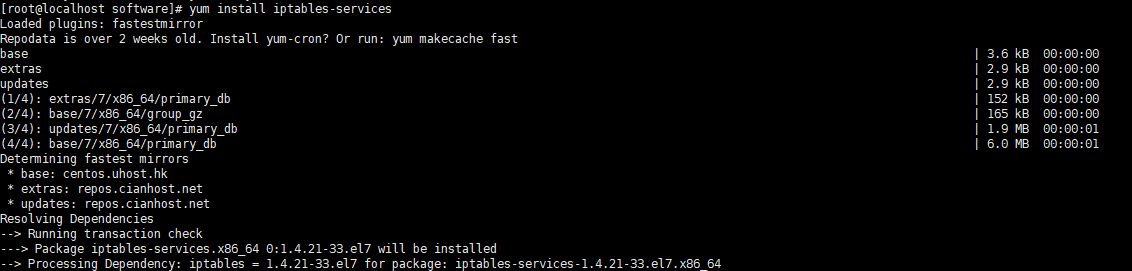
Then, set it to automatically start the service when the server starts
systemctl enable iptables

After , you can operate the firewall as needed
systemctl [stop|start|restart] iptables
or
Service [stop|start|restart] iptables

Finally, don’t forget to save the settings
service iptables save
PS: If you are not worried, you can check the status
Service iptables status
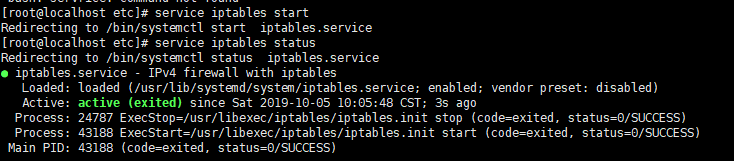
mainly depends on the status of Active.
(2) Related instructions
This part is mainly to explain the principle of the first part of the solution. If you just want to solve the problem at hand, you can just look at the first part. If you want to expand a bit, you can look at this part.
1) Why turn off the firewall
This blog post was generated when the zookeeper cluster was set up, and an error was reported when the firewall was turned off. The establishment of a firewall can protect the system and data, but sometimes the existence of a firewall will also affect our normal development, such as zookeeper, such as cluster port communication, data packet reception, or some port-based development.
2) CentOS, RHEL and Fedora
These three are all a kind of Linux system, and each has its own characteristics in terms of system packaging. The reason why these three linux releases are mentioned is because in CentOS 7, RHEL7 and Eedora, the management of the firewall is managed by firewalld. For the connection and distinction between Linux system (kernel) and Linux distribution system, please refer to my other blog post.
3) The difference between firewalld and iptables
This part is written by me referring to several blog posts and combining my own understanding. There will definitely be some inadequate places.
Firewalld (dynamic firewall) is a new firewall management mechanism introduced by CentOS 7. But its core is still based on iptables, and the bottom layer is also based on this entry, but it does not install the iptables.service service, so when we solve the first part of the restoration method, we directly use to disable the firewalled service, and then install it Click the iptables service to use the old operating instructions to operate the firewall.
In fact, compared with the traditional iptables, firewalld manages the firewall. The biggest feature is that it changes from static to dynamic and adds a mechanism like zone. Traditionally, if we need to set up different firewall rules for business replacement, we need to manually set up the firewall policy rules frequently, which is reflected in clearing the old rules first, and then reloading the new rules; and firewalld is a dynamic feature The direct manifestation is that there is no need to manually change the rules of the firewall. You only need to replace the new rules with the running iptables (the bottom layer of the firewall is still using iptables as the rule management entrance). How to add it? This is to mention zone (zone) ) For such a new mechanism, zone is public by default, but there are 9 categories in total. Each category represents a different default behavior for data packets (similar to permission modifiers). Different zone settings can help us set Set firewall policies for different ports so that we can quickly and easily set up when we need to change the firewall policy.
(Theoretical reference:
“https://blog.51cto.com/11638832/2092203”、“https://blog.csdn.net/u013485530/article/details/80906564”)
4)systemctl mask
I added this point because when I was running systemctl mask firewald, the role of the mask was a bit vague, and I got the following summary by consulting relevant information:
systemctl mask means to cancel the service.
Logging out of service means:
The service will not start when the system restarts
The service cannot perform systemctl start/stop operations
The service cannot perform systemctl enable/disable operation
5) Some commonly used commands
A blog post has been written in detail (https://blog.csdn.net/s_p_j/article/details/80979450)
In fact, I still want to say a lot, such as the Linux kernel version and release version, NetFilter and iptables framework, the underlying implementation process of the firewall under these different mechanisms, etc., there is no end, stop in time...
Intelligent Recommendation
Pit when configuring fastDfs: Restart the firewall on CentOs7 to report Unit not found or Job for iptables.service failed because the control pr...
Pit when configuring fastDfs: restart firewall on CentOs7 or Reference blog: Difference between CentOs7 and CentOs6 The default firewall for centos7 is firewalld firewall, not using iptables, so you m...
Solve the CentOS7 shutdown/open firewall. Unit iptables.service failed to load: No such file or directory....
Executed in CentOS7 Failed to start iptables.service: Unit iptables.service failed to load: No such file or directory. The firewall is managed by firewalld in CentOS 7 or RHEL 7 or Fedora. If you want...
Solve CentOS7 off / on firewall appears Unit iptables.service failed to load: No such file or directory ....
CentOS7 performed [plain] view plain copy print ? service iptables start/stop Will complain Failed to start iptables.service: Unit iptables.service failed to load: No such file o...
[Centos-Firewall] CentOS7 starts the firewall and reports an error Failed to start iptables.service: Unit not found.
Original address: Execute in CentOS7 Error: Redirecting to /bin/systemctl restart iptables.service Failed to restart iptables.service: Unit not found. The reason is because CentOS7 uses firewal...
Solve CentOS7 Close / Turn on the firewall Unit iptables.service failed to load: no such file or directory.
Error, firewall in CentOS 7 or RHEL 7 or Fedora is managed by FireWallD, of course, you can restore traditional management methods. Or use the new command to manage. If you use the tradition, please p...
More Recommendation
Failed to restart iptables.service: Unit not found.
In CentOS 7, the firewall has been managed by firewalld, and CentOS7 has firewallD by default. No installation can be installed with the yum command, and the iptables is not small. View firewall statu...
CentOS 7 appears Failed to start iptables.service: Unit iptables.service failed to load
The following error message: (1) Close firewalld: systemctl stop firewalld systemctl mask firewalld (2) use the iptables service: 1. Installation iptables-services: yum install ipt...
Redirecting to / bin / systemctl restart iptables.service / failed to restart iptables.service: Unit Not asked
Firewall by firewall in CentOS 7 or RHEL 7 or Fedora is managed by firewalld Add to Reload Check delete Open firewall View the running status Reference blog Centos7 Failed to Start iptables.service: U...
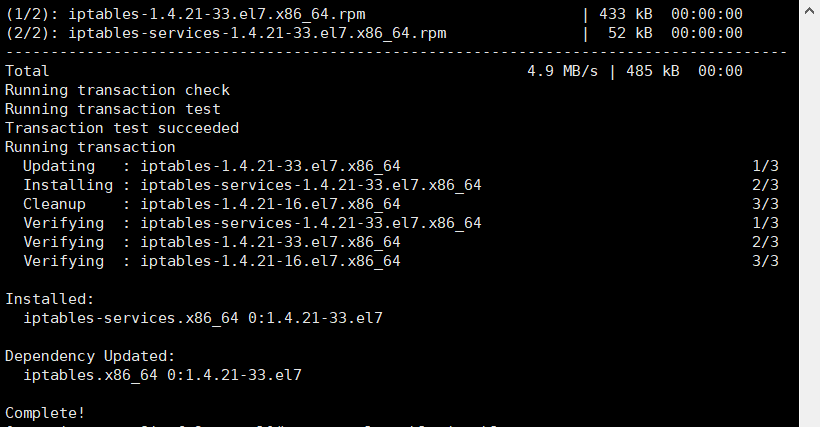
Unit iptables.service could not be found.(Firewall problem)
Problem: Checking the firewall status appears: solution: Install iptables-services 2. Start iptables Now execute to check the firewall status, stop and start it View firewall status: Turn off the fire...