CentOS 7 appears Failed to start iptables.service: Unit iptables.service failed to load
tags: Failed to start iptables.servi
The following error message:
service iptables start
Redirecting to /bin/systemctl start  iptables.service
Failed to start iptables.service: Unit iptables.service failed to load: No such file or directory.
Solutions are as follows:
 Because centos7 default firewall is firewalld firewall management tool, rather than using iptables. So we need to shut down firewalld service, or use the default firewalld firewall.
(1) Close firewalld:
-
systemctl stop firewalld -
systemctl mask firewalld
(2) use the iptables service:
1. Installation iptables-services:
yum install iptables-services
2. Set the boot:
systemctl enable iptables
3. iptables startup, shutdown, save:
systemctl [stop|start|restart] iptables
#or
service iptables [stop|start|restart]


service iptables save
#or
/usr/libexec/iptables/iptables.init save
Intelligent Recommendation
Redirecting to / bin / systemctl restart iptables.service / failed to restart iptables.service: Unit Not asked
Firewall by firewall in CentOS 7 or RHEL 7 or Fedora is managed by firewalld Add to Reload Check delete Open firewall View the running status Reference blog Centos7 Failed to Start iptables.service: U...
7 when mounted in CentOS iptables Start Job for iptables.service failed because the control process exited with error
iptables -A INPUT -p tcp --dport 22 -j ACCEPT iptables -A OUTPUT -p tcp --sport 3322 -j ACCEPT # Restart the firewall configuration file to take effect systemctl restart iptables.service # Ipta...
The exception is solved. CentOS7 closes/turns on the firewall. Unit iptables.service failed to load: No such file or directory.
original: Execution in CentOS7 Failed to start iptables.service: Unit iptables.service failed to load: No such file or directory. Firewalls are managed by firewalld in CentOS 7 or RHEL 7 ...
Solve the CentOS7 shutdown/open firewall. Unit iptables.service failed to load: No such file or directory....
Executed in CentOS7 Failed to start iptables.service: Unit iptables.service failed to load: No such file or directory. The firewall is managed by firewalld in CentOS 7 or RHEL 7 or Fedora. If you want...
Solve CentOS7 Close / Turn on the firewall Unit iptables.service failed to load: no such file or directory.
Error, firewall in CentOS 7 or RHEL 7 or Fedora is managed by FireWallD, of course, you can restore traditional management methods. Or use the new command to manage. If you use the tradition, please p...
More Recommendation
CentOS 7 restarts the firewall service, Job for iptables.service failed because the control process exited with error code
Re-run the network configuration...
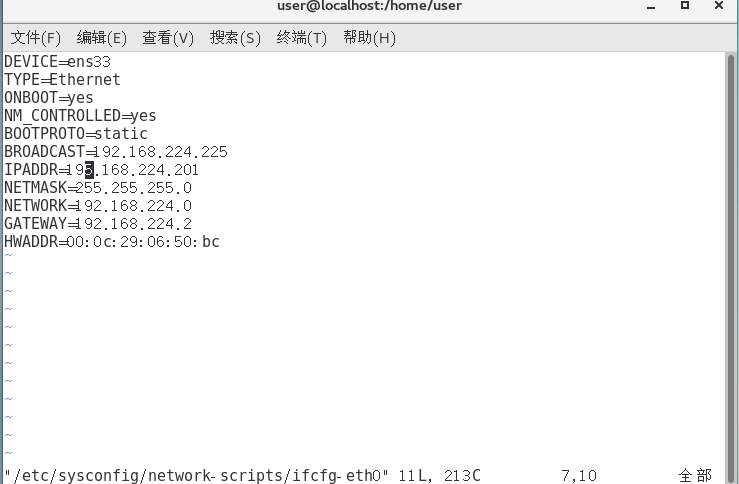
Centos 7 can not access, Job for iptables.service failed because the control process exited with error code.
Centos 7 can not access, Job for iptables.service failed because the control process exited with error code. Original May 20, 2017 14:21:41 label: centos / The internet A firstan examinationOwn n...
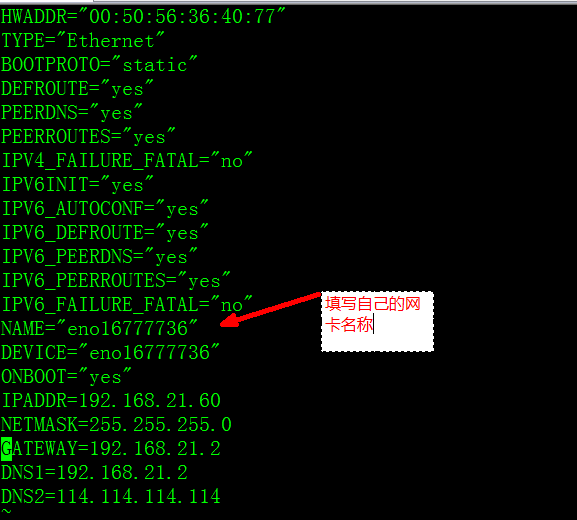
Centos 7 cannot access the Internet, Job for iptables.service failed because the control process exited with error code.
One, firstan examinationOwn network configuration information: Path: vi /etc/sysconfig/network-scripts/ifcfg-eno16777736 As shown in the figure Command to restart network configuration:service network...
Redirecting to / bin / systemctl stop iptables.service failed to stop iptables.service: solution
First, the problem description After installing MySQL under the Linux system (CentOS7), it is found that the database is not connected due to the firewall problem: Turn off the firewall problem: Secon...
Redirecting to /bin/systemctl restart iptables.service Job for iptables.service failed because the c
An error is as follows the reason: The meaning of this is to let you redirect to SystemctL and then enable, whitening is to start using SystemctL Enter systemctl start iptables...