PyWebView 2.0.3 simple understanding
tags: pywebview
Learn about pywebview, a very convenient front-end and back-end interactive technology.
Recently, Pywebview released a new version of 2.0. Pywebview allows you to create GUI applications using a combination of web technology and Python. Allows you to use Python for application logic control, and use Javascript and CSS to generate GUI. Pywebview has good support for freeze to implement the executable packaging of the program.
The biggest change in Pywebview2.0 is the two-way communication between Python and Javascript, which completely eliminates the need for a Python web server.
import webview
from threading import Thread

class Api():
    def helloWorld(self,param):
        # Executable business logic
        return 'return result'

def load_html():
    webview.load_html("""
        <style>
            #hdl_id{
                height:25%;
                width:100%;
                font-size: 30px;
                background-color:skyblue;
            }
        </style>
                 <!-- You can also import css files -->
        <!-- <link rel="stylesheet" type="text/css" href="test.css"/> -->

        <table style="border:1px solid #cccaca;background:red;">
            <tr>
                <td>11</td>
                <td>12</td>
            </tr>
            <tr>
                <td>21</td>
                <td>22</td>
            </tr>
        </table>
        <div id="hdl_id" onclick="hdl_function_test()">enene</div>

        <script>
            function hdl_function_test(){
                alert('be clicked!')
            }
        </script>
                 <!-- You can also import js files -->
        <!-- <script type="text/javascript" src="test.js"></script> -->
    """)
    # Added load_css function to load custom CSS
    # TypeError: evaluate_js() takes exactly 2 arguments (1 given) when used as follows
    # webview.load_css(stylesheet="""
    #     #hdl_id{
    #         height:25%;
    #         width:100%;
    #         font-size: 30px;
    #         background-color:skyblue;
    #     }
    # """,uid="master")

    #Create window
    second_window = webview.create_window('second  window')
    #Specify WebView and add content
    webview.load_html("""
        <span>this is a test</span><br>
        <div style="background-color:grey;">gegegeg</div>
        <input type="button" id="test" value="click it" onclick="test()">
    """,uid=second_window)
    #Callback background business logic
    webview.evaluate_js(script="""
        pywebview.api.helloWorld().then(function(response){
            alert(response)
        })
    """)

if __name__ == '__main__':
    api = Api()
    t = Thread(target=load_html)
    t.start()
    test = webview.create_window('first  window', js_api=api)
pywebview 2.0 released
http://www.myegotraps.com/pywebview-2-0-released/
documentation
https://github.com/r0x0r/pywebview
Results of the:


Intelligent Recommendation
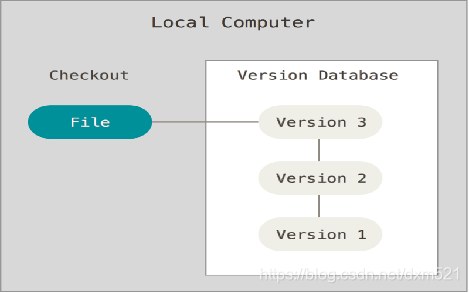
Git's simple understanding and understanding
What is "version control"? Versioning is a system that records one or several file content changes for future review of a particular version revision. * Version manager classification &ndash...
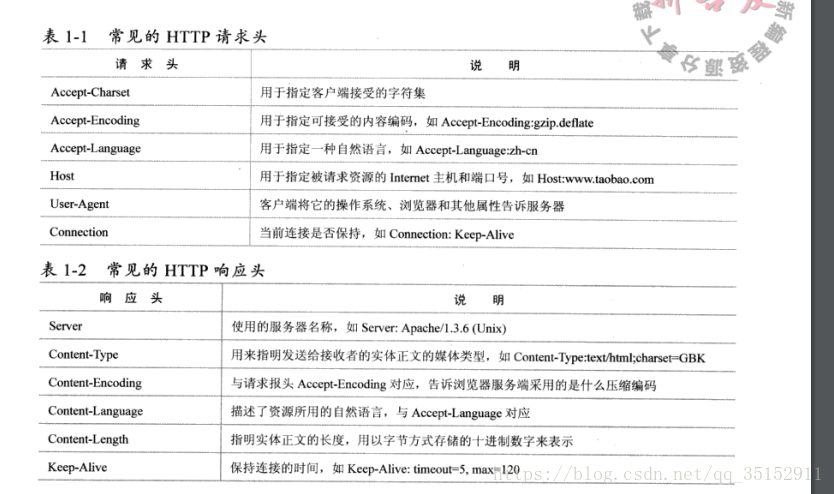
Http simple understanding and understanding
One: Initiate http: There is no difference between initiating an http request and how to establish a socket connection. Before establishing a socket connection, the browser must parse the ip address a...
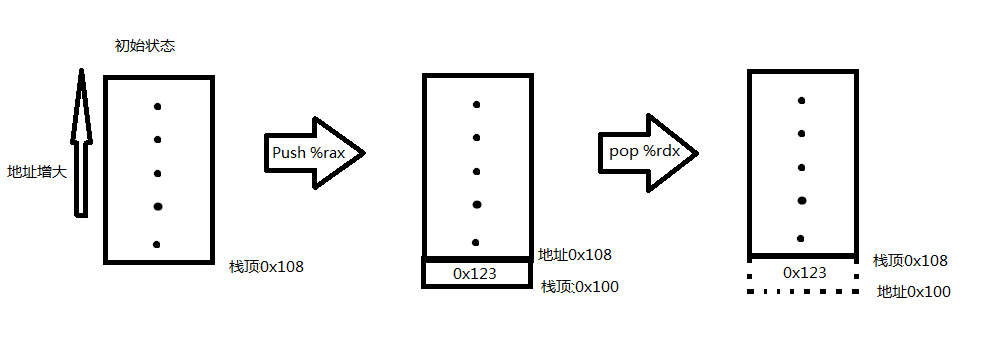
Simple understanding and understanding of the stack
1. The stack plays a vital role in the call of the handler, and there will be stacking and unstacking operations during the function interface call; function calls are for stacking operations, and fun...

dropout understanding ~ simple understanding
working principle: The so-called dropout, understood literally, is "abandonment." What to abandon? Abandoned are the nodes of the hidden layer in the network (the input layer and the output ...
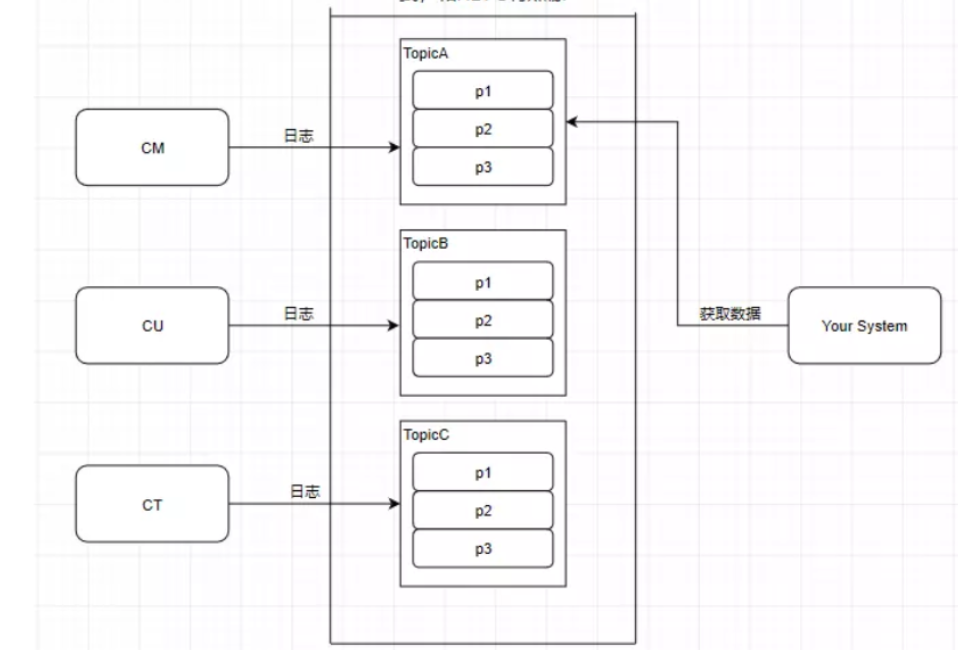
Simple understanding and understanding of Kafuka
Because there is a system in which the newspaper middleware Kafuka is used in the product, the understanding and the problem encountered in the work are summarized. It is convenient for later viewing,...
More Recommendation
A simple understanding of @RequestMapping (a simple understanding)
A simple understanding of @RequestMapping in the integrated use of SSM ================================================== Understand what is @RequestMapping "RequestMapping is an annotation used ...
Flask + PywebView development desktop application actual record
Upset review One year ago studied the development of desktop applications with PywebView:Python Develops Desktop Apps with PywebVIEW At that time, it was just a taste, there was no complete implementa...
PywebView full screen mode implementation program exits
After using pywebview to start the program with the full screen mode, it is no window border. Of course, there is no shutdown button, you can draw a button in the front page page, call the custom API ...

python video to GIF library Moviepy Pywebview
Official website:moviepy · PyPI Chinese document:MOVIEPY-CN documentation pywebviewwen'danhttps://pywebview.github.io/zh/guide/freezing.html usage: Packing pyinstaller: ① Pyinstaller: Moviepy p...
Python -Pywebview, Flaskwebgui to send desktop program
pywebview Packet Official article Case Practice flaskwebgui Pack: PIP Install FLASKWEBGUI github: Example: structure:...