arduino serial read string
problem:
I want to use a Bluetooth app or other sensors to connect to the Arduino serial port, but what comes from the serial port is a bunch of unreadable numbers (Figure 1)?

(1) (Photo 1)
answer:
Routine:
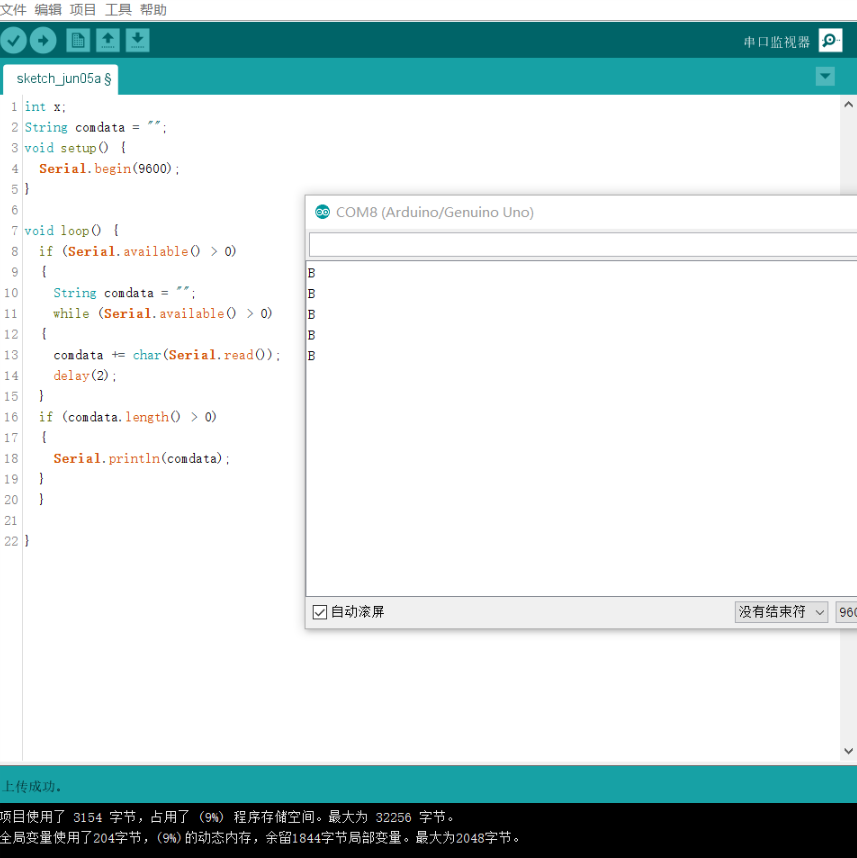
int x;//Cache function
 String comdata = "";//String function
void setup() {
     Serial.begin(9600);//Open serial port baud rate 9600
}

void loop() {
     if (Serial.available()> 0) // judge whether there is data in the serial port
  {
         String comdata = "";//The cache is cleared
         while (Serial.available()> 0) // whether there is data in the loop serial port
    {
             comdata += char(Serial.read());//Overlay data to comdata
             delay(2);//Delay to wait for response
    }
         if (comdata.length()> 0)//If comdata has data
    {
             Serial.println(comdata);//Print comdata data
    }
  }
}Intelligent Recommendation
Arduino serial port accepts string operations
For the use of the Arduino serial port part, it is somewhat inconvenient. Although the function to be called is officially provided, it is not flexible enough. The following is a summary of the string...
Arduino string comparison, serial print print
Arduino string comparison, serial port income serial port printing, with a Compareto () function. ...
Arduino Rx, Tx hard serial communication Serial has repeatedly failed to record-convert the value back to a string-what should I do if I read it repeatedly? ?
Introduction Arduino's simplest serial communication is the TTL protocol, which will be written after the RS485, as well as SPI and IIC. . . . Rx and Tx hard serial ports can basically be used on some...
Arduino + RC522 read and write string data
Arduino + RC522 read and write string data Experimental description RFID module basics MFRC522 library NXP_MFRC522 reader (Proximity Coupling Device) PICC(Proximity Integrated Circuit Card) Hardware c...
ARDUINO EEPROM string read and write function example
ARDUINO EEPROM string read and write function example Experience is to continue learning and reference, summarizing and summarizing. Share out better knowledge and let more people walk less unnecessar...
More Recommendation
arduino serial port to read multiple bytes (USART_HMI screen example)
1. Read multiple bytes Used to read bytes, the advantage over reading strings is that data larger than 0x7f can be read, because the data read by the string reading method cannot be larger than 0x7f. ...

Arduino serial communication (Serial)
Hardware structure of Arduino serial port Those who know the operating principle of single-chip microcomputers all know that the single-chip microcomputer is an electronic system based on a microcontr...
arduino receives string and int data through serial port
The arduino (0, 1) pin serial port is connected to HC-05 Bluetooth, which can be connected to other Bluetooth or Android mobile phone Bluetooth The source code of serial port receiving string type dat...