The practice of Kotlin StateFlow search function DB + NetWork
tags: Android development android kotlin Flow jetpack channel
Preface
Shared an article beforeGoogle recommends using Kotlin Flow in the MVVM architecture , In this article, we analyze how to use Kotlin Flow in the MVVM architecture, and Kotlin Flow solves the following problems for us:
-
LiveData is a life cycle aware component, it is best to use it in the View and ViewModel layers, if it is used in Repositories or DataSource, there will be several problems
- It does not support thread switching, and secondly does not support back pressure, that is, within a period of timesendData speed>acceptThe speed of data, LiveData cannot handle these requests correctly
- The biggest problem with LiveData is that all data conversion will be done on the main thread
-
Although RxJava supports thread switching and back pressure, RxJava has so many stupid and unclear operators. In fact, there may only be a few commonly used in projects, such as
Observable、Flowable、SingleWait, if we don’t understand the underlying principle, it is normal to cause memory leaks. You can check it on StackOverflow. There are many examples of memory leaks caused by RxJava. -
RxJava has a high barrier to entry. Friends who have studied, I believe I can experience what it's like to get started to give up
-
Solve the problem of callback hell
Compared with the above shortcomings, Flow has the following advantages:
- Flow supports thread switching and back pressure
- The entry barrier for Flow is very low, and there are not so many stupid and unclear operators
- Simple data conversion and operators, such as map etc.
- Flow is an extension of Kotlin coroutines, allowing us to run asynchronous code like synchronous code, making the code more concise and improving the readability of the code
- Easy to do unit testing
And this article mainly analyzesPokemonGo The practice of search function mainly includes the following aspects:
- What is Kotlin Flow? And how to use it?
- How to distinguish between terminal operators and intermediate operators?
- What is Kotlin Channel? And how to use it?
- What types of Kotlin Channel are there?
BroadcastChannelsWhat is it? And how to use it in the project?StateFlowWhat is it? And how to use it in the project?- Kotlin common operators
debounce、filter、flatMapLatest、distinctUntilChangedParsing?
Many friends gave me feedback on how to use Flow to implement search functions, so I’mPokemonGo Two search scenarios are added to the project, which are demonstrated separatelyBroadcastChannels with StateFlow Usage.
- Use ConflatedBroadcastChannel to implement DB search
- Use StateFlow for NetWork Search
Before analyzing these two implementations, you need to understand a few basic concepts, what are Flow and Channel, and commonly used operatorsdebounce 、filter 、flatMapLatest 、 distinctUntilChanged Wait for the use, Flow and Channel are a relatively large concept, I will spend several articles to analyze them later, this article will only outline the differences between them.
What is Kotlin Flow
Let's first take a look at how the official Kotlin documentation is introducedFlow
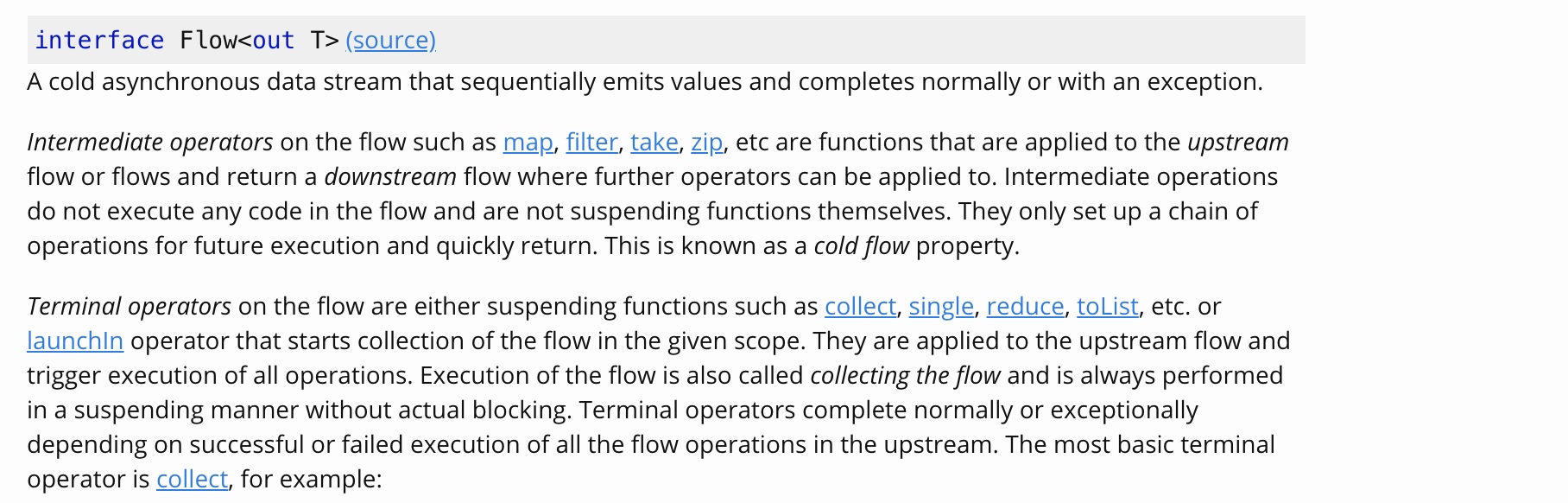
Summarize the above paragraph briefly:
- Flow is non-blocking and is executed in a suspended manner. Only when the terminal operator is encountered, the execution of all operations will be triggered
- All operations are executed sequentially within the same code block
- The values emitted are all executed sequentially, and only end at a certain moment (encounteredEnd operator Or something abnormal)
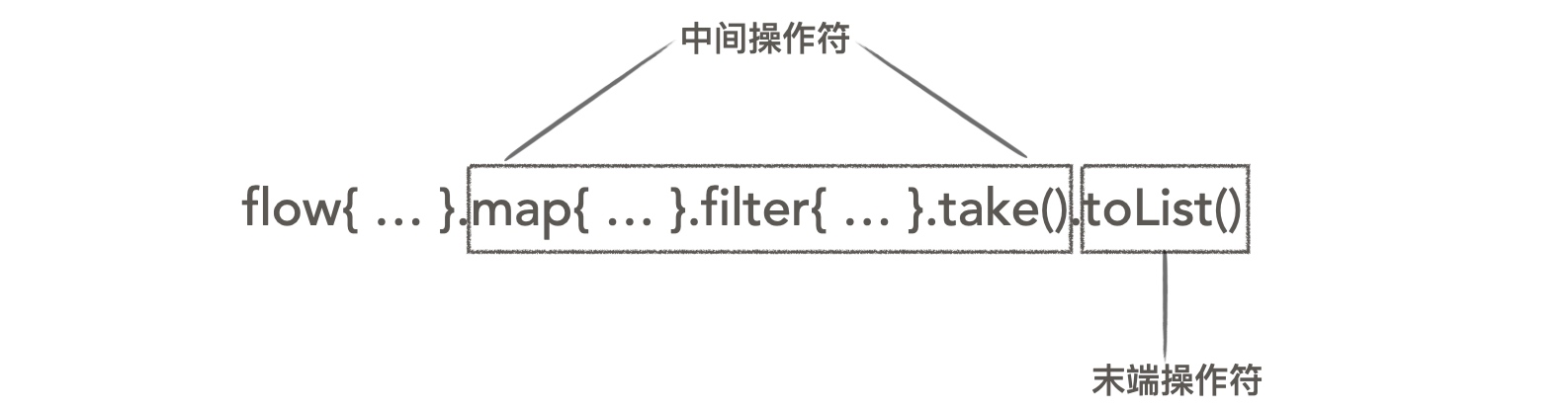
map,filter,take,zipAnd so on are intermediate operators,collect,collectLatest,single,reduce,toListWait for the end operator- The intermediate operator constructs a call chain to be executed, as shown in the following figure:
Non-blocking, execute in a suspended manner : That is, the coroutine scope is suspended, and the code outside the coroutine scope in the current thread will not block
Next we look at an example:
suspend fun printValue() = flow<Int> {
    for (index in 1..10) {
        emit(index)
    }
 }.map {it -> it * it} // map, filter, take, zip, etc. are intermediate operators
.filter { it -> it > 5 }
 .toList() // Only when the terminal operators collect, collectLatest, single, reduce, toList, etc. are encountered will the execution of all operations be triggered
- When encountering intermediate operators, it will not perform any operations, nor will it suspend the function itself. These operators construct a call chain to be executed
- The end operator is a suspendable function, and the execution of all operations will be triggered when the end operator is encountered
How to distinguish between terminal operators and intermediate operators
To distinguish between terminal operators and intermediate operators, you can followIs it a suspend functionTo distinguish, I personally think that the distinction is based on the suspend function, which is convenient to remember the features of Flow mentioned above. Of course, it can also be distinguished in other ways. Let's analyze the source code together.
// The intermediate operators are the extension functions of Flow, and they all emit data through emit at the end
public inline fun <T> Flow<T>.filter(crossinline predicate: suspend (T) -> Boolean): Flow<T> = transform { value ->
    if (predicate(value)) return@transform emit(value)
}

 // The end operator is a suspended function
 // The end operator, whether it is collectLatest, single, reduce, toList, calls collect at the end
public suspend fun <T> Flow<T>.toList(destination: MutableList<T> = ArrayList()): List<T> = toCollection(destination)

public suspend fun <T, C : MutableCollection<in T>> Flow<T>.toCollection(destination: C): C {
    collect { value ->
        destination.add(value)
    }
    return destination
}
- The intermediate operators are the extension functions of Flow, and they all pass
emitTo transmit data - The end operator is a suspended function
- Whether the end operator is
collectLatest,single,reduce,toListIn the end are all callscollect
What is Kotlin Channel
Let's see how the official Kotlin documentation is introducedChannel

Summarize the above paragraph briefly:
- Channel is non-blocking, it is used for communication between the sender (SendChannel) and the receiver (ReceiveChannel)
- Channel implements the SendChannel and ReceiveChannel interfaces, so it can both send and receive data
- Channel is similar to BlockingQueue in Java. The difference is that BlockingQueue is blocked, while Channel is suspended
- The sender (SendChannel) and receiver (ReceiveChannel) are synchronized through the buffer, as shown in the following figure:
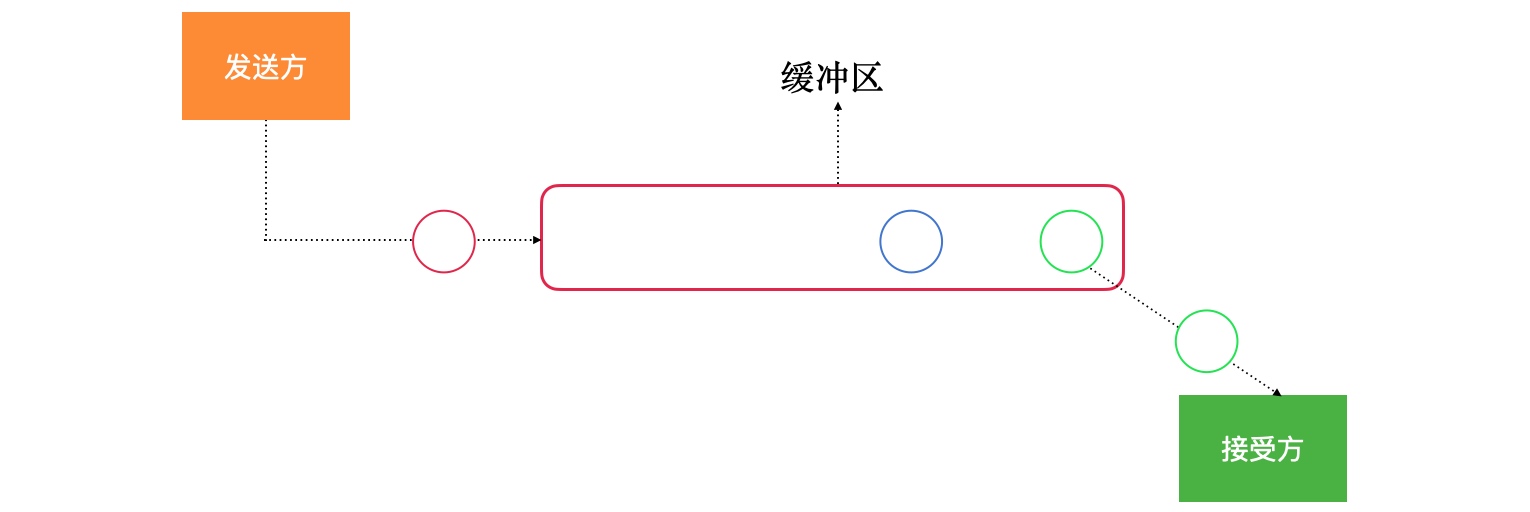
- Send data to the buffer through the sender (SendChannel)
- Get data from the buffer through the receiver (ReceiveChannel)
- There is a channel between the sender (SendChannel) and the receiver (ReceiveChannel), which is the buffer
- The function of the buffer helps us synchronize the data sent and received by the sender (SendChannel) and the receiver (ReceiveChannel), which means that multiple coroutines can send data to the same channel, and the data of a channel can also be used by multiple protocols. Cheng Shou
Let's implement a simple message sending and receiving example:
val channel = Channel<Int>()
 // accept message
suspend fun receiveEvent() {
    coroutineScope {
        while (!channel.isClosedForReceive) {

                         // The receive() method gets the element asynchronously. If the buffer is empty, the caller of receive() will be suspended until a new value is sent to the buffer
                         // receive() is a suspend function, a mechanism used to synchronize the sender and receiver
             channel.receive()

                         // The poll() method obtains an element synchronously, and returns null if the buffer is empty
            // channel.poll()
        }
    }
}

 // send messages
suspend fun postEvent() {
    coroutineScope {
        if (!channel.isClosedForSend) {
            (1..10).forEach {

                                 // If the buffer is not full, add elements immediately,
                                 // If the buffer is full, the caller will be suspended
                                 // send() is a suspend function, a mechanism used to synchronize the sender and receiver
                channel.send(it)

                                 // offer(): If the buffer exists and is not full, immediately add an element to the buffer
                                 // If the addition is successful, it will return true, if it fails, it will return false
                // channel.offer(it)
            }
        }
    }
}
as you saw send with accept There are two ways to analyze their differences.
The difference between send() and offer():
send(element: E): If the buffer is not full, add elements immediately, if the buffer is full, the caller will be suspended,send()Method is a suspend function, a mechanism used to synchronize the sender and receiveroffer(element: E): Boolean: If the buffer exists and is not full, immediately add an element to the buffer, it will return true if the addition is successful, false will be returned if it fails
The difference between receive() and poll():
receive(): E: Get the element asynchronously. If the buffer is empty, the caller will be suspended until a new value is sent to the buffer.receive()Method is a suspend function, a mechanism used to synchronize the sender and receiverpoll(): E?: Used to obtain an element synchronously, if the buffer is empty, null is returned
The difference between Flow and Channel:
- Flow: the intermediate operator (
map,filterEtc.) will construct a call chain to be executed, only the end operator (collect,toListEtc.) will trigger the execution of all operations, so Flow is also called cold data flow - Channel: The sender (SendChannel) sends data and does not depend on the receiver (ReceiveChannel), so Channel is also called cold data flow
Different types of channels
Channel corresponds to four different types:
RendezvousChannel: This is the default type, a buffer with a size of 0, only whensend()Methods andreceive()When the method is called, the element will be transmitted from the sender to the receiver, otherwise it will be suspendedLinkedListChannel: Will create a buffer with unlimited capacity (limited by the size of the memory),send()The method is far from hanging,offer()Method always returns trueConflatedChannel: Buffer at most one element, the new element will overwrite the old element, only the last sent element will be received, and the previous elements will be lost.send()The method never hangs,offer()Method always returns trueUnlimitedChannel: Will create an array buffer of fixed capacity,send()The method only hangs when the buffer is full,receive()Method only hangs when the buffer is empty
Ways to create four different types of channels:
val rendezvousChannel = Channel<Int>()
val bufferedChannel = Channel<Int>(30)
val conflatedChannel = Channel<Int>(Channel.Factory.CONFLATED)
val unlimitedChannel = Channel<Int>(Channel.Factory.UNLIMITED)
What is BroadcastChannels
Let's see how the official Kotlin documentation is introducedBroadcastChannels

- BroadcastChannels is non-blocking, it is used for communication between the sender (SendChannel) and the receiver (ReceiveChannel)
- BroadcastChannels implements the SendChannel interface, so only data can be sent
- BroadcastChannels provides
openSubscriptionMethod, will return a new ReceiveChannel, you can get data from the buffer - The data sent through BroadcastChannels will be received by all receivers (ReceiveChannel), as shown in the figure below
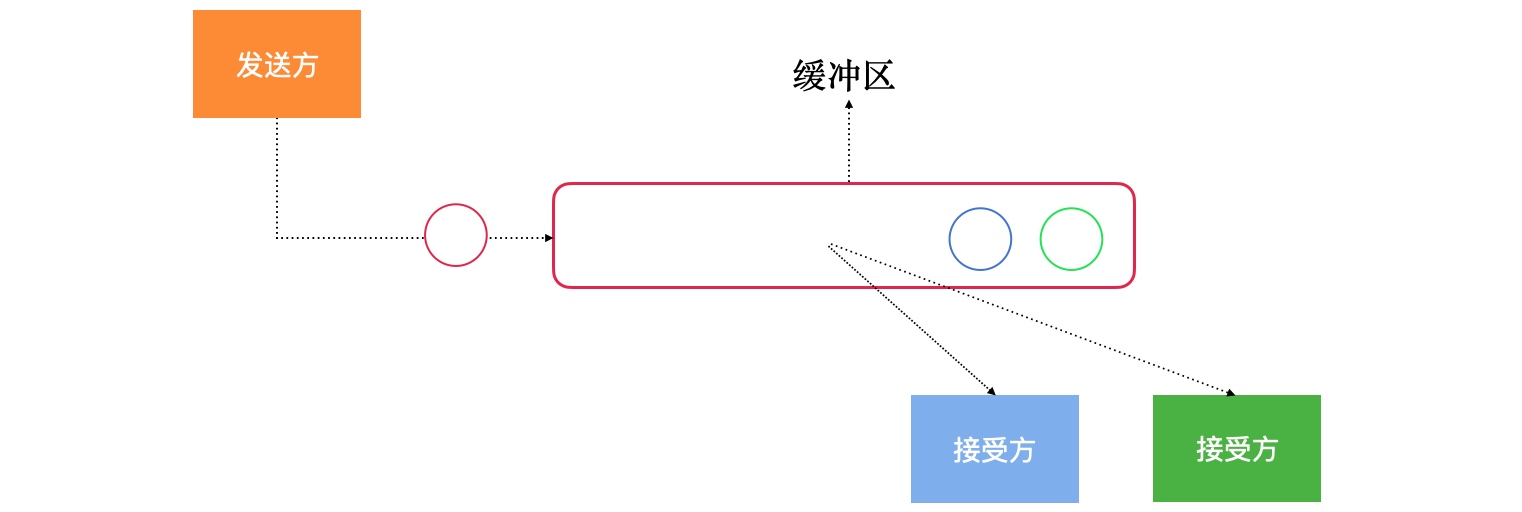
BroadcastChannels is an interface, and its subclasses are ConflatedBroadcastChannel, ArrayBroadcastChannel, here we mainly introduce ConflatedBroadcastChannel, ConflatedBroadcastChannel is rewrittenopenSubscription method.
public override fun openSubscription(): ReceiveChannel<E> {
    val subscriber = Subscriber(this)
         ... // Omit a lot of irrelevant code
    return subscriber
}
openSubscriptionMethod returns a ReceiveChannel as the receiver- In
openSubscriptionWithin the method, an instance of Subscriber is created
Subscriber is actually an internal class of ConflatedBroadcastChannel, which implements the ReceiveChannel interface.
private class Subscriber<E>(
    private val broadcastChannel: ConflatedBroadcastChannel<E>
) : ConflatedChannel<E>(), ReceiveChannel<E>
As you can see, Subscriber inherits ConflatedChannel and implements the ReceiveChannel interface. ConflatedChannel has been introduced above. At most one element will be buffered. The new element will overwrite the old element. Only the last sent element will be received. The previous elements will be lost, so ConflatedBroadcastChannel is suitable for implementing search-related functions, because users are only interested in the last search result.
note: StateFlow will replace ConflatedBroadcastChannel as described below
Use ConflatedBroadcastChannel to implement DB search
I'm here PokemonGo Two search scenarios have been added to the project, respectively throughBroadcastChannels with StateFlow To achieve, through ConflatedBroadcastChannel to achieve DB search, only two steps
1. Monitor the changes of ConflatedBroadcastChannel in Activity
src/main/java/com/hi/dhl/pokemon/ui/main/MainActivity.kt
// searchView is an AppCompatEditText, of course you can use androidx.appcompat.widget.SearchView, or other
searchView.addTextChangedListener {
                val result = it.toString()
                                 // Call the queryParamterForDb method to filter the user's input and query the database
                mViewModel.queryParamterForDb(result)
            }

 // Monitor query results
mViewModel.searchResultForDb.observe(this, Observer {
    mPokemonAdapter.submitData(lifecycle, it)
})
- Accept the data entered by the user and call
queryParamterForDbMethod to filter user input and then query the database - Pass
searchResultForDb.observeMethod to monitor query results
2. Implement queryParamterForDb method in MainViewModel
src/main/java/com/hi/dhl/pokemon/ui/main/MainViewModel.kt
// Search by keyword
fun queryParamterForDb(paramter: String) = mChanncel.offer(paramter)

 // Use ConflatedBroadcastChannel to search
val searchResultForDb = mChanncel.asFlow()
         // Avoid fast input causing a large number of requests in unit time
    .debounce(200)
         // Avoid repeated search requests. Suppose you are searching for dhl, the user deletes l and enters l. The final result is still dhl. It will no longer execute the search query dhl
         // distinctUntilChanged has no effect on any instance of StateFlow
    .distinctUntilChanged()
         .flatMapLatest {search -> // Only display the results of the last search, ignore previous requests
        pokemonRepository.fetchPokemonByParameter(search).cachedIn(viewModelScope)
    }
    .catch { throwable ->
                 // Exception catch
    }.asLiveData()
- Pass
mChanncel.offersend data - Pass
mChanncel.asFlow()Method, convert Channel to Flow and calldebounce、distinctUntilChanged、flatMapLatestPass the user’s input data,These operators will be analyzed in detail later - Finally, query the database and return the results. The project uses Paging3 to query the local database. For how to achieve this, you can check another articleJetpack member Paging3 data practice and source code analysis (1)
Focus: In the Kotlin coroutines library (1.3.6) version, a new class StateFlow has been added. Its design is the same as ConflatedBroadcastChannel. It is planned to completely replace ConflatedBroadcastChannel in the future.
What is StateFlow
StateFlow has been mentioned many times in the previous content, so what is StateFlow and what does it have to do with Flows and Channels? Let’s take a look at how the official Kotlin documentation introducesStateFlow
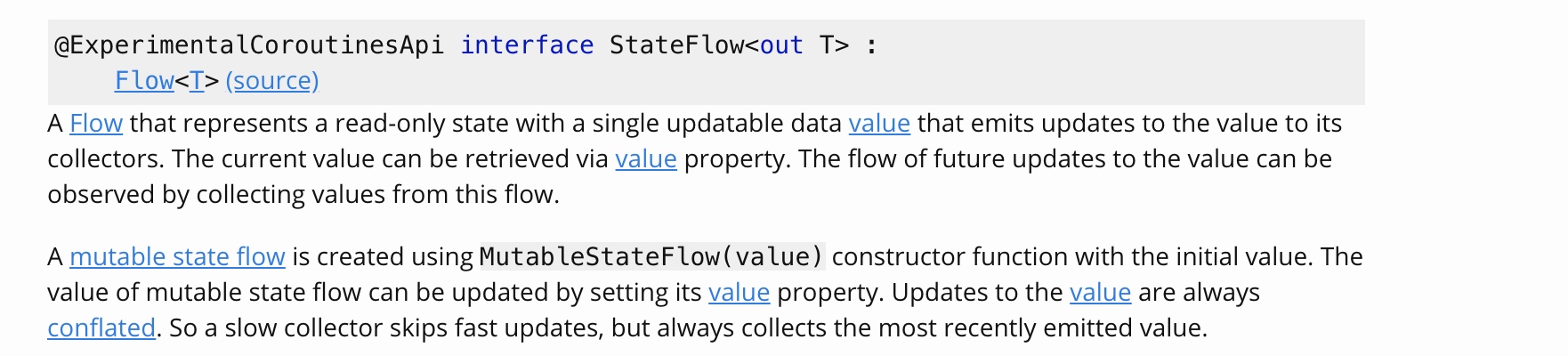
Summarize the above paragraph briefly:
-
StateFlow implements the Flow interface, which only represents a readable state, its value is unchanged, and is used for external calls
public interface StateFlow<out T> : Flow<T> { public val value: T // val keyword means immutable } -
StateFlow provides a variable version MutableStateFlow, its value is variable, used for internal calls
public interface MutableStateFlow<T> : StateFlow<T> { public override var value: T // var means variable } -
The difference between StateFlow and Flow is that StateFlow only represents a state and does not depend on a specific context, and Flow operations are executed in CoroutineScope. In other words, StateFlow does not need to be in the scope of the coroutine, it can also be executed
Just now we mentioned that StateFlow appeared to replace ConflatedBroadcastChannel, so what is the difference between it and ConflatedBroadcastChannel:
-
The implementation of StateFlow is simpler and does not need to implement all Channel APIs, while ConflatedBroadcastChannel encapsulates ConflatedChannel and BroadcastChannels inside it
-
There is a variable value inside StateFlow, which can be safely accessed at any time
-
StateFlow realizes read-write separation, StateFlow is used for reading and MutableStateFlow is used for writing
-
StateFlow internal use
Any.equalsTo compare the new value with the old value, in the same way as distinctUntilChanged, so applying distinctUntilChanged on StateFlow has no effectStateFlow source code:
if (oldState == newState) return // If the value has not changed, nothing will be donedistinctUntilChanged source code
public fun <T, K> Flow<T>.distinctUntilChangedBy(keySelector: (T) -> K): Flow<T> =
    distinctUntilChangedBy(keySelector = keySelector, areEquivalent = { old, new -> old == new })
Use StateFlow for NetWork Search
StateFlow is the same as ConflatedBroadcastChannel, it only takes two steps to realize the search function
1. Monitor the changes of ConflatedBroadcastChannel in Activity
src/main/java/com/hi/dhl/pokemon/ui/main/MainActivity.kt
// searchView is an AppCompatEditText, of course you can use androidx.appcompat.widget.SearchView or other
searchView.addTextChangedListener {
    val result = it.toString()
         // Call the queryParamterForNetWork method to filter the user’s input and query the network
    mViewModel.queryParamterForNetWork(result)
}

mViewModel.searchResultMockNetWork.observe(this, Observer {
         // Web search callback monitoring
})
- Accept the data entered by the user, and call the queryParamterForNetWork method to filter the user's input, and query keywords through the network
- Pass
searchResultMockNetWork.observeMethod to monitor query results
2. Implement queryParamterForNetWork method in MainViewModel
src/main/java/com/hi/dhl/pokemon/ui/main/MainViewModel.kt
// Search by keyword
fun queryParamterForNetWork(paramter: String) {
    _stateFlow.value = paramter
}

 // Because there is no suitable search interface, simulate the network search here
val searchResultMockNetWork =
         // Avoid fast input causing a large number of requests in unit time
    stateFlow.debounce(200)
        .filter { result ->
                         if (result.isEmpty()) {// Filter out invalid input such as empty strings
                return@filter false
            } else {
                return@filter true
            }
        }
                 .flatMapLatest {// Only display the results of the last search, ignore previous requests
                         // Network request, just replace your own implementation here
        }
        .catch { throwable ->
                         // Exception catch
        }
        .asLiveData()
- Pass
_stateFlow.valueupdate data - transfer
debounce、filter、flatMapLatestWait for the operator to filter out invalid requests
Common operator analysis
InPokemonGo Used in the projectdebounce 、filter 、flatMapLatest 、 distinctUntilChanged Wait for the operators, let's analyze in detail the meaning of these operators and how to use them.
debounce

debounce Also called the anti-shake function, when the user inputs "d", "dh", "dhl" in a short period of time, but the user may only be interested in the search results of "dhl", so we must discard the "d", "Dh" filters out unwanted requests. For this situation, we can usedebounce Function, multiple strings appear within a specified time,debounce Only the last string will always be sent, let's look at an example.
val result = flow {
    emit("h")
    emit("i")
    emit("d")
    delay(90)
    emit("dh")
    emit("dhl")
}.debounce(200).toList()
 println(result) // Final output: dhl
filter

filter Operators are used to filter unwanted strings, inPokemonGo Only empty strings are filtered in the project, let's look at an example.
val result = flow {
    emit("h")
    emit("i")
    emit("d")
    delay(90)
    emit("dh")
    emit("dhl")
}.filter { result ->
    if (!result.equals("dhl")) {
        return@filter false
    } else {
        return@filter true
    }
}.toList()
 println(result) // Final output: dhl
flatMapLatest

flatMapLatest Avoid showing users unwanted results, and only provide the results of the last search query (the latest). For example, if the user is searching for "dh" and then the user enters "dhl", the user is not interested in the results of "dh" at this time, and may only Interested in the result of "dhl", this time you can useflatMapLatest, Let’s look at an example.
flow {
    emit("dh")
    emit("dhl")
}.flatMapLatest { value ->

    flow<String> {
        delay(100)
                 println("collected $value") // finally output collected dhl
    }

}.collect()
note: flatMapLatest The following error will occur when using Kotlin coroutines library (1.3.20) and below.
IllegalStateException crash: call to 'resume' before 'invoke' with coroutine
The Kotlin team has fixed this problem in the Kotlin coroutines library (1.3.20) and above. If this problem occurs, upgrade the version to 1.3.20 or above.issues address。
DistinctUntilChanged

distinctUntilChangedOperators are used to filter out repeated requests and only send them when the current value is different from the last value. Let's look at an example.
val result = flow {
    emit("d")
    emit("d")
    emit("d")
    emit("d")
    emit("dhl")
    emit("dhl")
    emit("dhl")
    emit("dhl")
}.distinctUntilChanged().toList()
 println(result) // output [d, dhl]
- StateFlow has implemented something similar to
distinctUntilChangedOperator function, so distinctUntilChanged application has no effect on StateFlow
Let's analyze togetherdistinctUntilChanged How the operator source code is implemented
public fun <T> Flow<T>.distinctUntilChanged(): Flow<T> =
    when (this) {
        is StateFlow<*> -> this
        else -> distinctUntilChangedBy { it }
    }
distinctUntilChangedIs an extension function of Flow- If the current object is StateFlow, return directly to the caller itself
- If it is not StateFlow, it will call
distinctUntilChangedBymethod
public fun <T, K> Flow<T>.distinctUntilChangedBy(keySelector: (T) -> K): Flow<T> =
    distinctUntilChangedBy(keySelector = keySelector, areEquivalent = { old, new -> old == new })
Will finally callareEquivalent Method to compare, will filter out all the same value
The full text is over here, the renderings are shown below, if the renderings are not available, please click here to viewEffect picture
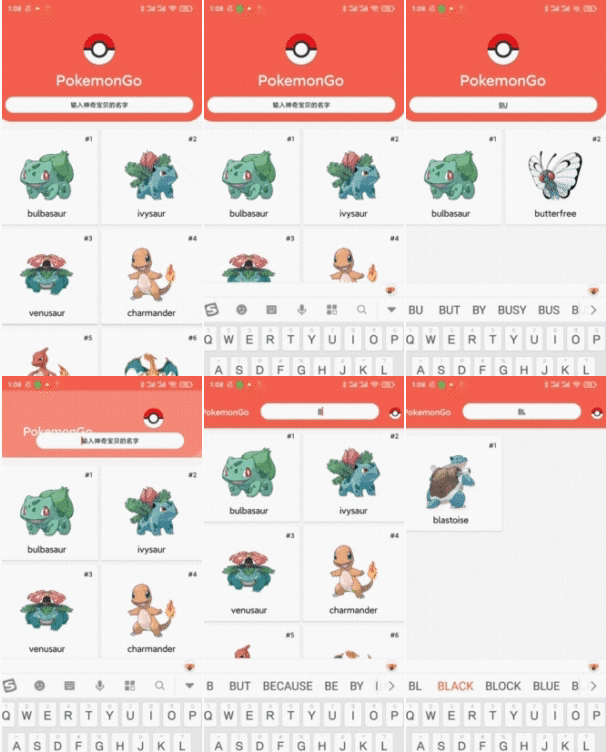
The PokemonGo (Pokemon) mentioned in the article is based on Jetpack + MVVM + Data Mapper + Repository + Paging3 + App Startup + Hilt + Kotlin Flow + Motionlayout + Coil and other technical comprehensive practical projects.Click here to view
references
- kotlinx.coroutines.channels
- kotlinx.coroutines.flow
- Implementing Search Filter using Kotlin
- Going deep on Flows & Channels
- Implement Instant Search Using Kotlin Flow Operators
Conclusion
Committed to sharing a series of articles related to Android system source code, reverse analysis, algorithm, translation, Kotlin, Jetpack source code, if this article is helpful to you, please give me a star, thanks! ! ! , Welcome to learn together and advance together on the road of technology.
During the National Day, I sorted out LeetCode / Jianzhi offer and interview questions from major companies at home and abroad. So far I have written 124+ questions on LeetCode. Each question will be implemented in Java and Kotlin, and there are more A variety of solution methods, problem-solving ideas, time complexity, space complexity analysis, the question bank is gradually improving, welcome to check it out.
- Jianzhi offer and interview questions of domestic and foreign companies:read online
- LeetCode series of problem solutions:read online
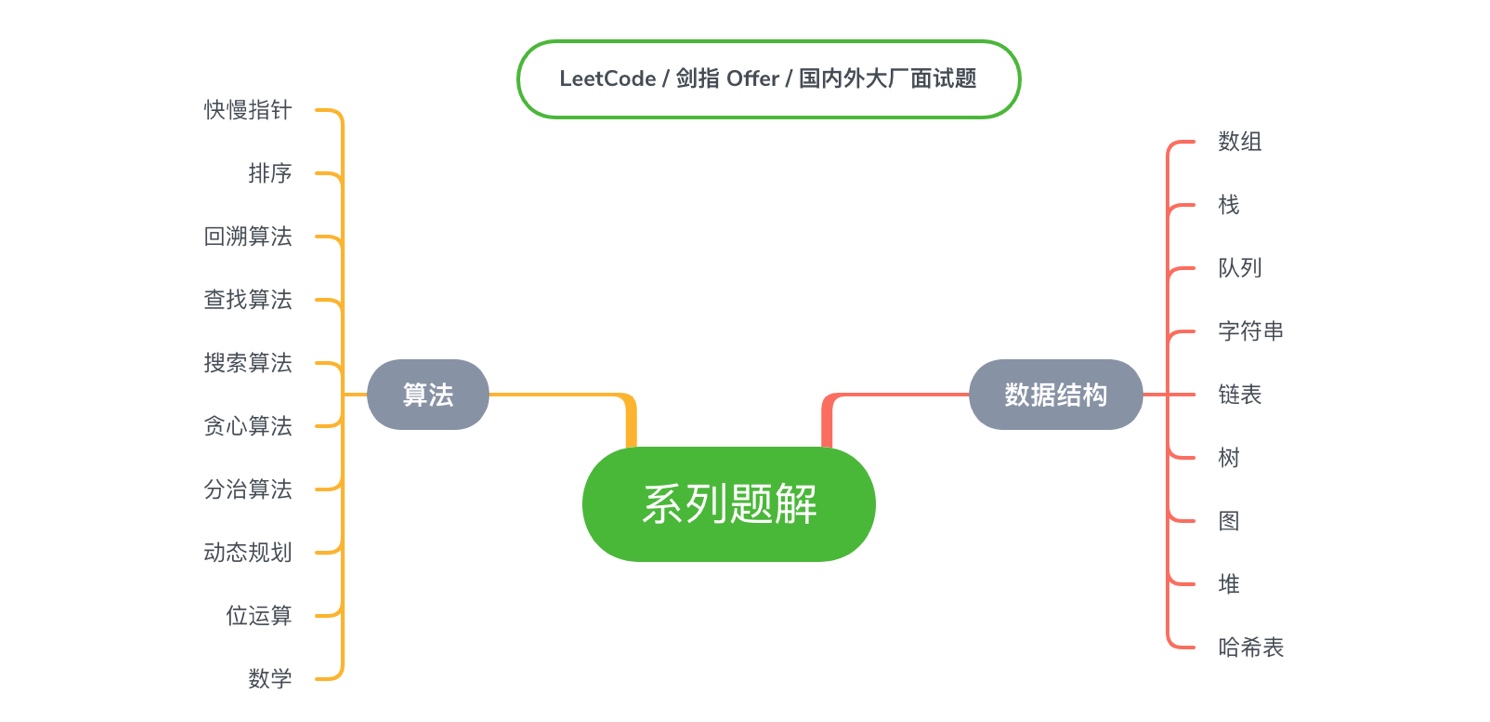
Finally, I recommend the projects and websites that I have been updating and maintaining:
-
It is planned to establish the most complete and latest actual combat project of AndroidX Jetpack related components and related component principle analysis articles. New members of Jetpack are gradually being added, and the warehouse is continuously updated. Welcome to check:AndroidX-Jetpack-Practice
-
LeetCode / Sword Finger Offer / Interview questions from major domestic and foreign companies, covering: multithreading, arrays, stacks, queues, strings, linked lists, trees, search algorithms, search algorithms, bit operations, sorting, etc. Each topic will use Java Realize with kotlin, the warehouse is continuously updated, welcome to checkLeetcode-Solutions-with-Java-And-Kotlin, Jianzhi offer and interview questions of domestic and foreign companies:read online, LeetCode series of problem solutions:read online
-
The latest Android 10 source code analysis series of articles, understanding the system source code, not only helps to analyze the problem, it is also very helpful to us during the interview process, the warehouse is continuously updated, welcome to check it outAndroid10-Source-Analysis
-
Organize and translate a series of selected foreign technical articles, each article will haveTranslator thinkingPart, a deeper interpretation of the original text, the warehouse is continuously updated, welcome to checkTechnical-Article-Translation
-
"Designed for Internet users, domestic and foreign famous website navigation" includes news, sports, life, entertainment, design, product, operation, front-end development, Android development, etc. URLs, welcome to check it outDesign a navigation website for Internet people
Intelligent Recommendation
Db helper function
Use of db helper function 1, function: select the current operation of the data table instance (similar to the name method) 2, the source location: /thinkphp/Helper.php 3, parameters and return values...
DB-storage function
The only difference between the functions programmed by the mysql function: the function must have a return value form The return type must be consistent with the defined type Precautions: Within the ...
DB ---- function query
Query of two tables Use the structure of the join two tables to test the data Inquire Summation (function judgment) 1: Query different types of the same field in the same table Summation (original) 2:...
Function interface Kotlin learning and practice (nine) with lambda and recipient of Java
With lambda recipient In the above example can be seen in the repeated calls to the function result object, if repeated calls more will turn for the worse, Kotlin with lambda recipient to solve this p...
Kotlin practice----cycle practice
Kotlin practice----cycle practice For-in loop For-in loop syntax format for (constant name in string | range | collection){} While loop While loop syntax format [init_statements] while (test_expressio...
More Recommendation
[Kotlin] Kotlin and Java reflection practice
Google Value Kotlin became the first-level language developed by Android, then kotlin turned up in an instant, and the various tutorials did it swept, but most of them were almost similar, syntax, usa...
Kotlin function
...
Kotlin-function
General notation of functions The function needs to be declared with the [fun] keyword; The format of the parameter isname: type, and Javatype nameThere is a big difference; Return value writing is di...
With function in Kotlin
The with function is a very useful function that can simplify a lot of code. withFunction receives oneT An object of type and a function that is used as an extension function. This method is mainly to...
Kotlin - function
Function declaration Kotlin uses the fun keyword to declare a function: Function usage Call the function in the traditional way: Call the member function with ".": parameter Function paramet...