Computer graphics experiment one draws a straight line segment with arbitrary slope
tags: Computer Graphics Graphics
1. The purpose of the experiment
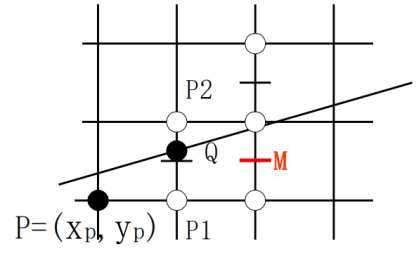
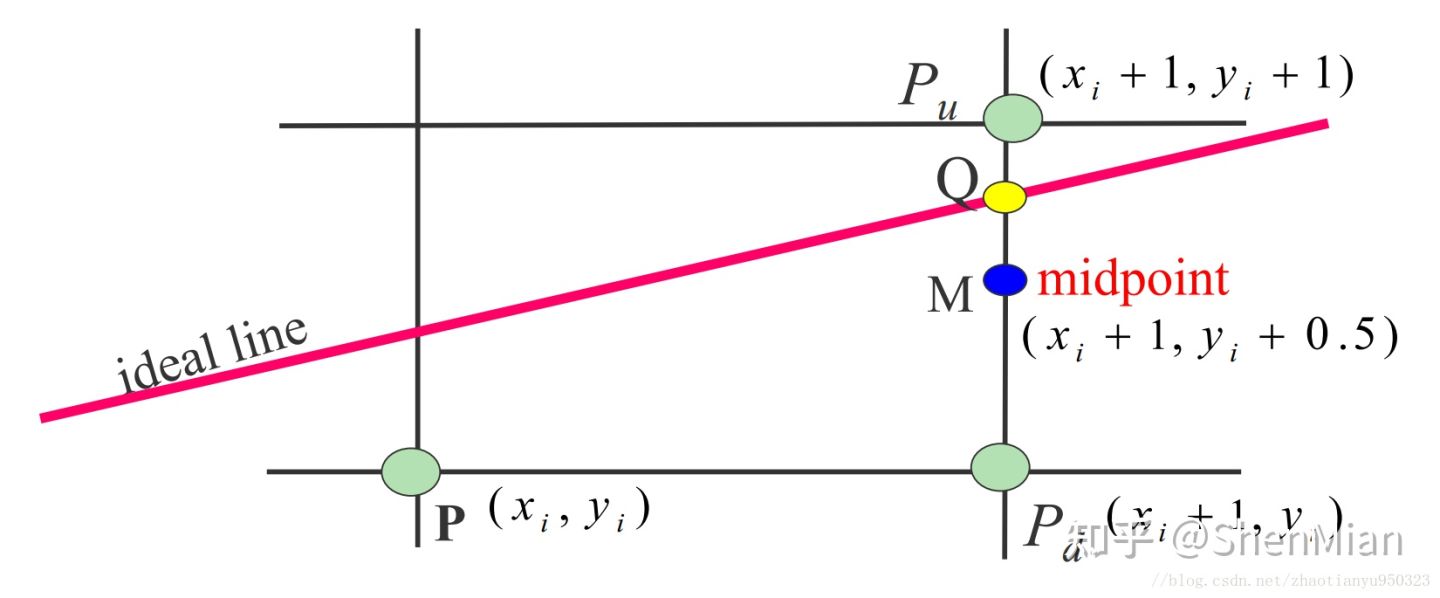
(1) Grasp the key Bresenham scan conversion algorithm of any slope line segment;
(2) Master the design method of Cline straight line;
(3) Master the programming method of the status bar.
2. Experimental steps
(1) Create MFC application
(2) Define the CLine class
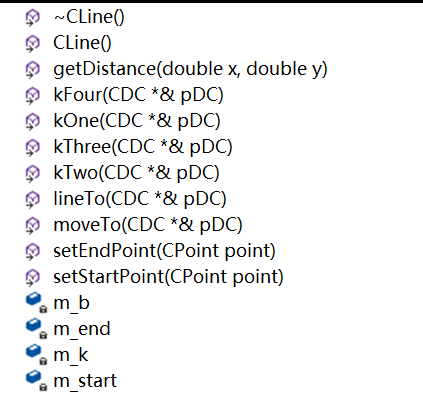
- Add a handler for message processing

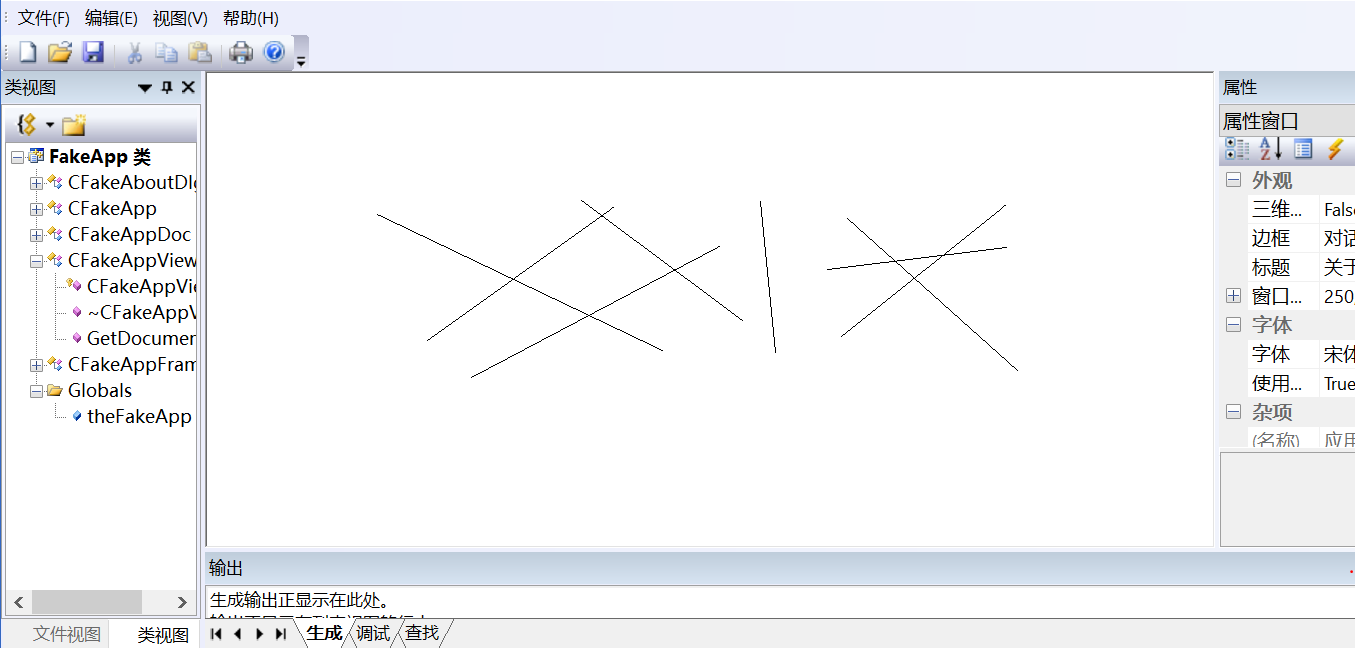
3. Experimental results
Four, experimental experience
In this experiment, through continuous exploration and practice, I learned how to create an MFC application, apply theory to practice, master the design method of straight lines, and learn how to draw arbitrary slopes, although the process is very difficult , Encountered many difficulties, but finally completed the experiment through continuous efforts and gained a lot.
Appendix: Source Code
 CLine.cpp
// The implicit function F(x,y)=y-kx-b, calculate the error term
double CLine::getDistance(double x, double y)
{
	return y - m_k * x - m_b;
}


 // Call MoveTo() of the CDC object to move to the starting point
void CLine::moveTo(CDC *&pDC)
{
	pDC->MoveTo(m_start);
}


 // Use the straight line scanning algorithm to draw a straight line
void CLine::lineTo(CDC *&pDC)
{
	 //If the line is vertical or parallel or k=1
	if ((m_end.x - m_start.x) == 0 || (m_end.y - m_start.y) == 0 ||
		(m_end.x - m_start.x) == (m_end.y - m_end.y) ||
		(m_end.x - m_start.x) == -(m_end.y - m_end.y))
		pDC->LineTo(m_end);
	else
	{
		m_k = ((double)(m_end.y - m_start.y)) / (m_end.x - m_start.x);
		m_b = m_start.y - m_k * m_start.x;
		if (0 < m_k && m_k < 1)
			kOne(pDC);
		else if (m_k > 1)
			kTwo(pDC);
		else if (-1 < m_k && m_k < 0)
			kThree(pDC);
		else if (m_k < -1)
			kFour(pDC);
	}
}


 // Set the starting point of the straight line
void CLine::setStartPoint(CPoint point)
{
	this->m_end = point;
}


 // Set the end point of the straight line
void CLine::setEndPoint(CPoint point)
{
	this->m_start = point;
}


 // The slope of the drawn line is in the range of 0<k<1
void CLine::kOne(CDC *&pDC)
{
	 //Always keep the starting point X coordinate less than Y coordinate
	if (m_start.x > m_end.x)
	{
		CPoint tmp = m_start;
		m_start = m_end;
		m_end = tmp;
	}
	double d = 0;
	 COLORREF color = RGB(0, 0, 0); //Set the color of the straight line
	 CPoint next = m_start; //Record starting point
	 pDC->SetPixelV(next, color); //Draw starting point
	for (int i = m_start.x + 1; i <= m_end.x; i++)
	{
		 next.x++; //The X axis is the main displacement direction
		 if (d <= 0) //The straight line is above the midpoint error
			 next.y++; //take the point above
		 pDC->SetPixelV(next, color); //Draw points
		 d = getDistance((double)next.x + 1, next.y + 0.5); //Next midpoint
	}
}


 // The slope of the drawn line is in the range of k>1
void CLine::kTwo(CDC *&pDC)
{
	if (m_start.y > m_end.y)
	{
		CPoint tmp = m_start;
		m_start = m_end;
		m_end = tmp;
	}
	double d = 0;
	COLORREF color = RGB(0, 0, 0);
	CPoint next = m_start;
	pDC->SetPixelV(next, color);
	for (int i = m_start.y + 1; i <= m_end.y; i++)
	{
		next.y++;
		if (d > 0)
			next.x++;
		pDC->SetPixelV(next, color);
		d = getDistance(next.x + 0.5, (double)next.y + 1);
	}
}


 // The slope of the drawn line is in the range of -1<k<0
void CLine::kThree(CDC *&pDC)
{
	if (m_start.x < m_end.x)
	{
		CPoint temp = m_start;
		m_start = m_end;
		m_end = temp;
	}
	double d = 0;
	COLORREF color = RGB(0, 0, 0);
	CPoint next = m_start;
	pDC->SetPixelV(next, color);
	for (int i = m_start.x - 1; i >= m_end.x; i--)
	{
		next.x--;
		if (d < 0)
			next.y++;
		pDC->SetPixelV(next, color);
		d = getDistance((double)next.x - 1, next.y + 0.5);
	}
}


 // The slope of the drawn line is in the range of k<-1
void CLine::kFour(CDC *&pDC)
{
	if (m_start.y < m_end.y)
	{
		CPoint tmp = m_start;
		m_start = m_end;
		m_end = tmp;
	}
	double d = 0;
	COLORREF color = RGB(0, 0, 0);
	CPoint next = m_start;
	pDC->SetPixelV(next, color);
	for (int i = m_start.y - 1; i >= m_end.y; i--)
	{
		next.y--;
		if (d < 0)
			next.x++;
		pDC->SetPixelV(next, color);
		d = getDistance(next.x + 0.5, (double)next.y - 1);
	}
}
 Message handler:
 Left mouse button down
 Release the left mouse button
 Display coordinates when the mouse moves:
void CMFCApplication1View::OnLButtonDown(UINT nFlags, CPoint point)
{
	 // The starting point of the record when the mouse is pressed
	this->line.setStartPoint(point);
	CView::OnLButtonDown(nFlags, point);
}


void CMFCApplication1View::OnLButtonUp(UINT nFlags, CPoint point)
{
	 // Release the mouse to record the end point
	this->line.setEndPoint(point);
	CDC *pDC = GetDC();
	this->line.moveTo(pDC);
	this->line.lineTo(pDC);
	CView::OnLButtonUp(nFlags, point);
}


void CMFCApplication1View::OnMouseMove(UINT nFlags, CPoint point)
{
	 // TODO: Add message handler code and/or call default value here
	CString stringX, stringY;
	CMainFrame * pFrame = (CMainFrame *)AfxGetMainWnd();
	CMFCStatusBar * pStatus = &pFrame->m_wndStatusBar;
	if (pStatus != NULL)
	{
		 //_T is a macro, the function is to make your program support Unicode encoding (double-byte encoding)
		stringX.Format(_T("x=%d"), point.x);
		stringY.Format(_T("y=%d"), point.y);

		CClientDC dc(this);
		CSize sizeX = dc.GetTextExtent(stringX);
		CSize sizeY = dc.GetTextExtent(stringY);
		pStatus->SetPaneInfo(1, nFlags, SBPS_NORMAL, sizeX.cx);
		pStatus->SetPaneText(1, stringX);
		pStatus->SetPaneInfo(2, nFlags, SBPS_NORMAL, sizeY.cx);
		pStatus->SetPaneText(2, stringY);

	}
	CView::OnMouseMove(nFlags, point);
}
Intelligent Recommendation
Computer graphics experiment-straight line, polygon drawing algorithm (rubber band effect)
Shandong University Computer Graphics Experiment 1.1 Rubber Band Effect Drawing OpenGL rubber band effect realization Rubber band effect straight line Rubber band effect polygon Run screenshot summary...
OpenCV - Slope of the straight line
Not much nonsense, directly on the code The first line of the upper line is to define a container VECTORR_LINES that receives a linear coordinate. This container stores four key points constituting th...


Computer graphics-DDA, Bresenham straight line algorithm
1. Principle of DDA algorithm The DDA (Numerical Differentiation Algorithm) algorithm is an incremental algorithm. Incremental algorithm: In an iterative algorithm, the x and y values of each step a...
Computer Graphics - Straight Line Generation Algorithm
Requirements: DDA algorithm, midpoint Bresenham algorithm and improved Bresenham algorithm scanning conversion line segment P1P2, where P1 is (0, 0), P2 is (8, 6)....
More Recommendation
Computer Graphics Bresenham Straight Line Generation Algorithm
Bresenham algorithm is a rasterized straight-line generation algorithm,Computer graphics currently use a wide linear scanning conversion algorithm,The specific logic is very simple, it is the point. S...
Scan conversion algorithm in the straight line of computer graphics
Digital Differential Analyzer (DDA) Although the pixel is an integer, the position point of the line segment can be the floating point number. Here you need to take it up. Only that, but I am also an ...

Computer Graphics-2.1 Use the midpoint line-to-scan conversion algorithm to draw a straight line with any slope. You can draw a pattern by calling this function (the pattern contains various slopes)
(1) Algorithm design principle Calculate the initial value of d and the calculation formula of d’ and d under different k values is summarized as follows (2) Program key code (3) Screenshot of r...

QT draws arbitrary angle graphics
QQ:609162385 The method explains that the principle of drawing arbitrary angles is to rotate the painter.rotate(210); the axis, and restore the axis after drawing, then painter.restore();...

For loop draws arbitrary graphics on the console
Double for loop draws arbitrary graphics on the console Many beginners will encounter such questions when they are learning programming. So how do we analyze such a problem? So the result will be like...