MS Coco dataset
tags: Deep learning artificial intelligence Target Detection cnn
1. MS COCO dataset introduction
The full name of MS Coco is Microsoft Common Objects in Context, which originated from the Microsoft Coco dataset marked by Microsoft in 2014.
Official website address:http://cocodataset.org
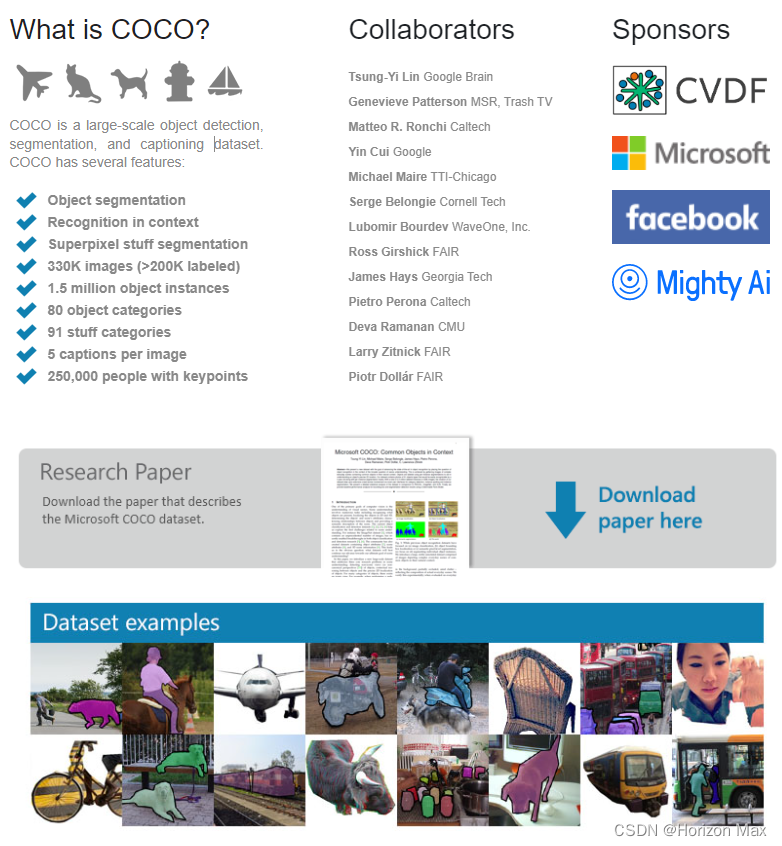
COCO is a very high industry status and a very large data set for target detection, segmentation, image description and other scenarios. Features include:
- Object segmentation: Object level segmentation
- Recognition in Context: context recognition
- Superpixel stuff segmentation: ultra -pixel segmentation
- 330K Images (> 200K Labeled): 3.3 million images (more than 200,000 images have been marked)
- 1.5 Million Object Instance: 1.5 million object instances
- 80 Object Categories: 80 target categories
- 91 stuff categories: 91 object categories
- 5 CAPTIONS PER Image: Each picture has 5 descriptions
- 250,000 Peical With Keypoints: 2.5 million individuals key points label
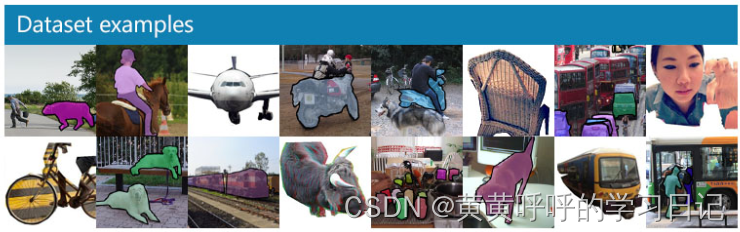
The further explanation of the above 80 target categories and 91 object categories (do not know the translation is right, hee hee).
The official paper explains:
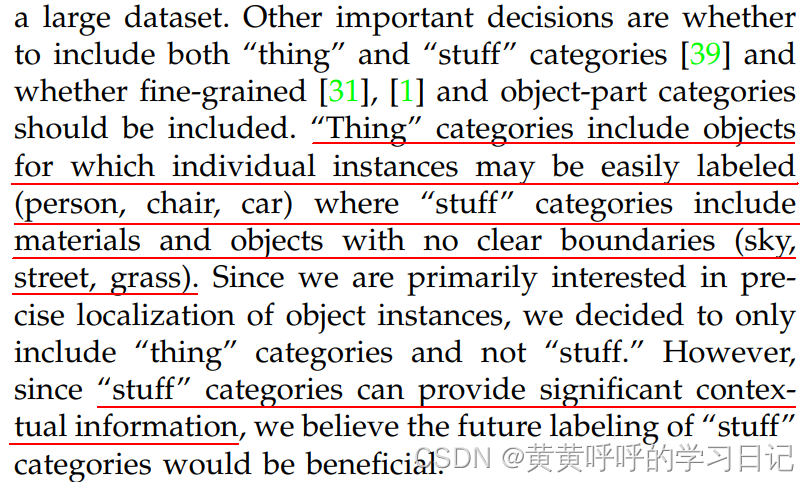
1. "Stuff" Categories Include Materials and Objects with No Clear Boundaries (Sky, Street, Grass).
2. For the target detection task, the 80 category is completely sufficient. The Stuff Category containing 91 categories can provide more context information. Therefore, 80 Object Categories is a subset of the 91 Stuff Categories.
3. The data concentration released in 2014 only contains 80 categories. (We can also see from the code that the data concentration in 2014, although the category ID is from 1-91, but there are actually 11 categories that have not been used.)
4. 11 categories: hat, shoe, eyeglasses (too many instances), mirror, window, door, street sign (ambiguous and difficult to label), plate, desk (due to confusion with bowl and dining table, respectively) and Blender, hair brush (too few instances).
Thesis link:download(You can also find the download link on the homepage of the official website)

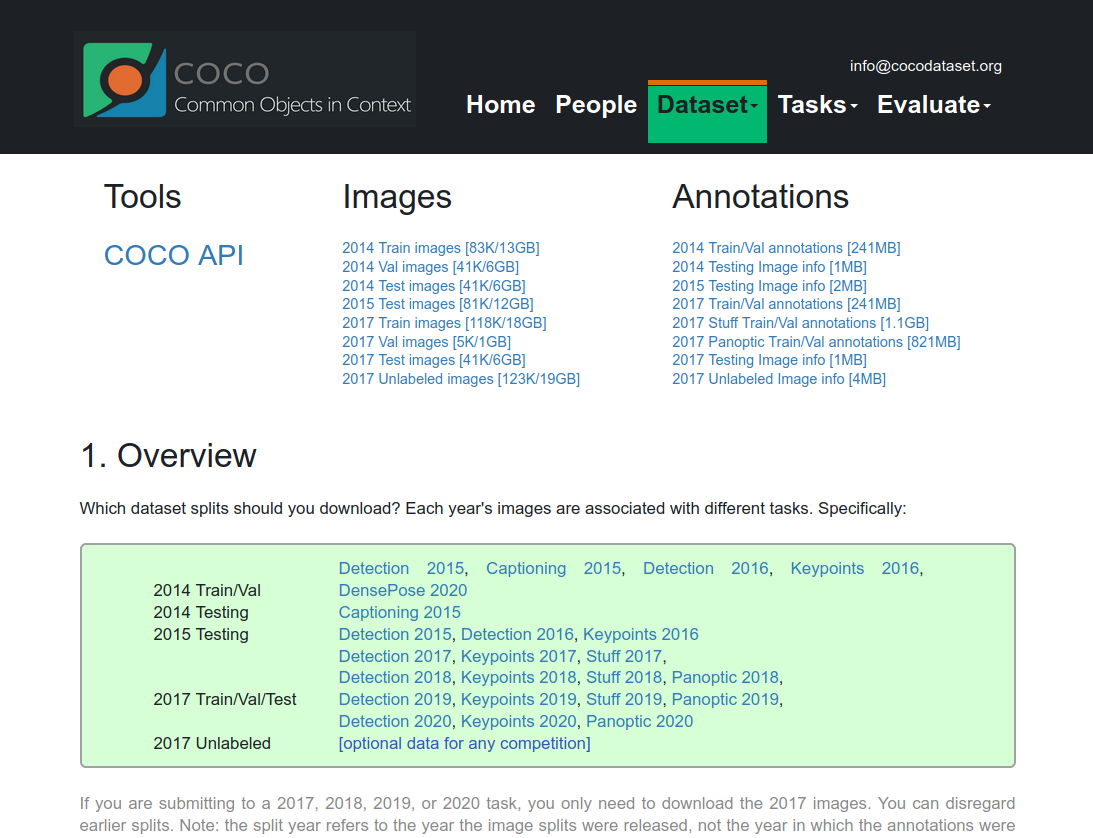
2. Coco dataset download
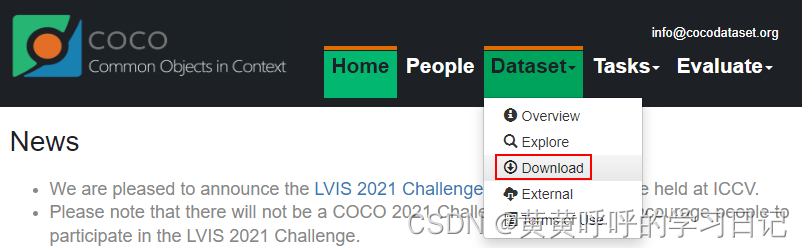
On the homepage of the official website, click DataSet-Download to enter the download interface.
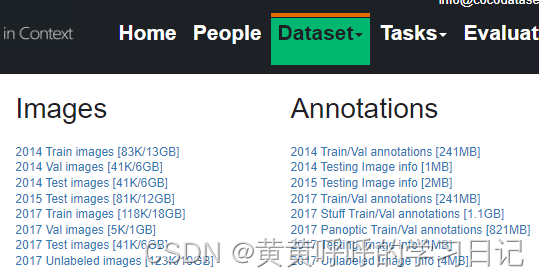
You can download it to the corresponding dataset.
in,
Train Images: Training set, images used during the training process
Val Images: Verification set, image used during the verification process
TEST Images: Test sets, images used during the test (if you use TEST dataset, you can use the verification set training set for training together), and no download in subsequent examples can be downloaded and used
Train/Val Annotations: The labeling file of the training set and verification set, JSON format
After downloading, compress it to the same folder, take COCO2017 as an example to form the following structure:
COCO_2017
0 ─ 0 Val2017 # Verifying set folder, contains 5,000 images
2 ─ ─ Train2017 # Training set folder, including 118287 images
T ── Annotations # ├ ├ ├ ├ ├, including the following files
C ─ ─ Instances_train2017.json # target detection, segmentation task training set labeling file
C ─ ─ Instances_val2017.json # target detection, segmentation task verification set label file file
_ ─ ─ Person_Keypoints_train2017.json # The training set labeling file of the key point detection of the human body
_ ─ ─ Person_Keypoints_val2017.json # Verification set labeling file for key points detection of human body
I ── Captions_train2017.json # ├ ├ ├ ├ ├ ├ ├ ├ ├
I ── Captions_val2017.json # Verifying set labeling file described by image description
3. Coco data format
The official homepage describes the data format.
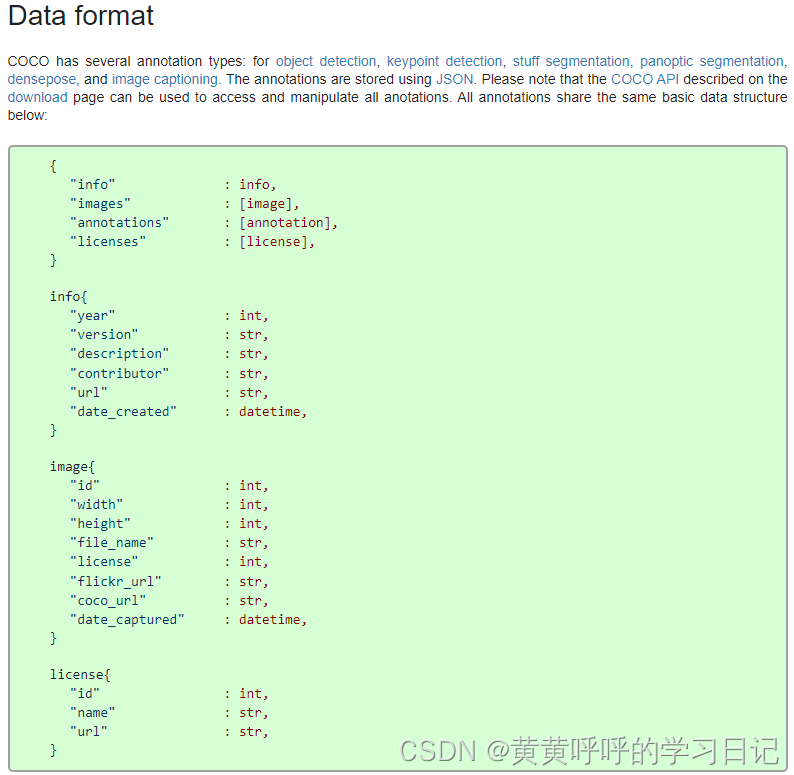
Use the JSON package here to check the data briefly.
import json

json_path = "./data/annotations/instances_val2014.json"
json_labels = json.load(open(json_path,'r'))
json_labels.keys()
At this time, the return result is:
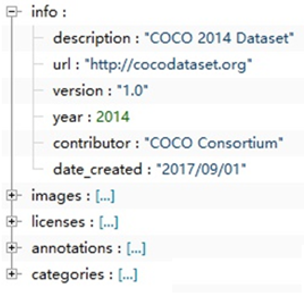
dict_keys(['info', 'licenses', 'categories', 'images', 'annotations'])
3.1 Info field
json_labels['info']At this time, the return result is:
{'description': 'COCO 2014 Dataset',
 'url': 'http://cocodataset.org',
 'version': '1.0',
 'year': 2014,
 'contributor': 'COCO Consortium',
 'date_created': '2017/09/01'}
3.2 Licenses field
A list contains different types of licenses, and is cited according to the ID number in Images, and basically not participated in the data parsing process.
json_labels['licenses']At this time, the return result is:
[{'url': 'http://creativecommons.org/licenses/by-nc-sa/2.0/',
  'id': 1,
  'name': 'Attribution-NonCommercial-ShareAlike License'},
 {'url': 'http://creativecommons.org/licenses/by-nc/2.0/',
  'id': 2,
  'name': 'Attribution-NonCommercial License'},
  ...,
  'name': 'No known copyright restrictions'},
 {'url': 'http://www.usa.gov/copyright.shtml',
  'id': 8,
  'name': 'United States Government Work'}]
3.3 Categories field
One list, the number of elements is equal to the number of categories, each element in the list is onedict,Corresponding information of each category, including the parent class SuperCategory, category ID, and sub -category name name.
Coco2014 datasets have a total of 80 categories (according to sub -category statistics).
json_labels['categories']At this time, the return result is:
[{'supercategory': 'person', 'id': 1, 'name': 'person'},
 {'supercategory': 'vehicle', 'id': 2, 'name': 'bicycle'},
 {'supercategory': 'vehicle', 'id': 3, 'name': 'car'},
......
 {'supercategory': 'indoor', 'id': 89, 'name': 'hair drier'},
 {'supercategory': 'indoor', 'id': 90, 'name': 'toothbrush'}]
Note that although the ID exceeds 80, there are actually some numbers in the middle, that is, 11 categories in Stuff are not used.
len (json_labels ['categories'] # # Back to 80 at this timeIn addition, it can be found that the ID starts from 1, and in fact 0 will be given to the background category.
3.4 IMAGES field
A list, the number of elements is equal to the number of images, each element in the list is onedictCorresponding to the relevant information of a picture, including the image name, width, height, ID and other information, the ID of the ID only identifies each picture.
json_labels['images']At this time, the return result is:
[{'license': 1,
  'file_name': 'COCO_val2014_000000556101.jpg',
  'coco_url': 'http://images.cocodataset.org/val2014/COCO_val2014_000000556101.jpg',
  'height': 640,
  'width': 480,
  'date_captured': '2013-11-16 15:42:33',
  'flickr_url': 'http://farm8.staticflickr.com/7442/9281624471_f030c5331e_z.jpg',
  'id': 556101},
     ......,
 {'license': 1,
  'file_name': 'COCO_val2014_000000281028.jpg',
  'coco_url': 'http://images.cocodataset.org/val2014/COCO_val2014_000000281028.jpg',
  'height': 480,
  'width': 640,
  'date_captured': '2013-11-17 04:16:09',
  'flickr_url': 'http://farm4.staticflickr.com/3235/2888670184_48d33767a0_z.jpg',
  'id': 281028}]
3.5 Annotations field
In a list, the number of elements is equal to the number of targets marked by the data concentration (one image may have multiple targets), and each element in the list is a DICT,Corresponding to a target labeling information. include:
Segmentation: Portal set of targets (Polygon polygon)
- When using Polygon, the polygon coordinate point is recorded. Two consecutive values indicate the coordinate position of a point, and the number of points is even.
- When using the RLE (Run Length Encoding) format, the general principle is: for example, set the pixel value of the target area in the image to 1 and the background set to 0, then form a two -value chart, for example: 0011110011100000 ... but this compares this comparison Occupy the storage space, so how many 0 and 1 can be used for local compression in the form of statistics, so the above RLE coding form is: 2-0-4-1-2-0-3-1-5-0 ... ( There are 2 0, 4, 1, 2 0, 3 1, 5 0).
- The official said that using RLE has achieved compression storage and efficient computing.
Area: area area
Image_id: The image ID where the label is located
iscrowd: 0 or 1. Under normal circumstances, 0 indicates a single goal. At this time, segmentation uses Polygon to indicate; 1 indicates a set of targets. At this time, Segmentation uses RLE format.
Bbox: The rectangular label box of the target, [x, y, width, height] (X in the upper left corner, the y coordinate in the upper left corner, wide, high)
category_id: the category ID of this labeled
ID: The currently marked ID, each ID corresponds to one label, there may be multiple target marks on a picture
json_labels['annotations'][2]At this time, the return result is:
{'segmentation': [[334.39,
   383.8,
   ......
   332.88,
   376.99]],
 'area': 1164.7766999999994,
 'iscrowd': 0,
 'image_id': 556101,
 'bbox': [294.28, 339.54, 40.11, 59.4],
 'category_id': 31,
 'id': 1433627}
4. Official COCO API use
Because the complete COCO dataset is relatively large, subsequent use of COCO2014 subset as an example.
The official DEMO of the MS COCO dataset reads and operates, refer to GitHub:Link。
4.1 Installation
LINUX system installs Pycocotools:
pip install pycocotoolsWindows system installation pycocotools:
pip install pycocotools-windowsMy Windows system, equipped with Tsinghua mirror source, installs Pycocotools above the above commands.
4.2 Example
from pycocotools.coco import COCO
from PIL import Image, ImageDraw
from matplotlib import pyplot as plt
anno_file = './data/annotations/instances_val2014.json'
# Load the coco label file
coco = COCO(anno_file)
# Get all the ID of all pictures
IDS = list (coco.imgs.keys ()) # Return Result: [556101,509020, ...] A total of 497 elements
# print("number of images: {}".format(len(ids)))
# Get the target category, and finally a dictionary: class_dict = {1: 'Person', 2: 'Bicycle', ..., 90: 'Toothbrush'}
classs_dict = {}
cat_ids = coco.loadCats(coco.getCatIds())
for cat in cat_ids:
classs_dict[cat["id"]] = cat["name"]
# Get the label ID of the picture of the first chapter
ann_ids = coco.getannids (IDS [0]) # Return Result: [163368, 192442, 1433627, 1687504, 2210763], all the ID values marked in the current picture
#
targets = coco.loadanns (ann_ids) # Return result: a list consisting of 5 dictionaries, each dictionary is an annotation
# Get the picture name
path = coco.loadImgs(ids[0])[0]['file_name'] # 'COCO_val2014_000000556101.jpg'
#
img = Image.open(os.path.join(img_path, path)).convert('RGB')
plt.imshow(img)
# Draw annotation
coco.showAnns(targets)
#plt.show()
draw = ImageDraw.Draw(img)
# Draw Bbox
for target in targets:
x, y, w, h = target["bbox"]
x1, y1, x2, y2 = x, y, int(x + w), int(y + h)
draw.rectangle((x1, y1, x2, y2),width=2)
draw.text((x1, y1), classs_dict[target["category_id"]])
# Show pictures
plt.imshow(img)
plt.show()The result of the return at this time:
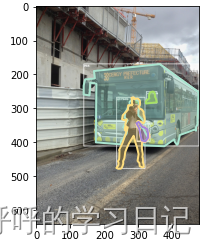
If you add it in the future, it will gradually be supplemented.
If you need this small COCO2014 dataset, I think of ways.
Intelligent Recommendation
【Coco dataset】
Since the recent task model needs to use the COCO data set format, it can only be converted to the XML format of existing data. I checked the information of many XML to COCO data sets on the Internet....

How to get the detection or segmentation result of COCO. What are the classes of MS-COCO and what are the labels. Take a look at the content description of the MS-COCO dataset, the definition of the data, the annotation information...
http://cocodataset.org/#download Official website address The purpose of this article is to get the results of the segmentation of all images and save the work. Introduced in the Mask API COCO provide...
Cityscapes dataset and COCO dataset
Cityscapes dataset and COCO dataset A brief overview of two public data sets. Article Directory Cityscapes dataset and COCO dataset Cityscapes dataset COCO data set info field images field license fie...
Coco dataset to vCO dataset
COCO dataset to VOC dataset COCO data set and VOC data set format You can read my previous article: https://blog.csdn.net/m0_64229606/article/details/124917579 COCO dataset to VOC dataset Still shit m...
[Dataset] Introduction to COCO Dataset
Author :Horizon Max Programming skills:Various operation summary Machine Vision:Will be magic OpenCV Deep Learning:Simple Getting Started PyTorch Neural Networks:Classic network model Algorithm:No mat...
More Recommendation

Ubuntu Install Tensorflow Object Detection API (MS Coco, The Open Image Dataset)
This article is used to record the installation and use of the Tensorflow Object Detection API, mainly including Coco datasets and larger the open images DataSet datasets for future quick look. The ma...
MS COCO Data Set
Article catalog 1. Introduction to MS COCO Dataset 2. MS COCO Data Set Download 3. MS COCO Note File Format 3.1 Using Python JSON libraries 3.2 Viewing Official CocoAPI 1. Introduction to MS COCO Data...
maskrcnn: labelme dataset to coco dataset
The format of the prepared labelme data is as follows: The code of is as follows, this code segment is also placed in the root directory. The execution results are as follows, two folders are generate...
DataSet - Coco DataSet data characteristics
Coco DataSet data characteristics The COCO data set has more than 200,000 pictures, 80 object categories. All object instances were labeled with detailed segmentation Mask, which was labeled more than...
COCO dataset to half -body dataset
This project mainly solves the low visual angle of the robot, and can only see the parts of the legs. Building people and random leg data sets. Generate XML labeling and mosaic images....