Embed an EXE program into MFC to run
tags: MFC
original:http://www.codeproject.com/Articles/18724/Hosting-exe-applications-into-a-dialog
HANDLE hProcess;
HWND apphWnd = NULL;
int CALLBACK EnumWindowsProc(HWND hwnd, LPARAM lParam)
{
    DWORD pID;
    DWORD tpID = GetWindowThreadProcessId(hwnd,&pID);
    if(tpID == (DWORD)lParam)
    {
        apphWnd = hwnd;
        return false;
    }
    return true;
}

HANDLE StartProcess(LPCTSTR program, LPCTSTR args)
{
     HANDLE hPro = NULL;
     PROCESS_INFORMATION processInfo;
     STARTUPINFO startupInfo;
     ::ZeroMemory(&startupInfo, sizeof(startupInfo));
     startupInfo.cb = sizeof(startupInfo);
     //Set that the window is not displayed when the process is created
     startupInfo.dwFlags = /*STARTF_USEPOSITION*/STARTF_USESHOWWINDOW;
     /*startupInfo.dwX = 600;
     startupInfo.dwY = 900;*/
     startupInfo.wShowWindow = SW_HIDE;
     if(::CreateProcess(program, (LPTSTR)args,
                        NULL,  // process security
                        NULL,  // thread security
                        FALSE, // no inheritance
                        0,     // no startup flags
                        NULL,  // no special environment
                        NULL,  // default startup directory
                        &startupInfo,
                        &processInfo))
        {
                         //Delay 0.5s, wait for the process to be created successfully
            Sleep(500);
            while(true)
            {
                ::EnumWindows(&EnumWindowsProc, processInfo.dwThreadId);//Iterate all windows
                if(NULL != apphWnd)
                    break;
            }
            hPro = processInfo.hProcess;

        }
     return hPro;
}


void CExeInsetMFCDlg::OnNew()
{
    if(apphWnd != NULL)
    {
        OnQuit();
    }

    CRect rect;
    GetClientRect(&rect);//get our dialog size into rect

//  hProcess=StartProcess("C:\\Program Files\\Microsoft Games\\Minesweeper\\MineSweeper.exe","");//Start ms paint
    hProcess=StartProcess("C:\\Users\\Administrator\\Documents\\Visual Studio 2010\\Projects\\AStar\\Debug\\AStar.exe","");//Start ms paint

    if(apphWnd!=NULL)//check for window handle
        {

            ::SetParent(apphWnd,m_hWnd);//set parent of ms paint to our dialog.
            SetWindowLong(apphWnd, GWL_STYLE, WS_VISIBLE);//eraze title of ms paint window.
            //Positioning ms paint.
            ::MoveWindow(apphWnd, rect.left, rect.top,rect.right, rect.bottom, true);
                         //Window redrawing, (because it is set to SW_HIDE when creating exe, the exe window will be partially covered by the parent window)
            Invalidate();
            ::UpdateWindow(apphWnd);
            ::ShowWindow(apphWnd,SW_SHOW);
        }
    else
        MessageBox("Cannot find Window");

}


void CExeInsetMFCDlg::OnQuit()
{
    TerminateProcess(hProcess,0);
    apphWnd = NULL;
}
turn:
STARTUPINFO interpretation
typedef struct _STARTUPINFO {
DWORD cb; //Contains the number of bytes in the STARTUPINFO structure. If Microsoft expands this structure in the future, it can be used as a version control method.
The application must initialize cb to sizeof(STARTUPINFO)
PSTR lpReserved; //Reserved. Must be initialized to N U L L
PSTR lpDesktop; //Used to identify the name of the desktop where the application is started. If the desktop exists, the new process is associated with the specified desktop.
If the desktop does not exist, create a desktop with default attributes and use the name specified for the new process. ▫ ▫
If lpDesktop is NULL (this is the most common case), then the process will be associated with the current desktop.
PSTR lpTitle; //Used to set the name of the console window. If l p Ti t l e is N U L L, the name of the executable file will be used as the window name
DWORD dwX; //Used to set the x and y coordinates (in pixels) where the application window should be placed on the screen. To
DWORD dwY; Only when the child process uses CW_USEDEFAULT as the x parameter of CreateWindow to create its first overlapping window,
only use these two coordinates. If it is an application that creates a console window, these members are used to indicate the upper left corner of the console window
DWORD dwXSize; //Used to set the width and length of the application window (in pixels) only dwYsize
DWORD dwYSize; When the child process uses C W _ U S E D E FA U LT as C r e a t e Wi n d o w
These values are used when the n Wi d t h parameter is used to create its first overlapping window.
If it is an application that creates a console window, these members will be used to specify the width of the console window.
DWORD dwXCountChars; //Used to set the width and height of the console window of the sub-application (in characters)
DWORD dwYCountChars;
DWORD dwFillAttribute; //Used to set the text and background color used by the console window of the sub-application
DWORD dwFlags; //Please refer to the description in the next paragraph and Table 4-7
WORD wShowWindow; //Used to set S h o w Wi n d o w if the sub-application is called for the first time, use S W _ S H O W D E FA U LT as S W _ S H O W D E FA U LT
N C m d S h o w How should the first overlapping window of the application appear when the parameter is passed?
This member can be any SW _ * identifier usually used for Show Wi n d o w functions.
WORD cbReserved2; //Reserved. Must be initialized to 0
PBYTE lpReserved2; //Reserved. Must be initialized to N U L L
HANDLE hStdInput; //Used to set the handle of the buffer for console input and output.
According to the default setting, h S t d I n p u t is used to identify the keyboard cache, and it is used to identify the keyboard cache.
H S t d O u t p u t and h S t d E r r o r Cache used to identify the console window
HANDLE hStdOutput; HANDLE hStdError; } STARTUPINFO, *LPSTARTUPINFO;
When Wi n d o w s creates a new process, it will use the relevant members of the structure. Most applications will require the generated application to use only default values. At least all members in the structure should be initialized to zero, and then the c b member should be set to the size of the structure:
STARTUPINFO si = { sizeof(si) }; CreateProcess(...,&si,...);
Table 4-7 dwFlags use flags and their meanings
Sign Meaning
STARTF_USESIZE // Use d w X S i z e and d w Y S i z e members
STARTF_USESHOWWINDOW //Use w S h o w Wi n d o w members
STARTF_USEPOSITION //Use d w X and d w Y members
STARTF_USECOUNTCHARS //Use d w X C o u n t C h a r s and dwYCount Chars members
STARTF_USEFILLATTRIBUTE //Use d w F i l l A t t r i b u t e members
STARTF_USESTDHANDLES //Use h S t d I n p u t, h S t d O u t p u t and h S t d E r r o r members
STARTF_RUN_FULLSCREEN //Force the console application running on the x 8 6 computer to start and run in full screen mode
There are also two signs, namelySTARTF_FORCEONFEEDBACKAnd STARTF_+FORCEOFFF -EEDBACK, they can be used to control the cursor of the mouse when starting a new process.
due toWindowsSupports true multi-task preemptive operation, so you can start an application, and then use another program when the process is initialized. In order to provide users with intuitive feedback information,
C r e a t e P r o c e s s can temporarily change the arrow cursor of the system to a new cursor, namely the hourglass arrow cursor:
The cursor indicates that you can wait for something to happen, or you can continue to use the system. When starting another process, the CreateProcess function allows you to better control the cursor.
When settingSTARTF_FORCEONFEEDBACKWhen marking, C r e a t e P r o c e s s does not change the cursor to an hourglass.
STARTF_FORCEONFEEDBACKEnable CreateProcess to monitor the initialization of a new process and change the cursor based on the result. When using this flag to call CreateProcess, the cursor changes to an hourglass.
After 2 s, if the new process does not call G U I, CreateProcess will restore the cursor to an arrow.
If the process calls the GUI within 2 s, CreateProcess will wait for the application to display a window. This must happen within 5 s after the process calls G U I. If no window is displayed, CreateProcess will restore the original cursor.
If a window is displayed, CreateProcess will keep the hourglass cursor for 5 s. If at some time the application calls the Get M e s s a g e function, indicating that it has completed initialization,
Then C r e a t e P r o c e s s will immediately restore the original cursor and stop monitoring the new process.
Before concluding the introduction of this section, I would like to talk about the w Sh o w Wi n d o w members of S TA RT U P I N F O. You initialize the member to the value of the last parameter n C m d S h o w passed to (w) Wi n M a i n.
This member displays the value of the last parameter n C m d S h o w of the (w) Wi n Ma i n function that you want to pass to the new process. It is one of the identifiers that can be passed to the Sh o w Wi n d o w function.
Generally, the value of n C m d S h o w can be either S W _ S H O W N O R M AL, or SW_ SHOWMINNOACTIVE. However, it can sometimes be S W _ S H O W D E FA U LT.
When an application is started in E x p l o r e r, the application's (w) Wi n M a i n function is called, and S W _ S H O W N O R M AL is passed as the n C m d S h o w parameter.
If you create a shortcut for the application, you can use the shortcut's property page to tell the system how the application's window should be displayed initially. Figure 4-3 shows the property page of the shortcut to run No t e p a d.
Note that using the combo box of the Ru n option, you can set how to display the No t e p a d window.
When using E x p l o r e r to start the shortcut, E x p l o r e r will correctly prepare the STRT U P I N F O structure and call C r e a t e P r o c e s s.
At this time, Note p a d starts to run, and for the n C m d S h o w parameter, S W _ S H O W M I N N O A C T I V E is passed to its (w) Wi n M a i n function.
Using this method, the user can easily start an application, and its main window can be displayed in a normal state, a minimum or a maximum state.
Finally, the application can call the following function to get a copy of the STRT U P I N F O structure initialized by the parent process. The child process can view the structure and change its behavior characteristics according to the values of the members of the structure.
VOID GetStartupInfo(LPSTARTUPINFO pStartupInfo);
Note that although the Wi n d o w s document does not clearly state it, before calling the G e t S t a r t I n f o function, the c b member of the structure must be initialized as follows:
STARTUPINFO si = { sizeof(si) };
GetStartupInfo(&si);
turn:
CreateProcess function usage
1.Function description:
WIN32API functionCreateProcessUsed to create a new process and its main thread, this new process runs the specified executable file.
2.Function prototype: BOOL CreateProcess ( LPCTSTR lpApplicationName, LPTSTR lpCommandLine, LPSECURITY_ATTRIBUTES lpProcessAttributes。 LPSECURITY_ATTRIBUTES lpThreadAttributes, BOOL bInheritHandles, DWORD dwCreationFlags, LPVOID lpEnvironment, LPCTSTR lpCurrentDirectory, LPSTARTUPINFO lpStartupInfo, LPPROCESS_INFORMATION lpProcessInformation ); 3.parameter:
lpApplicationName:
Points to a NULL-terminated string used to specify executable modules.
This string can be the absolute path of the executable module or a relative path. In the latter case, the function uses the current drive and directory to establish the path of the executable module. This parameter can be set to NULL. In this case, the name of the executable module must be at the front of the lpCommandLine parameter and separated by a space character and the following characters. The specified module can be a Win32 application. If the appropriate subsystem is available on the current computer, it can also be other types of modules (such as MS-DOS or OS/2).
In Windows NT, if the executable module is a 16-bit application, then this parameter should be set to NULL, and the name of the executable module should be specified in the lpCommandLine parameter. 16-bit applications are run in a DOS virtual machine or Windows (WOW) on Win32 as a process.
lpCommandLine:
Point to a NULL-terminated command line used to specify the command to run.
This parameter can be empty, then the function will use the string specified by the parameter as the command line of the program to be run.
If the lpApplicationName and lpCommandLine parameters are not empty, then the lpApplicationName parameter specifies the module to be run, and the lpCommandLine parameter specifies the command line of the module to be run. The newly running process can use the GetCommandLine function to get the entire command line. C language programs can use argc and argv parameters.
If the lpApplicationName parameter is empty, then the first element separated by a space in this string specifies the executable module name. If the file name does not include an extension, then .exe will be assumed to be the default extension. If the file name ends with a dot (.) and has no extension, or the file name contains a path, the .exe will not be appended. If the file name does not include the path, Windows will search for the executable file in the following order: 1. The directory of the current application. 2. The directory of the parent process.
3. Windows directory. You can use the GetWindowsDirectory function to get this directory. 4. The directories listed in the PATH environment variable. If the process being created is an application based on MS-DOS or 16-bit Windows, the lpCommandLine parameter should be an absolute path with the file name of the executable file as the first element, because doing so can make 32-bit Windows The program works well, so setting the lpCommandLine parameter is the strongest.
lpProcessAttributes:
Point to a SECURITY_ATTRIBUTES structure, this structure determines whether the returned handle can be inherited by the child process. If the lpProcessAttributes parameter is NULL, then the handle cannot be inherited.
lpThreadAttributes:
Point to a SECURITY_ATTRIBUTES structure, this structure determines whether the returned handle can be inherited by the child process. If the lpThreadAttributes parameter is empty (NULL), then the handle cannot be inherited.
bInheritHandles:
Indicates whether the new process inherited the handle from the calling process. If the value of the parameter is true, every inheritable open handle in the calling process will be inherited by the child process. The inherited handle has exactly the same value and access rights as the original process.
dwCreationFlags:
Specify additional flags used to control the creation of priority classes and processes. The following creation flags can be specified in any combination other than those listed below.
Below are some commonly used signs.
value:CREATE_DEFAULT_ERROR_MODEMeaning: The new process does not inherit the error mode of the calling process.CreateProcessThe function gives the new process the current default error mode as an alternative. The application can call the SetErrorMode function to set the current default error mode. This flag is very useful for multithreaded shell programs that run in an environment without hardware errors. forCreateProcessFunction, the default behavior is to inherit the caller's error mode for the new process. Set this flag to change the default processing method. value:CREATE_NEW_CONSOLEMeaning: The new process will use a new console instead of inheriting the parent process's console. This flag cannot be used with the DETACHED_PROCESS flag. value:CREATE_NEW_PROCESS_GROUPMeaning: The new process will be the root process of a process tree. All processes of the process tree are child processes of the root process. The user identifier of the new process tree is the same as the process identifier, which is returned by the lpProcessInformation parameter. The process tree often uses the GenerateConsoleCtrlEvent function to allow sending CTRL+C or CTRL+BREAK signals to a group of console processes. value:CREATE_SEPARATE_WOW_VDMmeaning:(only apply toWindows NT)This flag is only valid when running a 16-bit Windows application. If set, the new process will run in a private virtual DOS machine (VDM). In addition, all 16-bit Windows applications will run in a threaded manner in the same shared VDM by default. The advantage of running a 16-bit program alone is that the crash of an application will only end the operation of this VDM; other programs running in different VDMs will continue to operate normally. Similarly, 16-bit Windows applications running in different VDMs have different input queues, which means that if a program temporarily loses response, the application in a separate VDM can continue to get input. value:CREATE_SHARED_WOW_VDMmeaning:(only apply toWindows NT)This flag is only valid when running a 16-bit Windows application. If the DefaultSeparateVDM option in the Windows section of WIN.INI is set to true, this flag makes the CreateProcess function override this option and run a new process in the shared virtual DOS machine. value:CREATE_SUSPENDEDMeaning: The main thread of the new process will be created in a suspended state and will not run until the ResumeThread function is called. value:CREATE_UNICODE_ENVIRONMENTMeaning: If set, the environment block specified by the lpEnvironment parameter uses Unicode characters, if it is empty, the environment block uses ANSI characters. value:DEBUG_PROCESSMeaning: If this flag is set, the calling process will be treated as a debugger, and the new process will be treated as the debugged process. The system notifies the debugger of all debugging events that occur in the debugged program. If you use this flag to create a process, only the calling process (the process that calls the CreateProcess function) can call the WaitForDebugEvent function. value:DEBUG_ONLY_THIS_PROCESSMeaning: If this flag is not set and the calling process is being debugged, the new process will become another debugging target of the debugger that is debugging the calling process. If the calling process is not debugged, the debugging behavior will not occur. value:DETACHED_PROCESSMeaning: For the console process, the new process does not have permission to access the parent process console. The new process can create a new console by itself through the AllocConsole function. This flag cannot be used with the CREATE_NEW_CONSOLE flag. The dwCreationFlags parameter is also used to control the priority class of the new process. The priority class is used to determine the priority of thread scheduling of this process. If none of the following priority class flags are specified, then the default priority class isNORMAL_PRIORITY_CLASS, Unless the process being created isIDLE_PRIORITY_CLASS. The default priority class of the child process in this case isIDLE_PRIORITY_CLASS. Can be one of the following flags: priority:HIGH_PRIORITY_CLASSMeaning: Indicates that this process will execute time-critical tasks, so it must be run immediately to ensure correctness. Programs with this priority have priority over programs with normal priority or idle priority. An example is the Windows task list. In order to ensure that the user can respond immediately when called, the system load is abandoned. Make sure to be cautious when using high priority, because a high-priority CPU-related application can take up almost all of the available CPU time. priority:IDLE_PRIORITY_CLASSMeaning: The thread indicating this process will only run when the system is idle and can be interrupted by any high-priority task. For example, screen savers. The idle priority will be inherited by the child process. priority:NORMAL_PRIORITY_CLASSMeaning: Indicates that this process has no special task scheduling requirements. priority:REALTIME_PRIORITY_CLASSMeaning: Indicates that this process has the highest priority available. A thread of a process with real-time priority can interrupt the execution of all other process threads, including system processes that are performing important tasks. For example, a real-time process with a slightly longer execution time may cause insufficient disk cache or slow mouse response. TolpEnvironment:
Point to the environment block of a new process. If this parameter is empty, the new process uses the environment of the calling process. An environment block exists in a block composed of a character string ending in NULL, and this block also ends in NULL. Each string is in the form of name=value. Because the equal sign is used as a separator, it cannot be used as a variable name by an environment variable. Instead of using the environment block provided by the application, it is better to set this parameter to empty, and the current directory information on the system drive will not be automatically passed to the newly created process. For the discussion and how to deal with this situation, please refer to the Notes section. The environment block can contain Unicode or ANSI characters. If the environment block pointed to by lpEnvironment contains Unicode characters, the CREATE_UNICODE_ENVIRONMENT flag in the dwCreationFlags field will be set. If the block contains ANSI characters, the flag will be cleared. Please note that an ANSI environment block is terminated by two zero bytes: one is the end of the string, and the other is used to end this block. A Unicode environment block ends with four zero bytes: two represent the end of the string, and the other two are used to end the block.
lpCurrentDirectory:
Point to a NULL-terminated string, this string is used to specify the working path of the child process. This string must be an absolute path including the drive name. If this parameter is empty, the new process will use the same drive and directory as the calling process. This option is the main requirement for a shell program that needs to launch applications and specify their drive and working directory.
lpStartupInfo:
Point to a STARTUPINFO structure used to determine how to display the main window of the new process.
lpProcessInformation:
Point to a PROCESS_INFORMATION structure used to receive the identification information of the new process.
return value:If the function executes successfully, it returns a non-zero value. If the function fails and returns zero, you can use the GetLastError function to obtain additional information about the error.
4.Notes: CreateProcessThe function is used to run a new program. WinExec and LoadModule functions are still available, but they are also calledCreateProcessFunction implementation.
In additionCreateProcessIn addition to creating a process, the function also creates a thread object. This thread will be created together with an initialized stack. The size of the stack is determined by the description in the file header of the executable file. The thread starts execution from the beginning of the file.
The handles of the new process and the new thread are created with global access rights. For any of these two handles, if there is no security descriptor, then this handle can be used in any function that requires the handle type as a parameter. When a security descriptor is provided, when the handle is used in the following, the access permission check is always performed first. If the access permission check denies access, the requesting process will not be able to use the handle to access the process.
This process will be assigned a 32-bit process identifier. This identifier is valid until the process is terminated. It can be used to identify this process, or specified in the OpenProcess function to open the handle of this process. The initialized thread in the process will also be assigned a 32-bit thread identifier. This identifier is valid until the county is terminated and can be used to uniquely identify this thread in the system. These identifiers are returned in the PROCESS_INFORMATION structure.
When the application name is specified in the lpApplicationName or lpCommandLine parameter, whether the application name contains the extension will not affect the operation, except for one case: an MS-DOS program or Windows program with a .com extension must include .com extension.
The calling process can use the WaitForInputIdle function to wait for the new process to complete its initialization and wait for user input. This is extremely useful for synchronization between the parent process and the child process, becauseCreateProcessThe function does not wait for the new process to complete its initialization work. For example, before trying to associate a window with a new process, the process should callWaitForInputIdle。
The preferred way to end a process is to call the ExitProcess function, because this function informs all dynamic link libraries (DLLs) of this process that the program has entered the end state. Other methods of ending the process will not notify the associated dynamic link library. Note that when a process calls ExitProcess, other counties in this process have no chance to run any other code (including the termination code of the associated dynamic link library).
ExitProcess, ExitThread, CreateThread, CreateRemoteThread, when a process starts (callsCreateProcessThe result) is serialized in the process. In an address space, only one of these events can occur at a time. This means that the following restrictions will remain:
*In the process startup and DLL initialization phase, new threads can be created, but they cannot start running until the process DLL initialization is complete. There can only be one thread in the process of DLL initialization or removal routines. *Until all threads have finished DLL initialization or unloading,ExitProcessThe function returns.
The process will remain in the system until all threads in the process are terminated and all the handles of the process and their threads are terminated by calling the CloseHandle function. The handle of the process and the main thread must be calledCloseHandleThe function is closed. If these handles are no longer needed, it is best to close them immediately after creating the process.
When the last thread in the process terminates, the following events occur: *All objects opened by the process will be closed. * The termination state of the process (returned by the GetExitCodeProcess function) changes from its initial value STILL_ACTIVE to the end state of the last thread that ended. * The thread object of the main thread is set to the flag state for other threads waiting for this object to use. * The process object is set to a flag state for use by other threads waiting for this object.
Assuming that the current directory on the C drive is \MSVC\MFC and there is an environment variable called C:, its value is C:\MSVC\MFC, as mentioned in the previous lpEnvironment, on such a system drive Directory information is inCreateProcessIf the lpEnvironment parameter of the function is not empty, it will not be automatically passed to the new process. An application must manually pass the current directory information to the new process. In order to do so, the application must directly create environment strings, arrange them in alphabetical order (because Windows NT and Windows 95 use a simple environment variable), and put them into the environment block specified in lpEnvironment. Similarly, they have to find the beginning of the environment block and repeat the sorting of the environment block mentioned earlier.
One way to get the current directory variable of drive X is to call GetFullPathName("x:",..). This prevents an application from having to scan the environment block. If the returned absolute path is X:\, there is no need to pass this value as an environment data, because the root directory is the default current directory of the new process on drive X.
byCreateProcessThe handle returned by the function has PROCESS_ALL_ACCESS access to the process object.
The current directory of the child process object in the current directory specified by the lpcurrentDirectory parameter. The second item specified by the lpCommandLine parameter is the current directory of the parent process.
5.Usage example:
char chPath[301];
:: GetCurrentDirectory(300,(LPTSTR)chPath);//Get the current directory
char path[200]= "\\123.exe";
strcat(chPath,path);
STARTUPINFO si;
PROCESS_INFORMATION pi;
ZeroMemory( &pi, sizeof(pi) );
ZeroMemory( &si, sizeof(si) );
si.cb = sizeof(si);
// Start the child process
if(CreateProcess(chPath, "", NULL, NULL, FALSE, 0, NULL, NULL, &si, &pi))
{
CloseHandle( pi.hProcess );
CloseHandle( pi.hThread );
}
else
{
AfxMessageBox("Create failed!");
HANDLE hProcess = GetCurrentProcess();//get current process
TerminateProcess(hProcess,0); //close process
}
turn:
MFC window redraw
Often call the redraw function when refreshing the windowMFC provides three functions for window redrawing. InvalidateRect(&Rect) Invalidate() UpdateWindow() When the window needs to be updated or redrawn, the general system will send out two messages WM_PAINT (notify the client area has changed) and WM_NCPAINT (notify not There are changes in the client area) -WM_NVPAINT system will handle it by itself-The function corresponding to WM_PAINT message is OnPaint(), which is the default function of the system to accept WM_PAINT messages, but we generally do it in the OnDraw function when redrawing in the program , Because the ONDRAW function is called in the ONPAIN function. ///CView's default standard redrawing function void CView::OnPaint() {CPaintDC dc(this); OnPreparDC(&dc); OnDraw(&dc); //OnDraw is called}
As mentioned above, InvalidateRect(&Rect) and Invalidate() are similar in form and function, but Invalidate invalidates the entire window and forms an invalid rectangle, while InvalidateRect(&Rect) invalidates the specified area.
Invalidate() declares invalid, wait for WM_PAINT message to redraw, when there is no other message in the queue, the system will automatically send UpdateWindow() will send WM_PAINT immediately, but before it is sent, call GetUpdateRect(hWnd, NULL, TRUE) to see if there is any The drawable area, if not, no message is sent. RedrawWindow() RedrawWindow() has the dual characteristics of Invalidate() and UpdateWindow(). Declare that the status of the window is invalid, update the window immediately, and call WM_PAINT message processing immediately.
Why doesn't the system send WM_PAINT message when calling Invalidate? And why do you have to wait for the application message queue to be empty before sending the WM_PAINT message? This is because the system regards the drawing operation in the window as a low-priority operation, so it is done as late as possible. However, this is also conducive to improving the efficiency of drawing: the areas invalidated by InvalidateRect and InvaliateRgn between two WM_PAINT messages will be accumulated, and then updated once in one WM_PAINT message, which can not only avoid multiple repeated updates of the same Region, also optimized the update operation of the application. It depends on the system to invalidate the window area through InvalidateRect and InvalidateRgn. The mechanism of sending WM_PAINT messages at the right time is actually an asynchronous working mode, that is, there is a delay between invalidating the window area and sending the WM_PAINT message; sometimes this delay is not what we want, this Of course, we can use SendMessage to send a WM_PAINT message to force an immediate redraw after invalidating the window area, but it is better to use the more convenient and powerful functions provided by Windows GDI: UpdateWindow and RedrawWindow. UpdateWindow will check the Update Region of the window, and send WM_PAINT message when it is not empty; RedrawWindow gives us more control: whether to redraw the non-client area and background, whether to always send WM_PAINT message regardless of whether the Update Region is empty Wait. BeginPaint and WM_PAINT messages are closely related. What happens if you don't write BeginPaint in the WM_PAINT processing function? The program will reach an astonishing CPU occupancy as if it has entered an endless loop, and you will find that the program is always processing WM_PAINT messages one after another. This is because under normal circumstances, when the application receives a WM_PAINT message, the Update Region of the window is non-empty (if it is empty, there is no need to send a WM_PAINT message). One function of BeginPaint is to set the Update Region to empty. In this way, if you do not call BeginPaint, the Update Region of the window will never be empty. As mentioned earlier, the system will always send WM_PAINT messages.
BeginPaint and WM_ERASEBKGND messages are also related. When the Update Region of the window is marked as needing to erase the background, BeginPaint will send a WM_ERASEBKGND message to repaint the background, and at the same time there is a sign in the return message indicating whether the window background has been repainted. When we use InvalidateRect and InvalidateRgn to add the specified area to the Update Region, we can set whether the area needs to be erased from the background, so that the next BeginPaint will know whether it needs to send the WM_ERASEBKGND message.
Another point to note is that BeginPaint can only be used in the WM_PAINT processing function.
The following is the role of the Invalidate function::
void Invalidate( BOOL bErase = TRUE ); The function of this function is to invalidate the entire window client area. Invalid client area of a window means that it needs to be redrawn. For example, if a window that is obscured by other windows becomes the foreground window, then the originally obscured part is invalid and needs to be redrawn. At this time, Windows will place the WM_PAINT message in the message queue of the application. MFC provides the WM_PAINT message processing function OnPaint for the window class, and OnPaint is responsible for redrawing the window. The view class has some exceptions. The OnDraw function is called in the OnPaint function of the view class, and the actual redrawing work is done by OnDraw. When the parameter bErase is TRUE, the background in the redrawn area will be erased, otherwise, the background will remain unchanged. The difference between UpdateWindow() and UpdateWindow() is: The function of UpdateWindow() is to make the window redraw immediately. The window will not be redrawn immediately after calling Invalidate and other functions. This is because the priority of the WM_PAINT message is very low. It needs to wait for other messages in the message queue to be sent before being processed. Calling the UpdateWindow function can cause WM_PAINT to be sent directly to the target window, causing the window to be redrawn immediately.
Intelligent Recommendation

Embed other executable EXE programs in the Qt interface program
background: This article experimental environment Windows10, QT5.14 Since the work needs to write a small QT program, then in the actual use of other gadgets to switch back, I want to integrate other ...
Run .exe program under ubuntu
MobaXterm is used when connecting to the server remotely. The program downloaded from the official website is only in .exe format, but because the local host is linux, it is necessary to solve the pro...

[Turn] Exe program to run in Ubuntu
Exe program to run in Ubuntu Original Address: https://jingyan.baidu.com/article/d45ad148a78cbe69552b8089.html label:ubuntu 1 2 3 4 5 6 7 Read the step by step Many people use Ubuntu, it is nece...
How to run in Linux .exe program
How to run in Linux .exe program 1. Install Wine 2. Start using commands or scripts 1. Install Wine $sudo apt intall wine-stable 2. Start using commands or scripts $wine /home/xx.exe XX.SH script ./xx...
More Recommendation
MFC and Qt Embedded other exe program
Qt embedded in other exe program: Embedded Other MFC EXE program: ...
C# embed DLL into exe
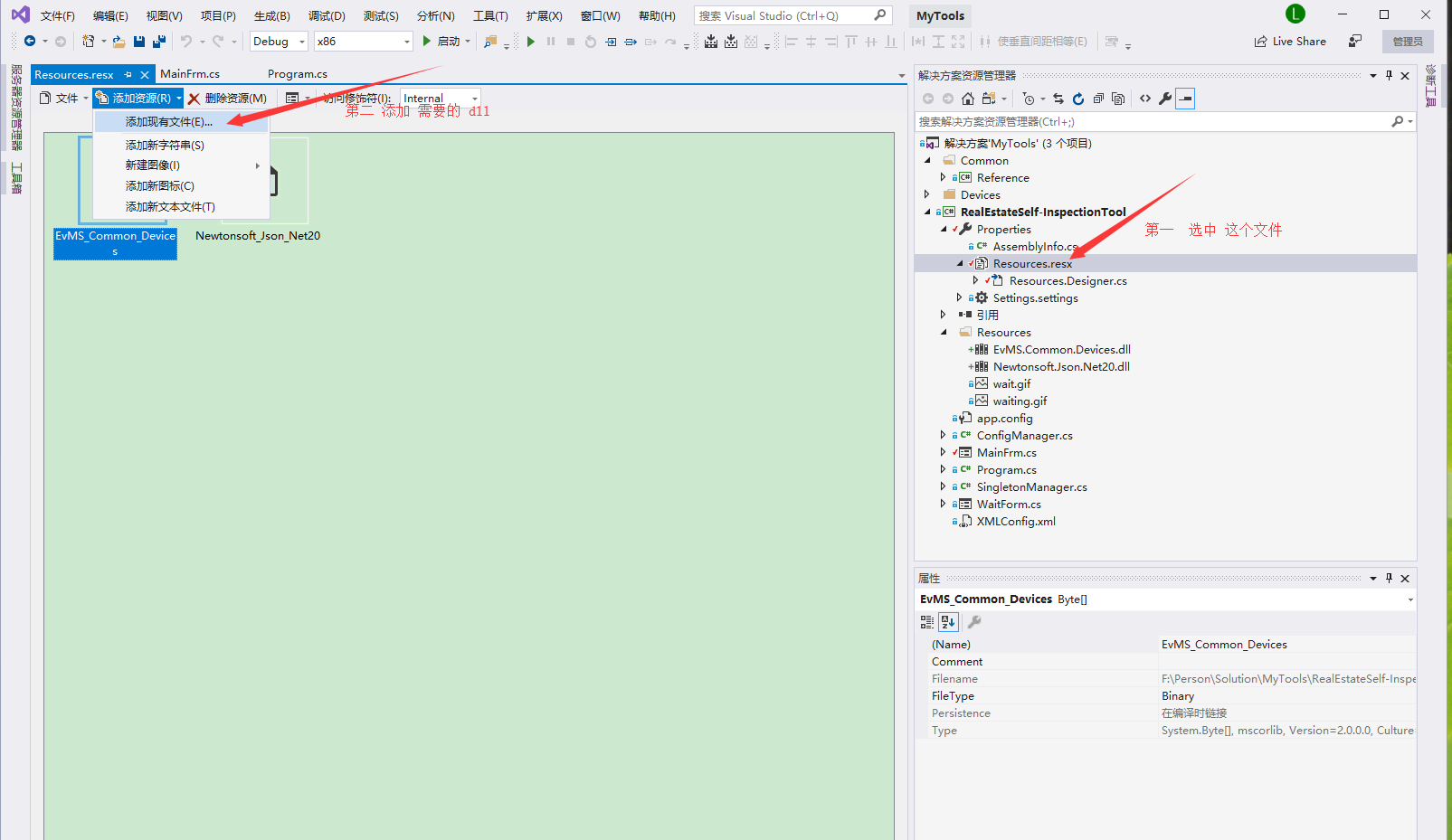
1. Select the project file, find Resources.resx, double-click Resources.resx, and then add the file (select the required dll file), click OK, a Resources folder will be automatically generated ...
C# embed dll in exe
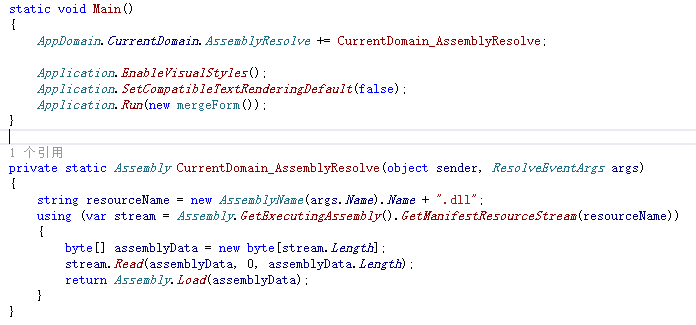
After groping, there are actually more ways to achieve embedding, the following is the answer from stackoverflow https://stackoverflow.com/questions/9228423/how-to-use-an-dll-load-from-embed-resource ...
How to embed DLL in EXE?
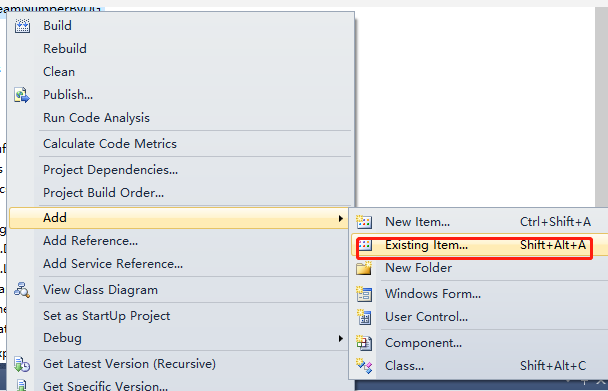
C # Embed DLL into Exe Configuring a DLL in the resource 1, add DLL 2, set build action DLL in the registered resource by reflective mechanism In order to avoid development completion tool EXE needs t...
Embed OpenGL to MFC
Handling from the CSDN blog:Embed OpenGL to MFC My big job in computer graphics is to implement some functions based on the MFC framework using OpenGL. But I didn't know how to add OpenGL modules to M...