The difference between $(window).width() and window.innerWidth
tags: window.width and window. window.width window.innerWidth
This article is reproduced fromhttp://www.webkaka.com/tutorial/js/2015/091615/
Recently, the website has been changed to adaptive, and some js and jquery programs need to be used. Due to the compatibility of various browsers, you need to pay attention to debugging, and in each function Use caution too. However, due to the heavy workload, there will be some bugs from time to time, which may only be discovered during use. Today, I found a problem. When IE8 opened the webpage, there was a yellow warning in the lower left corner, indicating that there was a problem with the webpage JS. After some tinkering, it turned out to bewindow.innerWidthThe problem with this writing method, which was originally invalid in IE8, appearedundefinedError message.
What data can window.innerWidth get?
In adaptive design, you need to use js to determine the width of the browser to adjust the width and layout of the web page. I used window.innerWidth at the beginning.
window.innerWidth can get the width of the current window (Include scroll bar), when the browser width is adjusted, this value will also change.
However, window.innerWidth is invalid in IE8 browser. Therefore, you need to use a substitute, that is $(window).width().
What is the difference between $(window).width() and window.innerWidth?
$(window).width() is also a way to get the width of the browser, but it is different from window.innerWidth.
1) $(window).width() needs to reference the jquery.js file, which is the jquery method. And window.innerWidth is a js method, no need to quote the jquery.js file.
2) The values they get are different. window.innerWidth gets the width of the current window (including scroll bars), and $(window).width() gets the width of the current window (not including scroll bar). Look at the picture below:

Knowledge expansion
Javascript, Jquery get various height and width of browser and screen
Javascript:
alert(document.body.clientWidth); //Web visible area width (body)
alert(document.body.clientHeight); //The visible area of the webpage is high (body)
alert(document.body.offsetWidth); //The visible area width of the webpage (body), including border, margin, etc.
alert(document.body.offsetHeight); //The width of the visible area of the webpage (body), including border, margin, etc.
alert(document.body.scrollWidth); //The full text of the webpage body is wide, including the unseen area when there is a scroll bar
alert(document.body.scrollHeight); //The full text of the webpage body is high, including the unseen area when there is a scroll bar
alert(document.body.scrollTop); //Top (scroll bar) where the webpage is scrolled
alert(document.body.scrollLeft); //Left (scroll bar) where the webpage is scrolled
alert(window.screenTop); //Browser distance Top
alert(window.screenLeft); //Browser distance Left
alert(window.screen.height); //High screen resolution
alert(window.screen.width); // Width of screen resolution
alert(window.screen.availHeight); //The height of the available working area of the screen
alert(window.screen.availWidth); //The width of the available working area of the screen
Jquery:
alert($(window).height()); //The height of the current viewable area of the browser window
alert($(document).height()); //The height of the browser's current window document
alert($(document.body).height()); //The height of the document body of the current window of the browser
alert($(document.body).outerHeight(true)); //The total height of the document body of the current window of the browser, including border padding margin
alert($(window).width()); // The width of the visible area of the browser's current window
alert($(document).width()); // The width of the document object in the current window of the browser
alert($(document.body).width()); // Width of the document body of the current window of the browser
alert($(document.body).outerWidth(true)); //The total width of the document body of the current window of the browser, including border padding margin
Instance
<!DOCTYPE html>
<script src="http://www.webkaka.com/js/lib/jquery.js" type="text/javascript" ></script>
<html>
  <head>
    <title>Javascript and Jquery get various height and width of browser and screen</title>
  </head>
  <body>
  <h1>aaaaaaaaaaaaaaaaaaaaaaaaaaaaaaaaaaaaaaaaaaaaaaaaaaaaaaaaaaaaaaaaaaaaaaaaaaaaaaaaaaaaaaaaaaaaaaaaaaaaaaaaaaaaaaaaaaaaaaaaaaaaaaaaaaaaaaaaaa</h1>
  <p>Welcome to aaa</p>
  <h1>aaa</h1>
  <h1>aaa</h1>
  <h1>aaa</h1>
  <h1>aaa</h1>
  <h1>aaa</h1>
  <h1>aaa</h1>
  <h1>aaa</h1>
  <h1>aaa</h1>
  <h1>aaa</h1>
  <h1>aaa</h1>
  <h1>aaa</h1>
  <h1>aaa</h1>
  <h1>aaa</h1>
  </body>
</html>
<script type="text/javascript">
var str = "document.body.clientWidth="+document.body.clientWidth+"\n";
str = str + "document.body.clientHeight="+document.body.clientHeight+"\n";
str = str + "document.body.offsetWidth="+document.body.offsetWidth+"\n";
str = str + "document.body.offsetHeight="+document.body.offsetHeight+"\n";
str = str + "document.body.scrollWidth="+document.body.scrollWidth+"\n";
str = str + "document.body.scrollHeight="+document.body.scrollHeight+"\n";
str = str + "document.body.scrollTop="+document.body.scrollTop+"\n";
str = str + "document.body.scrollLeft="+document.body.scrollLeft+"\n";
str = str + "window.screenTop="+window.screenTop+"\n";
str = str + "window.screenLeft="+window.screenLeft+"\n";
str = str + "window.screen.height="+window.screen.height+"\n";
str = str + "window.screen.width="+window.screen.width+"\n";
str = str + "window.screen.availHeight="+window.screen.availHeight+"\n";
str = str + "window.screen.availWidth="+window.screen.availWidth;
alert(str);
</script>Intelligent Recommendation
CSS step on the difference between min-width and width
I have encountered problems: When I want to draw rounds in the form, I set it up. But I found that the circle of the painting is flat, and later I found In general, Width sets the fixed value of the b...
width: 100%and Width: What is the difference between auto
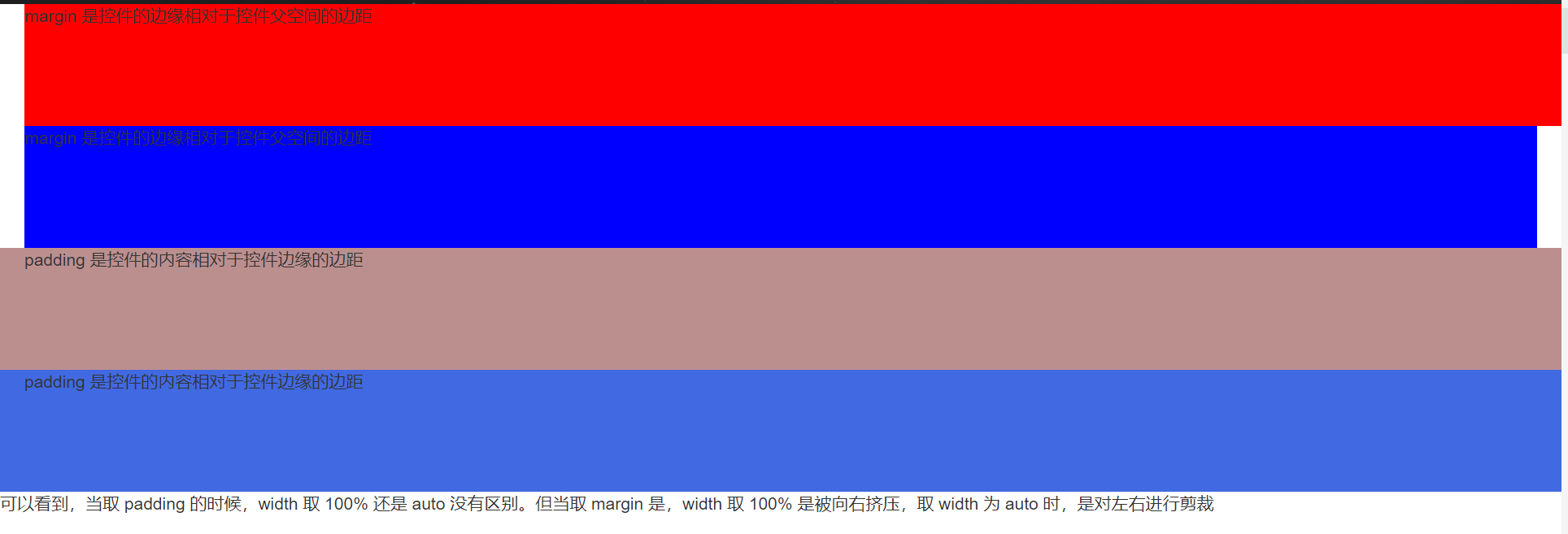
1. Write in front 2. Specific examples 2.1, set the children element Margin: 0 Settings at this timeWidth: 100%and Width: AutoThere is no difference. 2.2, set the children element Margin: 0 30px 2.3. ...

The difference between canvas width and style.width
In canvas, there are two attributes, width and height, which are defined as canvasCanvas and drawing paperthe size of. If not set, the default is 300*150; For example, we set the width and height of t...
The difference between flex-basis and width
The simplest case that flex-basis completely covers width is no longer mentioned! Just talk about the unpopular points of attention Ⅰ: When only basis is written, or basis >width, the value of basi...
More Recommendation

CSS setting width = WINDOW.INNERWIDTH still has a scroll bar (resolved)
As shown: Set the width height = width height of the window Two scroll bars Solution: -1 Can be seen, successfully solved Or set in Body:...
The difference between the default width Width: 100%and Width: Auto
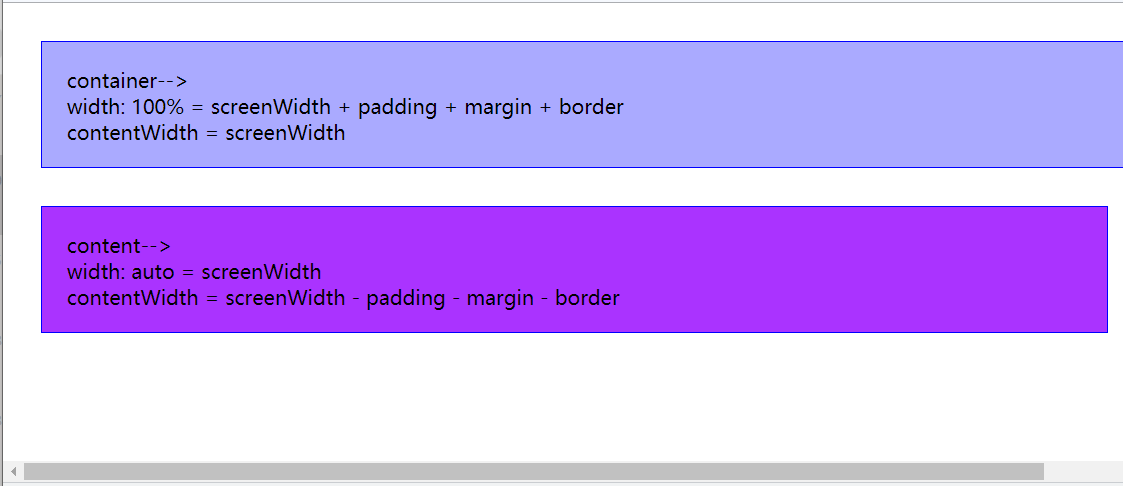
Example image: Element composition structure: content + margin + border + padding width: 100%: width: Auto : Recommend using Margin: Auto Example code: Margin: AUTO's element setting Margin-Right is n...
The difference between html canvas tag width and css width
Problems encountered If at this point I draw a circle on the canvas, but the effect I see on the browser is a flat circle. why? Personal understanding Canvas is like a picture. The above example is a ...
The difference between max(min)-device-width and max(min)-width
The difference between max(min)-device-width and max(min)-width In the webpage adaptive design, max-device-width and max-width are two indispensable CSS attributes, but there may not be too much atten...

The difference between the width and height of H5 canvas and the width and height in style
Canvas width height property 1. When using the width height attribute, the display will not be stretched normally; as follows The running effect is as follows, which is diagona...