GLSL -Commonly used built -in functions and applications
tags: glsl c++ C language
GLSL -Commonly used built -in functions and applications
Step function
step (a, b); when B> A, return 1; when B <A, return 0.
Function prototype
float step(float a, float x)
{
    if (a < x)
    {
        return x;
    }
    else
    {
        return a;
    }
}
application
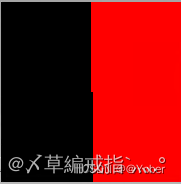
When the control is colored, the X coordinates are less than 0.5, and the black rendering is used; when the X coordinate is greater than 0.5, the red rendering is used.
Code
varying mediump vec2 texCoord0;

void main()
{
	precision mediump float;
	float color = 0.;
// Use the STEP function prototype to implement
//	if (texCoord0.x > 0.5)
//	{
//		color = 1.;
//	}
//	else
//	{
//		color = 0.;
//	}

    // Use the Step function to implement
	color = step(0.5, texCoord0.x);
    gl_FragColor = vec4(vec3(color, 0., 0.), 1.);
}
Effect
MIX
MIX (color, colorb, weight); two colors mixed rendering, Weight is the rendering weight of Colorb, 1-weight is the rendering weight of color, which is used in color mixed stack effects.
Function prototype
vec4 mix(vec4 colorA, vec4 colorB, float a)
{
    return x * (1 - a) + y * a;
}
application
Black and red mix, and the black weight increases according to the X coordinate
Code
varying mediump vec2 texCoord0;

void main()
{
	precision mediump float;
	vec4 colorRed = vec4(1.0, 0., 0., 1.);
	vec4 colorBlack = vec4(0., 0., 0., 1.);

    // Use MIX prototype to implement
    //gl_FragColor = colorRed * (1 - texCoord0.x) + colorBlack * texCoord0.x;

    // Use the MIX function to implement
    gl_FragColor = mix(colorRed, colorBlack, texCoord0.x);
}
Effect

CLAMP
CLAMP (x, min, max); When x is greater than MAX, return MAX, when x is less than min, return to min, when x is between min and max, return x itself
Function prototype
float clamp(float x, float min, float max)
{
    if (min > x)
    {
        return min;
    }
    else if (min < x && max > x)
    {
        return x;
    }
    else
    {
        return max;
    }
}
application
When x is less than 0.4, the red channel value is rendered at 0.4. When X is greater than 0.8, the red channel value is 0.8 for rendering. The red channel between 0.4 and 0.8 is from 0.4 to 0.8 gradient gradients.
Code
varying mediump vec2 texCoord0;

void main()
{
	precision mediump float;
	float color = 0.;
    // Use IF conditions to judge implementation
//    if (texCoord0.x < 0.4)
//    {
//        color = 0.4;
//    }
//    else if (0.4 < texCoord0.x && texCoord0.x < 0.8)
//    {
//        color = texCoord0.x;
//    }
//    else
//    {
//        color = 0.8;
//    }

    // Use CLAMP to implement
	color = clamp(texCoord0.x, 0.4, 0.8);

    gl_FragColor = vec4(vec3(color, 0., 0.), 1.);
}
Effect

LENGTH
length (a); return to vector A length
length(float a);
length(vec2 vec);
length(vec3 vec);
length(vec4 vec);
application
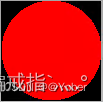
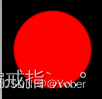
Draw a circle, the round heart coordinate center (0.5, 0.5), the radius is 0.5, the background is black, round red. When the distance from any point to the center of the center is less than the radius, draw the circle, and use the length calculation to the distance from the center of the center
Code
varying mediump vec2 texCoord0;

void main()
{
	precision mediump float;
	// round color
	vec4 colorCircle = vec4(1.0, 0., 0., 1.);
	// Background color
	vec4 colorBg = vec4(0., 0., 0., 1.);
	// Yuanxin
	vec2 center = vec2(0.5, 0.5);
	//radius
	float radio = 0.5;

	// Use length to calculate the distance from any point to Yuanxin
	float d = length(texCoord0 - center);
	if (d < radio)
	{
	    gl_FragColor = colorCircle;
	}
	else
	{
	    gl_FragColor = colorBg;
	}
}
Effect
DISTANCE
Distance (a, b); return the distance between A and B, that is, d = sqrt (a * a + b * b);
application
In the figure above, the length function calculates the distance from any point to the center of the center. You can also use the Distance function to calculate the distance from any point to the center of the center.
Code
varying mediump vec2 texCoord0;

void main()
{
	precision mediump float;
	// round color
	vec4 colorCircle = vec4(1.0, 0., 0., 1.);
	// Background color
	vec4 colorBg = vec4(0., 0., 0., 1.);
	// Yuanxin
	vec2 center = vec2(0.5, 0.5);
	//radius
	float radio = 0.5;

	// Ren point out the distance of Yuanxin
	float d = distance(texCoord0, center);
	if (d < radio)
	{
	    gl_FragColor = colorCircle;
	}
	else
	{
	    gl_FragColor = colorBg;
	}
}
The effect is the same as length
SMOOTHSTEP
Smoothstep (EDG0, EDG1, X); EDG0 left edge, EDG1 right edge, so that X is smoothly treated in the EDG0 and EDG1 range. The return value is within the [0, 1] interval, when x> EDG1, return 1, when x <EDG0, return 0, when x is between EDG0 and EDG1
Function prototype
float smoothstep(float edg0, float edg1, float x)
{
    // Perissitification of X
    float t = clamp((x - edg0) / (edg1 - edg0), 0., 1.);
    // Smoly processes the results of the normalized processing
    return (3 - 2 * x) * x * x;
}
application
Draw a circle with the length function and distance, but the round edge of the painting is jagged, which looks more stiff, so how to make the edge of the circle smoother? The use of the SMOOTHSTEP function is a good processing method. The core is to reserve a certain range to the edge of the circle, and the external color and transparency gradient on the edges and edges in this interval. In the circle drawn above, the radius of the circle is RADIO, so you can give a range of Radio -Blur or Radio + Blur. In this interval
Code
varying mediump vec2 texCoord0;

void main()
{
    precision mediump float;
    // Yuanxin
    vec2 center = vec2(0.5, 0.5);
    //radius
    float radio = 0.5;
    // Define the edge interval
    float blur = 0.025;

    // Calculate the distance from any point to the center of the center
    float d = distance(texCoord0, center);
    // Smooth Dymental D. When D is greater than RADIO, return 1, and when D is less than RADIO-BLUR, return 0,
    // When D is between Radio-Blur and Radio, fuzzy and smooth processing
    // Because the round stone red that we want to draw, the background is black, so add 1.--
    float d1 = 1.-smoothstep(radio - blur, radio, d);
    //gl_FragColor = mix(colorBg, colorCircle, d1);
    gl_FragColor = vec4(vec3(d1, 0., 0.), 1.);
}
Effect
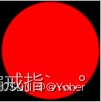
It can be seen that the edge of the circle has no jagged effect. You can adjust the smoothness through the Blur value
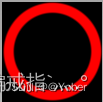
What effect would it be achieved if two Smoothstep functions were reduced?
Code
varying mediump vec2 texCoord0;

void main()
{
    precision mediump float;
    // The horizontal coordinate is written in vertexshader in vertical and horizontal ratio
//    texCoord0.x *= (200.0/100.0);
    // Yuanxin
    vec2 center = vec2(0.5, 0.5);
    //radius
    float radio = 0.5;
    float radio1 = 0.4;
    // Define the edge interval
    float blur = 0.025;

    // Calculate the distance from any point to the center of the center
    float d = distance(texCoord0, center);
    // Smooth Dymental D. When D is greater than RADIO, return 1, and when D is less than RADIO-BLUR, return 0,
    // When D is between Radio-Blur and Radio, fuzzy and smooth processing
    // Because the round stone red that we want to draw, the background is black, so add 1.--
    float d1 = (1.-smoothstep(radio - blur, radio, d)) - (1. - smoothstep(radio1 - blur, radio1, d));
    //gl_FragColor = mix(colorBg, colorCircle, d1);
    gl_FragColor = vec4(vec3(d1, 0., 0.), 1.);
}
Renderings
So, do you want to take?
Code
varying mediump vec2 texCoord0;

void main()
{
    precision mediump float;
    // The horizontal coordinate is written in vertexshader in vertical and horizontal ratio
//    texCoord0.x *= (200.0/100.0);
    // Yuanxin
    vec2 center = vec2(0.5, 0.5);
    //radius
    float radio = 0.5;
    float radio1 = 0.4;
    // Define the edge interval
    float blur = 0.025;

    // Calculate the distance from any point to the center of the center
    float d = distance(texCoord0, center);
    // Smooth Dymental D. When D is greater than RADIO, return 1, and when D is less than RADIO-BLUR, return 0,
    // When D is between Radio-Blur and Radio, fuzzy and smooth processing
    // Because the round stone red that we want to draw, the background is black, so add 1.--
    float d1 = (1.-smoothstep(radio - blur, radio, d)) * (1. - smoothstep(radio1 - blur, radio1, d));
    //gl_FragColor = mix(colorBg, colorCircle, d1);
    gl_FragColor = vec4(vec3(d1, 0., 0.), 1.);
}
Renderings
It can be seen through the above effect that the two Smoothstep are reduced, and you can get the patterns other than the subtraction Smoothstep.
LERP
Lerp (a, b, x); When x = 0, return A, when x = 1, return B, otherwise return to the difference between A and B
Function prototype
float lerp (float a, floatb, float x)
{
    a + x * (b - a);
}
application
When X is closer to 0, the return value month is close to A. When X closes to 1, the return value to the closer to B. Through this feature, it can be used to do some gradient effects, for example, the effect of the gradient from the coordinate center to the surroundings can be changed.
Code
varying mediump vec2 texCoord0;

void main()
{
    precision mediump float;
    vec4 colorBlack = vec4(0., 0., 0., 1.);
    // Gradually turned black to both sides in the middle
    gl_FragColor = lerp(0., 1., length(texCoord0 - 0.5)) * colorBlack;
}
Renderings

Original link:
Intelligent Recommendation
Python commonly used built-in functions
Anonymous function lambda zip() When the lengths given in the zip function parameters are inconsistent, follow the barrel effect map() Somewhat similar to higher order functions fillter() Return eligi...
String commonly used built-in functions
When it comes to modifying the string function, a new string is generated, and the original string is not changed. 1. Initials to uppercase The string .capitalize() - converts the first letter of the ...
Commonly used python built-in functions
"5 minutes a day python programming" Abs(), absolute value function All(), returns true if the elements of the list are true, 0 is false for numbers, non-zero is true Any(), when the element...
Python - commonly used built-in functions
sorted(iterable[, cmp[, key[, reverse]]]) sorts all iterable objects without modifying the original object, returning a sorted new object iterable -- An iterable object. cmp -- an optional parameter t...
Python3_ commonly used built-in functions
1, abs (): take the absolute value operation result: 1 2, all (): Boolean elements in the parameters The argument must be an iterable object. When one of the arguments is False, the result is False. W...
More Recommendation
PHP commonly used built-in functions
Date time function Output print function Serialization and reverse ordering functions String processing function Array handler...
PostgreSQL commonly used built-in functions
More about DB management function inchapter 9 functions and operators Query the current transaction xid xmax lookup table of tuples, xmin, ctid Query the database object oid (db, table) Information qu...
MATLAB commonly used built-in functions
mean2 (img): calculate the mean gray value image. mean (arr): average value calculating arrays. mean (img): the column of the image as a vector processing, averaging each column in a row are combined ...
TSQL commonly used built-in functions
7. Built-in functions 7.1. Scalar function ? System Function 1、 Case common usage CASE CASE statements in the GROUP BY CASE statements in the ORDER BY NOTE: In o...