ndgrid and meshgrid functions-Matlab

tags: Matlab

ndgridFunction andmeshgridThe function is similar, but the former supports from 1 to n dimensions, while the latter is only limited to 2 and 3 dimensions. In 2D and 3D, the coordinate output of the two functions is the same. The difference lies in the shape of the output array. For grid vectors x1gv, x2gv, x3gv, the lengths are M, N, and P respectively.ndgrid(x1gv, x2gv)The function outputs an array of MXN, andmeshgrid(x1gv, x2gvOutput an N*M array, similarly,ndgrid(x1gv, x2gv, x3gv)The function outputs an array of M*N*P, andmeshgrid(x1gv, x2gv, x3gvOutput an array of N*M*P .

The following example illustrates

[cpp] view plain copy
  1. x1gv =  [1 2];  
  2. x2gv =  [4 5 6];  
  3. x3gv =  [4 5 6 7];  
  4. a = ndgrid(x1gv,x2gv,x3gv)  
  5. b = meshgrid(x1gv,x2gv,x3gv)  

Result output

[cpp] view plain copy
  1. a(:,:,1) =  
  2.      1     1     1  
  3.      2     2     2  
  4.   
  5. a(:,:,2) =  
  6.      1     1     1  
  7.      2     2     2  
  8.   
  9. a(:,:,3) =  
  10.      1     1     1  
  11.      2     2     2  
  12.   
  13. a(:,:,4) =  
  14.      1     1     1  
  15.      2     2     2  
[cpp] view plain copy
  1. b(:,:,1) =  
  2.      1     2  
  3.      1     2  
  4.      1     2  
  5.   
  6. b(:,:,2) =  
  7.      1     2  
  8.      1     2  
  9.      1     2  
  10.   
  11. b(:,:,3) =  
  12.      1     2  
  13.      1     2  
  14.      1     2  
  15.   
  16. b(:,:,4) =  
  17.      1     2  
  18.      1     2  
  19.      1     2  


For example, the dimensions of x1gv, x2gv, and x3gv are 2, 3, and 4 respectively. After executing the two functions, a = ndgrid(x1gv,x2gv,x3gv), the dimensions of the output a is 2x3x4, and b = meshgrid(x1gv,x2gv,x3gv), the output dimension is 3x2x4.


The following explains the ndgrid() function in detail

 [X1,X2,X3,...] = ndgrid(x1gv,x2gv,x3gv,...), copy the values ​​of x1gv,x2gv,x3gv,... to generate a rectangular grid coordinate (X1,X2,X3,...). The element of the i-th dimension of the output array Xi is copied from the grid vector xigv. For example, the grid vector x1gv forms the rows of X1, the grid vector x2gv forms the columns of X2, and so on...

The above may be more convoluted, for a simple example,

[cpp] view plain copy
  1. x1gv =1:.1:2;  
  2. x2gv =4:.2:5;  
  3. [a b]= ndgrid(x1gv,x2gv)  
among them,

x1gv = [1 1.1 1.2 1.3 1.4 1.4 1.5 1.6 1.7 1.8 1.8 1.9 2], dimension is 1*11, length is 11, x2gv = [4 4.2 4.4 4.6 4.8 5], dimension The number is 1*6 and the length is 6, then, the rows of the output a are copied from the elements of x1gv, and the columns of the output b are also copied from the elements of x2gv.

The output result is as follows: As mentioned above, the dimension of the output array should be 11*6. Compare the contents of a and b with x1gv and x2gv, and you can understand the above Mouth place.

[cpp] view plain copy
  1. a =  
  2.     1.0000    1.0000    1.0000    1.0000    1.0000    1.0000  
  3.     1.1000    1.1000    1.1000    1.1000    1.1000    1.1000  
  4.     1.2000    1.2000    1.2000    1.2000    1.2000    1.2000  
  5.     1.3000    1.3000    1.3000    1.3000    1.3000    1.3000  
  6.     1.4000    1.4000    1.4000    1.4000    1.4000    1.4000  
  7.     1.5000    1.5000    1.5000    1.5000    1.5000    1.5000  
  8.     1.6000    1.6000    1.6000    1.6000    1.6000    1.6000  
  9.     1.7000    1.7000    1.7000    1.7000    1.7000    1.7000  
  10.     1.8000    1.8000    1.8000    1.8000    1.8000    1.8000  
  11.     1.9000    1.9000    1.9000    1.9000    1.9000    1.9000  
  12.     2.0000    2.0000    2.0000    2.0000    2.0000    2.0000  
  13.   
  14. b =  
  15.     4.0000    4.2000    4.4000    4.6000    4.8000    5.0000  
  16.     4.0000    4.2000    4.4000    4.6000    4.8000    5.0000  
  17.     4.0000    4.2000    4.4000    4.6000    4.8000    5.0000  
  18.     4.0000    4.2000    4.4000    4.6000    4.8000    5.0000  
  19.     4.0000    4.2000    4.4000    4.6000    4.8000    5.0000  
  20.     4.0000    4.2000    4.4000    4.6000    4.8000    5.0000  
  21.     4.0000    4.2000    4.4000    4.6000    4.8000    5.0000  
  22.     4.0000    4.2000    4.4000    4.6000    4.8000    5.0000  
  23.     4.0000    4.2000    4.4000    4.6000    4.8000    5.0000  
  24.     4.0000    4.2000    4.4000    4.6000    4.8000    5.0000  
  25.     4.0000    4.2000    4.4000    4.6000    4.8000    5.0000  

Finally, the dimension of the output array is determined by the number of output variables, which is determined byndgrid(……)Determined by the number of output lists on the right side of the function. This sentence means that if the number of outputs is 1, then the dimension is N*1, and N is the length of the grid vector, if the number of outputs is 2, then the dimension of each is N*N.

[cpp] view plain copy
  1. x1gv =1:.1:2;  
  2. [a]= ndgrid(x1gv)  

[cpp] view plain copy
  1. a =  
  2.     1.0000  
  3.     1.1000  
  4.     1.2000  
  5.     1.3000  
  6.     1.4000  
  7.     1.5000  
  8.     1.6000  
  9.     1.7000  
  10.     1.8000  
  11.     1.9000  
  12.     2.0000  

[cpp] view plain copy
  1. x1gv =1:.1:2;  
  2. [a b]= ndgrid(x1gv)  


[cpp] view plain copy
  1. a =  
  2.   Columns 1 through 9  
  3.     1.0000    1.0000    1.0000    1.0000    1.0000    1.0000    1.0000    1.0000    1.0000  
  4.     1.1000    1.1000    1.1000    1.1000    1.1000    1.1000    1.1000    1.1000    1.1000  
  5.     1.2000    1.2000    1.2000    1.2000    1.2000    1.2000    1.2000    1.2000    1.2000  
  6.     1.3000    1.3000    1.3000    1.3000    1.3000    1.3000    1.3000    1.3000    1.3000  
  7.     1.4000    1.4000    1.4000    1.4000    1.4000    1.4000    1.4000    1.4000    1.4000  
  8.     1.5000    1.5000    1.5000    1.5000    1.5000    1.5000    1.5000    1.5000    1.5000  
  9.     1.6000    1.6000    1.6000    1.6000    1.6000    1.6000    1.6000    1.6000    1.6000  
  10.     1.7000    1.7000    1.7000    1.7000    1.7000    1.7000    1.7000    1.7000    1.7000  
  11.     1.8000    1.8000    1.8000    1.8000    1.8000    1.8000    1.8000    1.8000    1.8000  
  12.     1.9000    1.9000    1.9000    1.9000    1.9000    1.9000    1.9000    1.9000    1.9000  
  13.     2.0000    2.0000    2.0000    2.0000    2.0000    2.0000    2.0000    2.0000    2.0000  
  14.   
  15.   Columns 10 through 11  
  16.     1.0000    1.0000  
  17.     1.1000    1.1000  
  18.     1.2000    1.2000  
  19.     1.3000    1.3000  
  20.     1.4000    1.4000  
  21.     1.5000    1.5000  
  22.     1.6000    1.6000  
  23.     1.7000    1.7000  
  24.     1.8000    1.8000  
  25.     1.9000    1.9000  
  26.     2.0000    2.0000  
  27.   
  28. b =  
  29.   Columns 1 through 9  
  30.     1.0000    1.1000    1.2000    1.3000    1.4000    1.5000    1.6000    1.7000    1.8000  
  31.     1.0000    1.1000    1.2000    1.3000    1.4000    1.5000    1.6000    1.7000    1.8000  
  32.     1.0000    1.1000    1.2000    1.3000    1.4000    1.5000    1.6000    1.7000    1.8000  
  33.     1.0000    1.1000    1.2000    1.3000    1.4000    1.5000    1.6000    1.7000    1.8000  
  34.     1.0000    1.1000    1.2000    1.3000    1.4000    1.5000    1.6000    1.7000    1.8000  
  35.     1.0000    1.1000    1.2000    1.3000    1.4000    1.5000    1.6000    1.7000    1.8000  
  36.     1.0000    1.1000    1.2000    1.3000    1.4000    1.5000    1.6000    1.7000    1.8000  
  37.     1.0000    1.1000    1.2000    1.3000    1.4000    1.5000    1.6000    1.7000    1.8000  
  38.     1.0000    1.1000    1.2000    1.3000    1.4000    1.5000    1.6000    1.7000    1.8000  
  39.     1.0000    1.1000    1.2000    1.3000    1.4000    1.5000    1.6000    1.7000    1.8000  
  40.     1.0000    1.1000    1.2000    1.3000    1.4000    1.5000    1.6000    1.7000    1.8000  
  41.   
  42.   Columns 10 through 11  
  43.     1.9000    2.0000  
  44.     1.9000    2.0000  
  45.     1.9000    2.0000  
  46.     1.9000    2.0000  
  47.     1.9000    2.0000  
  48.     1.9000    2.0000  
  49.     1.9000    2.0000  
  50.     1.9000    2.0000  
  51.     1.9000    2.0000  
  52.     1.9000    2.0000  
  53.     1.9000    2.0000  


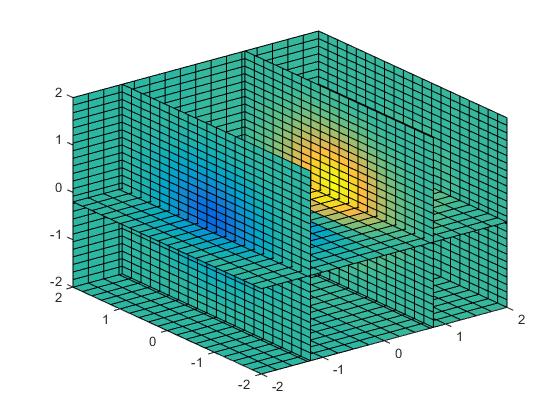
gives a dazzling drawing method

[cpp] view plain copy
  1. [x1,x2,x3] = ndgrid(-2:.2:2, -2:.25:2, -2:.16:2);  
  2. z = x2 .* exp(-x1.^2 - x2.^2 - x3.^2);  
  3. slice(x2,x1,x3,z,[-1.2 .8 2],2,[-2 -.2]);  


The above explanation may not be very clear, you can refer to the help file of matlab for details

Attach the link:http://cn.mathworks.com/help/matlab/ref/ndgrid.html

Intelligent Recommendation

Matlab function Meshgrid role

Matlab function Meshgrid's role:...

Use of Meshgrid in matlab

1、[x,y]=meshgrid(1:n,1:m); The data of the network sample point is generated, the number of lines of X, Y is equal to M, the column number is equal to N. 2、MeshGrid is used to generate grids from arra...
Matlab Meshgrid combined with interp2

Meshgrid is a statement used to construct a two-dimensional or three-dimensional grid that uses [X,Y] = meshgrid(x,y) or [X,Y,Z] = meshgrid(x,y,z) X, Y represents a "length" of a certain dim...
mgrid () and meshgrid () functions in numpy

Recently I saw a very clear article explaining the mgrid () and meshgrid () functions, which is collected and reproduced here. The original link:   First, the meshgrid function The meshgrid funct...

mgrid() and meshgrid() functions in numpy

One, meshgrid function The meshgrid function is usually used for vectorization of data. It is suitable for generating grid data and can accept two one-dimensional arrays to generate two two-dimensiona...

More Recommendation

Detailed explanation of the meshgrid function of matlab

Function form [C,R] =meshgrid(c, r) Preliminary explanation The first thing to be clear is that the parameters c and r are both row vectors. This function transforms the domain specified by the row ve...

The usage of meshgrid in matlab 3D image

The meshgrid function is used to generate a grid matrix, which can be two-dimensional or three-dimensional. For generating a two-dimensional grid, the usage is: [xy]=meshgrid(ab);% a and b are one-dim...

Introduction to Meshgrid matrix functions in Numpy

It can be understood that the meshgrid function draws a grid on a plane with points on two coordinate axes. Usage: Take [X,Y]=meshgrid(x,y) as an example to introduce this function. [X,Y] = meshgrid(x...

Usage of meshgrid and tile functions in numpy

The meshgrid function can be used to generate the index of a two-dimensional matrix. The tile function can copy the list in a certain dimension. It is assumed to be two-dimensional:     &nbs...
[Matlab] Three-dimensional surface (rectangular grid---meshgrid)

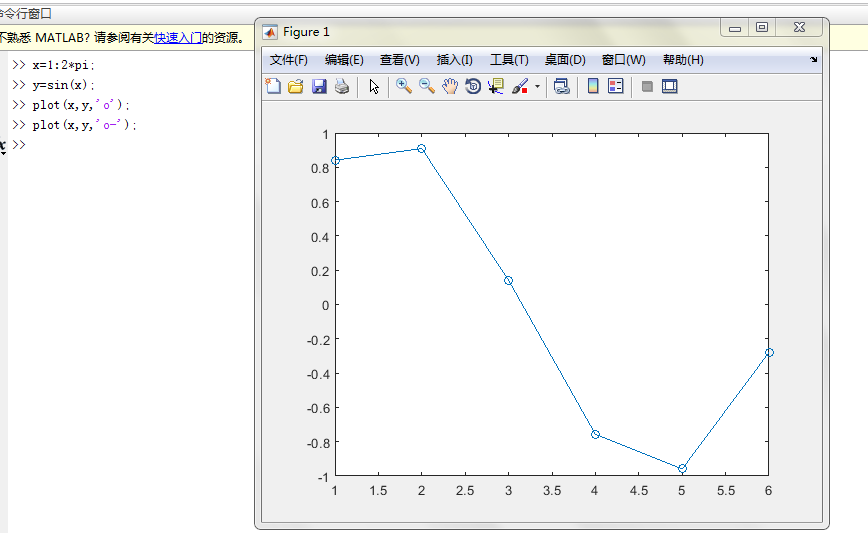
[Matlab] Three-dimensional surface (rectangular grid—meshgrid) Two-dimensional curve: First find x, find the corresponding y, and draw the point. Run screenshot For 3D surfaces: First find (x, y...

Copyright  DMCA © 2018-2026 - All Rights Reserved - www.programmersought.com  User Notice

Top