Excel import function
purpose
Add multiple member information at one time, this time you need to develop a batch import function: import the file in advance in Excel format into in advance.
Steps
-
A rear end provides an Excel template file
-
Users fill in this Excel template file
-
Upload this file to achieve bulk import functionality
Program
1: Back end lead (a lot of work in the backend)
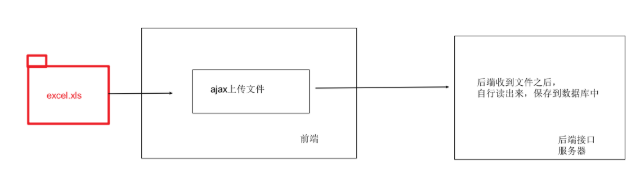
2: Front-end lead (front end read the Excel file, adjust the data to the backend)
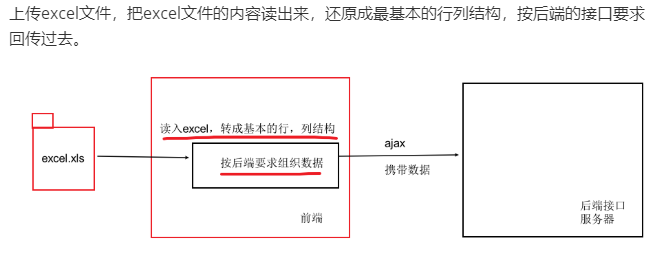
usevue-admin-elementImporting scheme (front end)
1: Install the plugin NPM Install XLSX -S
2: Copy the components provided by Vue-Element-Admin in to our own project
src/components/UploadExcel Under the file, register in mian.js and import in the target page
import PageTools from './PageTools'
import UploadExcel from './UploadExcel'

export default {
     // Initialization of the plugin, the plugin gives you the global functionality, you can configure here
  install(Vue) {
         / / Global registration for components
         Vue.component ('PageTools', PageTools) // Register Toolbar Components
         Vue.component ('UPLoadExcel', UPLoadExcel) / / Register Import Excel Components
  }
}
data processing
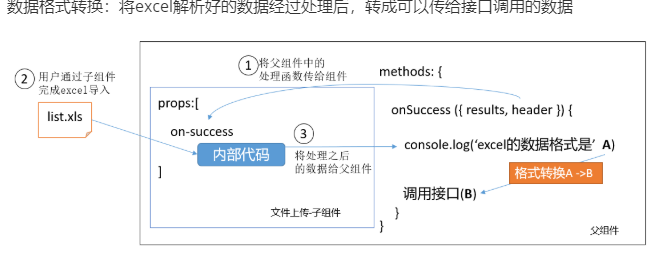
Click to upload the event triggered
handleSuccess({ header, results }) {
      // HEADER title
             // ['Name', 'Mobile number']
             // RESULTS Excel form
             // [{'Name': 'Xiao Zhang', 'Mobile Number': '13712345678'}, {.....}]
      console.log(header, results)
    }
Data processing (title)
  transExcel(results) {
 // The title of the back end is English here to convert the title.
      const mapInfo = {
                 'Introduction Date': 'TimeOfentry',
                 'Mobile number': 'Mobile',
                 'Name': 'UserName',
                 'Turn the date': 'CorrectionTime',
                 'Work number': 'Worknumber',
                 'Department': 'DEPARTMENTNAME',
                 'Hiring form': 'formofemployment'
      }
      return results.map(zhObj => {
        const enObj = {}
                 Const enkeys = Object.keys (zhobj) // ['Name ",' mobile phone number ']

        zhKeys.forEach(zhKey => {
          const enKey = mapInfo[zhKey]

          enObj[enKey] = zhObj[zhKey]
        })

        return enObj
      })
    }
Time processing (incoming time format is a problem with a separate conversion)
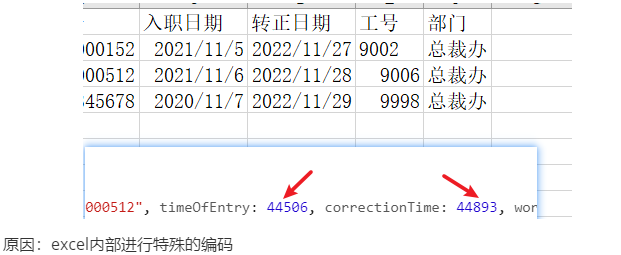
// Transfer the content of the date format in the Excel file into standard time
// https://blog.csdn.net/qq_15054679/article/details/107712966
export function formatExcelDate(numb, format = '/') {
  const time = new Date((numb - 25567) * 24 * 3600000 - 5 * 60 * 1000 - 43 * 1000 - 24 * 3600000 - 8 * 3600000)
  time.setYear(time.getFullYear())
  const year = time.getFullYear() + ''
  const month = time.getMonth() + 1 + ''
  const date = time.getDate() + ''
  if (format && format.length === 1) {
    return year + format + month + format + date
  }
  return year + (month < 10 ? '0' + month : month) + (date < 10 ? '0' + date : date)
}
Send request after processing data
Intelligent Recommendation
Import data function is to import data through Excel
A large part of what should be noted is that when using this import method, the Excel template we import should be relatively clean, without borders, and without styles. When you right-click to set th...

Excel file import function implementation
First look at my excel file first The notes are very clear and will not be explained in detail. Console printing...
Import data into Excel and download function
1, create an ExcelExportAction class 2, struts.xml configuration ...
Batch import excel function in the background
Technology stack: xlsx components Installation && use Code demo demo Reference link: github-xlsx Short book xlsx-import and export...
More Recommendation
Js implements Excel import function
Upload only Excel files to the background After js parses the contents of the Excel file, upload it to the background. Need to introduce xlsx.full.min.js file, read files through the FileReader object...
Excel import database poi function
.html .js controller service...

Java implementation import excel function
Implementation function: 1, Excel template download 2, import excel First, jsp effect and code View Code Second, the js code View Code Third, action processing View Code Reprinted at: https://w...
SSM Excel import function to achieve
1.controller wording This can be achieved import Excel data into the database but be aware that Excel column attributes of good service must be used with the corresponding treatment....
Excel Import and Export Function (POI)
Maven Read: ...