[SIM card] Sim card hot swap
tags: sim Hot swap MTK drive Lose card
3.1. Brief introduction of hot plug function
For non-hot-swappable projects, the card-checking process will only be started when the modem is turned on. If the card is not detected at boot time, the card-free process will not be followed. In order to realize the user's free card insertion and card removal after booting, without the need to shut down -> card -> reboot, the sim card hot plug feature came into being. The hot plug function is implemented by interrupt. Therefore, to support the sim card hot card, a special sim card holder is required on the hardware. This card holder will have a detect pin (that is, interrupt pin) when the user inserts or pulls the card. When the card is released, the interrupt level will change in high and low, and then the interrupt will be triggered. The software will judge whether the card is currently inserted or pulled according to the state of the interrupt, thereby performing card checking or card stopping. Currently we only support one type of hot-swap type of card: the card is high (low) level and the card is low (high) level. Please note that the interval between the card and the card must be more than 2s. The hot plug operation below 2s will cause the hot plug function to be abnormal!
3.2. Hot swap feature option Description
MODEM side:
xxAMDWxxx_xxx_xxx\make\[project_custom].mak
SIM_HOT_SWAP = sim_slot_1 //Open sim hot plug function
SIM_HOT_SWAP = NONE // Turn off sim hot plug function
Note: When users need to turn off hot plugging to do some card checking experiments, you can only turn off the feature on the modem side, build modem image, push into the phone to verify, so It will save time. But remember to recover after verification~
AP side:
alps\mediatek\config\[Custom_ Project]\ProjectConfig.mk
MTK_SIM_HOT_SWAP =yes //Open sim hot plug function
MTK_SIM_HOT_SWAP =no //Close sim hot plug function
Note: The sim card hot plug function is supported by default on the SP project. Customers can switch on their own and do not need to apply for patch or Flavor build.
3.3. Interrupt configuration
For the SP platform with integrated modem, the sim-related gpio configuration, including sim interface and interrupt pin, is configured in the AP's codegen.dws to generate the configuration file by the AP, and When the kernel is initialized, gpio and eint are initialized. When the modem is initialized during the startup process, it will interrupt the information to the AP through the CCCI interface, and then register the interrupt.
Sim hot plug does not work properly, basically it is the reason that the interrupt is not properly configured, so the next content here must be
Seriously look at it again~
There are two main points in configuring interrupts for hot plugging of sim cards:
a) The eint pin selected by Hw is usually multiplexed with gpio, so you need to configure the corresponding gpio as MD_EINT mode on the gpio setting page of the driver tool.
Note: The interrupt pin of the sim card must use gpio with MD_EINT mode. Only this type of gpio can directly trigger the modem interrupt. The normal gpio only has the EINT mode and can only trigger the AP interrupt.
b) Configure the corresponding eint on the MD1_EINT setting page:
EINT debounce time: enable,100
Sensitivity_level: Level
Polarity: configured to pull the card level
3.4. Sub-platform example illustrates the interrupt configuration method:
MT6582/MT6592 Platform:
ID: FAQ17406 MT6582/MT6592 platform sim card hot swap configuration
MT6572 Platform:
The configuration method is the same as that of 82/92, except that the MD_EINTx number on the gpio setting page is different from the MD1_EINT setting page number, as follows:
MT6589 Platform:
ID: FAQ17407 MT6589 platform sim card hot swap configuration
82/92+90 hot plug configuration method:
ID: FAQ12120 How to configure sim hot plug when using MT6290 as md
MT6595 Platform:
Please refer to Sim hot plug configure about MT6595.pptx, which can be downloaded on dcc.
MT6580 platform:
is the same as the MT6572 platform configuration method. The MD_EINTx number of the gpio setting page is the same as the MD1_EINT setting page number.
MT6735/MT6753/MT6795/MT6797/MT6755 and other LTE platforms:
Before the early MT6589 (including MT6589), the MD1_EINT setting page configures which serial number needs to be compared with the mode selected on the GPIO setting page.
What needs to be explained here is the LTE platform. The MD1_EINT setting page has one more column: Src Pin. This configuration must be correct, otherwise hot swap will not work.Src Pin is configured to be the name of the gpio pad used. For example, if the MT6753 platform customer uses GPIO21 as the interrupt of card 2, you need to configure Src Pin as PAD_ANT_SEL2.
For platforms with Src Pin configuration, the MD1_EINT setting page number corresponds to the card as follows:
MD1_EINT0 – MD1_SIM1_HOT_PLUG_EINT
MD1_EINT1 – MD1_SIM2_HOT_PLUG_EINT
That is, if you want to configure the interrupt of card 1, you must configure the line MD1_EINT0; if you want to configure the interrupt of card 2, you must configure the line MD1_EINT1. The configuration of Polarity is unchanged, and it is still configured as the interrupt level state after the card is pulled out.
Example: MT6735 platform, the customer is interrupted as follows:
GPIO9 -- Card 1 interrupt -- High level after card is pulled
Gpio8 -- Card 2 Interrupt -- Low after pulling the card
3.5. How to verify the hot plug function
After configuring the hot plug function according to the above method, you can use the following method to verify!
The simple verification method is as follows:
(1) Do not plug in the card, insert the card after booting to see if it can be recognized, if possible, the hot plug function is OK;
(2) Plug in the A card to boot, pull out the A card after booting, change the B card to insert, if the B card can also be recognized quickly, the hot plug function is OK;
The same card can be removed and re-inserted to identify that the hot-swap function is not OK. It is very likely that the card is saved.
You can also confirm this by log:
Record the time of card unplugging and card insertion when the log is captured (the interval between inserting and unplugging the card is better than 1min, which is better for the log), and then compare the system trace of md log. Search for the keywords "Insert" and "Remove" to see if it matches the time you recorded. If it matches, the hot plug configuration is OK.
For example: pull the card at 10:12 and insert the card at 10:13. The log is as follows:
26013, 0, 139943, 10:12:23:219 2015/11/26, MOD_NIL, , TRACE_INFO, [SIM_CUS_DRV:506]Remove SIM : 0, 0, 1, 1, 1, 1, 4ecc7
43844, 0, 1385397, 10:13:42:928 2015/11/26, MOD_NIL, , TRACE_INFO, [SIM_CUS_DRV:540]Insert SIM : 0, 0, 0, 0, 0, 0, 2cc75e
This part of the trace is printed in the interrupt handler, so it is most accurate to determine if there is an interrupt.
3.6. Hot plugging function abnormal troubleshooting method:
If the hot plug function is not working properly, you can do the following:
1. Check mdlog, search for the keyword "EINT" in PS Intergrated, and check if the interrupt information is consistent with the codegen.dws configuration.
Note1: Dual card common card design, card 2 and card 1 common interrupt, and default is the interruption of common card 1, so there is no need to configure interrupt information of card 2 in codegen.dws. The interrupt information for card 2 in log will be displayed as above.
Note2: If the interrupt information printed in the log is different from the one you configured in codegen.dws, please check whether the codegen.dws configuration is consistent in several paths on the AP side. For details, please refer to FAQ13193. Troubleshoot.
2. If the interrupt information is correct, but the interrupt is not triggered, the next step is to measure the waveform of the interrupt;
The interrupt waveform is measured in the state of the card and the card is not inserted, and the interrupt level is correctly changed.
3. If both 1 and 2 are checked, then you need to interrupt the state of the pin.
Cat's approach was introduced in a previous blog. You need to separate the values of the cat card and the card.
a) Confirm that DIN has changed correctly.
b) Confirm that the mode is correct;
If the mode is incorrect, you can check if the mode is modified in sim_switch.c. You can comment out this part of the code and try again.
static int set_sim_gpio(unsigned int mode)
{
SSW_DBG("set_sim_gpio: %d\n", mode);
switch(mode)
{
case SINGLE_TALK_MDSYS:
#if (defined(GPIO_SIM1_HOT_PLUG) && defined(GPIO_SIM2_HOT_PLUG))
// mt_set_gpio_mode(GPIO_SIM1_HOT_PLUG,5);
// mt_set_gpio_mode(GPIO_SIM2_HOT_PLUG,4);
#endif
//SIM1=> MD1 SIM1IF
// mt_set_gpio_mode(GPIO_SIM1_SCLK,1);
// mt_set_gpio_mode(GPIO_SIM1_SRST,1);
// mt_set_gpio_mode(GPIO_SIM1_SIO ,1);
//SIM2=> MD1 SIM2IF
// mt_set_gpio_mode(GPIO_SIM2_SCLK,1);
// mt_set_gpio_mode(GPIO_SIM2_SRST,1);
// mt_set_gpio_mode(GPIO_SIM2_SIO ,1);
break;
case SINGLE_TALK_MDSYS_LITE:
#if (defined(GPIO_SIM1_HOT_PLUG) && defined(GPIO_SIM2_HOT_PLUG))
// mt_set_gpio_mode(GPIO_SIM1_HOT_PLUG,2);
// mt_set_gpio_mode(GPIO_SIM2_HOT_PLUG,4);
#endif
//SIM1=> MD3 SIM1IF
// mt_set_gpio_mode(GPIO_SIM1_SCLK,4);
// mt_set_gpio_mode(GPIO_SIM1_SRST,4);
// mt_set_gpio_mode(GPIO_SIM1_SIO ,4);
//SIM2=> MD1 SIM2IF
// mt_set_gpio_mode(GPIO_SIM2_SCLK,1);
MEDIATEK CONFIDENTIAL
FOR xujikui.roco@ foxmail.com USE ONLY
[email protected],time=2015-12-19 01:26:48,ip=14.153.125.200,doctitle=SIM_debug_SOP.docx,company=JOYA_TABLET
// mt_set_gpio_mode(GPIO_SIM2_SRST,1);
// mt_set_gpio_mode(GPIO_SIM2_SIO ,1);
break;
…}
Basically, through the above 3 steps, you can locate the cause of the problem, and the interrupt itself is as simple as that!
3.7. How to view interrupt information from the log:
Search for the keyword "EINT" in mdlog to see the following message: EINT: 0, 0 0 100 0 0 1
The meaning of the next seven data is as follows:
[Application]:0 - sim1, 1 – sim2
[Get eint number successful]: 0 means success; negative means failure
[Eint number];
[debounce time]:
[polarity] :0 – low,1- high;
[Sensitive] :0 – level,1 – edge;
[socket type]: 0 (only support for this card is high (low) level, pull card is low (high) level)
3.8. PLUG IN/OUT ignore Cause
The following information will be displayed in the log when inserting and unplugging the card:
【System trace】
Insert SIM : .... // card
Remove SIM : ... //draw card
【PS Integrated log】
Under normal circumstances, the driver will execute the callback function after receiving the card and the card is interrupted. The callback function is in the sim task (this part of the code is not open to the client), in the callback function. The sim task will send out msg. You can see the following information in the log: This information is not necessarily there. Sometimes you see "Insert SIM..." or "Remove SIM..." in the system trace. However, MSG_ID_SIM_PLUG_IN_IND or MSG_ID_SIM_PLUG_OUT_IND is not visible in the Primitive log.
will see the following log in the system trace:
SIM Plug In but ignore!!!
SIM Plug Out but ignore!!!
Why is there such a log? Is such a log normal or abnormal? Below we will explain under what circumstances these two traces will be printed!
(1) Plug In ignore reason
a. There is a card in the card slot; (Ex: interrupt exception, false trigger)
b. SIM Task initialization is not completed; (Ex: card in boot phase, during modem startup)
c. SIM Task is in power off state; (Ex:modem off/starting process: shutdown, flight mode, SIM Switch)
d. The previous plug in has not been processed yet. (Ex: interrupt exception repeated trigger)
(2) Plug Out ignore reason
a. There is a card in the card slot; (Ex: interrupt exception, false trigger)
b. SIM Task initialization is not completed; (Ex: card in boot phase, during modem startup)
c. SIM Task is in power off state; (Ex:modem off/starting process: shutdown, flight mode, SIM Switch)
d. The previous plug in has not been processed yet. (Ex: interrupt exception repeated trigger)
[Note]: We do not support hot swap during modem startup/shutdown. If you test hot plug features, please note the following scenario:
(1) When the SIM SWITCH function (MTK_DISABLE_CAPABILITY_SWITCH = no) is turned on, do not do two cards alternately hot swap;
(2) In the case of MTK_FLIGHT_MODE_POWER_OFF_MD = yes, do not mix and match the switch flight mode with the SIM card hot swap;
(3) When there is a telecom card in the hot plug, please insert the card and confirm the card, then perform the card pull operation.
3.9. Difference between sim card hot swap and full recovery
Many customers have reported that it takes nearly 1 minute to insert the card to recognize the card and submit the log. Basically, the hot plug function is not configured successfully. This phenomenon is actually full recovery in its role and not a hot plug function. Because he used to plug in the card, it recognizes the card when booting, and then pulls the card (actually judged to drop the card), after the card has been inserted for nearly 1 minute, the card is actually full recovery, the card is saved, not The hot plug interrupt responds. In addition, full recovery is only for the same sim card. If the A card is inserted at boot time, the A card is unplugged and then the B card is inserted after the recognition. For the items that do not support hot plugging, the B card cannot be recognized. Sim hot plug function can realize the same card slot, and other cards can still be recognized by plugging and unplugging.
SIM does not recognize analysis processing
SIM card lost card problem
Intelligent Recommendation
SIM card APDU instruction
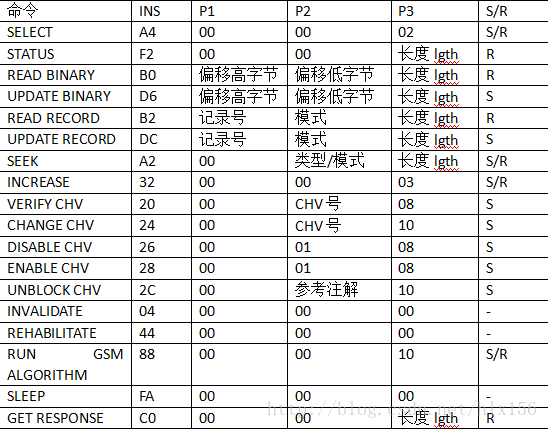
An APDU can be a command or a response to a command. The general format of the command APDU: CLA INS P1 P2 P2 Data P3 Data The general format for responding to APDUs: Data, SW1, SW1, SW2 The meaning o...
SIM card APDU command
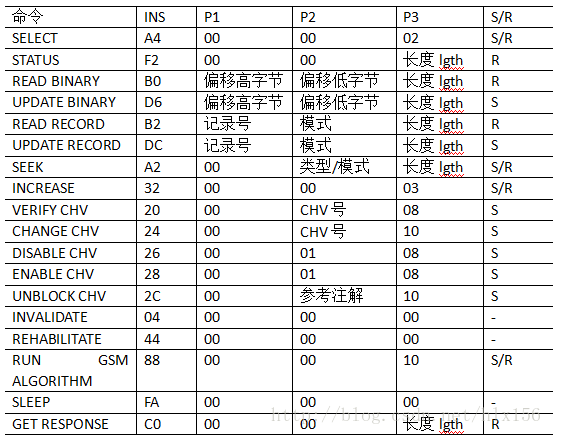
An APDU can be a command or a response to a command. The general format of the command APDU: CLA INS P1 P2 P3 Data The general format of the response APDU: Data SW1 SW2 The meaning of each byte is as ...
SIM card built by OAI
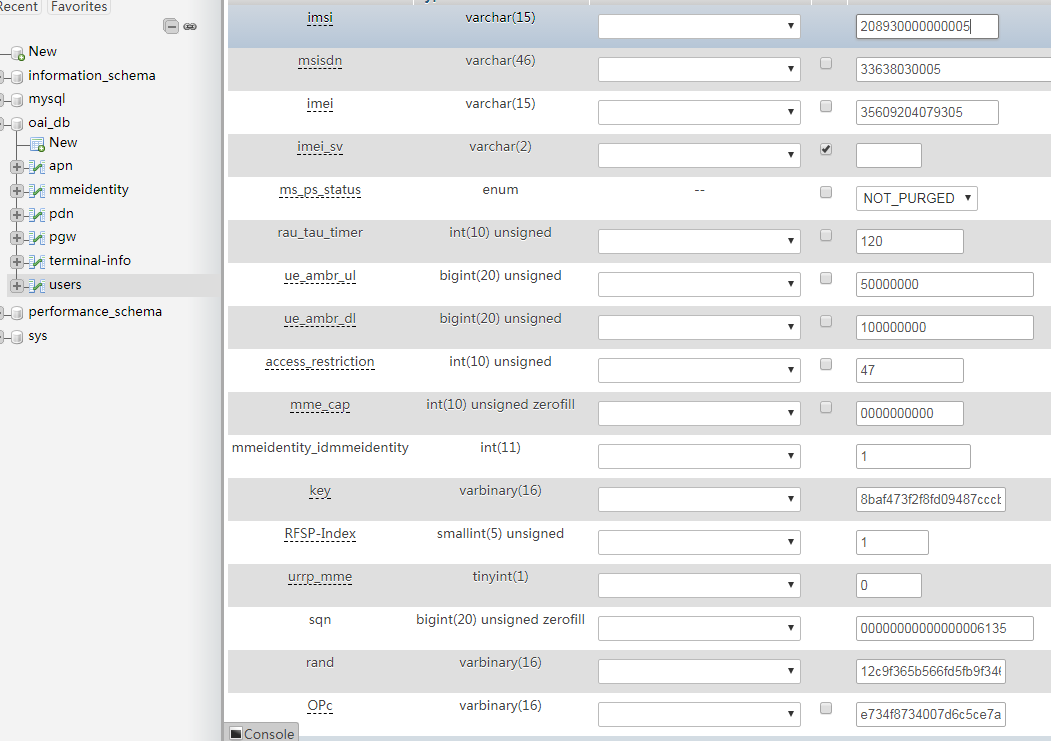
First of all, please make sure that you have set up EPC and ENB, and they can be connected (if the MME is connected, there will be a related display, and the ENB side will also display mme is associat...
SIM card initialization
//SIM card initialization...
SIM card --- status change
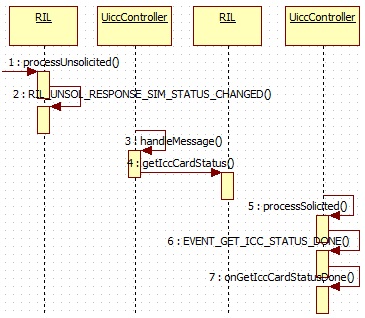
6,SIMcard The main content of the SIM card includes the change of the status of the SIM card information. Among them, the state change is mainly reported from the Modem to the RIL daemon and finally r...
More Recommendation
2027: Sim Card
http://acm.csu.edu.cn:20080/csuoj/problemset/problem?pid=2027 Give full play to your English reading level, probably the three major operators. Only one operator can be used. You call and surf the Int...
Sim card operator obtains
Sim card operator obtains 1. Description SIM (Subscriber Identification Module): Subscriber identification module, the card is mainly used as the unique identity of the user. When the status of the SI...
SIM card management
// Get the TelephonyManager instance object final TelephonyManager tm = (TelephonyManager) getActivity().getSystemService(Context.TELEPHONY_SERVICE); // Get the number of SIM cards final int num...
SIMID (SIM card use)
How to use the development board to implement SIM function Directory name How to use the development board to implement SIM function Introduction Material preparation step common problem Related infor...
Camera with SIM card
Why can't 80% of the code farmers can't do architects? >>> step: Enter Camera App -> Switch to VIDEO mode -> Turn on the flash -> Press POWER key lock screen -> Press ...