SIM card
How to implement SIM function with development board
Directory name
Introduction
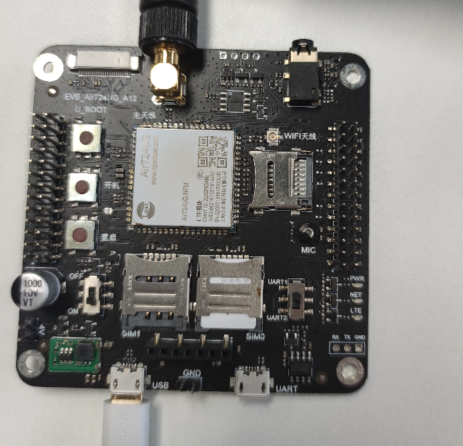
The SIM card is the most common function in the Internet of Things. This article describes how to use the AIR724 development board, and the PC side to build a SIM card read function demonstration.
API description
Socket's API has a package in Luat Lib, which is recommended to use lib's API interface.
| API interface | describe |
|---|---|
| sim.getIccid() | Get the ICCID of the SIM card |
| sim.getImsi() | Get the IMSI of the SIM card |
| sim.getMcc() | Get the MCC of the SIM card |
| sim.getMnc() | Get the GetMnc of the SIM card |
| sim.getStatus() | Get the status of the SIM card |
Detailed API introductionSIM API chapter
Example
This article uses Demo \ SimID this Demo as an example.
1. Insert an identifiable SIM card, on the SIM0 card, the USB line is connected to the USB port on the left. Be careful not to receive the serial port USB on the right. The switch is dial to the ON position, press the start button 1s to turn it on.
2. Modify Demo:
(1) Open a task Set the card holder ID number (1.3 baseline firmware can be automatically identified in SIM card 0 and SIM card 1, 1.2 baseline does not work)
--SIM_ID: SIM card card class ID number
local sim_id=0
sys.taskInit(function()
     - Call the settings SIM card ID number in Sim.lua
    sim.setId(sim_id)
    sys.wait(10000)
end)
(2) Turn on a loop timer, call the function in sim.lua, print SIM card parameters
sys.timerLoopStart(function ()
    - Get SIM card ICCID
    ril.request("AT+ICCID")
    log.info("sim_iccid:",sim.getIccid())

    - Get SIM Card IMSI
    log.info("sim_imsi:",sim.getImsi())

    - Get SIM Card Status
    log.info("sim_status:",sim.getStatus())

    - Get SIM card ID
    log.info("sim_id:",sim.getId())

end,1000)
3. After understanding and modifying Demo, download the Demo and the corresponding base package to the development board, download the way the way is not described herein, please refer toEnvironmental settlement chapter.
4. Restart after downloading, you can see the information printed in the Luatools tool:
[Outer chain picture "failed, the source station may have an anti-theft chain mechanism, it is recommended to save the picture directly upload (IMG-VC42JXDD-1624771567298) (http://openluat-luatcommunity.oss-cn-hangzhou.aliyuncs.com/images / 20210327223204891_ WeChat screenshot _20210327212327.png "undefined")]
common problem
- Why can't I read a SIM card?
Due to many types of types, press the steps to check:
1: Does the module start? Can the AT instruction can be used? Is the SIM card to another machine?
 2: See if there is no problem between the module and the card holder, remove the filter capacitance on the ESD device and the line, check the schematic and PCB and the physical object, especially the card holder PCB, the schematic is in the specification Whether the number is consistent.
 3: Power-on instant use oscilloscope test SIM_VDD pin waveform, if the waveform has 1.8V-3.3V-0V change, it is generally a problem between the card holder and module, and the card is to be identified.
 4: If the above is excluded, the firmware is restored.
- Why is SIM card power supply?
1: SIM card to identify the card will have voltage output
 2: 10 to 15s after the module is turned on, SIM_VDD will raise to 1.8V, start to find the card, if it is not successful with the SIM card letter, then turn off to 3V to find the card, if not yet If you find it, turn the SIM_VDD, the whole process is about 6s.
 3: If you want to accurately measure the SIM card, you can refer to the following URL.
-
http://doc.openluat.com/article/634/0
-
Why connect to the SIM card, can't swap detection
If you use GPIO23 to do a test feet, the 1623, 1624 version of the AT firmware is low. The default output is low. Use this pin to note that other versions are default high level 1.8V.
Related information and purchase links
- Air724ug development board purchase link
- AIR724 development board instructions
Intelligent Recommendation
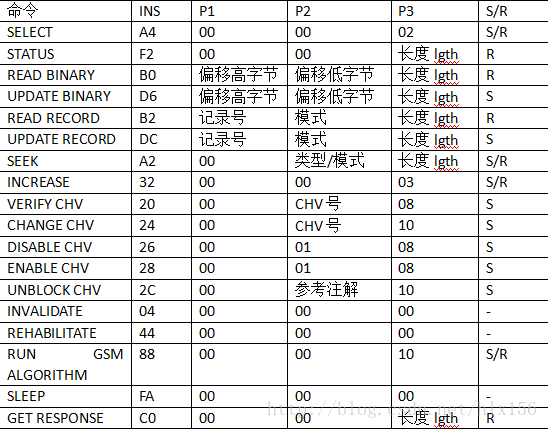
SIM card APDU instruction
An APDU can be a command or a response to a command. The general format of the command APDU: CLA INS P1 P2 P2 Data P3 Data The general format for responding to APDUs: Data, SW1, SW1, SW2 The meaning o...
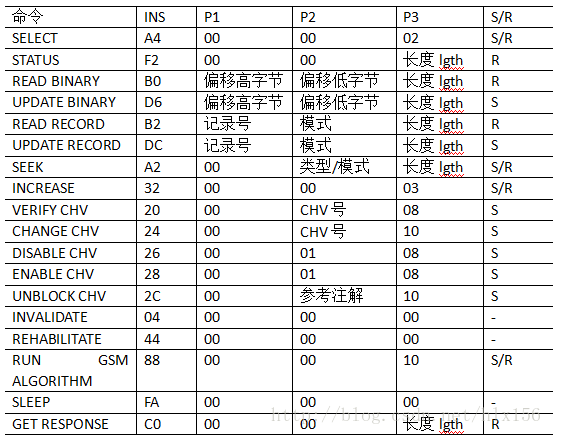
SIM card APDU command
An APDU can be a command or a response to a command. The general format of the command APDU: CLA INS P1 P2 P3 Data The general format of the response APDU: Data SW1 SW2 The meaning of each byte is as ...
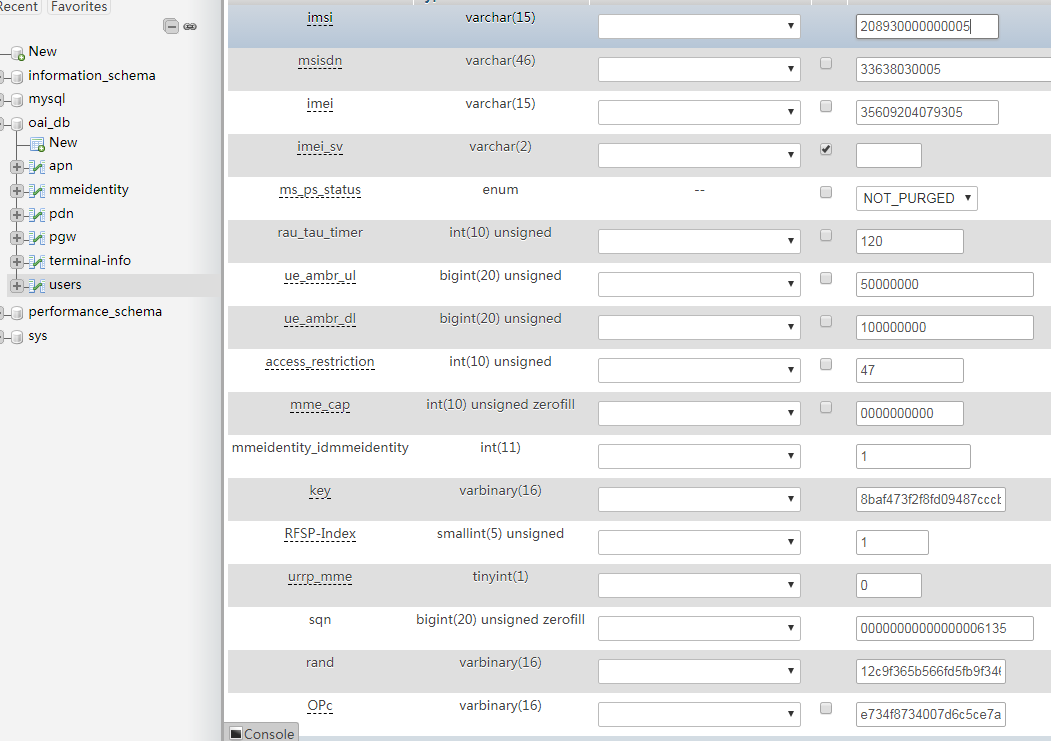
SIM card built by OAI
First of all, please make sure that you have set up EPC and ENB, and they can be connected (if the MME is connected, there will be a related display, and the ENB side will also display mme is associat...
SIM card initialization
//SIM card initialization...
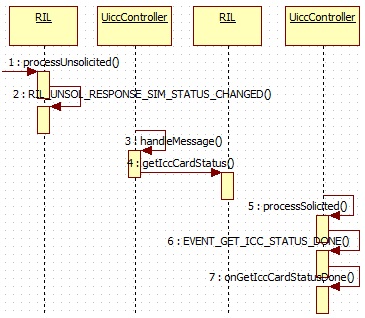
SIM card --- status change
6,SIMcard The main content of the SIM card includes the change of the status of the SIM card information. Among them, the state change is mainly reported from the Modem to the RIL daemon and finally r...
More Recommendation
2027: Sim Card
http://acm.csu.edu.cn:20080/csuoj/problemset/problem?pid=2027 Give full play to your English reading level, probably the three major operators. Only one operator can be used. You call and surf the Int...
Sim card operator obtains
Sim card operator obtains 1. Description SIM (Subscriber Identification Module): Subscriber identification module, the card is mainly used as the unique identity of the user. When the status of the SI...
SIM card management
// Get the TelephonyManager instance object final TelephonyManager tm = (TelephonyManager) getActivity().getSystemService(Context.TELEPHONY_SERVICE); // Get the number of SIM cards final int num...
SIMID (SIM card use)
How to use the development board to implement SIM function Directory name How to use the development board to implement SIM function Introduction Material preparation step common problem Related infor...
Camera with SIM card
Why can't 80% of the code farmers can't do architects? >>> step: Enter Camera App -> Switch to VIDEO mode -> Turn on the flash -> Press POWER key lock screen -> Press ...