Overview
QMUI Android Just updated1.0.4 The main feature of the version is the introduction of Android Lint to optimize the project code. Android Lint is a code scanning tool introduced by SDK Tools 16 (ADT 16). By static analysis of code, developers can help developers discover code quality problems and make suggestions for improvement. In addition to checking for potential errors in the Android project source code, the code is checked for correctness, security, performance, ease of use, convenience, and internationalization.
I finally chose Android Lint as the code detection tool for the project because it has the following features:
- It has been integrated into Android Studio and is easy to use.
- Ability to feed back potential problems in real time as you write your code.
- You can customize the rules. Android Lint itself contains a large number of already encapsulated interfaces that provide rich code information that developers can use to write custom rules based on this information.
start using
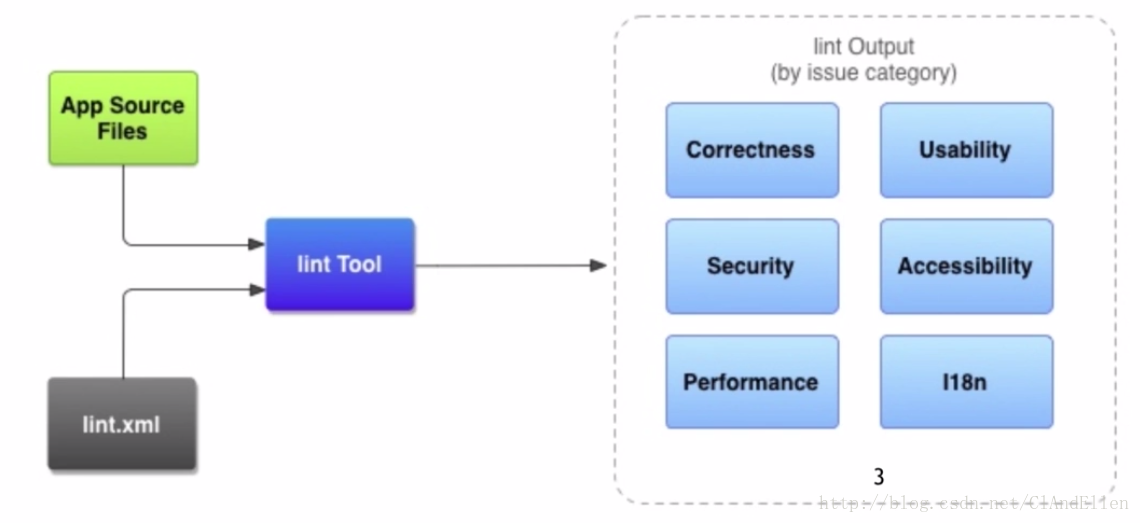
The working process of Android Lint is relatively simple. A basic Lint process consists of Lint Tool, Source Files and lint.xml. The Lint Tool reads Source Files, according to lint. The .xml configuration rules output (as shown below).
As described above, in Android Studio, Android Lint has been integrated, just click on the menu - Analyze - Inspect Code to run Android Lint, in the pop-up dialog box you can set the scope of the implementation of Lint, you can select the entire project You can also select only the current submodule or other custom scope:
After the inspection is completed, the Inspection console will pop up and the detailed inspection results will be listed in it:
As shown in the figure above, Android Lint classifies the results of the check, and the questions under the same rule are aggregated. The rule categories for Android will be Android-related before the classification, mainly in six categories:
- Accessibility accessibility,E.g
ImageViewMissingcontentDescriptionDescription, String encoding string and other issues. - CorrectnessFor example, incorrect attribute values are used in xml, and APIs that exceed the minimum SDK requirements are used directly in Java code.
- Internationalization, such as the lack of translation of characters and other issues.
- Performance performance, for example in
onMeasure、onDrawExecuting new, memory leaks, resulting in redundant resources, xml structure redundancy, etc. - Security securityFor example, there is no HTTPS connection to Gradle, permission issues in AndroidManifest, etc.
- Usability ease of useFor example, missing some multiple cuts, repeating icons, etc.
The other result entries are for Java grammar, and each question has a severity, in order from high to low:
- Fatal
- Error
- Warning
- Information
- Ignore
among them Fatal with Error All mean errors, butFatal Type errors can directly interrupt ADT exporting APKs, which is even more serious. In addition, as shown in the figure below, click on an entry in the results list to see the detailed source file name and location, as well as the hit error, solution, or masking prompt:
The example above shows the height set in the first layer of the ScrollView's child element.match_parent, Android Lint will give a solution directly - usewrap_content Instead, most static grammar related issues Android Lint can give a solution directly.
In addition to running Lint directly in the menu, most of the problem code is written when Android Studio gives a reminder:
Configuration
The relevant configuration for performing Lint operations is defined in the lintOptions of the gradle file, and the definable options and their default values include (translated fromLintOptions - Android Plugin 2.3.0 DSL Reference):
android {
    lintOptions {
                 // Set as  true, stop Gradle build when Lint finds an error
        abortOnError false
                 // Set as  true, the full path or absolute path of the file will be displayed when there is an error (by defaulttrue)
        absolutePaths true
                 // Check only the specified question (specified by id)
        check 'NewApi', 'InlinedApi'
                 // Set as  true  Then check all the issues, including not checking the problem by default
        checkAllWarnings true
                 // Set as  true  After that, the release build will run Lint with Fatal settings.
                 // If a Fatal problem is found during the build, the build will be aborted (specifically controlled by abortOnError)
        checkReleaseBuilds true
                 / / Do not check the specified question (specified according to the problem id)
        disable 'TypographyFractions','TypographyQuotes'
                 // check the specified question (specified by id)
        enable 'RtlHardcoded','RtlCompat', 'RtlEnabled'
                 // Whether to return the corresponding Lint description in the report
        explainIssues true
                 / / Write the path to the report, the default is lint-results.html under the build directory
        htmlOutput file("lint-report.html")
                 // Set as  true  Will generate a report in HTML format
        htmlReport true
                 // Set as  true  Report only errors
        ignoreWarnings true
                 // Reassign the Lint rule configuration file
        lintConfig file("default-lint.xml")
                 // Set as  true  The line number of the source code is not included in the error report.
        noLines true
                 // Set as  true  Lint will not report the progress of the analysis
        quiet true
                 // Override the severity of the Lint rule, for example:
        severityOverrides ["MissingTranslation": LintOptions.SEVERITY_WARNING]
                 // Set as  true  Shows all the places where the problem is, without truncating the list
        showAll true
                 / / Configure the location where the output is written, the format can be a file or stdout
        textOutput 'stdout'
                 // Set as  true, then generate a plain text report (default is false)
        textReport false
                 // Set as  true, will treat all warnings as error handling
        warningsAsErrors true
                 // Write the file for the inspection report (do not specify the default is lint-results.xml)
        xmlOutput file("lint-report.xml")
                 // Set as  true  Will generate an XML report
        xmlReport false
                 // Set the severity of the specified question (specified by id) to Fatal
        fatal 'NewApi', 'InlineApi'
                 // Set the severity of the specified question (specified by id) to Error
        error 'Wakelock', 'TextViewEdits'
                 // Set the severity of the specified question (specified by id) to Warning
        warning 'ResourceAsColor'
                 // Set the severity of the specified question (specified by id) to ignore
        ignore 'TypographyQuotes'
    }
}Copy code
Lint.xml This file is to configure the rules that Lint needs to disable, and the severity of the custom rules. The lint.xml file specifies the control of a rule through the issue tag, and creates a rule in the project root directory. After the lint.xml file, Android Lint will automatically recognize the file and check it according to the contents of lint.xml when performing the check. As mentioned above, developers can also specify configuration files via the lintConfig option in lintOptions. An example of a lint.xml is as follows:
<?xml version="1.0" encoding="UTF-8"?>
<lint>
    <!-- Disable the given check in this project -->
    <issue id="HardcodedText" severity="ignore"/>
    <issue id="SmallSp" severity="ignore"/>
    <issue id="IconMissingDensityFolder" severity="ignore"/>
    <issue id="RtlHardcoded" severity="ignore"/>
    <issue id="Deprecated" severity="warning">
        <ignore regexp="singleLine"/>
    </issue>
</lint>Copy code
Use the id in the issue tag to specify a rule.severity="ignore" This means that this rule is disabled. It should be noted that some rules can be specified by the ignore tag only for certain attributes, such as the aboveDeprecated, indicating whether to check for the use of deprecated properties and methods, and wrapping an ignore tag in the issue tag, in the ignore tagregexp Attributes are specified using regular expressionssingleLine, indicating thatsingleLine This property is masked for inspection.
In addition, developers can also use@SuppressLint(issue id)The annotation ignores some Lint checks for some code. This annotation can be added to the member variable before it can be added to the method declaration and the class declaration.
common problem
After we checked the project with Android Lint, we sorted out some problems and solutions. The following are some common scenarios:
ScrollView size validation
This is also the case mentioned above, setting the height in the first layer of child elements of the ScrollView tomatch_parent, this is the wrong way of writing, actually it will be treated here when measurewrap_content Go to work, so follow Lint’s suggestion and change directlywrap_content Just fine.
Handler reference leaks
A memory leak problem referenced by a Handler, such as the following example:
protected static final int STOP = 0x10000;
protected static final int NEXT = 0x10001;

@BindView(R.id.rectProgressBar) QMUIProgressBar mRectProgressBar;
@BindView(R.id.circleProgressBar) QMUIProgressBar mCircleProgressBar;

int count;

private Handler myHandler = new Handler() {
    @Override
    public void handleMessage(Message msg) {
        super.handleMessage(msg);
        switch (msg.what) {
            case STOP:
                break;
            case NEXT:
                if (!Thread.currentThread().isInterrupted()) {
                    mRectProgressBar.setProgress(count);
                    mCircleProgressBar.setProgress(count);
                }
        }
    }
};Copy code
First, non-static inner or anonymous classes implicitly hold references to their outer classes. Internal methods that use external methods/member variables also cause them to hold external class references, so this can lead to handlers. The external class is held. The external class holds the handler at the same time. The handler is asynchronous. When the message of the handler is sent out, the external class cannot be destroyed due to the holding of the hanlder, which eventually leads to memory leak.
The solution is to change the inner class to static, and the outer class method/member variable used in the inner class is changed to a weak reference, as follows:
@BindView(R.id.rectProgressBar) QMUIProgressBar mRectProgressBar;
@BindView(R.id.circleProgressBar) QMUIProgressBar mCircleProgressBar;

int count;

private ProgressHandler myHandler = new ProgressHandler();

@Override
protected View onCreateView() {
    myHandler.setProgressBar(mRectProgressBar, mCircleProgressBar);
}

private static class ProgressHandler extends Handler {
    private WeakReference<QMUIProgressBar> weakRectProgressBar;
    private WeakReference<QMUIProgressBar> weakCircleProgressBar;

    public void setProgressBar(QMUIProgressBar rectProgressBar, QMUIProgressBar circleProgressBar) {
        weakRectProgressBar = new WeakReference<>(rectProgressBar);
        weakCircleProgressBar = new WeakReference<>(circleProgressBar);
    }

    @Override
    public void handleMessage(Message msg) {
        super.handleMessage(msg);
        switch (msg.what) {
            case STOP:
                break;
            case NEXT:
                if (!Thread.currentThread().isInterrupted()) {
                    if (weakRectProgressBar.get() != null && weakCircleProgressBar.get() != null) {
                        weakRectProgressBar.get().setProgress(msg.arg1);
                        weakCircleProgressBar.get().setProgress(msg.arg1);
                    }
                }
        }

    }
}Copy code
Memory allocations within drawing code
OnMeasure and onDraw are frequently called methods, so Lint does not recommend performing a new operation in it. You can perform a new operation at the infrequently called timing such as onCreateView, save it with member variables, and use member variables in onMeasure.
‘private’ method declared ‘final’
private static final void addLinkMovementMethod(TextView t) {
    MovementMethod m = t.getMovementMethod();

    // ...
}Copy code
As in the sample code above, a warning is generated for ‘private’ method declared ‘final’ because the private method is not overrided, so there is no need to declare it at all.final。
Reference materials:
Improve your code with Lint | Android Studio
LintOptions - Android Plugin 2.3.0 DSL Reference
Android Lint Checks - Android Studio Project Site