[RXJAVA] starting from the entrance
tags: Android
1: Core thinking
- The core thinking of RXJAVA1.0 and RXJAVA2.0 is the observer mode, but RXJAVA2.0 optimizes some methods in the basis of RXJAVA1.0, which is convenient for developers to better understand their programming ideas, and increase Part of a new method solves 1.0 problems, such as back pressure, etc.
- When the observed object changes, the changed message will be sent to the observer. Because the main use of Kotlin, and different like the Java style, so the RXJAVA is more likely, but the author is very good, it is changed to kotlin.
Author: Chopin Kaka
Link: https://www.jianshu.com/p/cd3557b1a474
Source: Profile - Add dependence
    implementation 'io.reactivex.rxjava2:rxjava:2.0.1'
    implementation 'io.reactivex.rxjava2:rxandroid:2.0.1'
2: Simple observer mode DEMO 1:Emitter Send a callback with the OBserve interface
package com.ywjh.rxjavasample

import android.os.Bundle
import android.util.Log
import androidx.appcompat.app.AppCompatActivity
import io.reactivex.Observable
import io.reactivex.ObservableEmitter
import io.reactivex.ObservableOnSubscribe
import io.reactivex.Observer
import io.reactivex.disposables.Disposable

class MainActivity : AppCompatActivity() {

    private val TAG = "RxJavaTag"
    private var mDisposable: Disposable? = null
    // 0. Object explaining Disposable English meaning can be used freely, here is equivalent to subscription relationships of readers and serial novels,
    // If the reader doesn't want to subscribe to the novel, you can call mdisposable.dispose () to cancel the subscription.
    // At this time, it will not be pushed to the reader when updating the novel.

    override fun onCreate(savedInstanceState: Bundle?) {
        super.onCreate(savedInstanceState)
        setContentView(R.layout.activity_main)

        rxJavaBaseUse()
    }

    // RXJAVA basically used
    private fun rxJavaBaseUse() {
        // is observed
        // 1. CREATE method generates an object, the parameter OBSERVABLONSUBSCRIBE <T> can be understood as a schedule
        val obs: Observable<String> = Observable.create(object : ObservableOnSubscribe<String> {
            @Throws(Exception::class)
            // 2. Rewrive the Subscribe method, write a specific plan, this paper is to push the serial 1, serial 2 and serial 3
            // OnNext method can be invisible, and all OBServer (observers) can receive,
            // OneRror and OnComplete are mutually exclusive, Observer (observers) can only receive one,
            // Oncomplete can be repeatedly called, but Observer will only receive once.
            // OnError can not be repeated, the second call will report an exception

            override fun subscribe(emitter: ObservableEmitter<String?>) {// Observableemitter <String> Emitter's emitter is the meaning of the transmitter
                emitter.onNext("Serial 1")
                emitter.onNext("Serial 2")
                emitter.onNext("Serial 3")
                emitter.onComplete()
            }
        })

        // observer
        // 1. Create an interface object by anonymous internal class, and implement the internal method therefor
        val observer: Observer<String?> = object : Observer<String?> {

            override fun onNext(value: String?) {
                if ("2" == value) {
                    mDisposable?.dispose()// Accept message "2" cancel subscription
                    return
                }
                Log.e(TAG,"onNext:"+value);
            }

            override fun onSubscribe(d: Disposable?) {
                mDisposable = d
                Log.e(TAG,"onSubscribe");
            }

            override fun onError(e: Throwable?) {
                if (e != null) {
                    Log.e(TAG,"onError="+e.message)
                };
            }

            override fun onComplete() {
                Log.e(TAG,"onComplete()");
            }
        }
        // 2. Establish a subscription relationship
        obs.subscribe(observer)
    }
}
Three: UseSchedulerScheduling thread, RXJAVA's most common write method: asynchronous + chain programming [DEMO 2: Modified to asynchronous + chain]
- Which thread produces which thread is in the principle of consumption, that is, the thread does not change, always in the same. Then we generally use RXJAVA to execute the background, the front desk call.
1) In this way, we need to call Observeon (androidschedules.mainthread ()),Observeon is an event callbackThread, AndroidSchedules.mainthread () will know that it is the main thread,
2) Subscribeon (SCHEDULERS.IO ()), Subscribeon is the thread executive, and Schedules.io () is a sub-thread, which can also be used in Schedules.NewThread (), but the IO thread can reuse idle threads, therefore The lower IO () is more efficient than NewThread ().
3) Chain - a series of logic from the head writing to the end
// RXJAVA chain use
    private fun rxJavaChainUse() {
        Observable.create<String> { emitter ->
            emitter.onNext("Serial 1")
            emitter.onNext("Serial 2")
            emitter.onNext("Serial 3")
            emitter.onComplete()
        }
                .observeOn(AndroidSchedulers.mainThread()) // Parback in the main thread
                .subscribeOn(Schedulers.io()) // Execute in the IO thread
                .subscribe(object : Observer<String> {
                    override fun onSubscribe(d: Disposable) {
                        Log.e(TAG, "onSubscribe")
                    }

                    override fun onNext(value: String) {
                        Log.e(TAG, "onNext:$value")
                    }

                    override fun onError(e: Throwable) {
                        Log.e(TAG, "onError=" + e.message)
                    }

                    override fun onComplete() {
                        Log.e(TAG, "onComplete()")
                    }
                })
    }
Four: More application scenarios
- Used with Retrofit
Retrofit + RXJAVA's Internet mode is very hot, if you don't understand this article, you can see this article https://www.jianshu.com/writer#/noteBooks/5118090/NOTES/25405151 - Use of Rxpermissions and other libraries
Based on RXJava's open source libraries RXpermissions, RXBINDING, and RXBUS are very common in many projects and proven to be extremely useful. - All places for asynchronous
Because rxjava is a chain programming that supports asynchronous, so all the asynchronous places, we can use RXJAVA to complete
Asynchronous example one:
1) Why don't you directly new handler (). Postdelayed (). If your operation is very simple, you use new handler (). PostDelayed () doesn't matter, but if your operation is very complicated, then this time is the benefits of RXJAVA, borrowing the god of the gods One sentence is "As the program logic is getting more complicated, RXJAVA can still be simple."
    / / Timed operation
    private fun timeDoSomething() {
        Observable.create<Int> { emitter ->
            emitter.onNext(123)
            sleep(3000)
            emitter.onNext(456)
        }.observeOn(AndroidSchedulers.mainThread())
                .subscribeOn(Schedulers.io())
                .subscribe(object : Consumer<Int?> {

                    override fun accept(t: Int?) {
                        Log.e(TAG, t.toString() + "")
                    }
                }, object : Consumer<Throwable?> {
                    @Throws(java.lang.Exception::class)
                    override fun accept(throwable: Throwable?) {
                    }
                }, object : Action {
                    @Throws(java.lang.Exception::class)
                    override fun run() {
                    }
                })
    }
- Asynchronous examples:
1) Let's take a complex operation, such as we need to load 10 images in turn (loading the picture is time-consuming process), the sixth sheet is delayed for 3 seconds, the 7th we are copied to SD Kari, 8th Zhang we want to go to the network, then what do you want to do, if you use Handler, you must be a variety of nested, all logic is complicated to let you look at it, but if you use RXJAVA?
    //
    private fun complicatedDoSomething(drawableRes: IntArray) {
        Observable.create<Drawable> { emitter ->
            for (i in drawableRes.indices) {
                val drawable = resources.getDrawable(drawableRes[i])
                // The sixth picture delayed 3 seconds after the shelf
                if (i == 5) {
                    sleep(3000)
                }
                // Copy the 7th picture to SD card
                if (i == 6) {
                    val bitmap = (drawable as BitmapDrawable).bitmap
                    saveBitmap(bitmap, "test.png", CompressFormat.PNG)
                }
                // upload to the network
                if (i == 7) {
                    updateIcon(drawable)
                }
                emitter.onNext(drawable)
            }
        }.subscribeOn(Schedulers.io())
                .observeOn(AndroidSchedulers.mainThread())
                .subscribe(object : Consumer<Drawable?> {
                    @Throws(java.lang.Exception::class)
                    override fun accept(drawable: Drawable?) {
                        // After the callback is displayed on the UI interface
                    }
                })
    }

    private fun updateIcon(drawable: Drawable) {}


    /**
           * Save Bitmap to the specified path in the specified format
     * @param bitmap
     * @param name
     */
    fun saveBitmap(bitmap: Bitmap, name: String?, format: CompressFormat?) {
        // Create a file on the SD card
        val file = File(Environment.getExternalStorageDirectory(),
                name)
        var out: FileOutputStream? = null
        try {
            // Open the specified file output stream
            out = FileOutputStream(file)
            / / Output to the specified file
            bitmap.compress(format, 100,
                    out)
            out.close()
        } catch (e: IOException) {
            e.printStackTrace()
        }
    }
Intelligent Recommendation
Postgraduate courses learning diary 1-C language (starting from 0) Software Engineering Entrance Examination
Simply getting to know C programming HelloC (by far the most easy) And number two Function 1 Function 2 Learning website: b station ...
Web crawler preliminary: Starting from an entrance link to continuously crawl the URL in the page and store it
Foreword: In the previous articleWeb crawler preliminary: from accessing web pages to data analysis"in. We discussed how to crawl web pages. Analyze the crawled webpages, and access denied sites....
From RxJava to Coroutine
RxJava has been widely known and used as a streaming asynchronous framework. Now Kotlin provides us with a new choice, Coroutine, which can replace RxJava in some scenarios. This article compares the ...
Realize RXJAVA from 0
refer to: First make a simplest RXJAVA: The three classes above are the most basic RXJAVA class, below is a simple use. Output result: Is it very similar to the chain of RxJava, but the variable name ...
RXJAVA journey from scratch (1) ---- RXJAVA foundation
RxJava1 The open source library RXJAVA for the response programming is already fired for a long time. After being transplanted to a lot of platforms such as RXANDROID, it has been aware of it in recen...
More Recommendation
Hyperf Framework-Starting Analysis (Single Entrance)
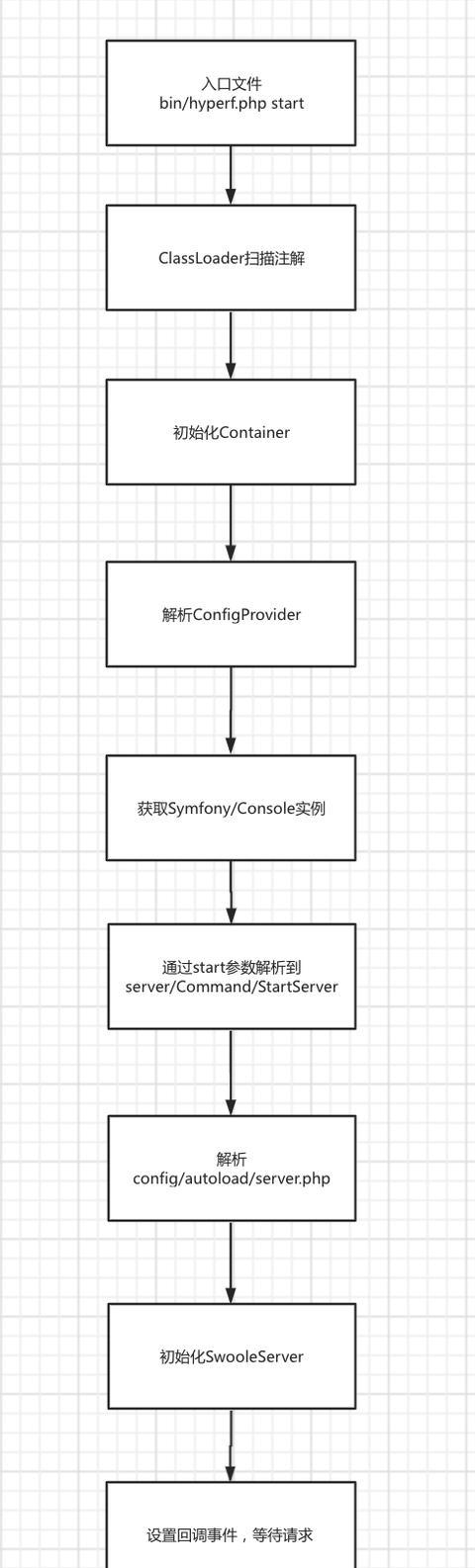
Starting process analysis Before running, we need to look at the official documentation and learn two things Execute the entrance file ./bin/hyperf.php start hyperf.php Enter container.php Then the ab...
"SWIFT from the entrance to" "" "" "" "" "" "" "" "" "" "" "" "" "" "
Contact: Shihu QQ:1224614774 Nickname:Oh, QQ group:807236138Group name:iOS technology exchange learning group reference: I, collection concept An array There are three initializations in arrays. The f...
Android APP starts from starting from starting
1. Monitor boot broadcast, SD card is mounted; 2, set to the desktop launcher; 3, set to third-party system startup; This way, equipment manufacturers are required, such as Hisense TV,...
RxJava from entry to full resolution
Foreword I have been using RxJava for a while and I feel deeply about it. Let's start with the basics of RxJava and share with you the usage of this powerful asynchronous library step by step! Prelimi...
How to upgrade from RxJava to RxJava2
How to upgrade from RxJava to RxJava2. RxJava2 has launched a year and a half, due before RxJava has been widely used in existing projects, while RxJava2 in addition to a lot of name and not much inno...