GTK: button
Reference link:
Code:
#include <gtk/gtk.h>
#include <stdio.h>
#include <stdbool.h>
#include <string.h>

static int num = 0;


void deal(GtkButton *button, gpointer data)
{
	if(NULL == data)
		return ;

	num++;

	switch(num)
	{
		case 1://Set button text content
		{
			gtk_button_set_label((GtkButton *) data, "ooooohahahahhahaha");
			break;
		}
		case 2://Get button text content
		{
			const gchar *text = gtk_button_get_label((GtkButton *)data);
			if(NULL != text)
				printf("text :%s \n", text);
			break;
		}
		case 3://Set button enable :  Disable the button
		{
			gtk_widget_set_sensitive((GtkWidget *)data, FALSE);
			break;
		}
		case 4://Set button enable :  Enable button
		{
			gtk_widget_set_sensitive((GtkWidget *)data, TRUE);
			break;
		}
		case 5://Set a picture for the button
		{
			GtkWidget *image = gtk_image_new_from_file("1.png");
			gtk_button_set_image(GTK_BUTTON(data), image);

			break;
		}
		case 6://Get the picture on the button
		{
			/* No operation*/
			break;
		}
		case 7://Set the transparent background color of the button
		{
			 gtk_button_set_relief((GtkButton *)data, GTK_RELIEF_NONE);

			break;
		}
		case 8://Set the button to normal mode (background is opaque)
		{
			gtk_button_set_relief((GtkButton *)data, GTK_RELIEF_NORMAL);
			break;
		}
		case 9:////Set the button to be half transparent
		{
			gtk_button_set_relief((GtkButton *)data, GTK_RELIEF_HALF);
			break;
		}
		case 10://Set the button to normal mode (background is opaque)
		{
			gtk_button_set_relief((GtkButton *)data, GTK_RELIEF_NORMAL);
			break;
		}
		default:
		{
			printf("num :%d \n", num);
			break;
		}

	}
	if(num >= 10)
	{
		num = 0;
	}
}


int main(int argc, char **argv)
{
	GtkWidget *window = NULL;
	GtkWidget *button1 = NULL;
	GtkWidget *button2 = NULL;
	GtkWidget *vbox = NULL;


	//Initialize gtk
	gtk_init(&argc, &argv);
	window = gtk_window_new(GTK_WINDOW_TOPLEVEL);

	gtk_widget_set_size_request(window, 200*2, 141*2);
	gtk_window_set_resizable(GTK_WINDOW(window), TRUE);
	gtk_window_set_position(GTK_WINDOW(window), GTK_WIN_POS_CENTER);
	g_signal_connect(window, "destroy", G_CALLBACK(gtk_main_quit), NULL);

	vbox = gtk_vbox_new(TRUE, 10);
	gtk_container_add(GTK_CONTAINER(window), vbox);

	button1 = gtk_button_new_with_label("button1");
	button2 = gtk_button_new_with_label("button2");

	gtk_container_add(GTK_CONTAINER(vbox), button1);
	gtk_container_add(GTK_CONTAINER(vbox), button2);


	g_signal_connect(button2, "pressed", G_CALLBACK(deal), button1);
	//g_signal_connect(button1, "pressed", G_CALLBACK(deal1), NULL);

	gtk_widget_show_all(window);
	gtk_main();

	return 0;
}
Compile command:
gcc demo.c -o demo `pkg-config --cflags --libs gtk+-2.0`
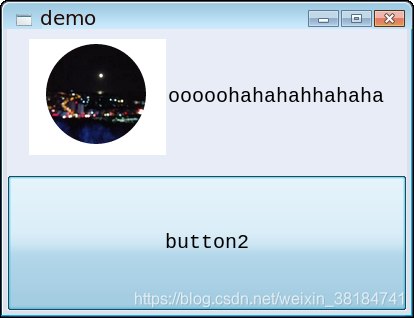
Run screenshot:
Intelligent Recommendation
gtk clock
Table of Contents Clock Effect Clock 1 clock.c Clock 2 dblclock.c Clock Effect Clock 1 clock.c Clock 2 dblclock.c ...

GTK installation
Use this method successfully in UBUNTU 10.04Install GTK2.20.1. 1. Installation 1, Install gcc/g++/gdb/makeBasic programming tools $sudo apt-get installbuild-essential 2, Install libgtk2.0-dev libglib2...

What is GTK
GTK(GIMP Toolkit) is a set of graphics toolkits across multiple platforms, released under the LGPL license agreement. Although originally written for GIMP, it has now developed in...
Clion+GTK
Open the msys2 terminal and enter in sequence Open clion Modify cmake main.c operation result...
More Recommendation
GTK: Calculator
Reference link: First draw 16 buttons, the effect is as follows: code show as below: Compile command: The running effect is shown in the figure above. Next, add an input box to the button above, which...

GTK# tutorial
This is GTK# tutorial for the C# programming language. This tutorial is suitable for beginners and more advanced programmers. GTK# GTK# is a wrapper over the GTK+ for the C# programming language. The ...
gtk calculator
calculator.c...
GTK Internationalization
2019 Unicorn Enterprise Heavy Glour Recruitment Python Engineer Standard >>> Yesterday, the project requested internationalization of a GTK program, spent an afternoon, looking at the relevan...
Linux GTK
Update domestic source Tsinghua University Open Source Software Mirroring Station:https://mirror.tuna.tsinghua.edu.cn/help/ubuntu/ GTK2.0 installation apt-get install build-essential # This will insta...