Detailed SCTP protocol and examples
1. What is SCTP?
As long as you have been in contact with programming, when you ask him what protocols are available in the transport layer? I think almost a lot of people will talk about TCP and IP protocols and few people know about SCTP (Stream Control Transmission Protocol), which has the same status as the above two protocols. To
The service provided by SCTP is similar to TCP and UDP, or it can even be understood as a product of the combination of the advantages of TCP and UDP.
2. Features of SCTP
(1) Establishment of SCTP connection
SCTP protocol can be used to establish a connection
int sctp_connectx(int sd, struct sockaddr *addrs, int addrcnt);
//Or send a message directly to establish a connection
int sctp_sendmsg(int s, const void *msg, size_t len, struct sockaddr *to,
         socklen_t tolen, uint32_t ppid, uint32_t flags,
uint16_t stream_no, uint32_t timetolive, uint32_t context);- 1
- 2
- 3
- 4
- 5
After introducing the interface for establishing a connection, let’s talk about the specific process of establishing a connection. Not much nonsense, first give a schematic diagram of the process of establishing a connection.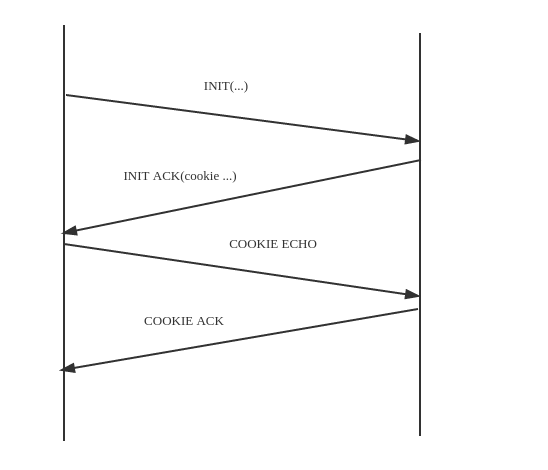
The process of SCTP connection establishment is shown in the figure above:
(1) The client sends an INIT initialization message to the server. The message contains a list of IP addresses that the client wants to tell the server and the initialization column number (it can be the same as the TCP initialization sequence Understand), used to indicate the actual flags of all groups in this association, customer requests, and the number of streams that can be supported, etc.
(2) The server returns an INIT ACK to the client to confirm the message that has just been received, and there are all types of server own information that the client sent to the server just now, except for this In addition, there will be a status cookie
(3) After the client receives the status cookie, it returns a COOKIE ECHO to the server, and at this time, it can also include user data in this packet.
(4) After receiving the COOKIE ECHO from the client, the server sends a COOKIE ACK to it and can also carry data.
So far, an SCTP association is established successfully
(2) SCTP disconnected
The interface of SCTP disconnection is the same as that of TCP. Shutdown() is called, but the semantics are different. The how parameter is for SCTP to both read and write.
The specific process is as follows
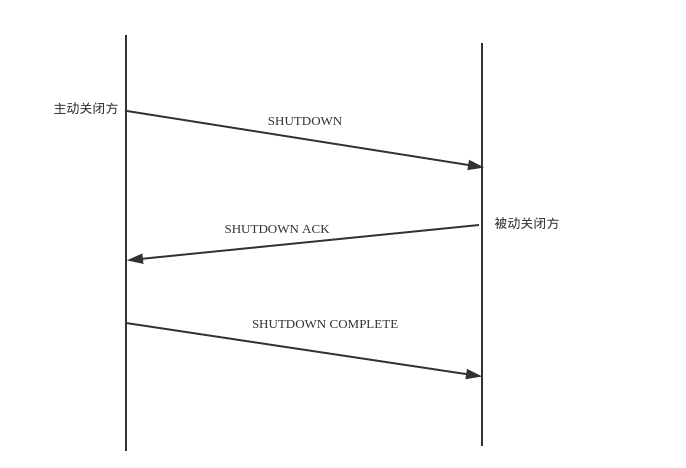
SCTP does not allow "half-closed association" like TCP does. When one end closes an association, the other must stop sending data.
(3) Multi-homed
TCP provides a connection between the client and the server, so that both parties can safely transmit data, while SCTP changes the connection to "association".
To explain clearly why SCTP changed the TCP connection to "association" I plan to explain the reason from their bind (binding interface), first take the server calling bind as an example.
The bind interface of TCP is as follows
int bind(int sockfd,const struct sockaddr *my_addr,socklen_t addrlen);- 1
The bind interface of SCTP is as follows
int sctp_bindx(int sockfd, struct sockaddr *my_addrs, int addrcnt, int flags);- 1
The interface of the binding socket corresponding to TCP and STCP is given above. Let's compare the parameters one by one.
(1) First of all, the first parameter sockfd of the two has the same meaning, and both refer to the socket to be bound
(2) The parameter my_addr in bind refers to which socket (IP address and port number) to bind to sockfd, which is equivalent to giving sockfd an identity, and then the network The sockfd can be uniquely identified, and the parameter name at the corresponding position in sctp_bindx becomes my_addrs. Careful readers will find that this parameter has become plural. Yes, this parameter is not the address of a single sockaddr structure, but the first address of the sockaddr structure array. The parameter addrcnt represents the number of elements in the array. Since there are multiple addresses here compared to the bind interface of TCP, it is not difficult to understand what sctp_bindx does is to bind these addresses to sockfd. In this way, the first difference between it and TCP comes out. That is, the socket after TCP's bind has only one identity (only one address is bound), and the socket after SCTP "bind has multiple identities (bound multiple addresses). Regarding the flags parameter, we will add later
In the above, the servers of our two protocols call the bind interface differently, so the connect interface called by SCTP and its corresponding client to establish a connection is similar and slightly different
sctpconnect interface
int sctp_connectx(int sd, struct sockaddr *addrs, int addrcnt);- 1
It can be seen that addrs is also a sockaddr structure array when SCTP establishes a connection
So what is the purpose of SCTP compared to TCP's binding port and the address array used for connection? That's right, this is the multi-homed feature we finally want to illustrate here. The server calls multiple addresses to identify itself, and the client can establish a path with each address. In this way, when one path of the client fails, it can automatically switch to another path, and the application does not even need to know that the failure has occurred. Is this better than the single path security of TCP?
(4) Multi-stream to solve head-end blocking
is still compared with TCP. Although TCP is a full-duplex protocol, its read and write directions each have only one stream. In many cases, a flow will be blocked at the head end. The approximate meaning is as follows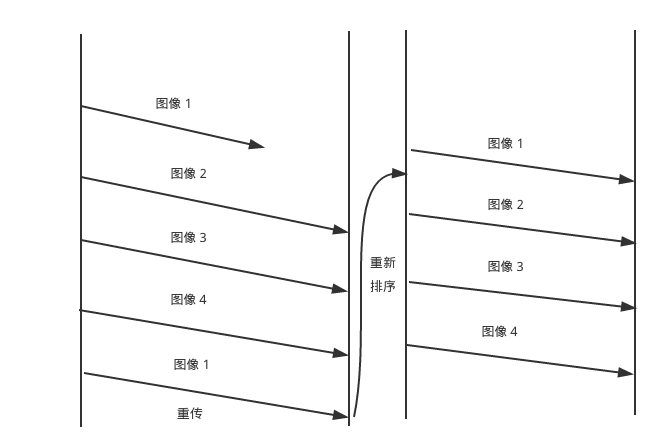
As shown in the figure above, because TCP has only one flow in each direction, when a certain part of the packet in the flow is lost, all subsequent packets can only wait After the lost part is retransmitted and reordered, it can be sent to the receiving buffer of the application. This kind of protocol setting is acceptable when there are strict order requirements for the sent data, but it is not so friendly if there is no such strong order restriction on the sent data. To
A specific scene
When one of our web pages wants to display many pictures, it's like the picture above. In this case, the order of arrival between pictures 1 to 4 is not affected at all. At this time, if you use a single-stream protocol like TCP, there will be data loss in the first picture, so you can't see the pictures 2 to 4 that have actually been sent. If you switch to SCTP, a protocol that supports multiple streams, then each picture you send will use a different stream number. At that time, when the data corresponding to the stream number in the picture one is lost, then only this one stream will wait for retransmission , The other pictures will not be affected by it, so we can see Figure 2 to Figure 4 first, and will not be affected by the loss of Figure 1. I don’t know if readers will feel the huge advantage of multi-streaming in this scenario at this time.
(5) Message-oriented
SCTP is a message-oriented protocol. Unlike TCP, it does not have the concept of packets. It also means that messages have no boundaries. The boundaries can only be designed and divided by the application layer, while SCTP is one package per package. Message, which greatly reduces the difficulty of programmers. Secondly, its send and receive interface can also pass message types, the interface is as follows
int sctp_sendmsg(int s, const void *msg, size_t len, struct sockaddr *to,
         socklen_t tolen, uint32_t ppid, uint32_t flags,
uint16_t stream_no, uint32_t timetolive, uint32_t context);- 1
- 2
- 3
The flags parameter in the above sending interface is the parameter used to identify the message type. Obtaining the message type directly in this way can reduce our unnecessary unpacking operations, which is really convenient
(6) One to many features
The one-to-many feature of SCTP is actually the same as the UDP socket. It can accept multiple messages through a socket, which means that programmers can not manage a large number of messages like TCP. Socket
3. SCTP common interface
The following interfaces are all for SCTP in one to many forms
(1) sctp_bindx port binding
This interface is used to name a socket
int sctp_bindx(int sd, struct sockaddr *addrs, int addrcnt, int flags);
//Return 0 for success, 1 for error- 1
- 2
This interface is used to bind a group of addresses to sd, or to add or delete an address from the addrs address group. The specific operation is controlled by flags, because we have introduced other parameters before, here is the value of flags
| flags | description |
|---|---|
| SCTP_BINDX_ADD_ADDR | add address to socket |
| SCTP_BINDX_REM_ADDR | remove the address from the socket |
(2) sctp_connectx function
This interface is used to establish a connection with the server
int sctp_connectx(int sd, struct sockaddr *addrs, int addrcnt);- 1
The meaning of the parameter is described above, here is not redundant
(3)sctp_sendmsg
If sctp_connectx has not been called before, the first call to this interface is responsible for both establishing a connection and sending data
int sctp_sendmsg(int s, const void *msg, size_t len, struct sockaddr *to,
         socklen_t tolen, uint32_t ppid, uint32_t flags,
uint16_t stream_no, uint32_t timetolive, uint32_t context);- 1
- 2
- 3
The first 5 parameters have the same meaning as the sendto parameter of UDP, and we will only discuss the last 4 here.
The ppid parameter specifies the payload protocol that will be transmitted with the data block
The flags parameter identifies the message type
The stream_no parameter identifies the specific stream number
timetolive specifies the lifetime of the message
context saves the context that may be generated during message transmission
(4)sctp_recvmsg
This interface is responsible for receiving data
int sctp_recvmsg(int s, void *msg, size_t len, struct sockaddr *from,
         socklen_t *fromlen, struct sctp_sndrcvinfo *sinfo,
int *msg_flags);- 1
- 2
- 3
Since the first 5 parameters are the same as recvfrom of UDP, here we also only discuss the last few parameters
sinfo saves the details related to the message
msg_flags corresponds to the flags in sctp_sendmsg
4. SCTP example code
The following is an echo server implemented with SCTP one-to-many
server.h
#pragma once

#include <sys/socket.h>
#include <netinet/in.h>
#include <netinet/sctp.h>

#define SERVER_PORT 6666
#define BUFFER_SIZE 1024
#define LISTEN_QUEUE 100

class SctpServer
{
    public:
        SctpServer();
        void start(void);
    private:
        //Open the listening socket
        void listenSocket(void);
        //Request processing
        void loop(void);

        int sockFd_;                            //Socket used to accept
        int messageFlags_;                      //Message type
        char readBuf_[BUFFER_SIZE];             //Accept buffer
        struct sockaddr_in clientAddr_;         //Used to save the client address
        struct sockaddr_in serverAddr_;         //Used to save the server address
        struct sctp_sndrcvinfo sri_;            //Message related details
        struct sctp_event_subscribe events_;    //Event set
        int streamIncrement_;                   //Stream number
        socklen_t len_;                         //Address length
        size_t readSize_;                       //The size read
};- 1
- 2
- 3
- 4
- 5
- 6
- 7
- 8
- 9
- 10
- 11
- 12
- 13
- 14
- 15
- 16
- 17
- 18
- 19
- 20
- 21
- 22
- 23
- 24
- 25
- 26
- 27
- 28
- 29
- 30
- 31
- 32
server.cpp
#include "server.h"
#include <unistd.h>
#include <fcntl.h>
#include <string.h>
#include <stdio.h>
#include <arpa/inet.h>

SctpServer::SctpServer()
    :streamIncrement_(1)
{

}

void SctpServer::listenSocket(void)
{
    //Create SCTP socket
    sockFd_ = socket(AF_INET,SOCK_SEQPACKET,IPPROTO_SCTP);
    bzero(&serverAddr_,sizeof(serverAddr_));
    serverAddr_.sin_family = AF_INET;
    serverAddr_.sin_addr.s_addr = htonl(INADDR_ANY);
    serverAddr_.sin_port = htons(SERVER_PORT);
    inet_pton(AF_INET,"127.0.0.1",&serverAddr_.sin_addr);

    //Address binding
    bind(sockFd_,(struct sockaddr *)&serverAddr_,sizeof(serverAddr_));

    //Set SCTP notification event (only I/O notification event is set here)
    bzero(&events_,sizeof(events_));
    events_.sctp_data_io_event = 1;
    setsockopt(sockFd_,IPPROTO_SCTP,SCTP_EVENTS,&events_,sizeof(events_));

    //Start listening
    listen(sockFd_,LISTEN_QUEUE);
}

void SctpServer::loop(void)
{
    while(true)
    {
        len_ = sizeof(struct sockaddr_in);
        //Read content from socket
        readSize_ = sctp_recvmsg(sockFd_,readBuf_,BUFFER_SIZE,
                                 (struct sockaddr *)&clientAddr_,&len_,&sri_,&messageFlags_);
        //Increase the message stream number
        if(streamIncrement_)
        {
            sri_.sinfo_stream++;
        }
        sctp_sendmsg(sockFd_,readBuf_,readSize_,
                     (struct sockaddr *)&clientAddr_,len_,
                      sri_.sinfo_ppid,sri_.sinfo_flags,sri_.sinfo_stream,0,0);
    }
}

void SctpServer::start(void)
{
    listenSocket();
    loop();
}- 1
- 2
- 3
- 4
- 5
- 6
- 7
- 8
- 9
- 10
- 11
- 12
- 13
- 14
- 15
- 16
- 17
- 18
- 19
- 20
- 21
- 22
- 23
- 24
- 25
- 26
- 27
- 28
- 29
- 30
- 31
- 32
- 33
- 34
- 35
- 36
- 37
- 38
- 39
- 40
- 41
- 42
- 43
- 44
- 45
- 46
- 47
- 48
- 49
- 50
- 51
- 52
- 53
- 54
- 55
- 56
- 57
- 58
- 59
main.cpp
#include "server.h"

int main(int argc,char **argv)
{
  SctpServer server;
  server.start();
  return 0;
}- 1
- 2
- 3
- 4
- 5
- 6
- 7
- 8
client.h
#pragma once

#include <sys/socket.h>
#include <netinet/in.h>
#include <netinet/sctp.h>
#include <string.h>
#include <unistd.h>
#include <fcntl.h>
#include <stdio.h>
#include <sys/types.h>
#include <sys/socket.h>
#include <arpa/inet.h>

#define SERVER_PORT 6666
#define MAXLINE     1024

void sctpstr_cli(FILE *fp,int sock_fd,struct sockaddr *to,socklen_t tolen);

class SctpClient
{
    public:
        SctpClient():echoToAll_(0)
        {

        }
        ~SctpClient()
        {
            close(sockFd_);
        }
        //Start the client
        void start(void)
        {
            makeSocket();
        }

    private:

        void makeSocket(void)
        {
            sockFd_ = socket(AF_INET,SOCK_SEQPACKET,IPPROTO_SCTP);
            bzero(&serverAddr_,sizeof(serverAddr_));
            serverAddr_.sin_family = AF_INET;
            serverAddr_.sin_addr.s_addr = htonl(INADDR_ANY);
            serverAddr_.sin_port = htons(SERVER_PORT);
            inet_pton(AF_INET,"127.0.0.1",&serverAddr_.sin_addr);

            bzero(&events_,sizeof(events_));
            events_.sctp_data_io_event = 1;
            setsockopt(sockFd_,IPPROTO_SCTP,SCTP_EVENTS,&events_,sizeof(events_));
            if(echoToAll_ == 0)
            {
                sctpstr_cli(stdin,sockFd_,(struct sockaddr *)&serverAddr_,sizeof(serverAddr_));
            }
        }

        int sockFd_;
        struct sockaddr_in serverAddr_;
        struct sctp_event_subscribe events_;
        int echoToAll_;
};

//Send and receive messages in a loop
void sctpstr_cli(FILE *fp,int sock_fd,struct sockaddr *to,socklen_t tolen)
{
    struct sockaddr_in peeraddr;
    struct sctp_sndrcvinfo sri;
    char sendline[MAXLINE];
    char recvline[MAXLINE];
    socklen_t len;
    int out_sz,rd_sz;
    int msg_flags;

    bzero(&sri,sizeof(sri));
    while(fgets(sendline,MAXLINE,fp) != NULL)
    {
        if(sendline[0] != '[')
        {
            printf("ERROR\n");
            continue;
        }
        sri.sinfo_stream = sendline[1] - '0';
        out_sz = strlen(sendline);

        //Send a message
        int count = sctp_sendmsg(sock_fd,sendline,out_sz,to,tolen,0,0,sri.sinfo_stream,0,0);
        len = sizeof(peeraddr);
        rd_sz = sctp_recvmsg(sock_fd,recvline,sizeof(recvline),
                             (struct sockaddr *)&peeraddr,&len,&sri,&msg_flags);
        printf("From str:%d seq:%d (assoc:0x%x):",
                sri.sinfo_stream,sri.sinfo_ssn,(u_int)sri.sinfo_assoc_id);
        printf("%d  %s\n",rd_sz,recvline);
    }
}- 1
- 2
- 3
- 4
- 5
- 6
- 7
- 8
- 9
- 10
- 11
- 12
- 13
- 14
- 15
- 16
- 17
- 18
- 19
- 20
- 21
- 22
- 23
- 24
- 25
- 26
- 27
- 28
- 29
- 30
- 31
- 32
- 33
- 34
- 35
- 36
- 37
- 38
- 39
- 40
- 41
- 42
- 43
- 44
- 45
- 46
- 47
- 48
- 49
- 50
- 51
- 52
- 53
- 54
- 55
- 56
- 57
- 58
- 59
- 60
- 61
- 62
- 63
- 64
- 65
- 66
- 67
- 68
- 69
- 70
- 71
- 72
- 73
- 74
- 75
- 76
- 77
- 78
- 79
- 80
- 81
- 82
- 83
- 84
- 85
- 86
- 87
- 88
- 89
- 90
- 91
- 92
- 93
client.cpp
#include "client.h"

int main(int argc,char **argv)
{
  SctpClient client;
  client.start();
  return 0;
}Intelligent Recommendation
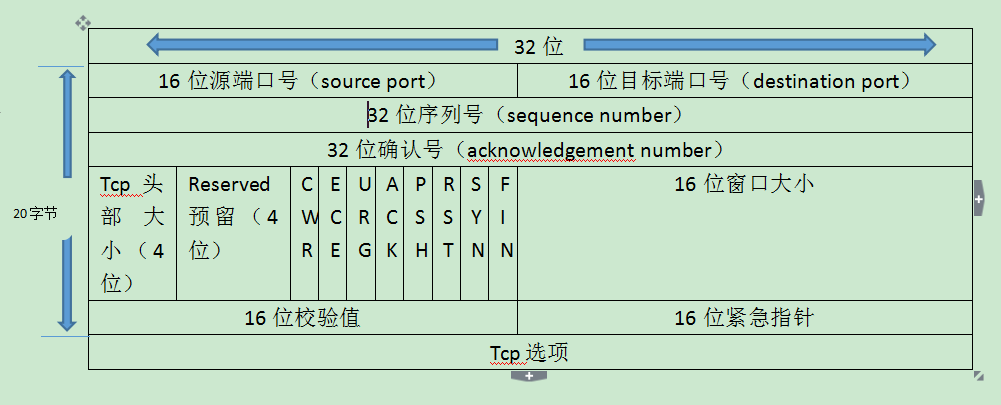
The difference between TCP protocol and SCTP protocol
TCP service table of Contents TCP service TCP header The process of establishing three connections by TCP (three handshake) TCP connection termination process (four waved hands) SCTP protocol The diff...

Internet Protocol-SCTP Stream Control Transmission Protocol
table of Contents Article Directory table of Contents SCTP The difference between SCTP and TCP Endpoint and Multi-homing Coupling (Association) Multi-streaming SCTP SCTP (Stream Control Transmission P...
SCTP
SCTP Related terms Multihomed Multi-stream Initialization protection (four-way handshake) Message framing Configurable out-of-order sending Smooth closing (three waved hands) SCTP is a transport layer...
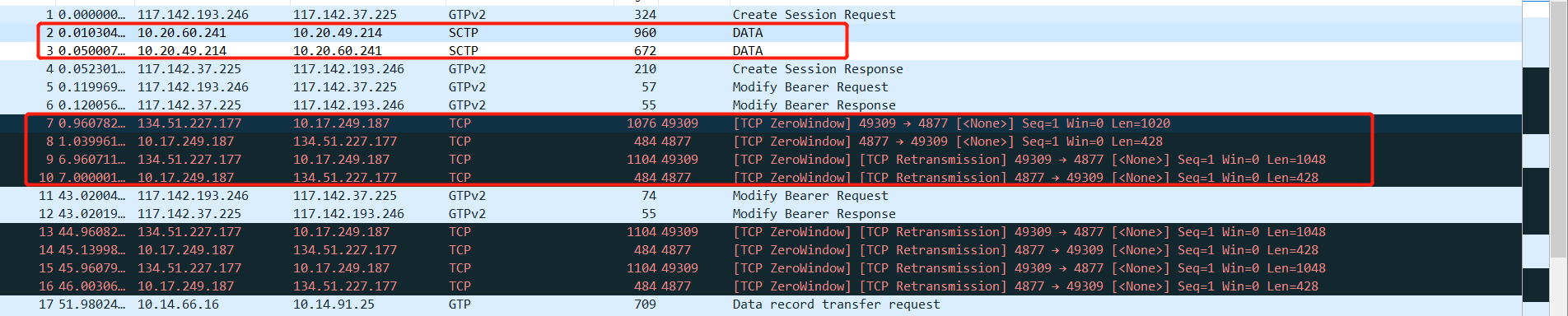
wireshark tcp sctp resolves to the correct diameter protocol
The correct wireshark tcp & sctp resolved to diameter protocol Often used in the current network to the diameter protocol, such as the EPC Gx, Gy, S6a interface to the IMS network has more of the ...
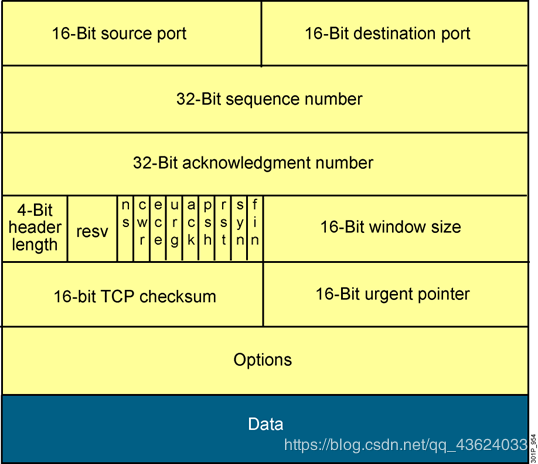
Network technical guidance [4] TCP and SCTP protocol
Summarize today's content, and learn the SCTP protocol to summarize its advantages over TCP! TCP+STCP Detailed TCP header TCP three-way handshake TCP four-way handshake SCTP introduction SCTP vs. TCP ...
More Recommendation
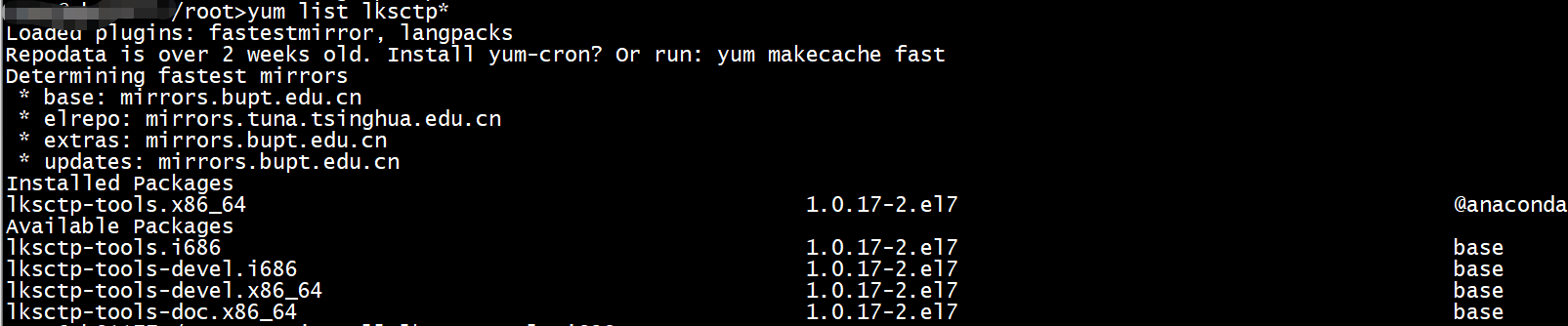
Install the sctp protocol stack on the linux host
Sometimes a project needs to use a client or server based on the sctp protocol. This article describes how to install sctp when the bottom layer of the test host does not support the sctp protocol sta...
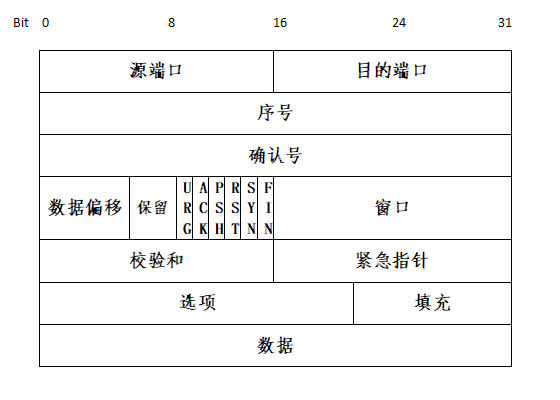
Summary of TCP protocol and interview questions and introduction of SCTP protocol
TCP summary and CSTP protocol introduction TCP is the transport layer of the OSI seven-layer model, used to provide end-to-end communication for network application services, and together with UDP as ...

Detailed examples HTTPS protocol request CURL
Detailed examples HTTPS protocol request CURL Can be regarded as HTTP protocol + SSL / TLS protocol HTTPS traffic is currently the Internet's most versatile and convenient means of communication, simp...

Detailed explanation and related examples of rip routing protocol
1. RIPV1 and RIPV2 1、RIPV1: ①Across the main class network boundary: refers to the routing network segment between two different main class networks. The router that crosses the main class network bou...
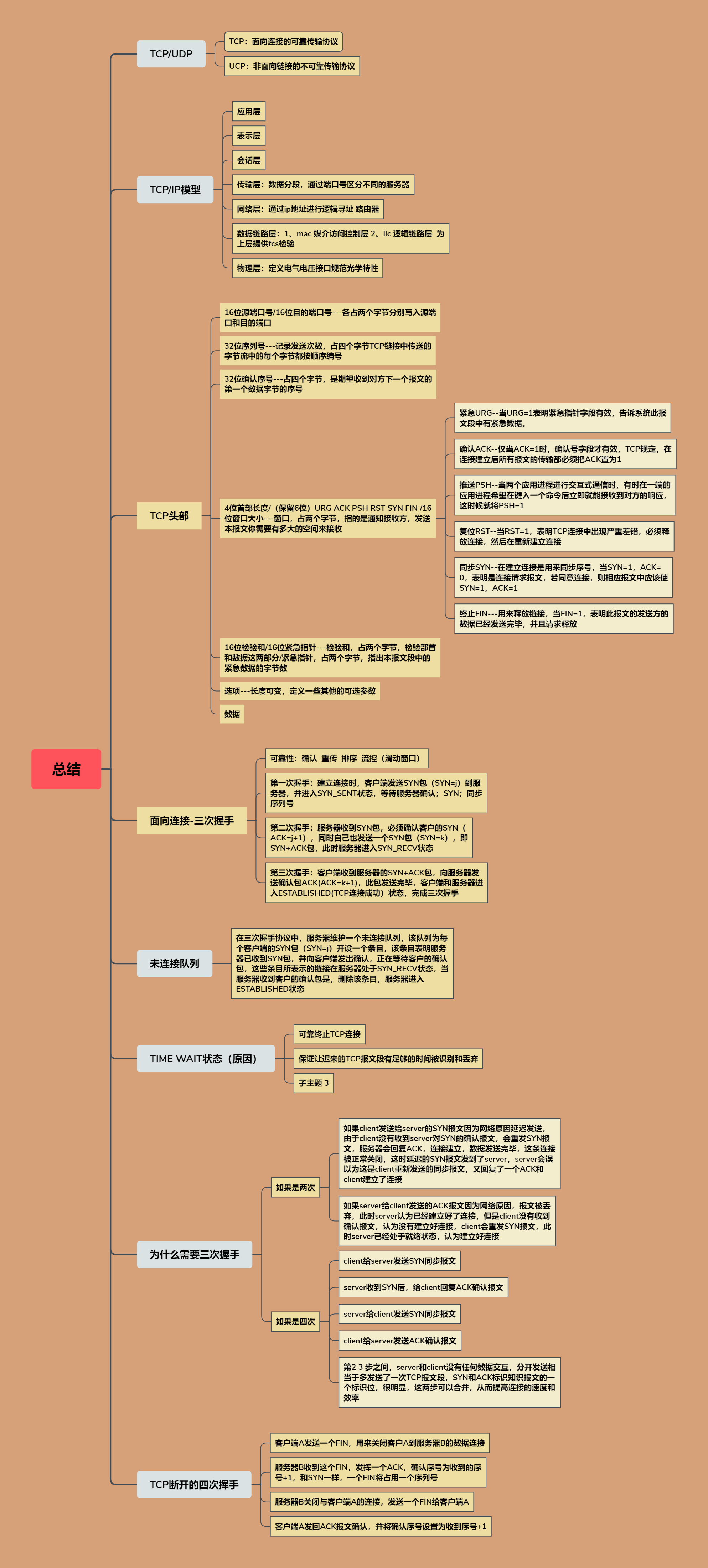
TCP summary/SCTP protocol summarizes its advantages over TCP
The SCTP protocol summarizes its advantages over TCP SCTP: Stream Control Transmission Protocol. A connection-oriented reliable transmission protocol. In the network model, SCTP is in the same layer a...