The difference between Query String Parameters, Form Data and Request Payload of HTTP request parameters
tags: Vue
1、Query String Parameters
The parameters of the initiating get request are displayed on the url, and the parameters follow? Separate different parameters with &
Example (backendspringboot restfulstyle)
Front end:http://xxx/getTest?name=Test&password=Test 2
Backend: (Parameters can be received by class)
    @GetMapping("/getTest")
	public String test(String name,String password) {

		return "success";
	}
2、Form Data
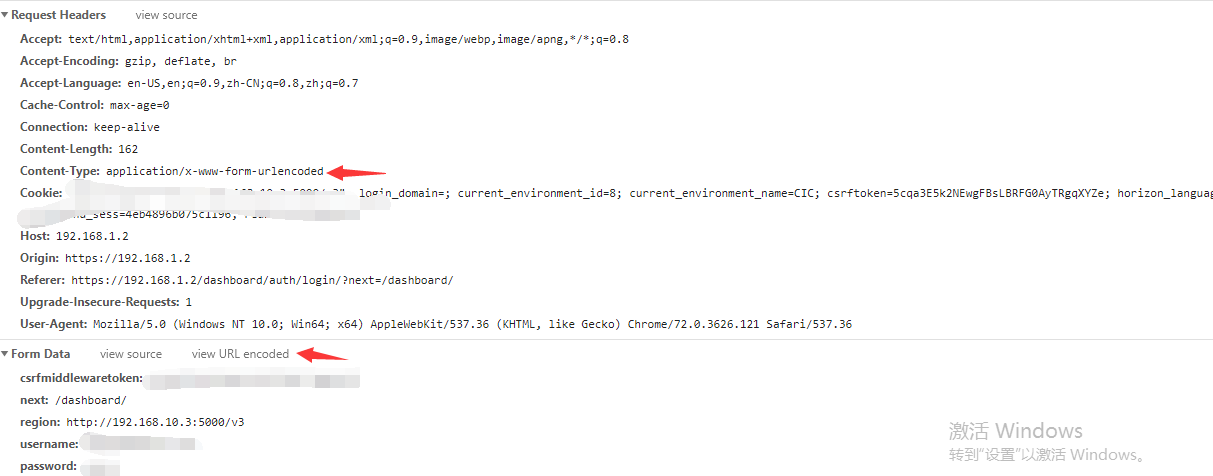
If content-type is not set, the default is application/x-www-form-urlencoded for the Post body
Connect the parameters of the key-value pair with &, if there is a space, convert the space to + plus sign; if there is a special symbol, convert the special symbol to ASCII
HEX value is actually passed to the backend in the form of key value, so the backend should not use @RequestBody to receive it, that is, don’t use one class to receive it. Multiple parameters can be used because it is a key. Value pair, so you have to receive it by key value, and if there is a file or the like, it is multipart/form-data
For Get, because the browser is the default application/x-www-form-urlencoded, the first type of Query String
Parameters are actually the result of not setting the content-type. What are the parameters? Separate different parameters with &
Example (backendspringboot restfulstyle)
Front end:http://xxx/getTest?name=Test&password=Test 2(Not displayed on the browser). Parameters withForm DataPass in the form of key-value pairs
Backend: (Parameters can be received by class)
    @PostMapping("/getTest")
	public String test(String name,String password) {

		return "success";
	}
3、Request Payload
The content-type is application/json, the post request parameter is located in the body, and a json serialized json string is passed to the backend. The backend should be accepted as a class or vo and annotated with RequstBody
front end:http://xxx/getTest
Backend: (Parameters can be received by class)
 @PostMapping("/getTest")
	public String test(@RequestBody request vo) {

		return "success";
	}
A journey of a thousand miles
starts with one step
Intelligent Recommendation

query string parameters and request payload
In the HTTP request, if it is a get request, the form parameters are appended to the URL in the form of name=value&name1=value1; post request: The form parameters are in the request body, and are ...
Frontend: The difference between form data and request payload in an HTTP request.
jQuery's ajax method and post method send requests separately, and the result is different when processing in the background Servlet. For example, when the request is sent by the $.ajax method (the da...
The difference between form data and request payload in HTTP request
The difference is: When Content-Type: application/x-www-form-urlencoded (default) is set in the request header of the POST request, the parameters are submitted in the form of the standard Form Data, ...
Form Data Request Payload and the difference between the HTTP request
Form Data Request Payload and the difference between the HTTP request Form DatawithRequest PayloadBrowserTransmitted tointerfaceThe two formats. Both formats are distinguished by the distinction Conte...
The difference between Form Data and Request PayLoad in the HTTP request
Original text reprinted from: http://xiaobaoqiu.github.io/blog/2014/09/04/Form-Data-Vs-Request-payload/ The difference between Form Data and Request PayLoad in the HTTP request Ajax POST regular form:...
More Recommendation
Form data and the difference in the HTTP request payload request
Today, I found that transmission method and post method ajax jQuery respectively requests are processed in the background when Servlet result is not the same, such as when sending a request by $ .ajax...
Form Data Request Payload and the difference between the http protocol
Project I'm developing front and back ends are completely independent, by configuring the proxy webpack of the front-end proxy cross-domain requests to back-office services. Yesterday found that I per...
The difference between form data and request payload in HTTP requests
jQuery's ajax method and post method send requests separately, and the results are different when processed in the background Servlet. For example, when the request is sent using the $ .ajax method (t...
The difference between HTTP protocol Request Payload and Form Data
Preface In a new project where the front and back ends are separated, the front end executes a post request, and the @RequestMapping of the back end springMVC cannot receive the corresponding request ...
The difference between the Request Payload and Form Data of the http protocol
Problem Description: When writing the unit test today, I found that I could not receive my parameter information in the controller method 1.post method 2. Method body does not use @RequestBody to acce...